

What you'll learn
- How SQL queries use
SELECT,FROM,WHERE,LIKE,ANDandOR. - How wildcards
*and%help you select or match data. - How to use
JOINand nestedSELECTqueries. - What
INSERT,DELETEandDROPdo to a database.
The database ideas SQL depends on
SQL is used with a relational database, where data is stored in tables.
Table, record and field
A table stores data about one type of thing, such as students or books. A record is one row in a table. A field is one column in a table, such as StudentID, Name or DateOfBirth.
For example:
| StudentID | Name | YearGroup | Tutor | ClassID |
|---|---|---|---|---|
| 1 | Asha | 12 | Khan | 10 |
| 2 | Ben | 12 | Patel | 20 |
| 3 | Cara | 13 | Khan | 30 |
A primary key is a field that uniquely identifies a record, such as StudentID. A foreign key is a field that links to a primary key in another table, such as ClassID.
What SQL is
Structured Query Language
Structured Query Language (SQL) is a language used to create, search, insert and remove data in a database. OCR expects you to recognise and use only a small assessed subset of SQL unless the question explains anything extra.
SQL keywords are often written in capitals, for example SELECT, but database systems are usually not case-sensitive for the keywords. Field names, table names and string data may be treated more strictly depending on the system, so copy spellings from the question.
The basic query shape
Most retrieval queries follow this pattern: SELECT the fields you want, FROM the table where the data is stored, then optionally use WHERE to filter the records.
SELECT and FROM
SELECT chooses which fields appear in the result. FROM names the table being queried.
SELECT Name FROM Studentreturns only theNamefield from every record inStudent.SELECT * FROM Studentreturns every field from every record inStudent.
Here, * is a wildcard meaning “all fields”.
Choosing fields from a table
Using the Student table above, write a query to show only each student’s name and tutor.
- Decide which fields should appear in the output:
NameandTutor. - Decide which table contains those fields:
Student. - Combine the clauses:
SELECT Name, Tutor FROM Student.
Selecting too much data
Do not use SELECT * if the question asks for specific fields. SELECT * is useful, but it returns all fields, which may not match the required output.
WHERE: filtering records
WHERE adds a condition that a record must satisfy to be included.
For example, SELECT Name FROM Student WHERE YearGroup = 12 returns only students in year 12.
Condition
A condition is a test that is either true or false for each record, such as YearGroup = 12 or Tutor = 'Khan'.
SQL uses = for equality in a WHERE condition. This is different from OCR exam pseudocode, where comparison is written as ==.
Filtering records with WHERE
Write a query to show the names of students whose tutor is Khan.
- Choose the output field: only
Nameis needed. - Choose the table: the data is in
Student. - Add the filter condition:
Tutor = 'Khan'. - Write the query:
SELECT Name FROM Student WHERE Tutor = 'Khan'.
LIKE and the % wildcard
LIKE is used in a WHERE clause to match a pattern rather than an exact value.
The % wildcard means “any sequence of characters”, including no characters.
| Pattern | Meaning |
|---|---|
'A%' | starts with A |
'%son' | ends with son |
'%ann%' | contains ann somewhere |
For example, SELECT Name FROM Student WHERE Name LIKE 'A%' returns names starting with A.
Matching part of a string
Write a query to find students whose names contain the letters ar.
- The field being searched is
Name. - Because
arcan appear anywhere in the name, put%before and after it:'%ar%'. - Use
LIKEbecause this is pattern matching, not exact equality. - Write the query:
SELECT Name FROM Student WHERE Name LIKE '%ar%'.
Wildcard sanity check
Read % as “anything”. So '%ar%' reads as “anything, then ar, then anything”.
AND and OR
AND combines conditions where both must be true.
Example: SELECT Name FROM Student WHERE YearGroup = 12 AND Tutor = 'Khan'
This returns students who are in year 12 and have Khan as tutor.
OR combines conditions where at least one must be true.
Example: SELECT Name FROM Student WHERE Tutor = 'Khan' OR Tutor = 'Patel'
This returns students whose tutor is Khan or Patel.
Combining conditions
Write a query to show names of year 12 students whose tutor is Patel.
- The output field is
Name. - The table is
Student. - Two conditions must both be true:
YearGroup = 12andTutor = 'Patel'. - Because both conditions are required, join them with
AND:SELECT Name FROM Student WHERE YearGroup = 12 AND Tutor = 'Patel'.
Using OR when both conditions are needed
OR usually makes the result larger because a record only needs to pass one condition. If the question says “students in year 12 who have Patel as tutor”, use AND, not OR.
JOIN: combining related tables
A JOIN combines records from two related tables. In OCR SQL, JOIN means INNER JOIN: only records with matching values in both tables are included.
The diagram below shows how an inner join keeps only matching ClassID values from both tables.
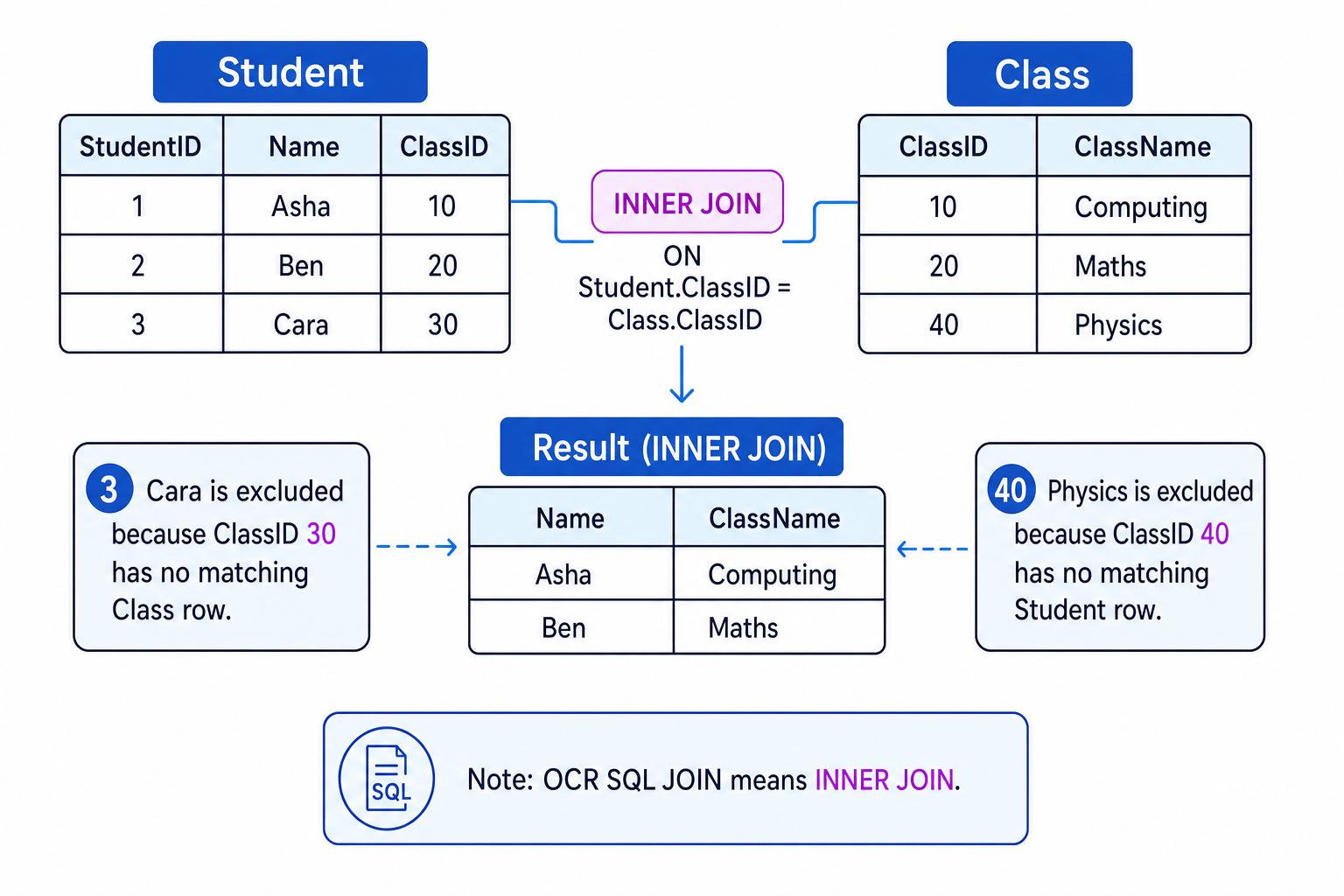
A typical join query is:
SELECT Student.Name, Class.ClassName FROM Student JOIN Class ON Student.ClassID = Class.ClassID
The ON part gives the matching rule for the join.
Joining two tables
Write a query to show each student’s name with their class name.
- Identify the fields required in the output:
Student.NameandClass.ClassName. - Identify the relationship:
Student.ClassIDlinks toClass.ClassID. - Use
JOINto combine matching records from the two tables. - Write the query:
SELECT Student.Name, Class.ClassName FROM Student JOIN Class ON Student.ClassID = Class.ClassID.
JOIN is not every possible combination
An inner join does not pair every student with every class. It only keeps rows where the join condition matches.
Nested SELECTs
A nested SELECT is a SELECT query placed inside another query. The inner query runs first, and its result is used by the outer query.
Example:
SELECT Name FROM Student WHERE ClassID = (SELECT ClassID FROM Class WHERE ClassName = 'Computing')
This means:
- Find the
ClassIDfor the class called Computing. - Use that
ClassIDto find matching students. - Return their names.
Using an inner query first
Suppose the Class table says Computing has ClassID 10. Trace the nested query SELECT Name FROM Student WHERE ClassID = (SELECT ClassID FROM Class WHERE ClassName = 'Computing').
- Evaluate the inner query:
SELECT ClassID FROM Class WHERE ClassName = 'Computing'gives 10. - Substitute that result into the outer condition:
ClassID = 10. - Apply the outer query to
Student, returning names of students whoseClassIDis 10.
INSERT: adding records
INSERT adds a new record to a table.
A common form is:
INSERT INTO Student (StudentID, Name, YearGroup, Tutor, ClassID) VALUES (4, 'Dina', 12, 'Khan', 10)
You should provide values in the same order as the field list.
Mismatched INSERT values
If you list five fields, you need five values, and they must match the correct fields. For example, putting 'Dina' where StudentID belongs would be wrong.
DELETE: removing records
DELETE removes records from a table.
Example: DELETE FROM Student WHERE StudentID = 2
This removes the record for the student with StudentID 2.
DELETE without WHERE
DELETE FROM Student would remove every record from the Student table. The table structure would still exist, but the data would be gone.
DROP: removing a table
DROP removes a whole database object, such as a table.
Example: DROP TABLE Student
This removes the Student table itself, including its structure and its data.
DELETE vs DROP
DELETE removes records from inside a table. DROP removes the table itself.
Putting it together
When you read or write SQL, build the query in a logical order:
- What data should appear? Use
SELECT. - Which table or tables contain it? Use
FROMand possiblyJOIN. - Which records should be included? Use
WHERE,LIKE,ANDandOR. - Is the command changing the database? Use
INSERT,DELETEorDROPcarefully.
Writing a query from a requirement
Requirement: show the names of year 12 students whose names start with A.
- The output needed is only the student name, so use
SELECT Name. - The data comes from the
Studenttable, so addFROM Student. - The year condition is
YearGroup = 12. - The name pattern is “starts with A”, so use
Name LIKE 'A%'. - Both conditions must be true, so join them with
AND:SELECT Name FROM Student WHERE YearGroup = 12 AND Name LIKE 'A%'.
In the exam
- Build retrieval queries in the order
SELECT,FROM, thenWHERE, even though the database logically filters records before displaying fields. - Use
LIKEwith%for partial text matching, and use=for exact matches. - For
JOIN, look for the matching key fields, often a primary key and a foreign key with the same name. - Treat
DELETEandDROPas destructive: say exactly whether records or the whole table are removed.
Check yourself
- What is the difference between
SELECT * FROM StudentandSELECT Name FROM Student? - When should you use
LIKE '%ing%'rather than= 'ing'? - Why does an OCR
JOINexclude records that do not have a matching value in both tables?