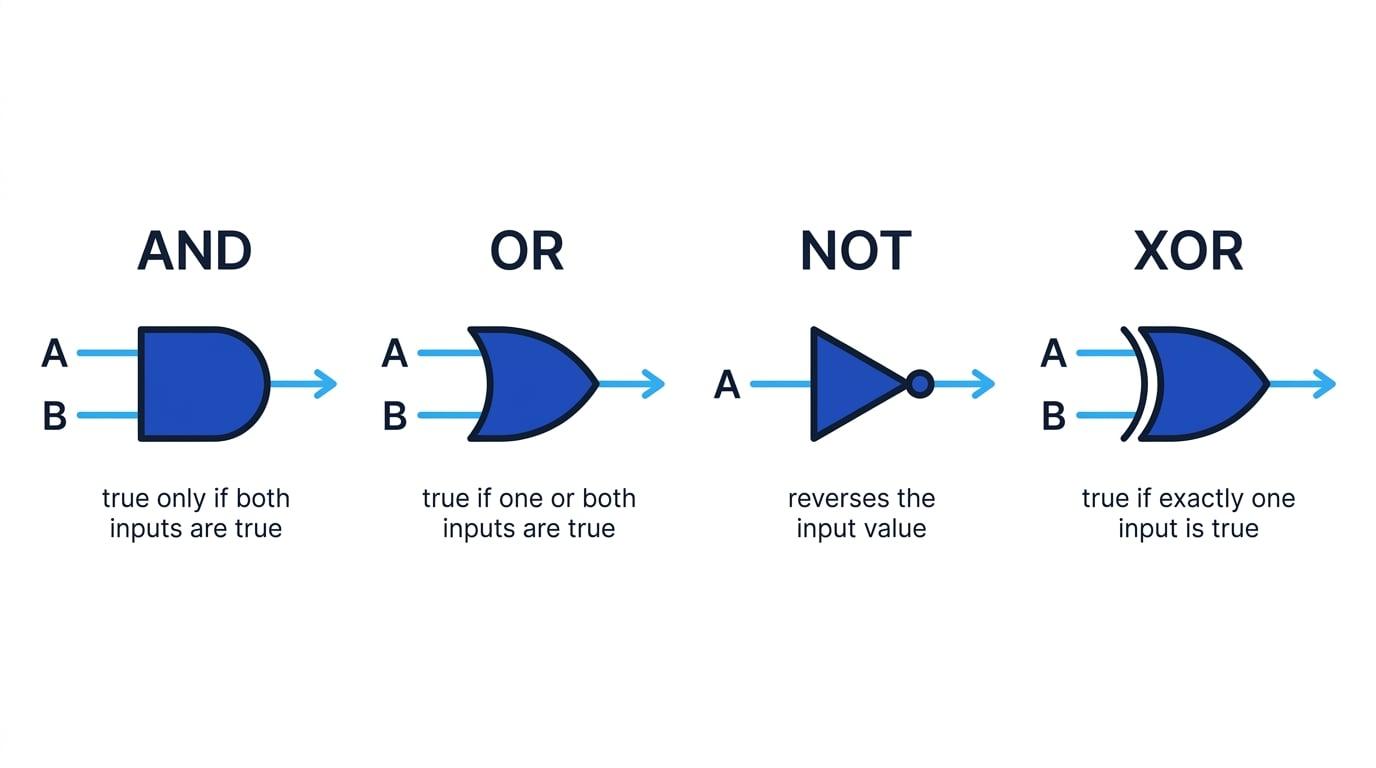

What you'll learn
- How Boolean values, variables and truth tables work.
- The OCR notation for AND, OR, NOT, XOR and equivalence.
- The accepted alternative symbols you may see or use.
- How to evaluate and compare Boolean expressions step by step.
Boolean algebra: the starting point
In Computer Science, many systems are based on decisions that are either true or false: a bit is set or not set, a condition is met or not met, a circuit output is on or off.
Boolean algebra
Boolean algebra is a system for representing and manipulating logical values, usually True and False, using logical operations such as AND, OR and NOT.
A Boolean variable is a named value that can only be True or False. For example, A, B and C are often used as Boolean variables in truth tables.
In OCR questions, truth values are often shown as:
- T for True and F for False
- sometimes 1 for True and 0 for False
A logic gate is a digital circuit component that performs a Boolean operation. It takes one or more inputs and produces one output.
Truth tables
A truth table shows the output of a Boolean expression for every possible combination of its inputs.
For two inputs, A and B, there are four possible combinations:
| A | B |
|---|---|
| T | T |
| T | F |
| F | T |
| F | F |
For three inputs, there would be 8 combinations. In general, for nnn Boolean inputs, there are 2n2^n2n rows.
Truth tables
A truth table is a complete check of a Boolean expression: if two expressions have the same final output column for every row, they are logically equivalent.
OCR notation at a glance
OCR external assessments use particular Boolean algebra symbols. You may also see accepted alternatives, especially in learner answers or other textbooks.
| Operation | Meaning | OCR notation in these notes | Accepted alternatives |
|---|---|---|---|
| Conjunction | AND | A ∧ B | A AND B, A.B |
| Disjunction | OR | A ∨ B | A OR B, A+B |
| Negation | NOT | ¬A | Ā, ~A, NOT A |
| Exclusive disjunction | XOR | A ⊻ B | A XOR B, A ⊕ B |
| Equivalence / iff | if and only if | A ≡ B | A ↔ B |
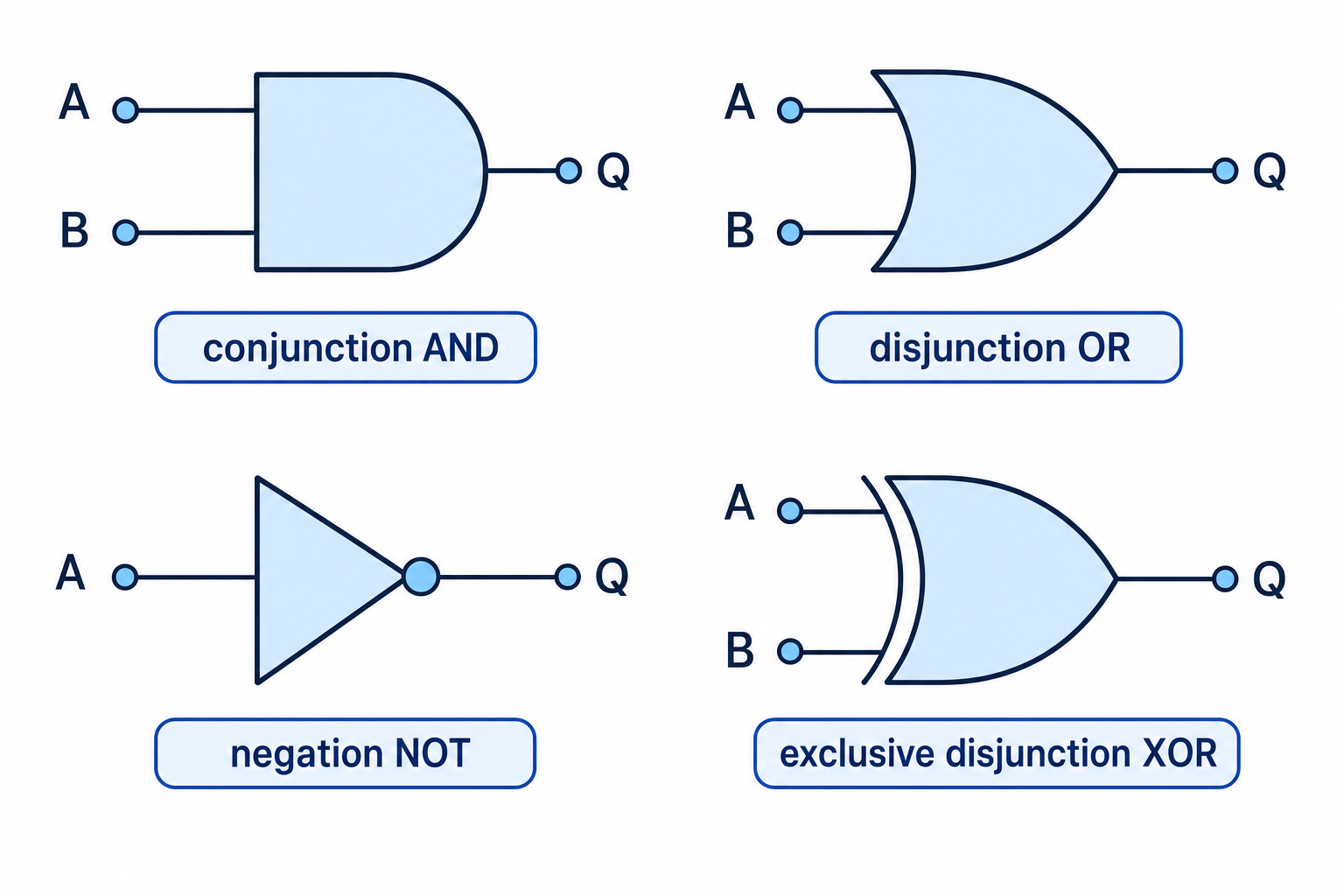
The main gate symbols are shown below. Inputs usually enter from the left, and the output leaves on the right.
Treating Boolean + as normal addition
In the alternative notation A+B, the + means OR, not arithmetic addition. If A and B are both True, A+B is True, not 2.
Conjunction: AND
A conjunction is the Boolean operation AND. It is true only when both inputs are true.
It is written as A∧BA \wedge BA∧B.
The AND gate symbol has a flat left side, a curved right side, two input lines and one output line.
| A | B | A ∧ B |
|---|---|---|
| T | T | T |
| T | F | F |
| F | T | F |
| F | F | F |
So, if a login system checks:
- password is correct
- two-factor code is correct
then access should be granted only if both are true.
Disjunction: OR
A disjunction is the Boolean operation OR. It is true when at least one input is true.
It is written as A∨BA \vee BA∨B.
The OR gate symbol has a curved input side and a pointed output side.
| A | B | A ∨ B |
|---|---|---|
| T | T | T |
| T | F | T |
| F | T | T |
| F | F | F |
This is an inclusive OR, meaning the output is still true when both inputs are true.
Confusing OR with XOR
In Boolean algebra, OR means “one or both”. It is not the same as everyday “either/or”, which often means “one but not both”.
Negation: NOT
Negation is the Boolean operation NOT. It reverses a Boolean value.
It is written as ¬A\neg A¬A.
NOT is a unary operation, meaning it has one input. AND and OR are binary operations, meaning they use two inputs.
The NOT gate symbol is a triangle with a small circle, called a bubble, at the output.
| A | ¬A |
|---|---|
| T | F |
| F | T |
So if A means “file exists”, then ¬A means “file does not exist”.
Exclusive disjunction: XOR
An exclusive disjunction, usually called XOR, is true when exactly one input is true.
It is written as A ⊻ B. Some OCR materials may show this as an underlined OR symbol; read it as the same XOR operation.
The XOR gate looks like an OR gate with an extra curved line on the input side.
| A | B | A ⊻ B |
|---|---|---|
| T | T | F |
| T | F | T |
| F | T | T |
| F | F | F |
A useful way to remember XOR is:
- same inputs → False
- different inputs → True
Combining Boolean operators
A compound Boolean expression combines several operations. For example:
¬A∨(B∧C)\neg A \vee (B \wedge C)¬A∨(B∧C)The brackets tell you which part to evaluate first. Negation usually applies very tightly to the next variable or bracketed expression.
Use brackets to remove doubt
¬A ∧ B means “not A, and B”. It is different from ¬(A ∧ B), which means “not both A and B”. When writing your own expressions, use brackets if there is any possible ambiguity.
Evaluating a compound expression
Evaluate ¬A∨(B∧C)\neg A \vee (B \wedge C)¬A∨(B∧C) when A = T, B = F and C = T.
-
Evaluate the bracketed part first:
B ∧ CusesFandT, so the result isF. -
Evaluate the negation: since
AisT,¬AisF. -
Combine the two results with OR:
F ∨ FisF, so the whole expression isF.
Equivalence and iff
Equivalence means two Boolean values or expressions have the same truth value.
It is written using ≡, as in:
This is read as “X is equivalent to Y” or “X if and only if Y”. The phrase iff is a short form of if and only if.
As a simple two-input operation, equivalence is true when both inputs match:
| A | B | A ≡ B |
|---|---|---|
| T | T | T |
| T | F | F |
| F | T | F |
| F | F | T |
In Boolean algebra, ≡ is often used to state that two expressions are identical for all possible inputs. It is not assignment.
For example:
(A∧B)≡¬(¬A∨¬B)(A \wedge B) \equiv \neg(\neg A \vee \neg B)(A∧B)≡¬(¬A∨¬B)This says the expression on the left always gives the same result as the expression on the right.
Testing De Morgan’s equivalence
Check whether (A∧B)≡¬(¬A∨¬B)(A \wedge B) \equiv \neg(\neg A \vee \neg B)(A∧B)≡¬(¬A∨¬B).
-
Work out the left-hand expression
A ∧ B: it is true only when bothAandBare true. -
For the right-hand expression, first find
¬Aand¬B, then OR those results, then negate the final result. -
Build the truth table columns carefully:
| A | B | A ∧ B | ¬A | ¬B | ¬A ∨ ¬B | ¬(¬A ∨ ¬B) |
|---|---|---|---|---|---|---|
| T | T | T | F | F | F | T |
| T | F | F | F | T | T | F |
| F | T | F | T | F | T | F |
| F | F | F | T | T | T | F |
- Compare the final column on the left,
A ∧ B, with the final column on the right,¬(¬A ∨ ¬B). They match for every row, so the two expressions are equivalent.
Quick memory summary
- AND / ∧: true only if both inputs are true.
- OR / ∨: true if at least one input is true.
- NOT / ¬: flips true to false and false to true.
- XOR / ⊻: true if exactly one input is true.
- Equivalence / ≡: true if both sides have the same truth value.
In the exam
-
Use OCR notation where possible:
∧,∨,¬,⊻and≡. -
If building a truth table, create intermediate columns for each small part of the expression rather than trying to jump straight to the final answer.
-
For equivalence questions, compare the final output columns row by row; one mismatch means the expressions are not equivalent.
Check yourself
- What is the difference between
A ∨ BandA ⊻ B? - Why is
¬(A ∧ B)not the same as¬A ∧ B? - How would you prove that two Boolean expressions are equivalent?