
What you'll learn
- What the Little Man Computer is modelling.
- How LMC instructions are written using mnemonics such as
LDA,ADD, andBRZ. - What each OCR H446 LMC instruction does.
- How to trace a short LMC program using the accumulator, memory, and output.
The big picture: what LMC is for
The Little Man Computer, usually shortened to LMC, is a simplified model of a computer. It helps you understand how a processor fetches, decodes, and executes instructions stored in memory.
LMC has:
- Memory, made of numbered mailboxes, usually addresses 00 to 99.
- An accumulator, which is a special storage location used for arithmetic and data movement.
- An input area, where values can enter the program.
- An output area, where values can be displayed.
- A program counter, which keeps track of the next instruction to fetch.
Instruction set
An instruction set is the complete list of instructions that a processor, or simulated processor such as LMC, can understand and execute.
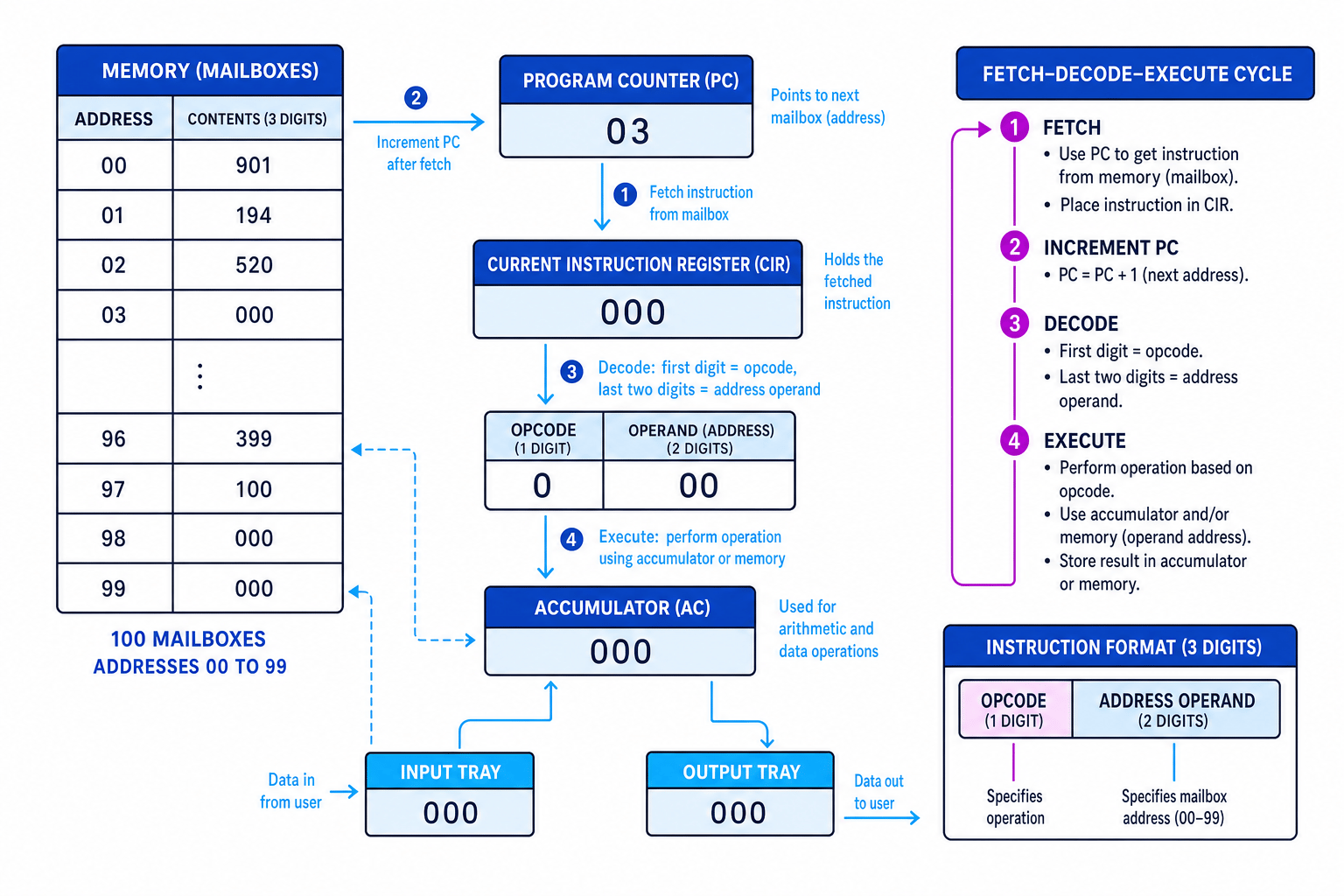
The diagram below shows how LMC links together memory, the accumulator, input/output, and the fetch-decode-execute cycle.
Mnemonics and machine instructions
A mnemonic is a short, memorable assembly-language word for an instruction. For example, ADD means “add”, and SUB means “subtract”.
In OCR questions, the official mnemonics are the ones in the left-hand column of the specification table. Some alternative mnemonics are accepted in learners’ answers, but it is safest to use the official OCR ones.
Use the OCR mnemonics
Write STA, LDA, BRA, BRZ, BRP, INP, OUT, and HLT in exam answers unless the question itself uses an accepted alternative.
LMC instruction format
Most LMC instructions are stored as three-digit codes.
- The first digit is usually the opcode, meaning the operation to perform.
- The last two digits are usually the operand address, meaning the mailbox address the instruction uses.
For example, 194 means:
- opcode
1→ADD - operand address
94→ use mailbox 94
So 194 means ADD 94.
Opcode and operand
The opcode says what operation to perform. The operand gives the data or address used by that operation. In LMC, the operand is usually a two-digit mailbox address.
Decoding an LMC instruction
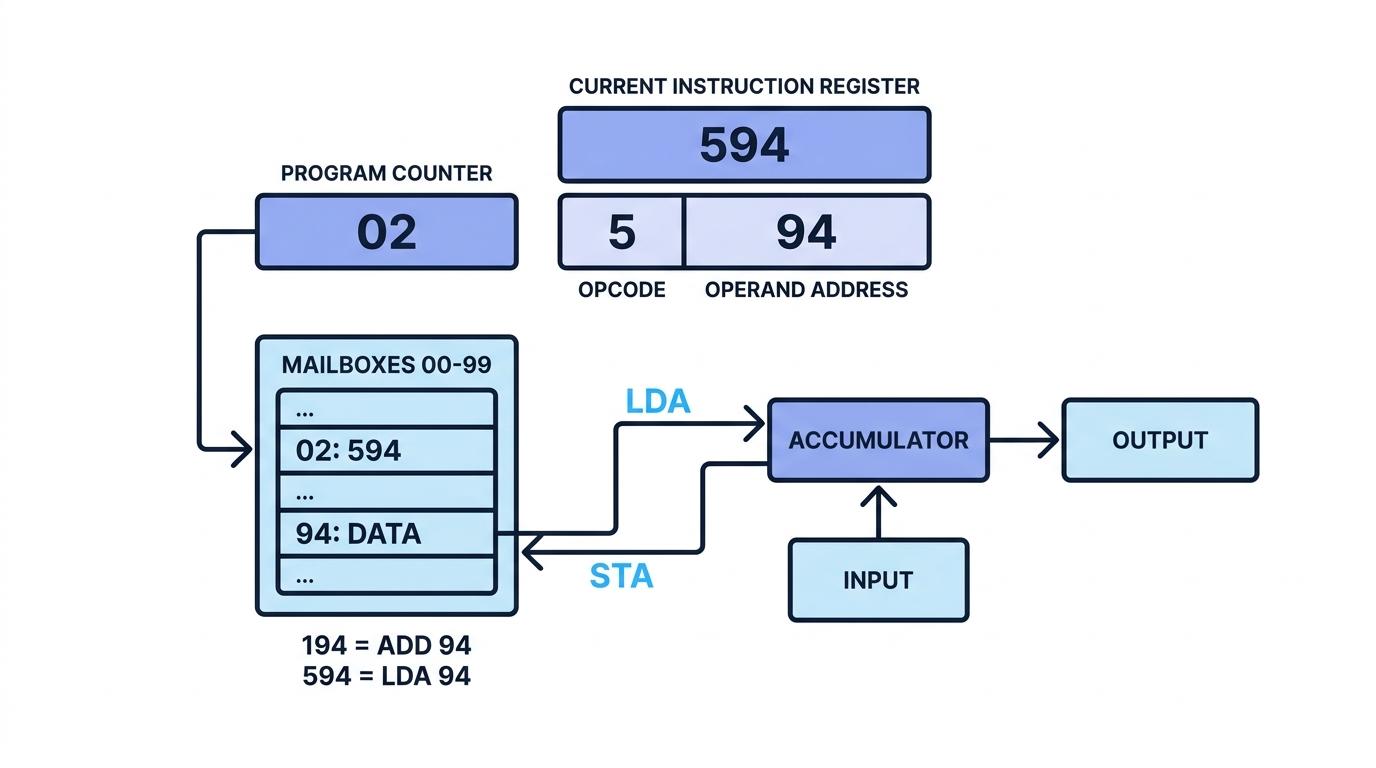
Suppose the instruction fetched from memory is 594.
- Split the instruction into its opcode and operand: opcode
5, operand address94. - Match the opcode to the LMC instruction set: opcode
5meansLDA. - Interpret the full instruction:
LDA 94means load the value stored in mailbox 94 into the accumulator.
The LMC instruction set
Here is the OCR H446 instruction set, with common machine-code patterns included to help you recognise what is happening.
| Mnemonic | Instruction | Typical LMC code pattern | What it does | Alternative mnemonics accepted |
|---|---|---|---|---|
ADD | Add | 1xx | Adds the value in mailbox xx to the accumulator | |
SUB | Subtract | 2xx | Subtracts the value in mailbox xx from the accumulator | |
STA | Store | 3xx | Stores the accumulator value into mailbox xx | STO |
LDA | Load | 5xx | Loads the value from mailbox xx into the accumulator | LOAD |
BRA | Branch always | 6xx | Always jumps to instruction at address xx | BR |
BRZ | Branch if zero | 7xx | Jumps to address xx if the accumulator is zero | BZ |
BRP | Branch if positive | 8xx | Jumps to address xx if the accumulator is positive | BP |
INP | Input | 901 | Takes user input into the accumulator | IN, INPUT |
OUT | Output | 902 | Outputs the value currently in the accumulator | |
HLT | End program | 000 | Stops execution | COB, END |
DAT | Data location | data value | Reserves a mailbox for data |
Data movement: LDA, STA, and DAT
Three of the most important LMC instructions are about moving data.
LDA — load
LDA xx copies the value from mailbox xx into the accumulator.
Example: LDA 90 means “load the value from mailbox 90 into the accumulator”.
STA — store
STA xx copies the current value in the accumulator into mailbox xx.
Example: STA 91 means “store the accumulator value in mailbox 91”.
DAT — data location
DAT marks a mailbox as a place for data rather than an instruction. It can be empty or initialised with a value, such as DAT 005.
Mixing up LDA and STA
LDA loads from memory into the accumulator. STA stores from the accumulator into memory. The direction is the key difference.
Tracing load, add, and store
Consider this section of an LMC program.
| Address | Instruction | Meaning |
|---|---|---|
| 00 | LDA 90 | Load value from mailbox 90 |
| 01 | ADD 91 | Add value from mailbox 91 |
| 02 | STA 92 | Store result in mailbox 92 |
| 90 | DAT 007 | Data value 7 |
| 91 | DAT 005 | Data value 5 |
| 92 | DAT 000 | Space for result |
LDA 90copies the value in mailbox 90 into the accumulator, so the accumulator becomes 7.ADD 91adds the value in mailbox 91, so the accumulator becomes 12.STA 92copies the accumulator value into mailbox 92, so mailbox 92 now stores 12.
Arithmetic: ADD and SUB
The accumulator is the working area for calculations.
ADD
ADD xx adds the value in mailbox xx to the accumulator. The result stays in the accumulator.
SUB
SUB xx subtracts the value in mailbox xx from the accumulator. Again, the result stays in the accumulator.
Accumulator thinking
For ADD and SUB, read the instruction as: “new accumulator value equals old accumulator value combined with the value at the given mailbox.”
Input and output: INP and OUT
INP
INP takes a value from the user and places it in the accumulator. It does not need a mailbox address.
OUT
OUT outputs the current value in the accumulator. It also does not need a mailbox address.
Tracing an input-and-add program
This program inputs two numbers, adds them, and outputs the result.
| Address | Instruction | Comment |
|---|---|---|
| 00 | INP | Input first number |
| 01 | STA 90 | Store it in mailbox 90 |
| 02 | INP | Input second number |
| 03 | ADD 90 | Add first number |
| 04 | OUT | Output total |
| 05 | HLT | Stop |
| 90 | DAT | Storage for first number |
Suppose the inputs are 7 then 5.
INPat address 00 places the first input, 7, in the accumulator.STA 90stores 7 in mailbox 90, so the program does not lose it when the second input arrives.INPat address 02 replaces the accumulator value with the second input, 5.ADD 90adds the stored value 7 to the accumulator, giving 12.OUToutputs 12, thenHLTstops the program.
Branching: changing the order of execution
Normally, LMC executes instructions in address order: 00, then 01, then 02, and so on.
A branch instruction changes this by setting the program counter to a different address. This is how LMC programs make decisions and loops.
BRA — branch always
BRA xx always jumps to address xx.
Use it for unconditional jumps, such as returning to the start of a loop.
BRZ — branch if zero
BRZ xx jumps to address xx only if the accumulator is zero.
If the accumulator is not zero, execution continues with the next instruction.
BRP — branch if positive
BRP xx jumps to address xx only if the accumulator is positive.
Branching checks the accumulator
BRZ and BRP test the value in the accumulator, not the value in the mailbox named by the operand.
Following a conditional branch
Consider this program fragment.
| Address | Instruction | Comment |
|---|---|---|
| 00 | LDA 90 | Load test value |
| 01 | BRZ 04 | If accumulator is zero, jump to 04 |
| 02 | LDA 91 | Load output value |
| 03 | OUT | Output it |
| 04 | HLT | Stop |
| 90 | DAT 000 | Test value |
| 91 | DAT 123 | Output value |
LDA 90loads the value in mailbox 90, so the accumulator becomes 0.BRZ 04checks the accumulator. Because it is zero, the program counter jumps to address 04.- Address 04 contains
HLT, so the program stops. The instructions at addresses 02 and 03 are skipped.
Ending a program: HLT
HLT stops the program. In typical LMC machine code it is represented as 000.
Without a halt instruction, the program may continue into memory locations that were meant to be data.
Do not execute data accidentally
DAT reserves a mailbox for data, but memory still only stores numbers. If the program counter reaches a data mailbox, the LMC may try to treat that data as an instruction. Use HLT or branches to avoid falling into data storage.
Accepted alternatives in answers
OCR states that questions will use the official mnemonics in the left-hand column. However, the following alternatives are accepted:
| Official mnemonic | Accepted alternative |
|---|---|
STA | STO |
LDA | LOAD |
BRA | BR |
BRZ | BZ |
BRP | BP |
INP | IN, INPUT |
HLT | COB, END |
There are no listed alternatives for ADD, SUB, OUT, or DAT.
Best habit
Even though alternatives may be accepted, use the OCR official mnemonics consistently. It reduces the chance of ambiguity when tracing or writing LMC code.
In the exam
- Keep a trace table with columns for address, instruction, accumulator, changed mailbox values, and output.
- For
BRZandBRP, always check the accumulator value before deciding whether the branch is taken. - Remember that
INPoverwrites the accumulator, so store important input values withSTAbefore another input happens.
Check yourself
- What is the difference between
LDA 90andSTA 90? - Which instruction would you use to jump only when the accumulator is zero?
- Why is it risky if execution reaches a
DATmailbox?