Revision notes for OCR GCSE Computer Science Embedded systems. Open the guide for explanations and worked examples. Written against the OCR GCSE Computer Science (J277) specification, so the content matches what's examinable rather than general Computer Science background.
Embedded systems
What you'll learn
- What an embedded system is and how it differs from a general-purpose computer.
- The main purpose of embedded systems in everyday devices.
- Typical characteristics of embedded systems.
- A range of examples you should recognise for OCR J277.
Before embedded systems: what is a computer system?
A computer system is made from hardware and software working together.
- Hardware means the physical parts, such as a processor, memory, buttons, sensors, screens, motors, and speakers.
- Software means the instructions or programs that tell the hardware what to do.
- A processor is the hardware that carries out instructions and makes decisions.
Most computer systems follow an input → process → output pattern:
- Input: data entering the system, such as a button press or sensor reading.
- Process: the processor uses instructions to make a decision.
- Output: the system produces a result, such as switching on a light, moving a motor, or showing a message.
What is an embedded system?
An embedded system is still a computer system, but it is usually hidden inside another product.
Definition
Embedded system
An embedded system is a computer system built into a larger device to perform a specific function, usually as part of controlling or monitoring that device.
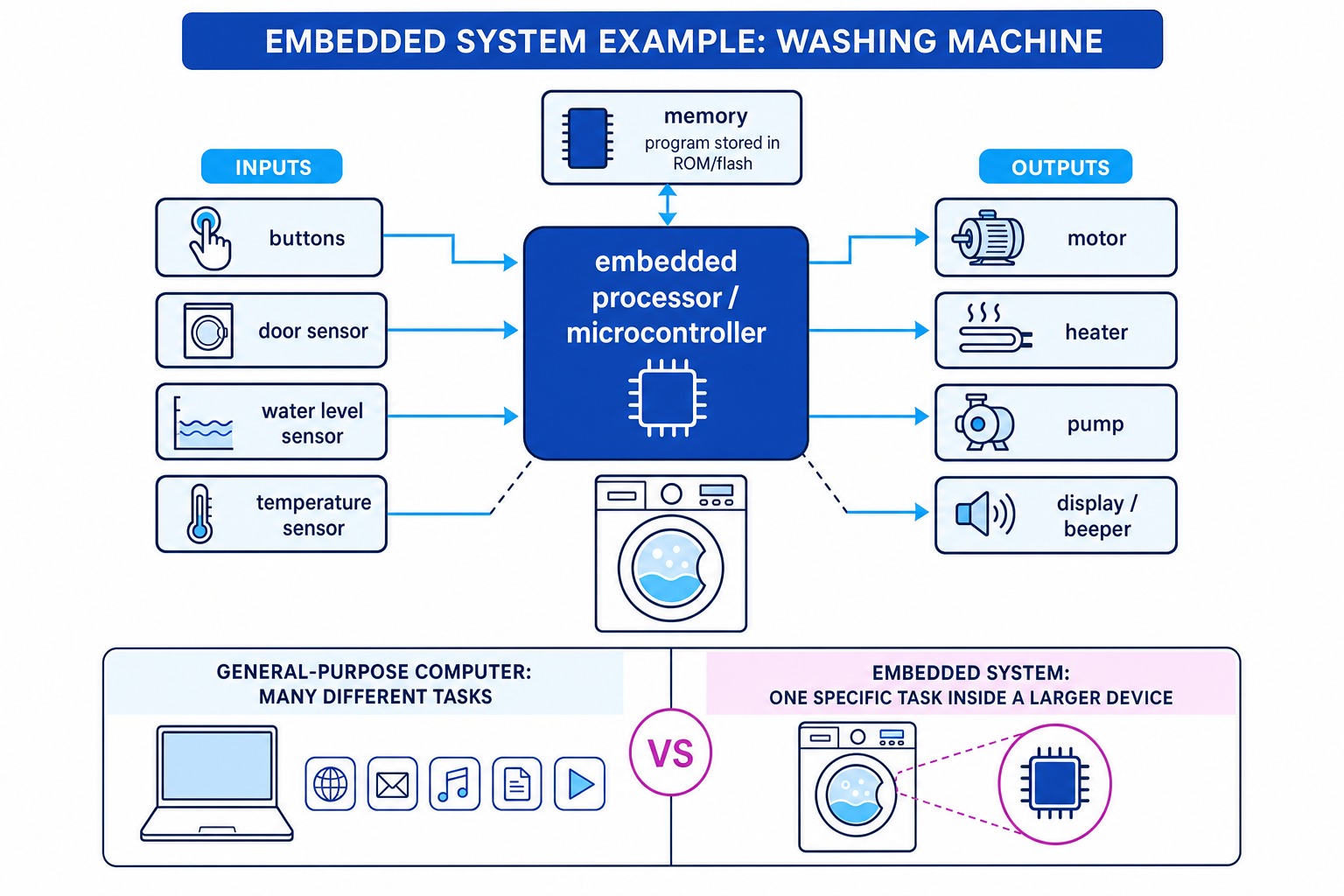
The key idea is that the user normally thinks they are using the device, not “using a computer”. For example, when you use a washing machine, you choose a programme and press start. Inside, a small computer controls the water, motor, heater, pump, display, and beeper.
The diagram shows how an embedded system can take inputs from buttons and sensors, process them using a built-in processor, then control outputs such as a motor or heater.
Key Idea
The big idea
An embedded system is a dedicated computer system inside another device. It is not designed for the user to run lots of different programs.
Embedded systems vs general-purpose computers
A general-purpose computer is a computer designed to perform many different tasks. A laptop, desktop PC, tablet, or smartphone can browse the web, edit documents, play games, send messages, and run many apps chosen by the user.
An embedded system is different because it normally has a much narrower job.
| Feature | General-purpose computer | Embedded system |
|---|---|---|
| Main role | Many different tasks | One specific task or small set of related tasks |
| User control | User installs and runs many programs | Program is usually built in |
| Examples | Laptop, desktop PC, tablet | Microwave controller, traffic light controller, washing machine controller |
| Hardware | Usually more powerful and flexible | Often smaller, cheaper, and more limited |
| Visibility | The computer is the main product | The computer is hidden inside another device |
Common Mistake
Calling every electronic device embedded
An electronic device is not automatically an embedded system. It must contain a computer system that processes instructions. For example, a modern washing machine has an embedded system, but a purely mechanical timer would not count as a computer system.
Example
Classifying devices
-
A laptop is designed to run many different programs chosen by the user, such as a browser, word processor, game, or video editor. That makes it a general-purpose computer.
-
A washing machine controller is built into the washing machine and mainly controls the wash cycle, water level, temperature, drum motor, and pump. That makes it an embedded system.
-
A smartphone is usually treated as general-purpose because the user can install and run many apps. However, it may contain smaller embedded systems inside components, such as a camera controller or fingerprint sensor controller.
The purpose of embedded systems
Embedded systems are used to make devices automatic, safe, efficient, and easy to use.
They often do one or more of these jobs:
Control
To control a device means to make it behave in a planned way. For example, a microwave controller turns the magnetron, turntable, light, and beeper on and off at the correct times.
Monitor
To monitor means to repeatedly check data from inputs. For example, a car engine management system monitors temperature, speed, fuel mixture, and other readings.
Respond
Many embedded systems respond to changes in the real world. A sensor is an input device that detects a physical condition, such as temperature, light, movement, pressure, or water level.
An actuator is an output device that causes a physical action, such as a motor turning, a valve opening, or a heater switching on.
Example
Mapping inputs and outputs in a thermostat
-
The thermostat receives an input from a temperature sensor, such as the current room temperature.
-
The processor compares the current temperature with the target temperature set by the user.
-
If the room is too cold, the thermostat sends an output to switch the heating on; if the room is warm enough, it switches the heating off.
Typical characteristics of embedded systems
You do not need every embedded system to have every characteristic, but these are the common ones OCR expects you to recognise.
1. Dedicated to a specific task
An embedded system is usually designed for one main job. A dishwasher controller controls washing cycles. A traffic light controller controls traffic signals. A pacemaker helps regulate a heartbeat.
This makes the system simpler than a general-purpose computer.
2. Built into a larger device
The embedded system is normally part of a larger product. The product may be a household appliance, vehicle, medical device, security system, or industrial machine.
The user may never see the computer system directly.
3. Runs built-in software
Many embedded systems run firmware. Firmware is software stored in non-volatile memory, meaning it is kept even when the power is turned off.
This matters because the device needs to remember its instructions every time it starts up.
4. Limited hardware resources
Embedded systems often have less processing power, memory, and storage than a laptop or desktop PC. This is because they only need enough resources for their specific job.
Using limited hardware can reduce cost, size, and power use.
5. Reliable and stable
Many embedded systems are expected to work for long periods without crashing. Some are safety-critical, such as car braking systems, airbag controllers, and medical devices.
A safety-critical system is one where failure could risk injury or death.
6. Often need real-time response
A real-time response means the system responds quickly enough for the situation. It does not always mean “instantly”; it means within the required time limit.
For example, an airbag controller must respond extremely quickly during a crash. A washing machine water-level controller must also respond, but the timing is less urgent.
7. Low power, small size, and low cost
Many embedded systems are designed to be cheap to produce, small enough to fit inside the device, and efficient with power.
This is especially important for battery-powered devices, such as digital watches, fitness trackers, remote controls, and medical sensors.
8. Simple user interface
A user interface is how the user interacts with a system. Embedded systems often have a simple interface: a few buttons, lights, a small display, or beeps.
Some embedded systems have no direct user interface at all, such as an engine control unit inside a car.
Common Mistake
Characteristics are typical, not absolute
Avoid saying “all embedded systems are low power” or “all embedded systems have no screen”. Some are powerful or have complex displays. The safest exam wording is usually “often”, “typically”, or “usually”.
Example
Choosing characteristics for an airbag controller
-
The airbag controller has a very specific job: detect a serious crash and trigger the airbag system. This supports the characteristic dedicated to a specific task.
-
It must react within a very short time during a crash. This supports the characteristic real-time response.
-
If it fails, people could be injured. This supports the characteristic reliable / safety-critical.
Examples of embedded systems
You should be familiar with a range of examples, not just one.
| Area | Example | What the embedded system does |
|---|---|---|
| Home appliances | Washing machine | Controls wash cycles, water, heat, drum motor, pump |
| Home appliances | Microwave oven | Controls timer, power level, turntable, beeper |
| Heating | Smart thermostat | Monitors temperature and controls heating |
| Transport | Car engine management system | Monitors sensors and controls engine operation |
| Transport | ABS braking system | Helps control braking to reduce wheel lock |
| Public systems | Traffic lights | Controls the sequence and timing of lights |
| Security | Burglar alarm | Monitors sensors and triggers siren or alert |
| Medical | Pacemaker | Helps regulate heart rhythm |
| Medical | Insulin pump | Delivers controlled doses of insulin |
| Consumer devices | Digital camera | Controls image capture, focus, storage, and display |
| Office equipment | Printer | Controls paper feed, printing mechanism, and status display |
| Industrial systems | Robotic arm controller | Controls precise movement in manufacturing |
Tip
Pick clear examples
In an exam, choose obvious embedded-system examples such as washing machine, microwave, traffic lights, pacemaker, or car engine management system. Avoid vague answers like “phone” unless you clearly refer to a specific embedded subsystem inside it.
How to recognise an embedded system
When deciding whether something is an embedded system, ask yourself:
- Is there a computer system inside it?
- Is it built into another device or product?
- Does it perform a specific control or monitoring task?
- Is it less flexible than a general-purpose computer?
If the answer is mostly yes, it is probably an embedded system.
Exam technique
In the exam
-
For a definition, include the ideas computer system, built into a device, and specific function.
-
For characteristics questions, name the characteristic and link it to the device, such as “low power because it is battery powered” or “real-time because it must respond quickly to sensor input”.
-
For examples, give familiar, unambiguous devices: washing machine, microwave, traffic lights, pacemaker, burglar alarm, or car engine management system.
Self review
Check yourself
- In one sentence, how is an embedded system different from a general-purpose computer?
- For a microwave, identify one input, one processing decision, and one output.
- Name three typical characteristics of embedded systems and explain why one matters in a car braking system.

Recap questions
Test yourself with 5 quick questions on this guide. Answer them all correctly to complete it.
You've reached the end
Test yourself on this topic, or move on to the next guide.
How was this guide?