Revision notes for OCR GCSE Computer Science Primary storage (memory). Open the guide for explanations and worked examples. Written against the OCR GCSE Computer Science (J277) specification, so the content matches what's examinable rather than general Computer Science background.
Primary storage (memory)
What you'll learn
- Why the CPU (Central Processing Unit) needs primary storage while programs are running.
- The difference between RAM and ROM, including volatility and purpose.
- How virtual memory helps when RAM is full.
- Why cache is used to speed up CPU access to data and instructions.
Why computers need primary storage
A computer processes instructions and data. An instruction is a command the CPU can carry out, such as adding two values or loading something from memory. Data is the information being processed, such as numbers, text, images, or program values.
The CPU works very quickly, so it needs fast access to the instructions and data it is using right now. It would be too slow to fetch everything directly from secondary storage, such as an SSD or hard disk, every time it was needed.
Definition
Primary storage
Primary storage, also called main memory, is storage that the CPU can access quickly while the computer is running. It usually consists of RAM and ROM.
Secondary storage is non-volatile long-term storage, used for files, applications, and the operating system when they are not currently being used. Primary storage is the “working area” that helps the CPU run programs efficiently.
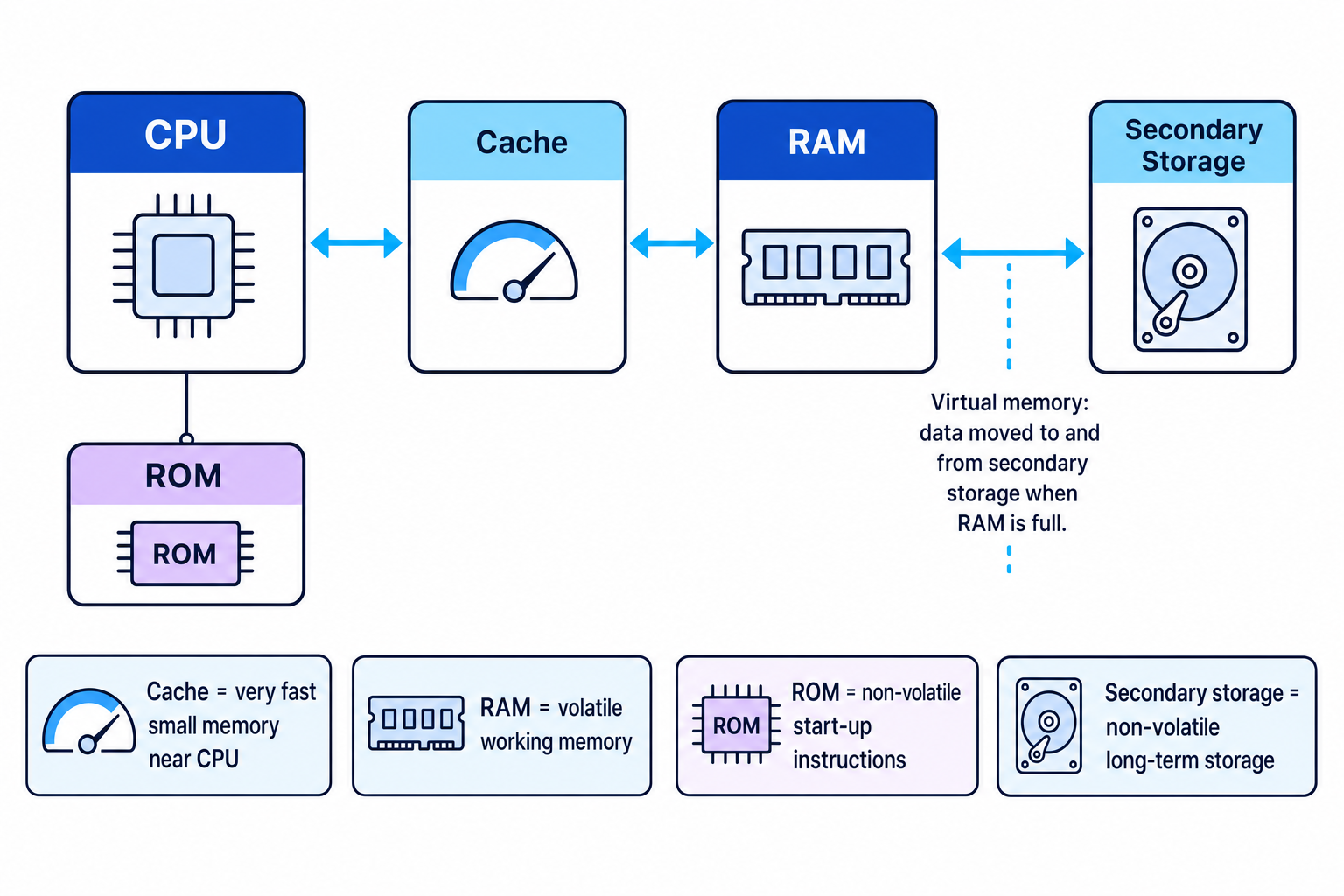
The diagram below shows how the main parts fit together: cache is close to the CPU, RAM is the main working memory, ROM stores start-up instructions, and secondary storage can be used for virtual memory when RAM is full.
Key Idea
The need for memory
Primary storage gives the CPU fast access to the instructions and data it needs immediately, while secondary storage keeps data long-term.
Example
Opening an application
- The application’s files are stored on secondary storage because they must still exist after the computer is switched off.
- When you open the application, the operating system copies the program instructions and needed data into RAM so the CPU can access them quickly.
- As the program runs, frequently used instructions or data may be copied into cache, because cache is even faster than RAM.
- If you save your work, the changed data is written back to secondary storage so it is not lost when power is turned off.
RAM: Random Access Memory
Definition
RAM
RAM stands for Random Access Memory. It is volatile, read/write memory used to store the operating system, programs, and data currently in use.
Random access means the computer can access any memory location directly, without having to read through all the previous locations first.
Volatile means the contents are lost when power is switched off. This is why unsaved work in RAM disappears if the computer suddenly loses power.
Read/write means the CPU can both read data from RAM and write new or changed data to RAM.
RAM is used to hold:
- the operating system while the computer is running
- open applications
- data currently being processed
- temporary values needed by programs
Having more RAM can allow more programs, larger files, or more browser tabs to be open at once before the computer has to rely on virtual memory.
Tip
RAM exam shortcut
If the question is about what the computer is using right now, RAM is often involved. If the question is about what remains after power is off, RAM is usually not the answer.
ROM: Read-Only Memory
Definition
ROM
ROM stands for Read-Only Memory. It is non-volatile memory that stores instructions needed to start up the computer.
Non-volatile means the contents are retained when power is switched off.
ROM is called “read-only” because the CPU can read the stored instructions, but they are not normally changed during everyday use. In GCSE terms, ROM stores the computer’s firmware: software stored in hardware that helps start or control the device.
The main purpose of ROM is to provide the first instructions when the computer is switched on. These instructions help the system begin the boot process, which means starting up the computer and loading the operating system into RAM.
Example
Starting a computer
- When the computer is first switched on, RAM is empty because RAM is volatile.
- The CPU still needs instructions to know what to do first, so it reads start-up instructions from ROM.
- The ROM instructions help the computer find the operating system on secondary storage.
- The operating system is loaded into RAM, where the CPU can access it quickly while the computer is running.
Common Mistake
ROM is not your file storage
ROM does not store your documents, photos, and installed applications. Those are normally stored on secondary storage. ROM stores start-up instructions needed before the operating system is loaded.
RAM and ROM compared
| Feature | RAM | ROM |
|---|---|---|
| Full name | Random Access Memory | Read-Only Memory |
| Volatile? | Volatile: contents lost when power is off | Non-volatile: contents kept when power is off |
| Can it be changed easily during normal use? | Yes, it is read/write | No, it is read-only in normal use |
| Main purpose | Stores programs and data currently in use | Stores start-up instructions |
| Typical contents | Operating system, running programs, open files, temporary data | Firmware and boot instructions |
| When it matters most | While programs are running | When the computer starts up |
Key Idea
RAM versus ROM
RAM is temporary working memory for what is happening now. ROM is permanent start-up memory for getting the system going.
Virtual memory
RAM has a limited capacity. If too many programs are open, or if a program needs more memory than is available, RAM can become full.
Definition
Virtual memory
Virtual memory is a technique where part of secondary storage is used to temporarily hold data or instructions that would normally be in RAM, when RAM is full.
Virtual memory is needed so the computer can continue running even when there is not enough physical RAM available. It makes the system behave as if it has more memory than the RAM chips alone provide.
How virtual memory works
When RAM is full:
- The operating system identifies data or instructions in RAM that are not needed immediately.
- That data is transferred from RAM to an area of secondary storage.
- Space is freed in RAM for the data or program currently needed.
- If the moved data is needed again later, it is transferred back from secondary storage into RAM.
- Something else may be moved out of RAM to make room.
The important point is that the CPU still works fastest with data in RAM or cache. Data held in virtual memory must be brought back into RAM before it can be used efficiently.
Example
Tracing virtual memory use
- A computer has several programs open, and RAM becomes full, so there is no room for the active program’s next data.
- The operating system chooses data from a background program that is not currently being used and transfers it from RAM to secondary storage.
- The freed RAM is used for the active program, allowing it to continue running.
- When the user switches back to the background program, its data must be transferred back into RAM, which causes a delay because secondary storage is slower than RAM.
Common Mistake
Virtual memory is not extra RAM hardware
Virtual memory is not another RAM chip. It is a use of secondary storage to temporarily act like extra memory when RAM is full.
Tip
Stay at GCSE depth
For J277, describe virtual memory as data being transferred between RAM and secondary storage when RAM is full. You do not need technical methods such as paging or segmentation.
Cache
Definition
Cache
Cache is a very small, very fast type of memory close to or inside the CPU. It stores frequently used instructions and data so the CPU can access them faster than from RAM.
Cache helps because the CPU is faster than RAM. Without cache, the CPU may spend more time waiting for instructions and data to arrive from RAM.
Cache usually stores data or instructions that have been used recently or are likely to be used again soon. If the CPU needs something and it is already in cache, it can be accessed very quickly. If it is not in cache, it must be fetched from RAM, which takes longer.
Cache is:
- faster than RAM
- smaller than RAM
- more expensive per unit of storage than RAM
- volatile
- used to improve CPU performance, not to store files permanently
Example
Using cache in a repeated task
- A program repeatedly uses the same set of instructions, such as instructions inside a loop.
- The first time they are needed, the instructions may be fetched from RAM and copied into cache.
- On later repeats, the CPU can access those instructions from cache instead of waiting for RAM.
- This reduces delays and can improve the overall speed of processing.
Putting it all together
A typical sequence looks like this:
- You switch on the computer.
- The CPU reads start-up instructions from ROM because RAM is empty at power-on.
- The operating system is loaded from secondary storage into RAM.
- Programs and data currently in use are stored in RAM.
- Frequently used instructions and data may be stored in cache for faster CPU access.
- If RAM becomes full, virtual memory transfers some data between RAM and secondary storage.
Exam technique
In the exam
- For RAM versus ROM, always compare volatility, whether it can be written to, and purpose.
- For ROM, mention that it stores start-up instructions retained when power is off.
- For virtual memory, use the sequence: RAM full → data moved to secondary storage → data moved back when needed → slower performance.
- For cache, link it to performance: it is small and very fast, storing frequently used data and instructions for the CPU.
Self review
Check yourself
- Why can’t a computer rely only on secondary storage while programs are running?
- What is stored in ROM, and why must it be non-volatile?
- How does virtual memory work when RAM is full, and why can it slow the computer down?

Recap questions
Test yourself with 5 quick questions on this guide. Answer them all correctly to complete it.
You've reached the end
Test yourself on this topic, or move on to the next guide.
How was this guide?