Revision notes for OCR GCSE Computer Science CPU performance. Open the guide for explanations and worked examples. Written against the OCR GCSE Computer Science (J277) specification, so the content matches what's examinable rather than general Computer Science background.
CPU performance
What you'll learn
- What CPU performance means.
- How clock speed, cache size and number of cores affect performance.
- Why “bigger numbers” do not always guarantee a faster computer.
- How to compare CPUs in GCSE-style written answers.
Starting point: what the CPU is doing
The CPU is the part of the computer that runs program instructions. An instruction is a small command that tells the computer to do something, such as add two values, compare data, or move data.
The CPU repeatedly uses the fetch-decode-execute cycle: it fetches an instruction, decodes what it means, then executes it. For this topic, you only need to understand how CPU characteristics affect performance — not the detailed movement of data between registers.
Definition
Central Processing Unit (CPU)
The CPU is the main processor in a computer. It executes instructions so that programs can run.
Definition
CPU performance
CPU performance means how quickly the CPU can process useful work, such as running programs, responding to user input, or completing calculations.
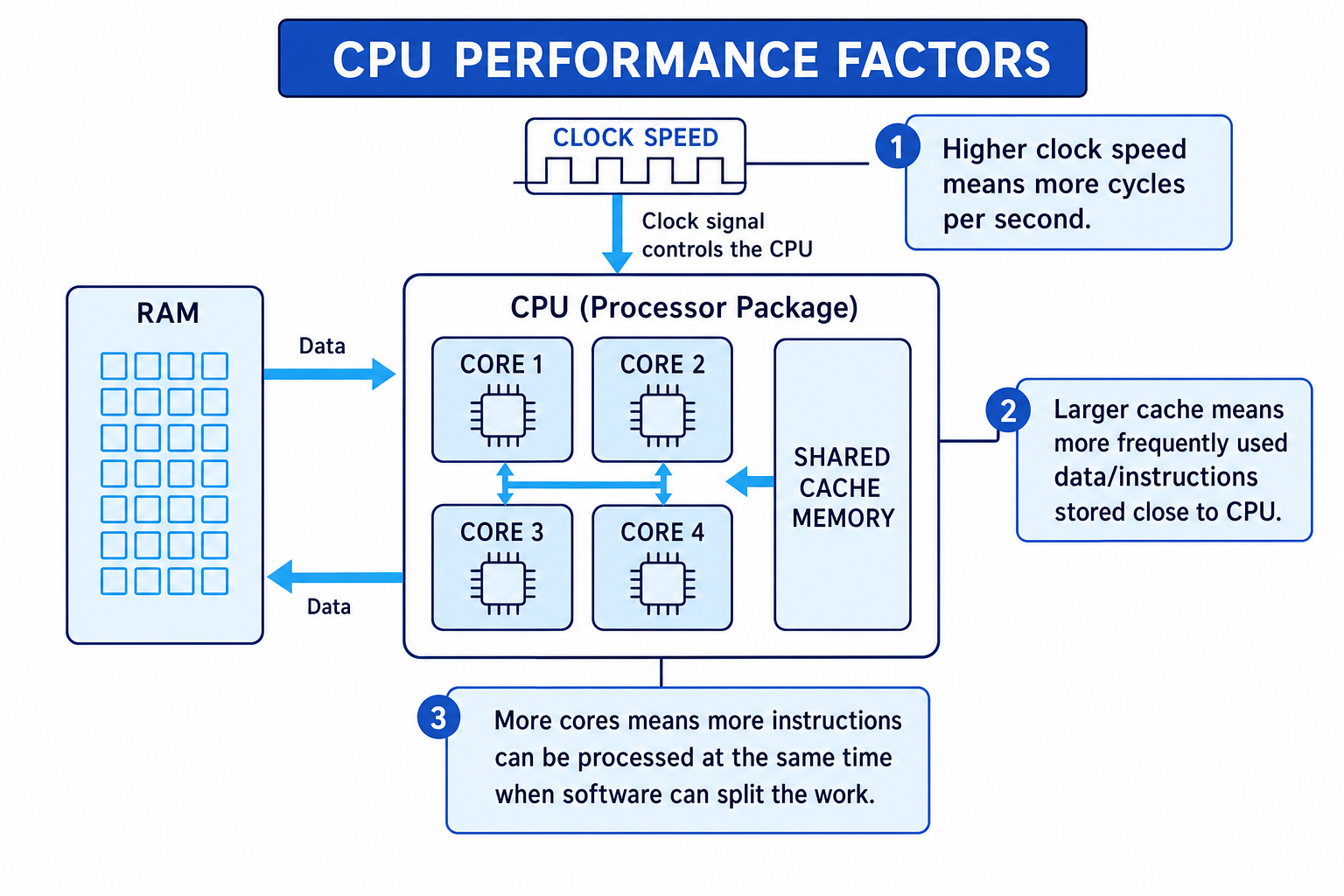
The three common CPU characteristics you need for OCR J277 are clock speed, cache size and number of cores.
Clock speed: the CPU’s rhythm
A CPU is controlled by a regular electrical signal called a clock. One tick of this clock is called a clock cycle.
Definition
Clock speed
Clock speed is the number of clock cycles a CPU can carry out per second. It is measured in hertz (Hz), often gigahertz (GHz), where 1 GHz means 1 billion cycles per second.
A higher clock speed means there are more cycles per second. This usually means the CPU can process more instructions per second, so programs may run faster.
However, one clock cycle does not always mean one whole instruction is completed. Some instructions take more work than others, and the CPU may still have to wait for data from memory.
Key Idea
Clock speed effect
Increasing clock speed normally improves performance because the CPU has more cycles available each second, but the improvement depends on the rest of the system and the task being run.
Example
Comparing clock speeds
Two CPUs have the same cache size and the same number of cores. CPU A has a clock speed of 2.4 GHz. CPU B has a clock speed of 3.6 GHz.
- Since cache size and number of cores are the same, the main difference to compare is clock speed.
- Compare the clock speeds using a ratio: 3.6÷2.4=1.53.6 \div 2.4 = 1.53.6÷2.4=1.5.
- CPU B has 1.5 times as many clock cycles per second, so it has 50% more cycles available. It is likely to perform faster for the same task, although real performance may not increase by exactly 50%.
Common Mistake
Assuming clock speed tells the whole story
A CPU with a higher clock speed is not automatically faster in every situation. Cache size, number of cores, CPU design and the type of program also matter.
Cache size: reducing waiting time
The CPU often needs instructions and data from RAM, which is the main memory used for programs and data that are currently in use. RAM is fast, but it is still slower than the CPU.
To reduce waiting, CPUs use cache.
Definition
Cache
Cache is a small amount of very fast memory located inside or very close to the CPU. It stores frequently used instructions and data so the CPU can access them quickly.
If the CPU needs data and finds it in cache, that is called a cache hit. If the data is not in cache and must be fetched from RAM, that is a cache miss.
A larger cache can store more frequently used data and instructions. This increases the chance of cache hits, so the CPU spends less time waiting for slower RAM.
Key Idea
Cache size effect
Increasing cache size can improve performance because more data and instructions can be stored close to the CPU, reducing the number of slower RAM accesses.
Example
Predicting the benefit of a larger cache
CPU A and CPU B have the same clock speed and the same number of cores. CPU A has 4 MB of cache. CPU B has 12 MB of cache. A program repeatedly uses the same set of instructions and data.
- Because the clock speed and number of cores are the same, cache size is the characteristic being compared.
- The program repeatedly uses the same instructions and data, so storing them in cache is useful.
- CPU B is likely to perform better because its larger cache can hold more of the repeated instructions and data, causing fewer cache misses.
Common Mistake
Thinking larger cache always makes a big difference
A larger cache helps most when programs reuse the same data or instructions. If a task keeps needing new data that is not already in cache, the benefit may be smaller.
Number of cores: doing more work at once
A core is a processing unit within the CPU. A CPU with one core can work on one main stream of instructions at a time. A CPU with multiple cores can work on multiple streams of instructions at the same time.
Definition
Core
A core is an individual processing unit inside a CPU that can fetch, decode and execute instructions.
A CPU with more than one core is called a multi-core CPU. For example, a quad-core CPU has 4 cores.
More cores can improve performance because different cores can process different instructions at the same time. This is especially useful for multitasking, where several programs are running, or for programs designed to split work into separate parts.
Definition
Parallel processing
Parallel processing means splitting work so that multiple cores can process different parts at the same time.
The important condition is: the software must be able to make use of the extra cores. If a task cannot be split up well, extra cores may not make that one task much faster.
Key Idea
Number of cores effect
Increasing the number of cores can improve performance when the computer can divide work between the cores, but it does not guarantee every program will run faster.
Example
Deciding whether more cores help
Two CPUs have the same clock speed and cache size. CPU A has 2 cores. CPU B has 6 cores. A video export program can split its work into several parts, but a simple word processor mostly uses one main part.
- For the video export, the work can be split between several cores, so CPU B can process more parts at the same time.
- For the word processor, most of the work is not split between many cores, so CPU B may not make that single program much faster.
- CPU B is likely to be better for the video export and for heavy multitasking, while the difference may be small for the simple word processor.
Common Mistake
Multiplying clock speed by cores
A 4-core 3 GHz CPU is not simply a 12 GHz CPU. Each core runs at about 3 GHz; the extra cores help when work can be shared between them.
Combining the three characteristics
In real computers, clock speed, cache size and number of cores work together.
A workload is the type and amount of work the computer is being asked to do. A bottleneck is the part of the system that limits overall performance because other parts are waiting for it.
For example:
- A higher clock speed helps the CPU carry out more cycles per second, especially for tasks that mainly use one core.
- A larger cache helps when the CPU repeatedly needs the same instructions or data.
- More cores help when the workload can be split up or when several programs are running at once.
- A balanced CPU is usually better than one with one very strong feature and other weak features.
Tip
Use the cause-effect-condition chain
For longer answers, explain the feature, then its effect, then the condition. For example: “A larger cache stores more frequently used data close to the CPU, so fewer RAM accesses are needed, which improves performance when data is reused often.”
Example
Choosing a CPU for different workloads
CPU A has 4 cores, a clock speed of 3.8 GHz and 6 MB cache. CPU B has 8 cores, a clock speed of 2.8 GHz and 12 MB cache.
- For a task that mainly uses one core, compare the clock speeds first. CPU A has the higher clock speed, so it may complete that task faster.
- For a task such as video rendering that can split work between cores, compare the number of cores. CPU B has 8 cores rather than 4, so it can potentially process more parts at the same time.
- CPU B also has a larger cache, so it may reduce waiting for RAM if the task reuses data. Overall, CPU A may be better for a mostly single-core task, while CPU B may be better for a parallel workload.
Exam technique
In the exam
- If asked about one characteristic, name it clearly and explain the mechanism: clock speed means more cycles, cache reduces RAM access, cores allow parallel work.
- Use cautious wording such as “can improve performance” or “is likely to improve performance” when the result depends on the workload.
- For questions about cores, always mention that the program or workload must be able to split work between cores.
- For comparison questions, do not just pick the biggest number. Consider clock speed, cache size and number of cores together.
Self review
Check yourself
- Why can a CPU with a higher clock speed still be slower for some tasks?
- How does a larger cache reduce the amount of time the CPU spends waiting?
- Why does doubling the number of cores not always double CPU performance?

Recap questions
Test yourself with 5 quick questions on this guide. Answer them all correctly to complete it.
You've reached the end
Test yourself on this topic, or move on to the next guide.
How was this guide?