Revision notes for OCR GCSE Computer Science Additional programming techniques. Open the guide for explanations and worked examples. Written against the OCR GCSE Computer Science (J277) specification, so the content matches what's examinable rather than general Computer Science background.
Additional programming techniques
What you'll learn
- How to manipulate strings using concatenation and slicing.
- How programs use files, records, arrays and SQL to store and search data.
- How functions and procedures help you write structured, reusable code.
- How random numbers can be generated and used in a program.
Why these techniques matter
So far, you may have written programs using variables, selection, iteration and basic input/output. These are the foundations.
This topic adds techniques that make programs more realistic: saving data in files, grouping related data together, searching tables, and splitting code into manageable subprograms.
Key Idea
The big picture
These techniques help programs handle larger amounts of data and keep code organised, readable and easier to test.
Strings: working with text
A string is a sequence of characters, such as "hello", "Ava Patel" or "GCSE2026".
Definition
String manipulation
String manipulation means changing, combining or selecting parts of strings in a program.
Concatenation
Concatenation means joining strings together.
For example, in Python:
firstName = "Ava"
surname = "Patel"
fullName = firstName + " " + surname
The variable fullName would store "Ava Patel".
Slicing
Slicing means taking part of a string.
In Python, string positions usually start at index 0. So in "Patel":
Pis at index 0ais at index 1tis at index 2
A slice such as surname[0:3] takes characters from index 0 up to, but not including, index 3.
Example
Creating a user ID from strings
A program stores:
firstName = "Ava"
surname = "Patel"
userID = firstName[0:1] + surname[0:3] + "25"
Work out the value of userID.
firstName[0:1]takes the character at index 0, so it gives"A".surname[0:3]takes indexes 0, 1 and 2 from"Patel", so it gives"Pat".- Concatenating the parts gives
"A" + "Pat" + "25", souserIDstores"APat25".
Common Mistake
Forgetting the end index is not included
In Python slicing, text[0:3] does not include index 3. It includes indexes 0, 1 and 2.
File handling: saving and loading data
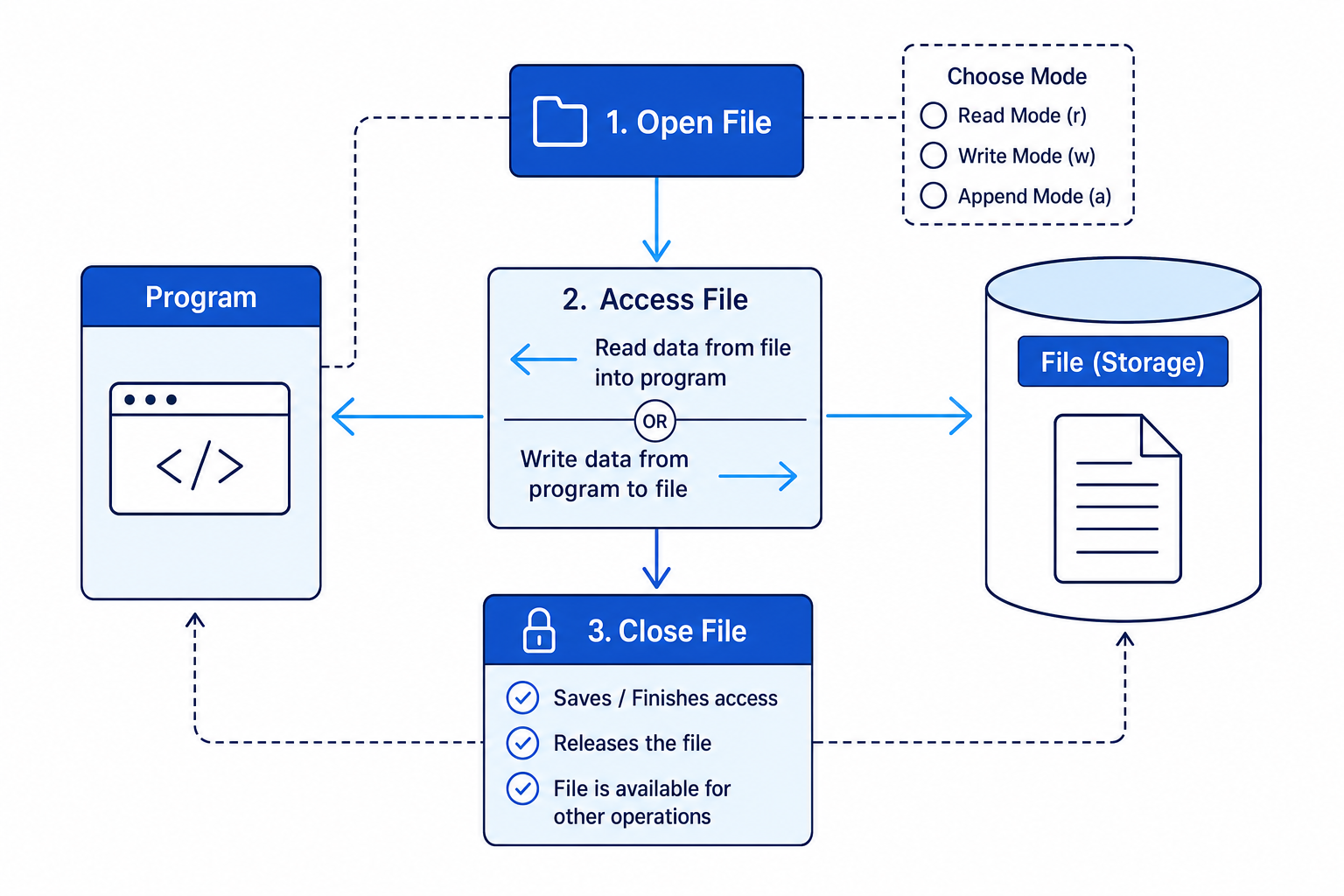
A file stores data on secondary storage, so it can still exist after the program has finished running.
Programs commonly use four basic file handling operations:
- Open: connect the program to the file.
- Read: get data from the file.
- Write: put data into the file.
- Close: finish using the file safely.
A file is usually opened in a particular mode, such as read mode, write mode or append mode. Append mode adds new data to the end of an existing file.
Key Idea
Always close files
Closing a file finishes the operation properly and makes the file available for other parts of the program or other programs.
Example
Adding a score to a file
A program needs to add the line Ava,85 to the end of a file called scores.txt, without deleting the existing scores.
- The existing data must be kept, so append mode is the correct choice rather than write mode.
- The program opens the file in append mode using
"a". - The program writes the new line, including a line break so the next score starts on a new line.
- The program closes the file.
scoreFile = open("scores.txt", "a")
scoreFile.write("Ava,85
")
scoreFile.close()
Common Mistake
Using write mode when you meant append
Opening a file in write mode often overwrites the existing contents. If you need to add to the end of a file, use append mode.
Arrays, records and tables
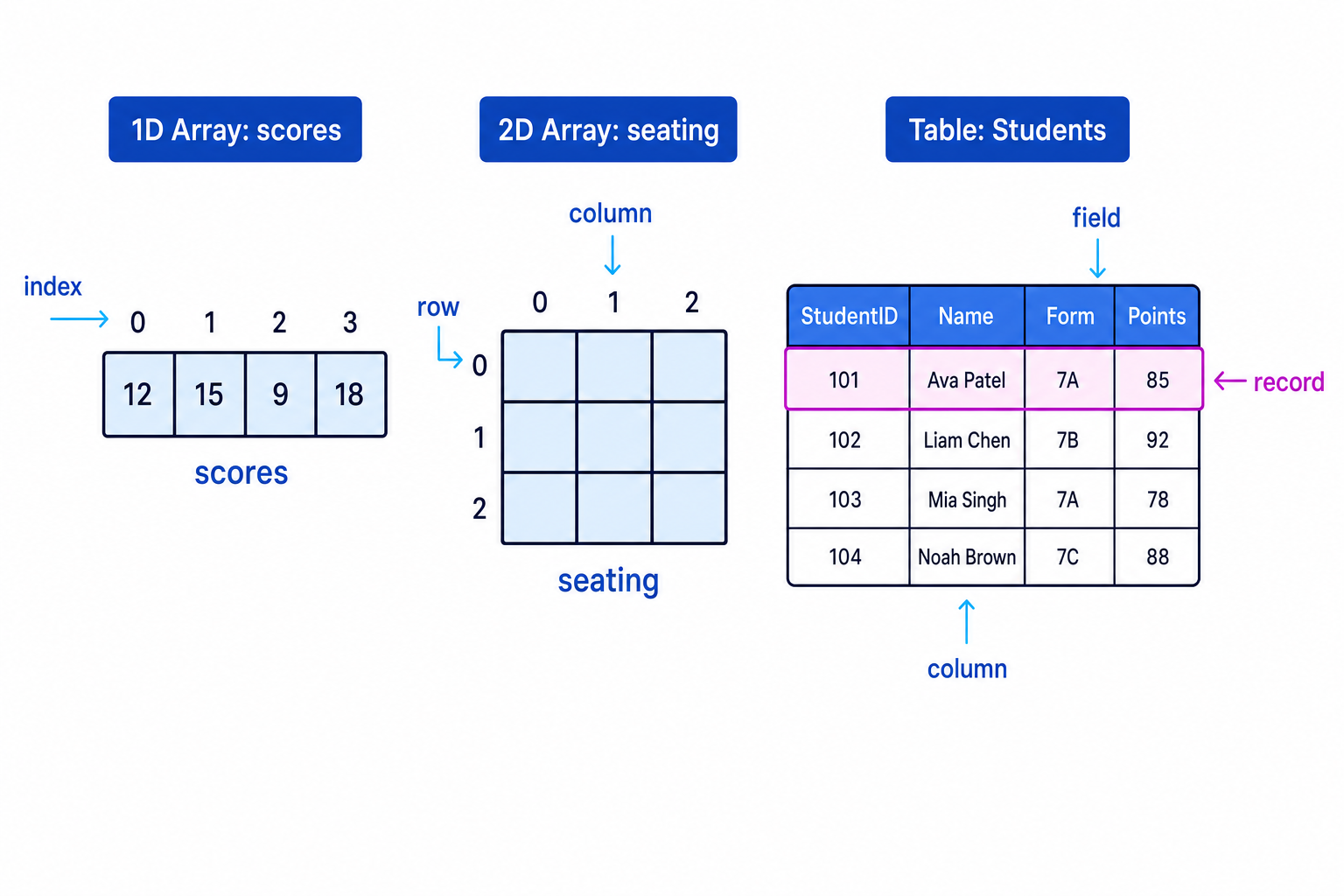
An array is a data structure that stores multiple values under one identifier. In OCR J277, arrays are treated as fixed length or static structures, meaning their size is set and does not keep changing while the program runs.
A one-dimensional array, or 1D array, is like a single row of values. A two-dimensional array, or 2D array, is like a grid with rows and columns.
A record stores related fields about one thing. For example, one student record might contain StudentID, Name, Form and Points.
A 2D array can be used to emulate a simple database table: each row is a record, and each column is a field.
Definition
Fields and records
A field is one item of data, such as Name. A record is a complete set of fields about one entity, such as one student.
Choosing the right structure
Use a 1D array when you need a simple list, such as test scores:
scores = [85, 92, 78, 88]
Use a record when the data items belong together:
student = {"StudentID": 101, "Name": "Ava Patel", "Form": "7A", "Points": 85}
Use a 2D array or table when you have many similar records:
students = [
    [101, "Ava Patel", "7A", 85],
    [102, "Liam Chen", "7B", 92],
    [103, "Mia Singh", "7A", 78]
]
Example
Selecting data from a 2D array
Using this 2D array:
students = [
    [101, "Ava Patel", "7A", 85],
    [102, "Liam Chen", "7B", 92],
    [103, "Mia Singh", "7A", 78]
]
Find the name in row 1.
- Row indexes start at 0, so row 1 is the second row:
[102, "Liam Chen", "7B", 92]. - In that row, the name is stored in column 1.
- Therefore
students[1][1]gives"Liam Chen".
Common Mistake
Treating arrays as automatically expandable
For J277, remember that arrays are fixed length/static structures. Python lists can grow in real programs, but the exam concept of an array is fixed length.
SQL: searching for data
SQL stands for Structured Query Language. It is used to search and retrieve data from database tables.
For J277, you need the commands:
SELECT: choose which fields to display.FROM: choose which table to search.WHERE: choose which records match a condition.
Definition
SQL query
An SQL query is an instruction that asks a database to return data matching certain criteria.
For example:
SELECT Name, Points
FROM Students
WHERE Form = '7A';
This returns the Name and Points fields for students whose Form is 7A.
Example
Writing a query to find matching records
A table called Students has the fields StudentID, Name, Form and Points. Write a query to display the names of students in form 7B.
- The output should only show names, so use
SELECT Name. - The data is stored in the
Studentstable, so useFROM Students. - Only records where the form is
7Bshould be returned, so useWHERE Form = '7B'.
SELECT Name
FROM Students
WHERE Form = '7B';
Common Mistake
Using Python operators in SQL
In SQL, equality is written with a single =, not ==. String values such as '7B' are usually written in quotes.
Subprograms: functions and procedures
A subprogram is a named block of code that can be called when needed.
There are two important types:
- A function returns a value.
- A procedure performs an action but does not return a value.
Definition
Functions and procedures
A function should be used when the program needs a result back. A procedure should be used when the program needs an action carried out.
Why subprograms are useful
Subprograms help you produce structured code. This means the program is split into smaller, logical sections.
This makes code:
- easier to read
- easier to test
- easier to debug
- easier to reuse
Local and global variables
A local variable is created inside a subprogram and can only be used there.
A global variable is created outside subprograms and can be accessed more widely in the program.
A constant is a named value that should not change while the program runs. In Python, constants are often written in capital letters by convention, such as MAX_SCORE.
MAX_SCORE = 100   # global constant

def calculatePercentage(score):
    percentage = score / MAX_SCORE * 100   # percentage is local
    return percentage
Common Mistake
Overusing global variables
Global constants are useful for values like MAX_SCORE, but global variables can make programs harder to debug because many parts of the program may change them.
Passing arrays to subprograms
An array can be passed into a function or procedure as a parameter.
def findTotal(scores):
    total = 0
    for score in scores:
        total = total + score
    return total
Here, scores is passed into the function. The function returns the total.
Example
Choosing between a function and a procedure
A program stores an array of scores. It needs one subprogram to calculate the total score and another to print every score.
- Calculating the total produces a value that the main program may need later, so this should be a function.
- Printing every score is an action and does not need to send back a value, so this should be a procedure.
- The array of scores should be passed as a parameter to both subprograms, so they can work with the same data without relying on unnecessary global variables.
Random number generation
Random number generation means creating a number that cannot be predicted easily by the user. Programs use this for games, simulations, quizzes and testing.
In Python, you can generate a random integer like this:
import random

diceRoll = random.randint(1, 6)
This generates an integer from 1 to 6 inclusive.
Definition
Random number
A random number is a value selected from a range where the result is not known in advance.
Example
Using random numbers for two dice
A program needs to simulate rolling two six-sided dice and storing the total.
- Generate the first random integer in the range 1 to 6.
- Generate the second random integer separately, also in the range 1 to 6.
- Add the two values together and store the result in a variable called
total.
import random

dice1 = random.randint(1, 6)
dice2 = random.randint(1, 6)
total = dice1 + dice2
Tip
Check the range
Different languages use different random number functions. In Python, randint(1, 6) can produce both 1 and 6, but always check the language or pseudocode used in the question.
Bringing it together
A realistic program may use several of these techniques at once.
For example, a quiz program could:
- use strings to create usernames
- store questions in an array
- use random numbers to choose a question
- use a function to calculate the score
- use a procedure to display feedback
- write the final score to a file
- search stored results using SQL
The important GCSE skill is not just naming the technique, but choosing where it fits in a program.
Exam technique
In the exam
- When asked to choose a technique, link it to the problem: arrays for lists, records for grouped fields, files for permanent storage, and subprograms for reusable sections of code.
- For SQL, stick to
SELECT,FROMandWHERE; do not add extra commands unless the question specifically provides them. - If writing code, use meaningful identifiers, pass data into subprograms as parameters where possible, and clearly distinguish functions from procedures.
Self review
Check yourself
- What is the difference between concatenation and slicing?
- When would you use a function instead of a procedure?
- How could a 2D array represent records and fields in a table?

Recap questions
Test yourself with 5 quick questions on this guide. Answer them all correctly to complete it.
You've reached the end
Test yourself on this topic, or move on to the next guide.
How was this guide?