Revision notes for OCR GCSE Computer Science Defensive design. Open the guide for explanations and worked examples. Written against the OCR GCSE Computer Science (J277) specification, so the content matches what's examinable rather than general Computer Science background.
Defensive design
What you'll learn
- How programmers anticipate misuse so programs do not crash or behave dangerously.
- How input validation deals with invalid data.
- How authentication confirms a user’s identity.
- How maintainability makes programs easier to read, test and improve.
What is defensive design?
When you write a program, you cannot assume every user will type exactly what you expect. Users may mistype, leave boxes blank, enter values outside the allowed range, or even deliberately try to break the program.
Definition
Defensive design
Defensive design means designing and writing a program so it can cope with likely mistakes, unexpected input and misuse without crashing or producing unsafe results.
A robust program is one that keeps working correctly even when things do not go perfectly. Defensive design is part of producing robust programs.
Key Idea
The main idea
Do not just design for the “happy path” where the user behaves perfectly. Think about what could go wrong, then build sensible checks and responses into the program.
Anticipating misuse
Misuse means using a program in a way that was not intended. This might be accidental, such as entering a letter where a number is needed, or deliberate, such as trying lots of passwords.
A programmer should consider all likely input values, including:
- valid values, such as an age of 15
- invalid values, such as an age of -3
- wrong data types, such as typing
fifteeninstead of15 - missing data, such as pressing Enter without typing anything
- extreme values, such as 999999999
- unexpected menu choices, such as choosing option 7 when only 1 to 4 exist
Designing for problems before they happen
A defensive design approach asks questions like:
- What inputs are allowed?
- What inputs should be rejected?
- What should the program do after rejecting invalid input?
- Could the user get stuck?
- Could the program crash?
- Could private data be accessed by the wrong user?
Example
Planning for likely misuse
A school program asks for a student’s year group. Valid year groups are 7 to 11.
- Identify the valid range: the input must be a whole number from 7 to 11 inclusive.
- List likely invalid inputs:
6,12,Year 9, a blank input, and9.5should not be accepted. - Decide the response: the program should display a helpful error message and ask for the year group again, rather than continuing with invalid data.
- Decide when to continue: only once the input is a whole number and is within the range 7 to 11.
Common Mistake
Only checking one bad value
Do not just check for one invalid input, such as 0. A good defensive design considers the full set of likely invalid inputs, such as too low, too high, blank, or the wrong data type.
Input validation
Definition
Input validation
Input validation is checking data entered into a program to make sure it is reasonable and acceptable before the program uses it.
Validation does not prove that data is true. It only checks whether the data follows the rules.
For example, if a program asks for an age and the user enters 15, validation can check that 15 is a sensible age. It cannot prove that the user really is 15.
Common validation checks
You should be able to design simple validation rules. Common examples include:
| Validation check | What it checks | Example |
|---|---|---|
| Presence check | Data has been entered | A username cannot be blank |
| Range check | A number is between limits | Age must be from 0 to 120 |
| Type check | Data is the correct type | Quantity must be an integer |
| Length check | Data has the correct number of characters | Password must be at least 8 characters |
| Format check | Data follows a pattern | Email contains @ |
| Lookup check | Data is one of a set of allowed values | Menu choice must be A, B or C |
Dealing with invalid data
When invalid data is entered, the program should not simply crash or continue using it. It should respond safely.
Good responses include:
- displaying a clear error message
- asking the user to enter the data again
- returning to a menu
- stopping safely if continuing would be unsafe
- preventing invalid data from being saved
Example
Designing validation for an age input
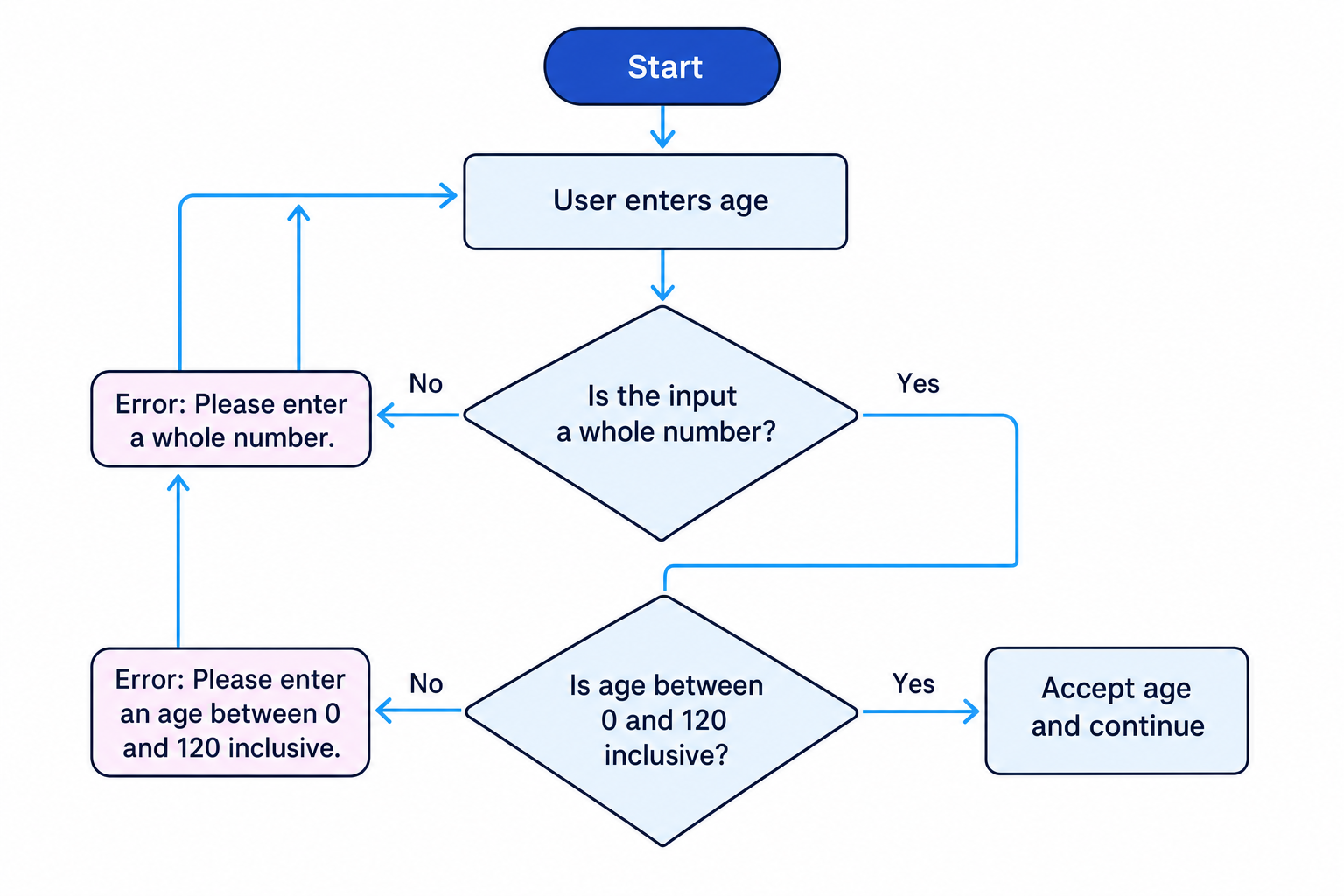
A program asks the user to enter their age. Ages must be whole numbers from 0 to 120.
- Choose the type check first: the program must check that the input is a whole number before comparing it with 0 and 120.
- Apply the range check: if the number is less than 0 or greater than 120, it should be rejected.
- Decide the recovery action: after each rejected input, the program should show a message such as
Enter a whole number from 0 to 120and ask again. - Accept the input only when both checks pass: whole number and within the allowed range.
Tip
Order your checks sensibly
Check the data type before doing range comparisons. For example, do not try to check whether cat is less than 120.
Simple authentication
Definition
Authentication
Authentication is the process of confirming the identity of a user.
A common simple method is a username and password. The user enters both values, and the program compares them with stored details. If they match, the user is allowed to log in.
At GCSE level, you need to understand and design simple authentication logic. You do not need to build a full real-world security system.
Authentication is not the same as validation
Validation checks whether input is acceptable. Authentication checks whether the user is who they claim to be.
For example:
- Checking that a password box is not blank is validation.
- Checking that the password matches the stored password for that username is authentication.
Example
Checking a username and password
A program stores one valid account: username student1 and password green42.
- Compare the entered username with the stored username. If it is not
student1, the login must fail. - If the username matches, compare the entered password with the stored password.
- Allow access only if both comparisons are true: username matches AND password matches.
- If either comparison fails, display a general message such as
Login failedand do not allow access.
A simple pseudocode design might use this structure:
INPUT username
INPUT password

IF username == "student1" AND password == "green42" THEN
    OUTPUT "Access granted"
ELSE
    OUTPUT "Login failed"
ENDIF
Common Mistake
Accepting either the username or password
For login, the username and password must both be correct. The condition should use AND, not OR.
You may also see programs limit the number of login attempts. This is another defensive design choice because it helps reduce repeated guessing.
Maintainability
Definition
Maintainability
Maintainability means how easy a program is to understand, correct, improve and adapt after it has been written.
Programs are often changed later. A different programmer might need to fix a bug, add a feature, or understand how a section works. Maintainable code makes that much easier.
The OCR J277 spec highlights four important ways to improve maintainability:
- use of sub programs
- naming conventions
- indentation
- commenting
Use of sub programs
A sub program is a named section of code that performs a specific task. You may see sub programs called procedures or functions.
Sub programs improve maintainability because they:
- break a large problem into smaller parts
- reduce repeated code
- make code easier to test
- make the main program easier to read
For example, a quiz program might use sub programs called askQuestion, checkAnswer and displayScore.
Key Idea
Sub programs support decomposition
Using sub programs helps decompose a large program into smaller, named tasks. This makes the program easier to follow and change.
Naming conventions
A naming convention is a consistent way of naming identifiers such as variables, constants and sub programs.
Good names describe purpose. Poor names force the reader to guess.
| Weak name | Better name |
|---|---|
x | studentAge |
n | numberOfTickets |
p | password |
calc | calculateTotalPrice |
You might use camelCase, such as totalScore, or snake_case, such as total_score. The exact style matters less than being clear and consistent.
Tip
Name things by meaning
A good identifier says what the data represents, not just what data type it is. userAge is more useful than integer1.
Indentation
Indentation means using spaces or tabs at the start of lines to show the structure of the program.
Indentation makes it clear which statements belong inside an IF, ELSE, loop or sub program.
For example, this is easier to read:
IF score >= 50 THEN
    OUTPUT "Pass"
ELSE
    OUTPUT "Try again"
ENDIF
Without indentation, the logic is harder to follow, especially in longer programs.
Common Mistake
Indentation does not fix logic
Indentation makes code clearer, but it does not automatically make the logic correct. You still need the right conditions and statements.
Commenting
A comment is text in a program that explains something to a human reader. Comments are ignored when the program runs.
Comments are useful because they can explain:
- the purpose of a section of code
- why a particular decision was made
- what a sub program expects or returns
- any non-obvious logic
However, comments should be used appropriately. Do not comment every obvious line.
Poor comment:
// Add 1 to score
score = score + 1
Better comment:
// Award one mark for a correct answer
score = score + 1
The better comment explains the purpose, not just the operation.
Example
Improving maintainability
A program contains repeated code for asking the user to enter a valid menu choice.
- Identify the repeated task: the program asks for a menu choice in several places and checks whether it is valid.
- Create a sub program with a meaningful name, such as
getValidMenuChoice, so the repeated logic is stored once. - Use clear variable names inside it, such as
menuChoice, rather than vague names likex. - Indent the selection and loop statements so it is clear which code repeats.
- Add a short comment explaining the purpose of the sub program, such as
// Gets a menu option from 1 to 4.
Bringing it together
Defensive design is not one single line of code. It is a way of thinking while designing and writing programs.
A defensive program:
- expects that users may make mistakes
- validates input before using it
- deals with invalid data safely
- uses authentication when identity matters
- is written clearly so it can be maintained
Exam technique
In the exam
- If asked about defensive design, mention both preventing problems and dealing with problems safely.
- For validation questions, state the rule, the check needed, and what happens if the data is invalid.
- For maintainability questions, use the spec words: sub programs, naming conventions, indentation and commenting.
Self review
Check yourself
- What is the difference between validation and authentication?
- Why should a program ask again after invalid input instead of continuing?
- How do sub programs and good variable names improve maintainability?

Recap questions
Test yourself with 5 quick questions on this guide. Answer them all correctly to complete it.
You've reached the end
Test yourself on this topic, or move on to the next guide.
How was this guide?