Revision notes for Edexcel GCSE Computer Science Identifying and correcting program errors. Open the guide for explanations and worked examples. Written against the Edexcel GCSE Computer Science (1CP2) specification, so the content matches what's examinable rather than general Computer Science background.
Identifying and correcting program errors
What you'll learn
- How to tell the difference between syntax, runtime, and logic errors.
- How to identify the type of error from what the program does.
- How to locate the faulty line or condition using error messages, testing, and trace tables.
- How to correct the error and retest your Python 3 code.
The basic idea: bugs and debugging
A program rarely works perfectly the first time. Part of developing code is finding mistakes, understanding them, fixing them, and checking that the fix has actually worked.
Definition
Program error / bug
A program error, often called a bug, is a mistake in code that causes the program to fail, crash, or produce the wrong result. Debugging means finding and correcting these mistakes.
For GCSE, the key skill is not just saying “there is an error”. You need to be able to:
- Identify the type of error.
- Locate where the error is in the code.
- Correct the code so it matches the intended behaviour.
Before you can debug properly, you need to know what the program is meant to do. The expected output is what should happen. The actual output is what really happens when the program runs.
Key Idea
Debug against the intended behaviour
You can only spot a logic error if you know what the correct output should be for given test data.
A practical debugging workflow
When you run or inspect a Python program, the symptoms usually guide you towards the type of error.
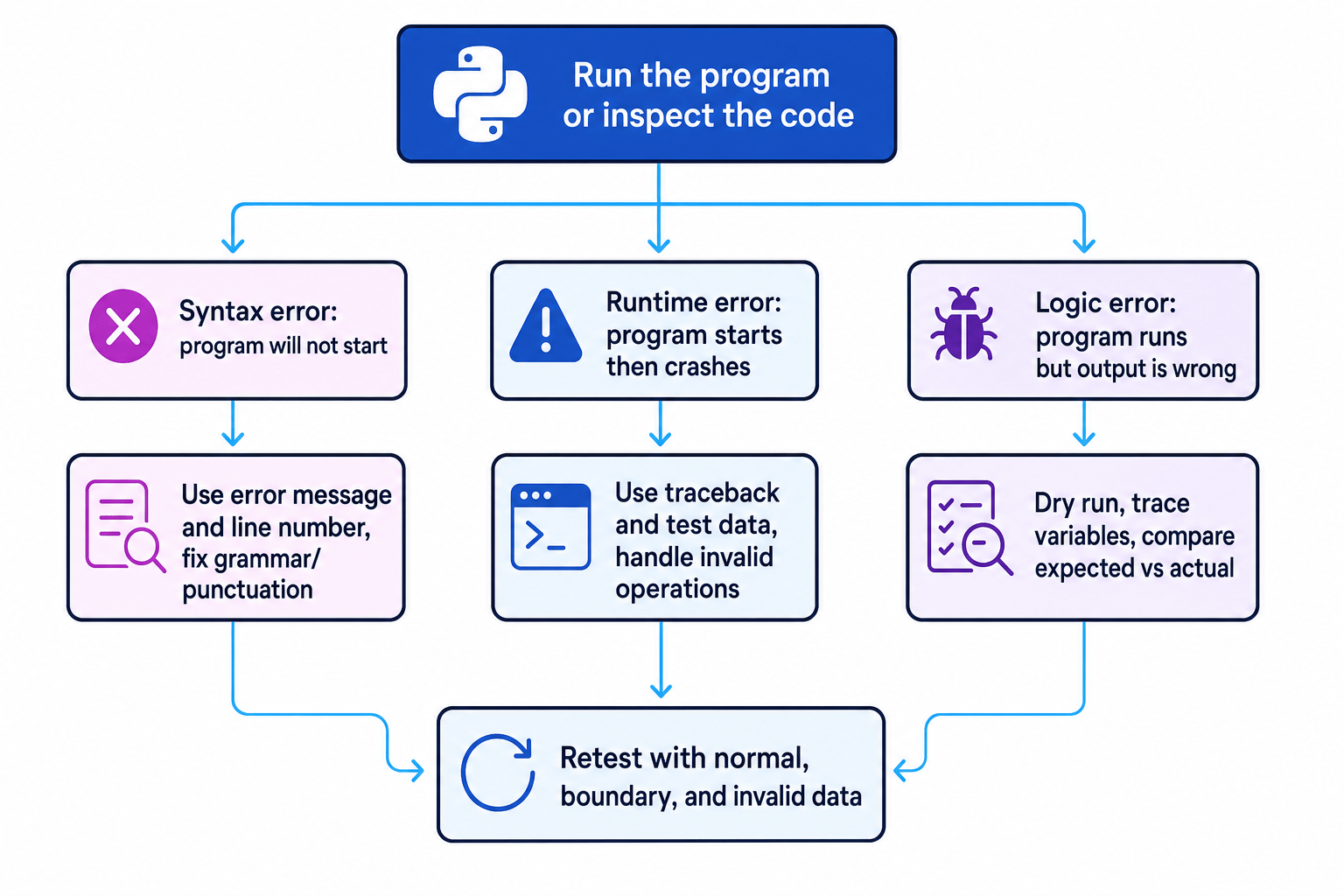
The three main types of program error
Syntax error
Syntax means the grammar and punctuation rules of a programming language.
Definition
Syntax error
A syntax error is a mistake that breaks the grammar rules of the language, so the program cannot be translated or started correctly.
In Python, common syntax errors include:
- Missing
:after anif,while,for, or function header. - Missing quotation marks around a string.
- Unmatched brackets.
- Incorrect indentation where Python expects an indented block.
Python usually gives you an error message and a line number. The line number is a strong clue, but it may show where Python noticed the problem rather than where the problem began.
Example
Correcting a missing colon
The program is:
score = int(input("Score: "))
if score >= 50
    print("Pass")
- The program does not start, and Python reports
SyntaxError: expected ':'near line 2, so this is a syntax error. - The faulty statement is the
ifheader. In Python, anifcondition must end with a colon. - Correct line 2 by adding the colon, then run the program again:
score = int(input("Score: "))
if score >= 50:
    print("Pass")
Common Mistake
Trusting the line number blindly
A syntax error line number often shows where Python became confused. Always check the line before as well, especially for missing brackets, quotes, and colons.
Runtime errors
Runtime means the period when the program is actually executing.
Definition
Runtime error
A runtime error happens while the program is running. The code has valid syntax, but an operation fails during execution.
A runtime error may only appear for certain inputs. For example, a program might work for 4 but crash for 0.
Common Python runtime errors include:
ZeroDivisionError— trying to divide by zero.ValueError— trying to convert unsuitable data, such asint("cat").IndexError— trying to access a list position that does not exist.NameError— using a variable name that has not been defined.
A traceback is Python’s runtime error report. It shows the line where the crash happened and the type of error.
Example
Correcting division by zero
The program is meant to share 24 sweets equally:
people = int(input("Number of people: "))
sweets_each = 24 // people
print(sweets_each)
If the user enters 0, the program crashes.
- The program starts and accepts input before crashing, so the grammar is valid. This points to a runtime error, not a syntax error.
- The traceback points to
sweets_each = 24 // people. The operator//is integer division, and division by zero is not allowed. - Correct the program by checking the value before dividing:
people = int(input("Number of people: "))

if people > 0:
    sweets_each = 24 // people
    print(sweets_each)
else:
    print("Number of people must be more than 0")
Tip
Use the error type as a clue
In Python, the error name often tells you what kind of operation failed. For example, ZeroDivisionError points towards a division calculation, while IndexError points towards list positions.
Logic errors
Logic means the sequence of decisions, calculations, and steps used by an algorithm.
Definition
Logic error
A logic error happens when the program runs without crashing but produces the wrong output because the algorithm or calculation is incorrect.
Logic errors are often the hardest to spot because Python may not display any error message. The program looks as if it worked, but the answer is wrong.
Common logic errors include:
- Using
>instead of>=. - Adding when you should subtract.
- Updating the wrong variable.
- Putting statements in the wrong order.
- Repeating a loop one time too many or one time too few.
An off-by-one error is a common logic error where a loop includes one extra value or misses one value.
Locating logic errors with dry runs and trace tables
A dry run means manually stepping through code without running it on the computer.
A trace table records the values of variables as each line of code is followed. It helps you compare what the program actually does with what you expected it to do.
Example
Tracing an off-by-one error
This function is meant to add all whole numbers from 1 up to limit:
def total_to(limit):
    total = 0

    for number in range(1, limit):
        total = total + number

    return total

print(total_to(5))
The expected result for total_to(5) is 15, but the program prints 10.
-
The program runs and prints an answer, so it is not a syntax error or runtime error. The wrong answer means this is a logic error.
-
Trace the loop values. The loop uses
numbervalues1,2,3, and4, so the value5is never included.numbertotalafter update1 1 2 3 3 6 4 10 -
In Python,
range(1, limit)stops beforelimit. Correct the loop so it stops beforelimit + 1instead:
def total_to(limit):
    total = 0

    for number in range(1, limit + 1):
        total = total + number

    return total

print(total_to(5))
Common Mistake
Only testing one input
A logic error can hide if you only test one value. Test normal data, boundary data, and invalid data where suitable.
Correcting errors carefully
When you correct a program, avoid making lots of changes at once. If the program still fails afterwards, you will not know which change caused the new problem.
A good correction process is:
- Reproduce the error using the same test data.
- Identify the error type from the symptoms.
- Locate the most likely line, condition, loop, or calculation.
- Make one focused correction.
- Retest the original case and at least one other relevant case.
Boundary data means data at the edge of what should be accepted, such as 0, 1, or a maximum allowed value. Boundary tests are especially useful for finding > / >= and loop-limit mistakes.
Tip
Think symptom first
If it will not start, suspect syntax. If it starts then crashes, suspect runtime. If it runs but gives the wrong answer, suspect logic.
Typical exam tasks
In Paper 2-style programming questions, you may be asked to:
- State the type of error in a short piece of code.
- Identify the line containing the error.
- Explain why the error happens.
- Rewrite the faulty line or small section correctly.
- Use test data to show that the corrected program works.
Be precise. “There is an error in the loop” is weaker than “the loop uses range(1, limit), so it excludes limit; it should use range(1, limit + 1).”
Exam technique
In the exam
- Classify from the symptom: will not start means syntax, starts then crashes means runtime, runs but wrong output means logic.
- Use the evidence given: Python error messages, tracebacks, line numbers, test inputs, and expected outputs.
- When correcting code, change the smallest necessary part and make sure the corrected version still matches the program’s purpose.
Self review
Check yourself
- A program displays
ValueErrorafter trying to runint(input("Age: ")). What type of error is this likely to be? - Why might a syntax error line number point to the line after the actual missing symbol?
- How could a trace table help you find a loop that repeats one time too few?
You've reached the end
Test yourself on this topic, or move on to the next guide.
How was this guide?