Revision notes for Edexcel GCSE Computer Science Evaluating program fitness and efficiency. Open the guide for explanations and worked examples. Written against the Edexcel GCSE Computer Science (1CP2) specification, so the content matches what's examinable rather than general Computer Science background.
Evaluating program fitness and efficiency
What you'll learn
- How to decide whether a program is fit for purpose using requirements, test data and reasoning.
- How to choose test data that checks normal, boundary and invalid situations.
- How to count compares and passes through a loop for a given program and input.
- How to comment on a program’s memory use without drifting into A Level complexity.
The big picture
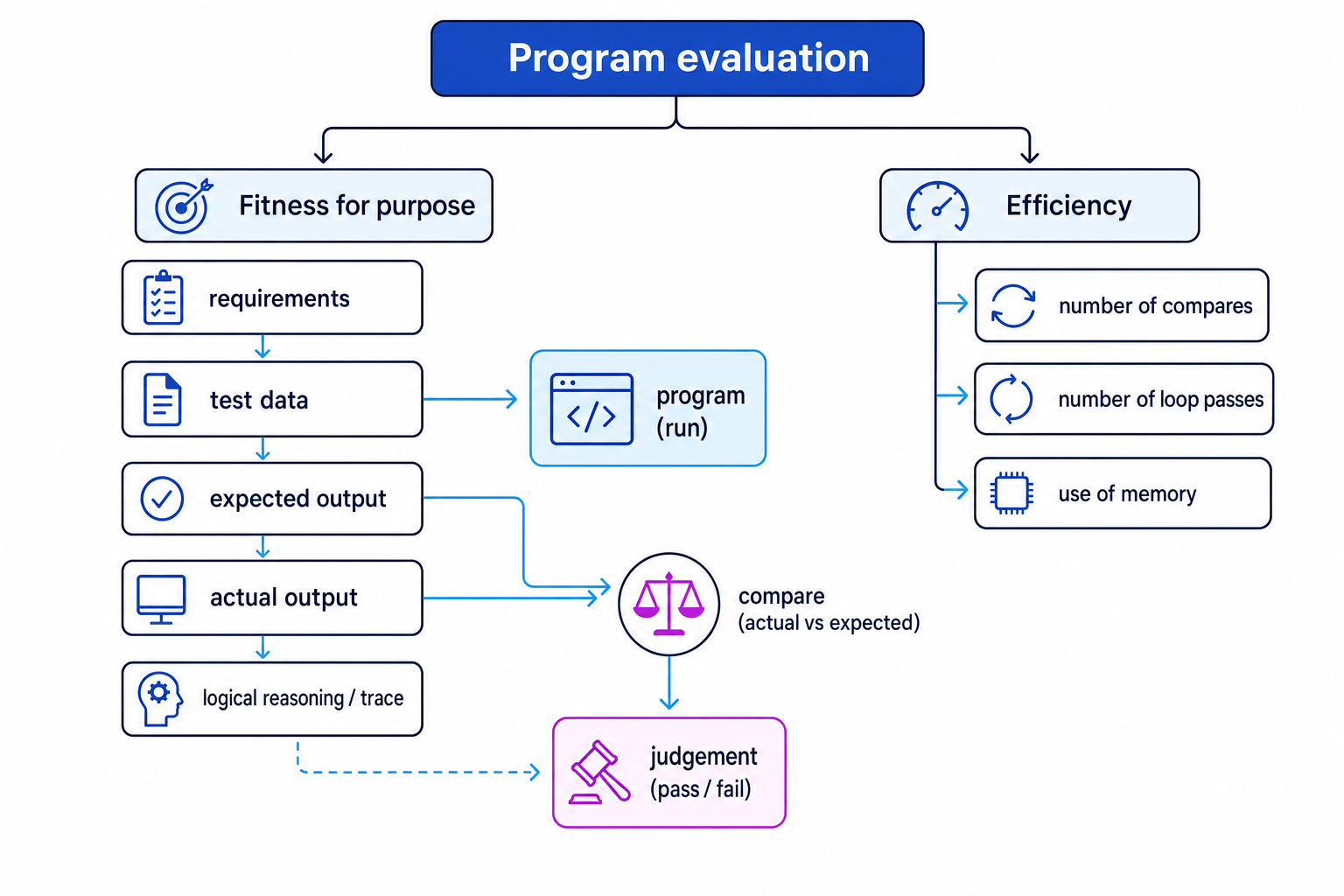
When you evaluate a program, you are not just asking “Does it run?” A program might run without crashing but still give the wrong answer, miss a requirement, take too many steps, or store unnecessary data.
At GCSE, you should evaluate two main things:
- Fitness for purpose: does the program do what it is supposed to do?
- Efficiency: how much work and memory does it use?
Fitness for purpose
Definition
Fitness for purpose
A program is fit for purpose if it meets its requirements: it produces the correct outputs, handles the intended inputs, and behaves as the user or client needs.
A requirement is something the program must do. For example, “calculate the correct total price”, “reject invalid ages”, or “display the highest score”.
To evaluate fitness for purpose, you need evidence. That evidence usually comes from:
- test data: inputs chosen to check the program
- expected results: what the program should output
- actual results: what the program really outputs
- logical reasoning: carefully following the program’s logic to explain why it works or fails
Definition
Test data
Test data is a set of input values used to check whether a program works correctly. Good test data includes normal data, boundary data and invalid data where relevant.
Types of test data
Normal test data is valid data that should be accepted by the program.
Boundary test data checks values at the edges of a condition, such as exactly 50 when the rule changes at 50.
Invalid test data is data the program should reject or handle safely, such as a negative age or text where a number is expected.
Common Mistake
Only testing easy values
Testing one normal value is not enough. Many bugs happen at boundaries, such as using > instead of >=, or accepting 100 when the maximum valid value is 99.
Example
Testing a boundary condition
A shop program should apply a 10% discount when the order total is £50 or more. The program uses this condition:
if total > 50:
Evaluate whether this part of the program is fit for purpose.
-
The requirement says “£50 or more”, so the important boundary value is exactly £50. Values just below and just above £50 should also be tested.
-
Choose test data: £49.99, £50.00 and £50.01. These check below the boundary, at the boundary, and above the boundary.
-
Apply the requirement to get expected results: £49.99 should have no discount, £50.00 should have a discount, and £50.01 should have a discount.
-
Apply the program condition
total > 50: £49.99 gives false, £50.00 gives false, and £50.01 gives true. -
Compare expected and actual behaviour. The program fails at £50.00, so this part is not fit for purpose. The condition should be changed to
total >= 50.
Logical reasoning
Definition
Logical reasoning
Logical reasoning means using the program’s instructions, conditions and variables to work out what will happen, instead of guessing.
You often use logical reasoning when you do a dry run. A dry run means manually following the program step by step, using chosen test data.
A trace table can help. A trace table records the values of variables each time an important instruction runs, especially inside loops.
For this topic, you do not always need a full trace table, but you should be able to explain the reason for your judgement. For example:
- “The loop stops when the target is found, so the final two items are not compared.”
- “The program overwrites
totaleach time instead of adding to it, so the average will be wrong.” - “The value 100 is accepted because the condition checks
score <= 100.”
Tip
Make your judgement evidence-based
Instead of writing “the program works”, write something like: “For inputs 49.99, 50.00 and 50.01, the program gives the wrong result at 50.00, so it is not fit for purpose.”
Efficiency
Definition
Efficiency
Efficiency describes how well a program uses resources, especially processor work and memory, while still producing the correct result.
At GCSE, you are not expected to use formal Big-O notation. Instead, you should make practical comparisons using things you can count, such as:
- the number of compares
- the number of passes through a loop
- the use of memory
A program can be correct but inefficient. It can also be fast but wrong, which is not useful. Fitness for purpose comes first.
Key Idea
Correct first, then efficient
A program must meet the requirements before efficiency matters. A fast program that gives the wrong answer is still not fit for purpose.
Number of compares
Definition
Compare
A compare is when a program checks two values against each other, such as score > highest, name == target, or age <= 15.
Compares matter because each compare is a small piece of processor work. If two programs solve the same problem correctly, the one that needs fewer compares for the same input is often more efficient.
In searching and sorting questions, “number of compares” usually means comparisons between data values, such as comparing a target with a list item. However, if the question gives code, follow the code exactly.
Common Mistake
Counts depend on the exact code
Two correct programs can count differently because their conditions are written differently. If code or an algorithm is given, count the compares made by that version, not by a version you remember.
Example
Counting compares in a linear search
A linear search looks for 27 in this list:
[14, 9, 31, 6, 27, 18]
It checks one item at a time from left to right.
-
Compare 14 with 27. They are not equal, so the search moves on.
-
Compare 9 with 27, then 31 with 27, then 6 with 27. None of these are equal to the target.
-
Compare 27 with 27. This is a match, so the search stops.
-
The program has made 5 data comparisons. It does not compare 18 because the target has already been found.
Number of passes through a loop
Definition
Pass through a loop
A pass through a loop, also called an iteration, is one complete run of the instructions inside a loop body.
Counting loop passes helps you judge how much work the program is doing. A loop that runs 5 times usually does less work than a loop that runs 500 times, assuming the loop body is similar.
There are two common situations:
- A count-controlled loop runs a known number of times, such as once for each item in a list.
- A condition-controlled loop runs until a condition changes, so the number of passes depends on the data.
The same linear search example above made 5 passes through its loop, because it checked 5 list items before finding 27.
Example
Counting loop passes in a search
A program searches for 40 in this list:
[12, 19, 25, 31, 38, 44]
It stops when it finds the target or reaches the end of the list.
-
The target 40 is not the first item, so the loop must pass through at least once and then continue.
-
Check each list item in order: 12, 19, 25, 31, 38 and 44. None is equal to 40.
-
Because the target is not present, the search cannot stop early. It must check every item.
-
The loop makes 6 passes and the program makes 6 data comparisons.
Common Mistake
Confusing compares with passes
A loop pass and a compare are not always the same thing. One pass through a loop might contain no compares, one compare, or several compares. Count what the question asks for.
Use of memory
Definition
Memory use
Memory use means how much data the program needs to store while it runs, such as variables, lists, arrays, input data and copied data.
A memory-efficient program avoids storing data it does not need. For example, if a program only needs to count how many readings are above a threshold, it may not need to store every reading in a list.
However, sometimes extra memory is useful. A program might store a list because it needs to sort it later, search it many times, or display all values to the user.
Example
Comparing memory use
A program processes 2048 sensor readings. Each reading uses 1 byte. The final count uses 2 bytes.
- Program A stores all readings in a list, then counts how many are above a threshold.
- Program B reads one value at a time and updates the count immediately.
-
Identify what each program stores. Program A stores all 2048 readings and the count. Program B stores only the current reading and the count.
-
Calculate the memory used for the main data.
-
Compare the results. Program B is more memory-efficient for this task because it does not store the whole list.
-
Check the requirement. If the program later needs to display or sort all readings, Program A’s extra memory may be justified. If it only needs the count, Program B is the better design.
Bringing fitness and efficiency together
A strong evaluation comments on both correctness and resource use.
For example:
“The program is fit for purpose for the test data because it gives the expected output for normal, boundary and invalid inputs. It is also reasonably efficient because the loop stops as soon as the target is found, reducing unnecessary comparisons. However, it stores a second copy of the list, so its memory use could be improved.”
Notice how that judgement is specific. It mentions test evidence, loop behaviour and memory use.
Exam technique
In the exam
-
Link your judgement to evidence: mention the requirement, the test data, and whether the actual output matches the expected output.
-
Count exactly what is asked for: compares, loop passes or memory use. Follow the given code or algorithm, not a different version.
-
Avoid vague claims like “it is efficient”. Say why: fewer comparisons, fewer loop passes, or less stored data.
Self review
Check yourself
- What test data would you choose to check a rule that changes at age 16?
- In a linear search, when would the loop make the fewest passes, and when would it make the most?
- Why might a program that stores an extra copy of a list be less memory-efficient?
You've reached the end
Test yourself on this topic, or move on to the next guide.
How was this guide?