Revision notes for AQA GCSE Computer Science Units of information. Open the guide for explanations and worked examples. Written against the AQA GCSE Computer Science (8525) specification, so the content matches what's examinable rather than general Computer Science background.
Units of information
What you'll learn
- What a bit is, and why it is the smallest unit of information.
- How a byte groups together 8 bits.
- How to use decimal prefixes: kB, MB, GB and TB.
- How to compare storage sizes by converting them into the same unit.
Why computers need units
Computers store and process data: values such as numbers, text, images, sound and instructions. To measure how much data there is, we need units of information, just like we use metres for length or grams for mass.
The smallest unit used in GCSE Computer Science is the bit.
Definition
Bit
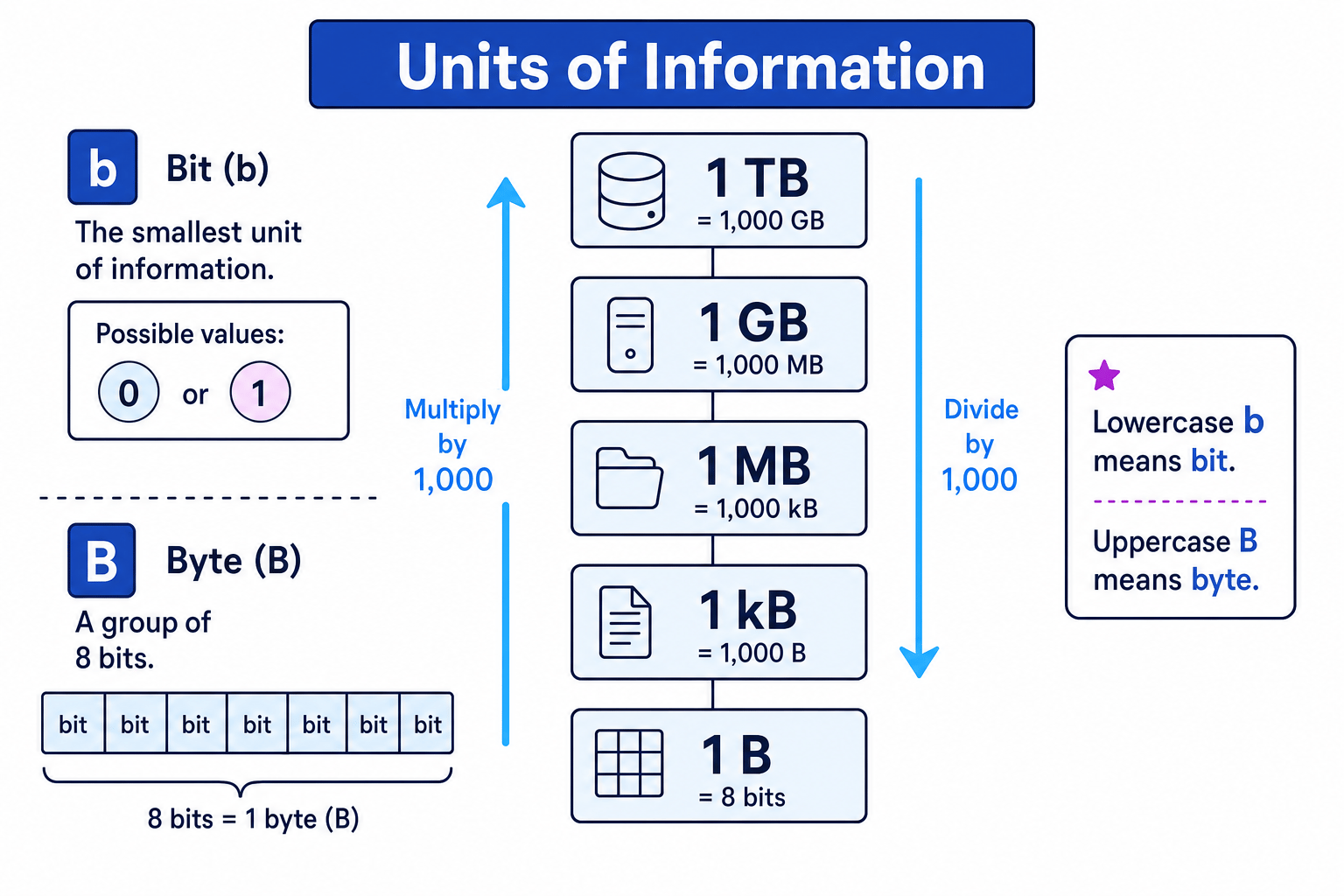
A bit is the fundamental unit of information. A bit can only have one of two values: 0 or 1. The symbol for bit is lowercase b.
A single bit is tiny. It can represent a simple two-choice situation, such as yes/no, on/off, true/false, or 0/1.
Bytes: groups of 8 bits
A byte is the next key unit. It is used very often because one byte is large enough to represent many common pieces of data, such as a single character in some character sets.
Definition
Byte
A byte is a group of 8 bits. The symbol for byte is uppercase B.
For example, this is one byte because it contains 8 bits:
0100 0001
The space in the middle is just for readability: GCSE binary is often grouped into nibbles, where a nibble is 4 bits. So 0100 0001 is still 8 bits in total.
The diagram below summarises the key units and the decimal prefix ladder you need for this topic.
Key Idea
Lowercase and uppercase matter
Lowercase b means bit. Uppercase B means byte. Since 1 B = 8 b, mixing them up changes the answer by a factor of 8.
Converting between bits and bytes
Because 1 byte is 8 bits:
- To convert bytes to bits, multiply by 8.
- To convert bits to bytes, divide by 8.
Example
Converting between bits and bytes
A small piece of data is 64 bits. How many bytes is this?
- Use the relationship between the units: 1 byte is 8 bits, so bits must be divided by 8 to get bytes.
- Calculate the conversion: 64÷8=864 \div 8 = 864÷8=8.
- State the result with the correct unit: 64 bits is 8 B.
Common Mistake
Writing the wrong symbol
Do not write 8 b when you mean 8 B. 8 b means 8 bits, but 8 B means 8 bytes, which is 64 bits.
Larger quantities: byte prefixes
A single byte is very small, so storage sizes are usually written using prefixes.
Definition
Prefix
A prefix is a short label added to the front of a unit to show a larger quantity. For example, kilo in kilobyte means 1000 bytes in this specification.
For AQA GCSE Computer Science, use decimal prefixes, based on powers of 10. That means each step is 1000 times larger than the previous one.
You need to know these:
- 1 kB = 1,000 B
kB means kilobyte. - 1 MB = 1,000 kB
MB means megabyte. - 1 GB = 1,000 MB
GB means gigabyte. - 1 TB = 1,000 GB
TB means terabyte.
Key Idea
The prefix ladder
For this specification, each move to the next larger byte unit multiplies by 1000: B → kB → MB → GB → TB.
You can also go the other way:
- From TB to GB, multiply by 1000.
- From GB to MB, multiply by 1000.
- From MB to kB, multiply by 1000.
- From kB to B, multiply by 1000.
If you are converting up to a larger unit, you divide by 1000 each step.
Example
Converting across prefixes
Convert 3.2 GB into MB, then into kB.
- Move from GB to MB. This is one step down the prefix ladder, so multiply by 1000: 3.2×1000=3200 MB3.2 \times 1000 = 3200\ \text{MB}3.2×1000=3200 MB.
- Move from MB to kB. This is another step down, so multiply by 1000 again: 3200×1000=3,200,000 kB3200 \times 1000 = 3{,}200{,}000\ \text{kB}3200×1000=3,200,000 kB.
- Therefore, 3.2 GB = 3200 MB = 3,200,000 kB.
Tip
Direction check
If you convert from a larger unit to a smaller unit, the number should get bigger. If you convert from a smaller unit to a larger unit, the number should get smaller.
Comparing quantities of bytes
To compare two storage sizes, convert them into the same unit first. Then compare the numbers.
For example, you cannot fairly compare 2 MB and 1500 kB just by looking at 2 and 1500, because the units are different.
Example
Comparing MB and kB
Which is larger: 2.4 MB or 2300 kB?
- Choose one unit to compare in. Since one value is already in kB, convert 2.4 MB into kB.
- Convert MB to kB by multiplying by 1000: 2.4×1000=2400 kB2.4 \times 1000 = 2400\ \text{kB}2.4×1000=2400 kB.
- Compare the two values in the same unit: 2400 kB is greater than 2300 kB, so 2.4 MB is larger.
You can also compare by converting both quantities into bytes, but that often creates larger numbers. It is usually easier to convert one value into the unit already used by the other value.
Decimal prefixes in this course
In some real-world computing contexts, you may see storage units used slightly differently. For this GCSE specification, keep it simple:
- 1 kB = 1000 B
- 1 MB = 1000 kB
- 1 GB = 1000 MB
- 1 TB = 1000 GB
Common Mistake
Use the GCSE definition
In AQA GCSE questions, use the decimal values above. Do not change 1 kB into 1024 B unless a question explicitly gives you a different conversion.
Quick summary
- A bit is either 0 or 1.
- The symbol for bit is b.
- A byte is 8 bits.
- The symbol for byte is B.
- Decimal byte prefixes go up in steps of 1000:
- B
- kB
- MB
- GB
- TB
- To compare data quantities, convert them into the same unit first.
Exam technique
In the exam
- Check whether the question uses b or B before you calculate; bits and bytes are not the same.
- When converting between B, kB, MB, GB and TB, count the number of prefix steps and use 1000 for each step.
- For comparisons, convert both quantities into the same unit, then compare the numbers.
Self review
Check yourself
- What is the difference between b and B?
- How many bits are there in 12 bytes?
- Which is larger: 0.75 GB or 800 MB?
You've reached the end
Test yourself on this topic, or move on to the next guide.
How was this guide?