Revision notes for AQA GCSE Computer Science Binary arithmetic. Open the guide for explanations and worked examples. Written against the AQA GCSE Computer Science (8525) specification, so the content matches what's examinable rather than general Computer Science background.
Binary arithmetic
What you'll learn
- How to add up to three binary numbers using column addition.
- How binary carries work when a column totals 2 or 3.
- How to apply a logical binary shift to an 8-bit number.
- How shifts can multiply or divide by powers of 2.
Before you start: binary place value
Binary is a number system that uses only two digits: 0 and 1. Each digit is called a bit.
AQA GCSE questions on binary arithmetic use a maximum of 8 bits. An 8-bit number can represent values from 0 to 255 if it is treated as an ordinary positive whole number.
Definition
Bit and nibble
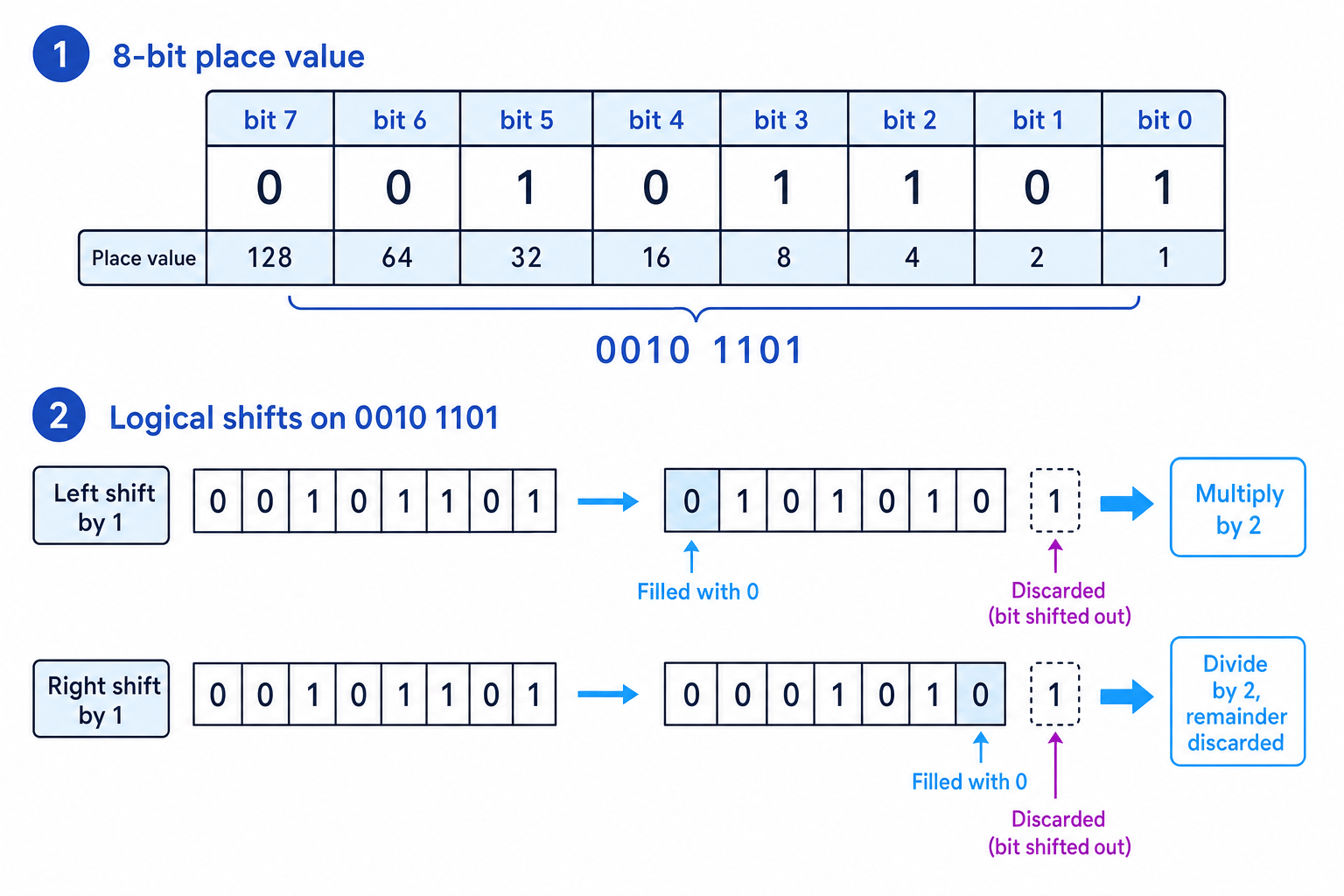
A bit is a single binary digit, either 0 or 1. A nibble is a group of 4 bits, so an 8-bit number is often written as two nibbles, for example 0010 1101.
Binary place values double as you move from right to left:
- rightmost bit: 1
- then 2
- then 4
- then 8
- then 16, 32, 64, 128
The rightmost bit is the least significant bit because it has the smallest place value. The leftmost bit is the most significant bit because it has the largest place value.
The diagram shows the 8-bit place values and how bits move during logical shifts.
Example
Finding the decimal value of a binary number
Find the decimal value of 0010 1101.
- Match the 1 bits to their place values:
0010 1101has 1s in the 32, 8, 4 and 1 columns. - Add those place values: 32 + 8 + 4 + 1 = 45.
- So
0010 1101represents decimal 45.
Tip
Nibble grouping
When writing 8-bit binary, group the bits into two nibbles, such as 0101 1010. It makes the number much easier to read and reduces copying errors.
Binary addition
Binary addition works like decimal column addition, but each column can only contain 0 or 1 in the answer. If a column total is too large, you carry into the next column on the left.
Definition
Carry
A carry is a value moved into the next column when the current column total is too large to fit in one binary bit.
The key addition rules
You only need these rules:
0 + 0 = 00 + 1 = 11 + 0 = 11 + 1 = 10, so write 0 and carry 11 + 1 + 1 = 11, so write 1 and carry 1
That last rule is especially important because a column might contain two 1s plus a carried 1, or three 1s when adding three binary numbers.
Key Idea
Binary column addition
Start at the rightmost bit. Add each column, write one result bit, then carry to the next column if needed.
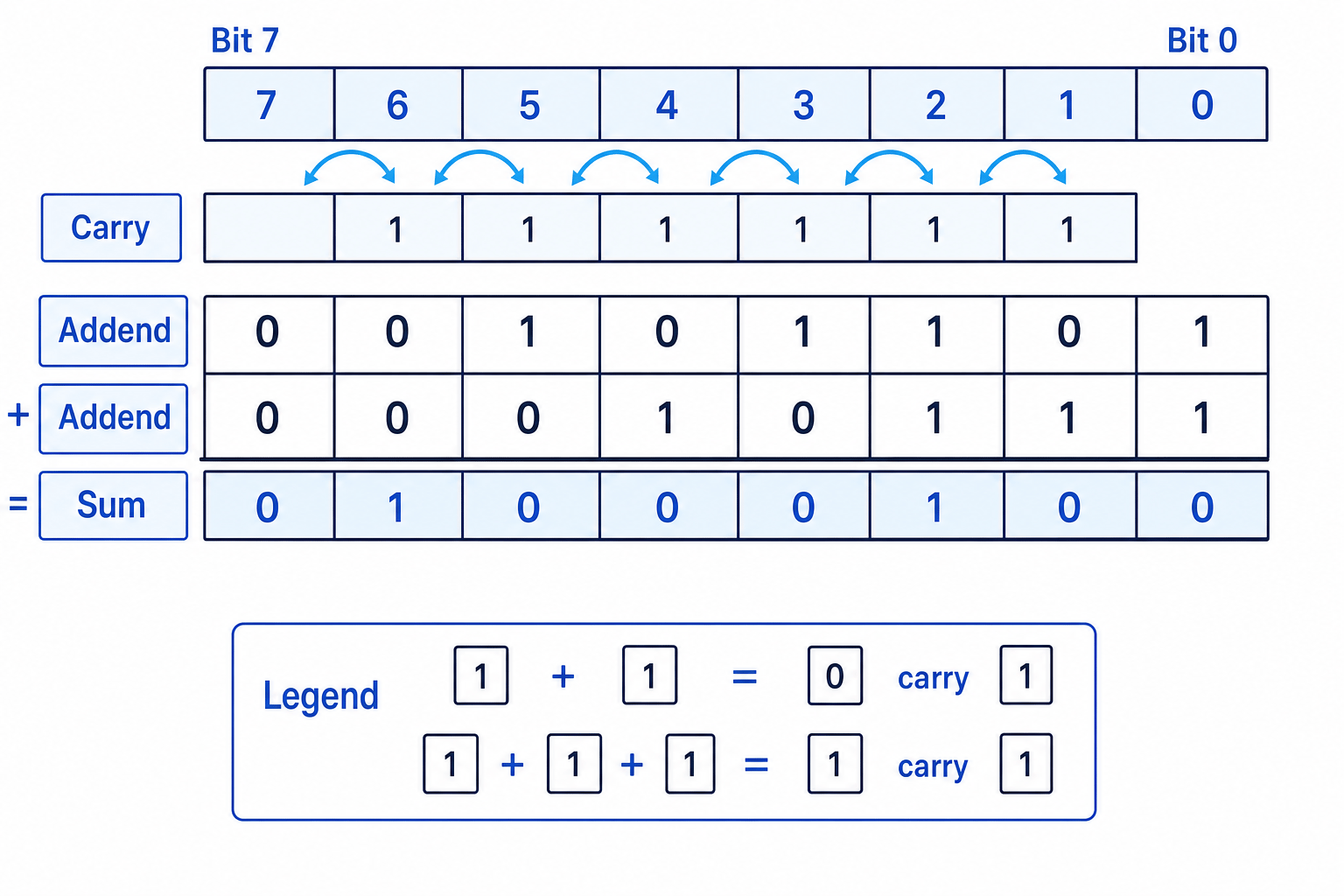
The numbers being added are sometimes called addends. The diagram shows a two-number addition with carries.
Example
Adding two 8-bit binary numbers
Add 0010 1101 and 0001 0111.
- Start at bit 0 on the far right:
1 + 1gives result bit 0 and carry 1 into the next column. - At bit 1:
0 + 1plus the carried 1 gives result bit 0 and carry 1. - At bit 2:
1 + 1plus the carried 1 gives result bit 1 and carry 1. - Continue left: bits 3, 4 and 5 each give result bit 0 with carry 1; bit 6 gives result bit 1 with no new carry; bit 7 gives result bit 0.
- Reading the result from left to right gives
0100 0100. As a check, decimal 45 + 23 = 68, and0100 0100is 68.
Adding three binary numbers
The same method works for three binary numbers. You still add from right to left and carry when needed.
At GCSE, you will only be expected to handle a maximum of three 1s in a single column, and answers will fit within 8 bits.
Example
Adding three 8-bit binary numbers
Add 0000 0101, 0000 0011 and 0000 0001.
- At bit 0:
1 + 1 + 1gives binary11, so write result bit 1 and carry 1. - At bit 1:
0 + 1 + 0plus the carried 1 gives 2, so write result bit 0 and carry 1. - At bit 2:
1 + 0 + 0plus the carried 1 gives 2, so write result bit 0 and carry 1. - At bit 3:
0 + 0 + 0plus the carried 1 gives result bit 1 with no carry. All remaining left-hand bits are 0. - The final answer is
0000 1001. As a check, decimal 5 + 3 + 1 = 9.
Common Mistake
Forgetting the carry
The most common error is writing the correct bit for a column but forgetting to add the carry into the next column. Carries matter just as much as the original bits.
Logical binary shifts
A binary shift moves every bit in a binary number left or right by a fixed number of places.
AQA GCSE only expects you to understand logical shifts.
Definition
Logical binary shift
A logical binary shift moves all bits left or right. Empty positions are filled with 0, and any bits shifted out of the 8-bit number are discarded.
Left shifts
A left shift moves every bit to the left.
For ordinary positive 8-bit values, a left shift by 1 place has the effect of multiplying by 2, as long as no important 1 bit is lost from the left-hand end.
For example:
0000 1011left shift by 1 becomes0001 0110- decimal 11 becomes decimal 22
A left shift by 2 places multiplies by 4, because 4 is a power of 2. A left shift by 3 places multiplies by 8.
Right shifts
A right shift moves every bit to the right.
A right shift by 1 place has the effect of dividing by 2. If a 1 is shifted out of the right-hand end, the remainder is discarded because this topic does not use fractions.
For example:
0000 1011right shift by 1 becomes0000 0101- decimal 11 divided by 2 gives 5 remainder 1
- the result stored is 5
Example
Applying logical shifts
Start with 0010 1101.
- For a left shift by 1, move every bit one place left and fill the empty rightmost position with 0.
- The left shift result is
0101 1010, which represents decimal 90. This matches decimal 45 doubled. - For a right shift by 1, move every bit one place right and fill the empty leftmost position with 0.
- The right shift result is
0001 0110, which represents decimal 22. This matches 45 divided by 2 with the remainder discarded.
Common Mistake
Wrapping bits around
In a logical shift, bits do not wrap around to the other side. A bit shifted out of the 8-bit number is discarded, and the empty space is filled with 0.
Common Mistake
When shifting loses information
If a left shift discards a 1 from the most significant end, the 8-bit result will not equal the full mathematical multiplication result. The bit has been lost.
Using shifts for multiplication and division
Binary shifts are useful for simple multiplication and division by powers of 2.
Definition
Power of 2
A power of 2 is a number made by repeatedly doubling from 1, such as 2, 4, 8, 16, 32, 64 and 128.
The link is:
- left shift by 1: multiply by 2
- left shift by 2: multiply by 4
- left shift by 3: multiply by 8
- right shift by 1: divide by 2
- right shift by 2: divide by 4
- right shift by 3: divide by 8
In general, shifting by nnn places uses a factor of 2n2^n2n.
Example
Choosing a shift for a power of 2
Use a shift to multiply 0000 0111 by 8.
- 8 is 232^323, so multiplying by 8 means using a left shift by 3 places.
- Move the bits in
0000 0111three places left and fill the three empty right-hand positions with 0. - The result is
0011 1000. As a check, decimal 7 times 8 = 56, and0011 1000is 56.
Tip
Sanity check for shifts
A left shift should usually make the value larger. A right shift should make the value smaller or keep it at 0. If that feels backwards, check the shift direction.
Exam technique
In the exam
- For addition, line up all 8 bits carefully and work from right to left, including any carry in the next column.
- For shifts, state the direction, fill empty spaces with 0, and discard bits that move out of the 8-bit number.
- Link shifts to powers of 2: left means multiply, right means divide with any remainder discarded.
Self review
Check yourself
- Add
0000 1111and0001 0001. - What is the result of left shifting
0001 0100by 2 places? - Why does right shifting
0000 1011by 1 place give 5, not 5.5?

Recap questions
Test yourself with 5 quick questions on this guide. Answer them all correctly to complete it.
Fundamentals of data representation
Guide 4 of 8
You've reached the end
Test yourself on this topic, or move on to the next guide.
How was this guide?