Revision notes for AQA GCSE Computer Science Structured programming and subroutines (procedures and functions). Open the guide for explanations and worked examples. Written against the AQA GCSE Computer Science (8525) specification, so the content matches what's examinable rather than general Computer Science background.
Structured programming and subroutines (procedures and functions)
What you'll learn
- What a subroutine is, and how it is called from another part of a program.
- The difference between procedures and functions.
- How parameters, return values and local variables pass and protect data.
- Why a structured approach makes programs easier to write, test and maintain.
Starting point: programs are built from smaller actions
Before subroutines, you need to be comfortable with the three basic programming constructs:
- Sequence means instructions run in order.
- Selection means the program chooses between paths, usually with
IF. - Iteration means instructions repeat, usually with
FOR,WHILEorREPEAT.
As programs get bigger, writing everything in one long sequence becomes hard to read. Structured programming solves this by breaking a program into smaller named blocks.
Subroutines
A subroutine is a named block of code that sits “out of line” from the main program. It only runs when it is called, which means another part of the program executes it by writing its name in a statement.
Definition
Subroutine
A subroutine is a named block of code that can be run by calling its name from another part of the program.
For example, a game might have subroutines called DisplayMenu, GetPlayerMove and CalculateScore. The main program can call these whenever it needs them, instead of repeating the same code.
Why use subroutines?
Subroutines are useful because they:
- make code easier to read by hiding detail inside named blocks
- reduce repetition, because the same subroutine can be reused
- make testing easier, because each part can be checked separately
- make debugging easier, because faults can be narrowed down to one block
- allow different programmers to work on different parts of a program
- make the program easier to maintain and update later
Key Idea
The main benefit
Subroutines let you split a large problem into smaller named tasks, so the program becomes easier to understand, reuse, test and change.
Example
Splitting a quiz program into subroutines
A quiz program needs to show instructions, ask five questions, calculate the score and display the result. A structured version could be planned like this:
- Choose the main tasks that happen in the program: showing instructions, asking questions, calculating marks and displaying feedback.
- Turn each task into a clear subroutine name, such as
DisplayInstructions,AskQuestion,CalculateScoreandShowResult. - Decide which parts need data.
AskQuestionmight need the question text and the correct answer, so those can be passed in as parameters. - Decide which parts produce data.
CalculateScoremay need to return the updated score to the main program.
Procedures and functions
There are two common types of subroutine in GCSE programming.
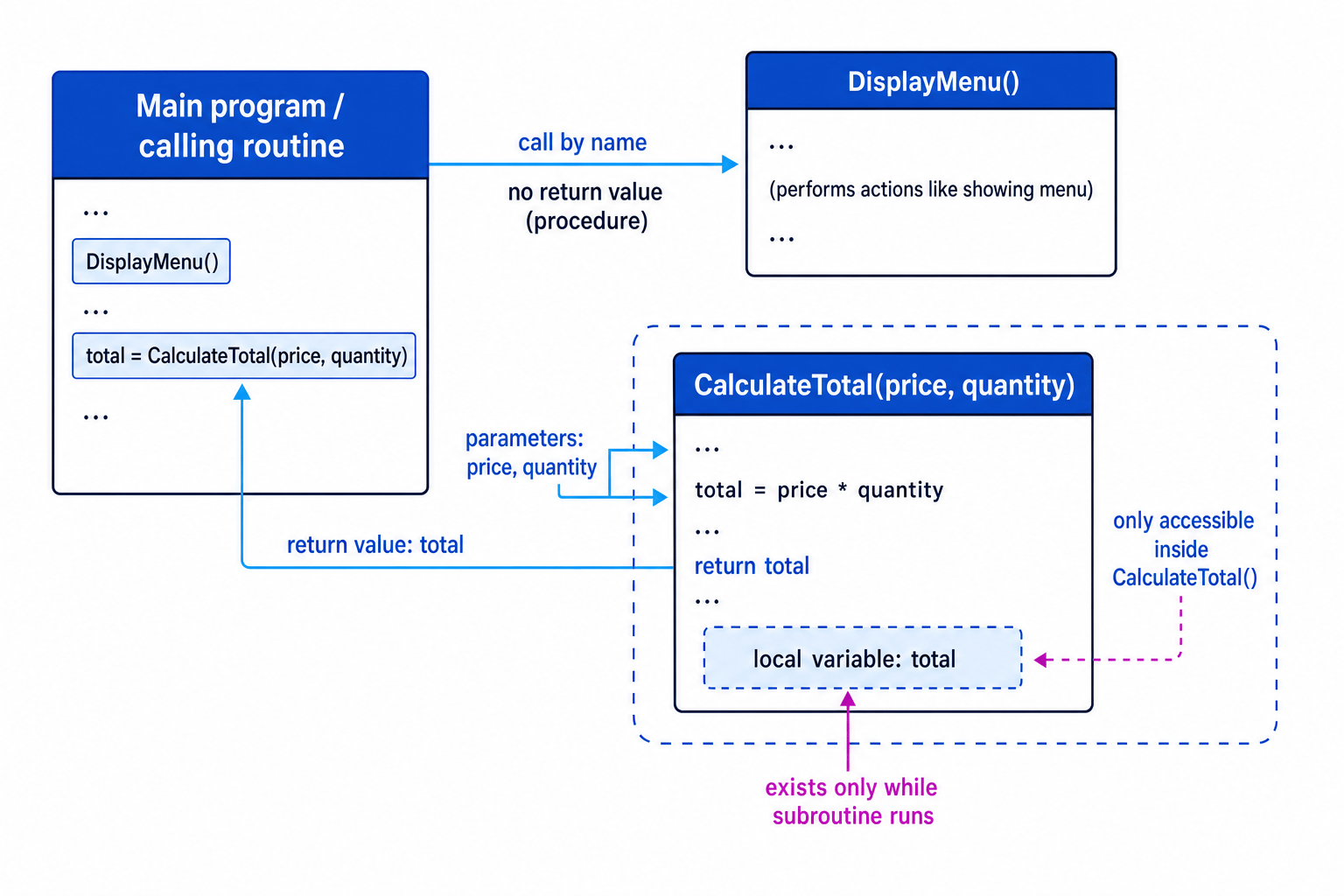
A procedure is a subroutine that performs an action but does not return a value. For example, DisplayMenu might print a menu on the screen.
A function is a subroutine that returns a value to the part of the program that called it. For example, CalculateArea might return the calculated area.
Definition
Procedure and function
A procedure carries out a task and does not return a value. A function carries out a task and returns a value to the calling routine.
The calling routine is the part of the program that calls the subroutine. This could be the main program or another subroutine.
Procedure example
SUBROUTINE DisplayMenu()
    OUTPUT "1. Start game"
    OUTPUT "2. View scores"
    OUTPUT "3. Quit"
ENDSUBROUTINE

DisplayMenu()
Here, DisplayMenu() is called by writing its name. It outputs text, but it does not send back a result.
Function example
SUBROUTINE CalculateTotal(price, quantity)
    total ← price * quantity
    RETURN total
ENDSUBROUTINE

amountToPay ← CalculateTotal(3, 4)
Here, CalculateTotal returns a value. The returned value is stored in amountToPay.
Example
Tracing a function call
Consider this subroutine call:
amountToPay ← CalculateTotal(3, 4)
where:
SUBROUTINE CalculateTotal(price, quantity)
    total ← price * quantity
    RETURN total
ENDSUBROUTINE
- Match the parameter values to the parameter names:
pricebecomes 3 andquantitybecomes 4. - Substitute the values into the calculation: total=price×quantitytotal = price \times quantitytotal=price×quantity, so total=3×4total = 3 \times 4total=3×4.
- The subroutine returns 12, so the calling routine stores 12 in
amountToPay.
Common Mistake
Forgetting to store the return value
If a function returns a value, the calling routine usually needs to use or store it, for example answer ← CalculateTotal(3, 4). Just writing CalculateTotal(3, 4) may run the function but lose the returned result.
Parameters: passing data into a subroutine
A parameter is a value passed into a subroutine so the subroutine has the data it needs to work.
Definition
Parameter
A parameter is data passed into a subroutine when it is called. In AQA GCSE exam material, the term parameter is used for both the variable in the subroutine heading and the value supplied in the call.
Parameters make subroutines flexible. Instead of writing separate subroutines for every possible input, one subroutine can work with different values.
For example:
SUBROUTINE DisplayGreeting(name)
    OUTPUT "Hello " + name
ENDSUBROUTINE

DisplayGreeting("Amina")
DisplayGreeting("Ben")
The same subroutine is reused, but the parameter value changes.
More than one parameter
Subroutines can require more than one parameter. The order matters because the values are matched to the names in the subroutine heading.
SUBROUTINE ShowLogin(username, attemptsLeft)
    OUTPUT username
    OUTPUT attemptsLeft
ENDSUBROUTINE

ShowLogin("student1", 2)
Here, username gets "student1" and attemptsLeft gets 2.
Example
Matching multiple parameters
A subroutine is called like this:
ShowRectangleArea(5, 8)
and its heading is:
SUBROUTINE ShowRectangleArea(width, height)
- Match the first value to the first parameter:
widthbecomes 5. - Match the second value to the second parameter:
heightbecomes 8. - If the subroutine calculates area=width×heightarea = width \times heightarea=width×height, it calculates 5×85 \times 85×8, giving 40.
Tip
Check the order
When a subroutine has several parameters, read the heading and the call together. The first value goes into the first parameter, the second value into the second parameter, and so on.
Return values: passing data out
A return value is data sent back from a function to the calling routine.
Definition
Return value
A return value is the result passed back from a function to the routine that called it.
Return values are useful when a subroutine calculates or finds something that the rest of the program needs.
For example:
SUBROUTINE IsAdult(age)
    IF age >= 18 THEN
        RETURN true
    ELSE
        RETURN false
    ENDIF
ENDSUBROUTINE

canVote ← IsAdult(19)
The function returns true, so canVote stores true.
A procedure does not return a value, but it can still perform useful actions, such as outputting text, changing the screen, or saving data.
Local variables
A variable is a named storage location for data. A local variable is a variable declared or created inside a subroutine.
Definition
Local variable
A local variable is a variable that belongs to a subroutine. It usually only exists while that subroutine is running and is only accessible inside that subroutine.
This “only accessible inside” idea is called scope. The scope of a variable describes where in the program it can be used.
Local variables are good practice because they:
- prevent one subroutine accidentally changing another part of the program
- allow the same variable name to be used safely in different subroutines
- make subroutines easier to test because they depend mainly on parameters and return values
- reduce unexpected side effects
For example:
SUBROUTINE CalculateAverage(mark1, mark2)
    total ← mark1 + mark2
    average ← total / 2
    RETURN average
ENDSUBROUTINE
total and average are local variables. The main program should not rely on them existing after the subroutine has finished.
Common Mistake
Trying to use a local variable outside its subroutine
If average is created inside CalculateAverage, the main program should use the returned value instead. It should not try to access average directly after the subroutine ends.
Example
Using a local variable safely
A program calls:
result ← CalculateAverage(10, 14)
where:
SUBROUTINE CalculateAverage(mark1, mark2)
    total ← mark1 + mark2
    average ← total / 2
    RETURN average
ENDSUBROUTINE
- Pass the values into the parameters:
mark1becomes 10 andmark2becomes 14. - Calculate the local variable
total: total=10+14total = 10 + 14total=10+14, sototalbecomes 24. - Calculate the local variable
average: average=24÷2average = 24 \div 2average=24÷2, soaveragebecomes 12. - Return 12 to the calling routine, so
resultbecomes 12. The local variablestotalandaverageare no longer needed by the main program.
The structured approach to programming
The structured approach means designing programs as a set of clear, well-organised parts rather than one long block of code.
In this topic, structured programming includes:
- modularised programming: splitting the program into modules or subroutines
- clear interfaces: making it obvious what data goes into and out of each subroutine
- parameters: passing data into subroutines
- return values: passing results back out
- local variables: keeping temporary data inside the subroutine that needs it
- documentation: using sensible names and comments to explain purpose where helpful
Definition
Interface
An interface is the agreed way one part of a program communicates with another, such as the subroutine name, its parameters and its return value.
A well-structured subroutine has a clear purpose. If you cannot describe what it does in one short phrase, it may be trying to do too much.
Key Idea
Structured programming
Structured programming is about controlling complexity: break the program into modules, give each module a clear job, and pass data through parameters and return values rather than relying on hidden shared data.
Why structured programming helps
The structured approach has similar benefits to subroutines, but at the whole-program level:
- Readability: the overall program flow is easier to follow.
- Maintainability: changes can often be made in one module.
- Testing: each module can be tested with known inputs and expected outputs.
- Reusability: useful subroutines can be used in other programs.
- Teamwork: different people can work on different modules if the interfaces are clear.
- Reliability: local variables reduce accidental interference between parts of the program.
Example
Choosing a clean interface
Suppose a program needs to calculate a discounted price. A poor design might make the subroutine use hidden variables from the main program. A better design is:
SUBROUTINE CalculateDiscountedPrice(price, discountPercent)
    discount ← price * discountPercent / 100
    newPrice ← price - discount
    RETURN newPrice
ENDSUBROUTINE
- Identify the data the subroutine needs from outside: it needs
priceanddiscountPercent. - Pass those values in as parameters, so the subroutine does not depend on hidden variables elsewhere.
- Identify the one result the caller needs: the discounted price.
- Return that result using
RETURN newPrice, so the calling routine can store or output it.
Exam technique
In the exam
- If asked to define a subroutine, mention that it is a named block of code that can be called by writing its name.
- If asked about parameters and return values, say parameters pass data into a subroutine and return values pass data back out to the calling routine.
- If asked why local variables are good practice, focus on scope: they usually only exist while the subroutine runs and are only accessible inside it.
Self review
Check yourself
- What is the difference between a procedure and a function?
- Why is using a parameter better than relying on a variable from the main program?
- What usually happens to a local variable when its subroutine has finished running?

Recap questions
Test yourself with 5 quick questions on this guide. Answer them all correctly to complete it.
You've reached the end
Test yourself on this topic, or move on to the next guide.
How was this guide?