Revision notes for AQA GCSE Computer Science Robust and secure programming. Open the guide for explanations and worked examples. Written against the AQA GCSE Computer Science (8525) specification, so the content matches what's examinable rather than general Computer Science background.
Robust and secure programming
What you'll learn
- How validation helps a program reject unsuitable input.
- How simple authentication checks a username and password.
- How to choose normal, boundary, and erroneous test data.
- How to spot and correct syntax errors and logic errors.
Why programs need to be robust and secure
A program is robust if it can cope with unexpected or incorrect input without crashing or producing nonsense.
A program is secure if it helps protect data, systems, or users from unauthorised access or misuse.
In this topic, the GCSE focus is very practical: checking user input, checking login details, testing programs, and fixing errors.
Definition
Robust program
A robust program handles invalid or unexpected input sensibly, usually by rejecting it, showing an error message, and asking the user to try again.
Definition
Secure program
A secure program helps prevent unauthorised users from accessing data or features they should not be allowed to use.
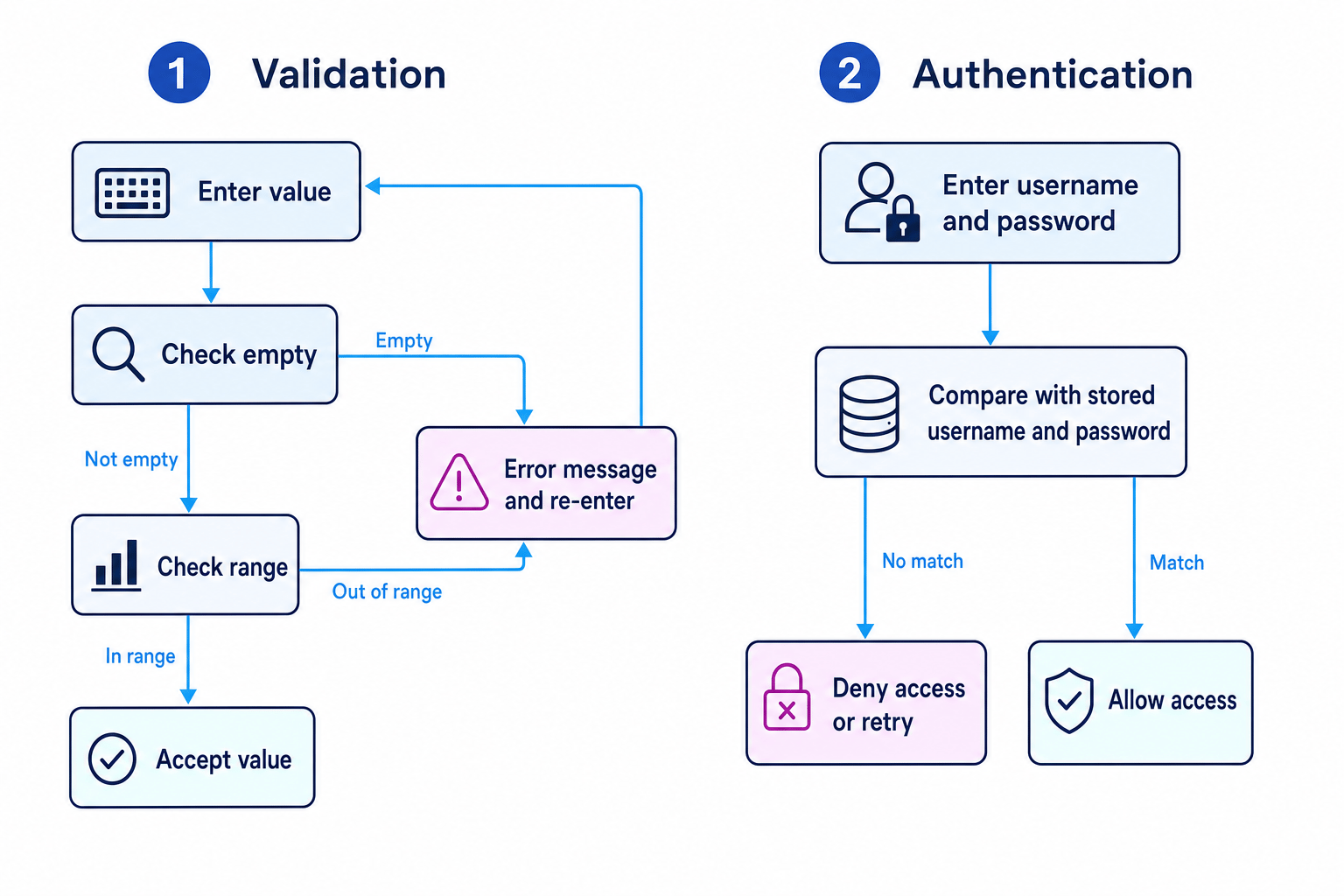
The two routines below are the big idea: validation checks whether input is acceptable, while authentication checks whether a user is who they claim to be.
Validation: checking input before using it
Validation means checking whether data entered by a user is acceptable for the program.
For example, a program might check that:
- a name is not empty
- a password has a minimum length
- a number lies between 1 and 10
Definition
Validation
Validation is the process of checking that input data is reasonable and meets the rules set by the program before it is processed.
Validation does not prove the data is true. If someone enters their age as 15, a range check may accept it, but the program cannot know whether they are lying.
Common Mistake
Validation does not prove truth
Validation checks whether data follows the rules. It does not prove the data is accurate in real life.
Common validation checks
A presence check makes sure something has been entered. For example, a username must not be an empty string.
A length check checks how many characters are in a string. For example, a password must be at least 8 characters long.
A range check checks whether a value is between a lower and upper limit. For example, a rating must be between 1 and 10.
Writing a validation routine
A validation routine usually uses a loop:
- Ask the user for input.
- Check whether the input is valid.
- If it is invalid, show an error message and ask again.
- Only continue once the input is valid.
Here is an AQA-style pseudocode routine for a number between 1 and 10:
valid ← FALSE

WHILE valid = FALSE
    OUTPUT "Enter a number from 1 to 10"
    number ← USERINPUT

    IF number >= 1 AND number <= 10 THEN
        valid ← TRUE
    ELSE
        OUTPUT "Invalid number"
    ENDIF
ENDWHILE
Key Idea
Range checks need both limits
For a value to be inside a range, it must be greater than or equal to the lower limit and less than or equal to the upper limit.
Example
Writing a range validation routine
A program should only accept a difficulty level from 1 to 5.
-
The valid values must satisfy both conditions:
level >= 1andlevel <= 5. -
Because both conditions must be true at the same time, join them using
AND. -
Put the check inside a loop so the user is asked again if they enter 0, 6, or another invalid value.
valid ← FALSE
WHILE valid = FALSE OUTPUT "Enter difficulty level from 1 to 5" level ← USERINPUT
 IF level >= 1 AND level <= 5 THEN
     valid ← TRUE
 ELSE
     OUTPUT "Level must be between 1 and 5"
 ENDIF
ENDWHILE
Tip
Use AND for inside a range
For “between 1 and 10”, use number >= 1 AND number <= 10. Using OR here is a very common logic error.
Authentication: checking identity
Authentication means checking that a user is who they claim to be. At GCSE, you only need simple authentication using a plain text username and password.
Definition
Authentication
Authentication is the process of checking a user’s identity, often by comparing entered login details with stored login details.
A simple authentication routine:
-
stores a correct username and password
-
asks the user to enter their username and password
-
compares both entered values with the stored values
-
allows access only if both match
storedUsername ← "student1" storedPassword ← "blue7"
OUTPUT "Enter username" username ← USERINPUT
OUTPUT "Enter password" password ← USERINPUT
IF username = storedUsername AND password = storedPassword THEN OUTPUT "Access granted" ELSE OUTPUT "Access denied" ENDIF
Common Mistake
Plain text passwords are only for this GCSE routine
In real systems, passwords should not be stored as plain text. For this specification, simple username and password checks use plain text values, so do not add encryption or hashing unless the question asks for it.
Example
Tracing an authentication check
The stored username is student1 and the stored password is blue7. A user enters username student1 and password Blue7.
- Compare the usernames:
student1 = student1, so the username condition is true. - Compare the passwords exactly:
Blue7is not the same asblue7, so the password condition is false. - The authentication uses
AND, so both conditions must be true. Since one condition is false, access is denied.
Common Mistake
Passwords are case-sensitive
Blue7 and blue7 are different strings because the capital letter is different.
Testing: finding problems before users do
Testing means running an algorithm or program with chosen input data to check whether it works correctly.
Definition
Testing
Testing is the process of running a program or algorithm with test data and comparing the actual result with the expected result.
Good testing is planned. You should not just try one random value and assume the program works.
A useful test plan includes:
- the input data
- the type of test data
- the expected result
- the actual result after running the program
- whether the test passed or failed
Key Idea
Expected result first
Decide what should happen before running the program. This makes it much easier to spot when the program is wrong.
Test data
Test data is the input data used to test a program.
For GCSE, you need to know three main types.
Normal test data
Normal test data is valid, typical data that should be accepted.
For a range of 1 to 10, normal data could be 5 or 7.
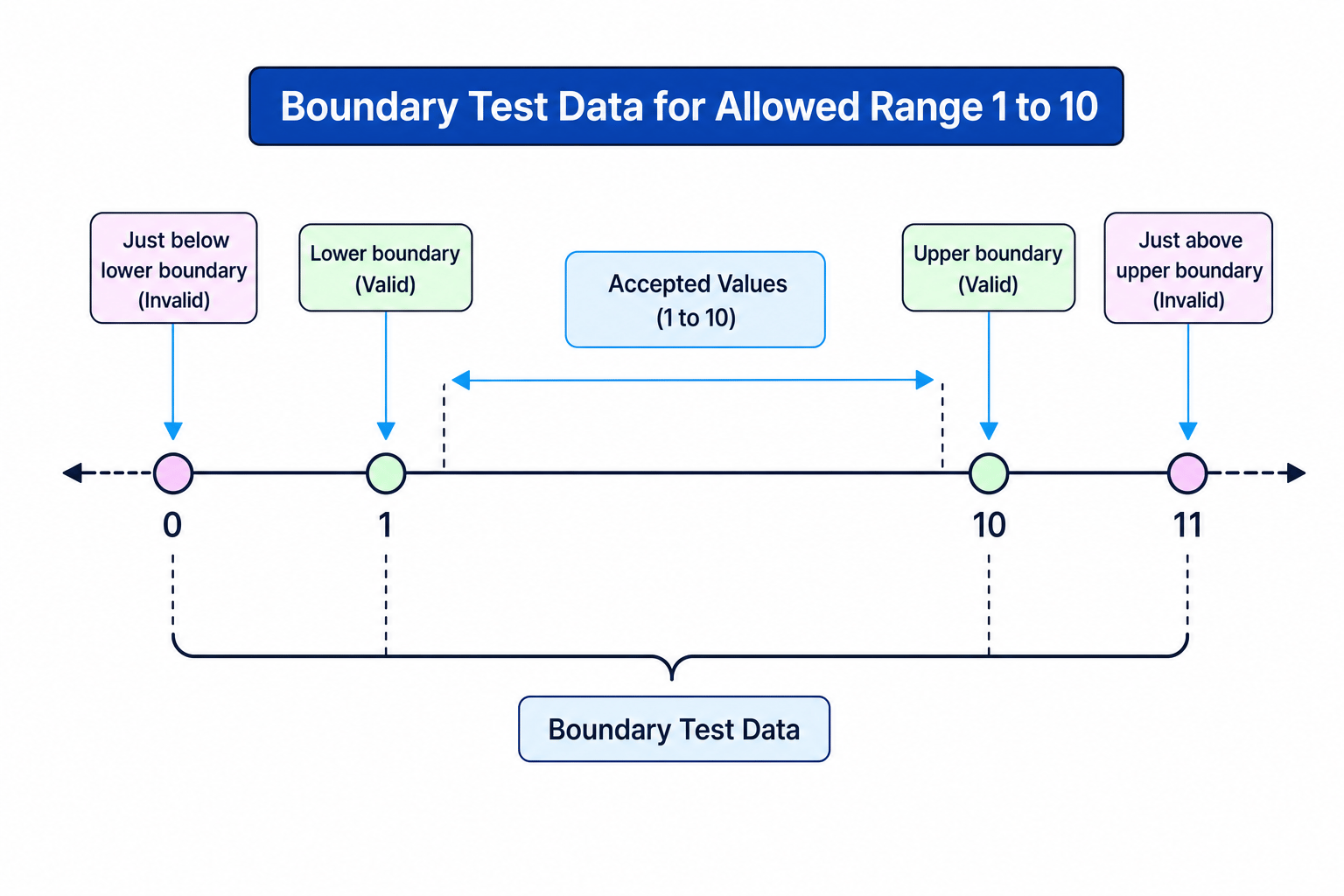
Boundary test data
Boundary test data is data at the edge of what is allowed, and just outside the edge.
For a range of 1 to 10, the key boundary values are:
- 0: just below the valid range, should be rejected
- 1: lower boundary, should be accepted
- 10: upper boundary, should be accepted
- 11: just above the valid range, should be rejected
Erroneous test data
Erroneous test data is invalid data that should be rejected.
Examples might include:
- a number outside the allowed range
- a blank input when something must be entered
- text when a number is expected
Example
Selecting test data for a range check
A program should accept only whole numbers from 1 to 10.
- Choose normal data well inside the range, such as 5. The expected result is accepted.
- Choose boundary data at and just outside the limits: 0, 1, 10, and 11. The expected results are reject, accept, accept, reject.
- Choose erroneous data that breaks the rule in a different way, such as an empty input or text like
ten. The expected result is rejection without crashing.
Common Mistake
Forgetting just outside the boundary
Boundary testing is not only the endpoints. For 1 to 10, test 1 and 10, but also 0 and 11.
Errors in programs
An error is a fault in an algorithm or program. The specification focuses on two types: syntax errors and logic errors.
Syntax errors
A syntax error happens when the code breaks the grammar rules of the language or pseudocode.
Examples include:
- missing
THENafter anIFcondition - misspelling a keyword such as
WHILE - forgetting
ENDIF
Definition
Syntax error
A syntax error is an error caused by breaking the rules of the programming language, so the program may not run.
For example, this has a syntax error because THEN is missing:
IF number >= 1 AND number <= 10
    OUTPUT "Accepted"
ENDIF
Logic errors
A logic error happens when the program runs, but it does the wrong thing.
Definition
Logic error
A logic error is an error where the program runs but produces an incorrect result because the algorithm’s logic is wrong.
For example, this code runs, but the condition is wrong:
IF number >= 1 OR number <= 10 THEN
    OUTPUT "Accepted"
ELSE
    OUTPUT "Rejected"
ENDIF
This accepts almost every number. For example, 99 is accepted because 99 >= 1 is true.
Example
Correcting a logic error
A program should accept numbers from 1 to 10, but it uses this condition: number >= 1 OR number <= 10.
- Test a value below the range, such as 0. The condition
0 <= 10is true, so the program incorrectly accepts it. - Test a value above the range, such as 11. The condition
11 >= 1is true, so the program incorrectly accepts it. - To be inside the range, the number must pass both limits, so replace
ORwithAND:number >= 1 AND number <= 10.
Correcting errors
When correcting a program, use the test results to locate the problem.
If the program will not run at all, suspect a syntax error first. Look for missing keywords, incorrect indentation in Python, spelling mistakes in commands, or unmatched brackets.
If the program runs but gives the wrong answer, suspect a logic error. Check conditions, calculations, loop boundaries, and whether variables are updated correctly.
Tip
Use failed tests as clues
If only boundary tests fail, the error is often in a comparison such as < instead of <=, or > instead of >=.
Exam technique
In the exam
- When asked for validation, write a check plus a response: reject invalid data, show an error message, and ask again if needed.
- For test data, always include expected outcomes, especially for boundary values just inside and just outside the valid range.
- When identifying errors, say whether it is a syntax error or logic error, then explain the effect on the program.
Self review
Check yourself
- What is the difference between validation and authentication?
- For an allowed range of 20 to 50, what boundary test data would you choose?
- Why is
age >= 13 OR age <= 18wrong for checking whether an age is between 13 and 18?

Recap questions
Test yourself with 5 quick questions on this guide. Answer them all correctly to complete it.
Programming
Guide 11 of 11
You've reached the end
Test yourself on this topic, or move on to the next guide.
How was this guide?