Revision notes for AQA GCSE Computer Science Fundamentals of computer networks. Open the guide for explanations and worked examples. Written against the AQA GCSE Computer Science (8525) specification, so the content matches what's examinable rather than general Computer Science background.
Fundamentals of computer networks
What you'll learn
- What a computer network is, and why organisations use them.
- The differences between PANs, LANs and WANs.
- How wired and wireless networks compare.
- What common protocols and security methods do in a network.
What is a computer network?
A computer network lets devices communicate. A device could be a computer, phone, printer, server, games console or smart watch. A resource is something that can be shared, such as a printer, file storage, software or an internet connection.
Definition
Computer network
A computer network is two or more computers or other devices connected together so they can communicate and share data or resources.
Why networks are useful
Networks are common in homes, schools and businesses because they allow:
- Sharing hardware — many computers can use one printer.
- Sharing files — users can access shared folders or cloud storage.
- Sharing internet access — devices can connect through the same router.
- Communication — email, messaging and video calls.
- Centralised management — a school can manage accounts, permissions, updates and backups from one place.
Disadvantages of networks
Networks also create problems:
- Security risks — unauthorised users may try to access data.
- Malware spread — viruses can move between connected devices.
- Dependence on network services — if a server or router fails, many users may be affected.
- Cost and maintenance — cables, wireless access points, servers and technical support cost money.
- Performance issues — too much traffic can slow a network down.
Key Idea
The trade-off
Networks make sharing and communication easier, but they also increase the need for security, management and reliable equipment.
Main types of network
The GCSE specification expects you to know three main types: PAN, LAN and WAN.
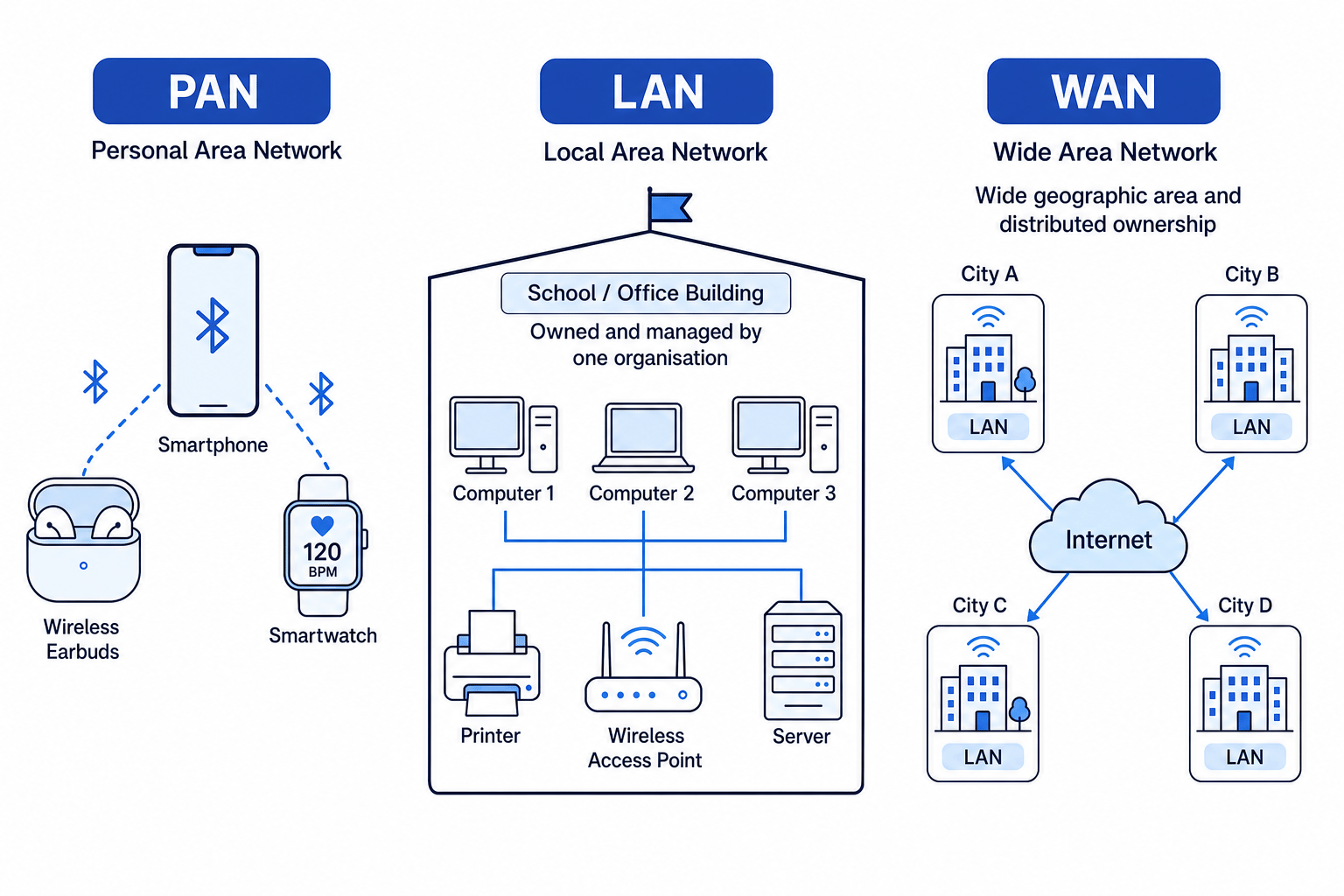
Personal Area Network, PAN
A Personal Area Network (PAN) covers a very small area around one person. For this course, you only need to consider Bluetooth as the PAN technology.
Examples include:
- a phone connected to wireless earbuds
- a smartwatch connected to a phone
- a laptop connected to a Bluetooth mouse
Local Area Network, LAN
A Local Area Network (LAN) covers a relatively small geographical area, such as a home, school, office or single building.
LANs are usually owned, controlled and managed by one person or organisation. For example, a school usually manages its own school network.
Wide Area Network, WAN
A Wide Area Network (WAN) covers a wide geographical area. It can connect LANs across towns, countries or continents.
The Internet is the biggest example of a WAN. WANs are often under collective or distributed ownership, meaning no single organisation owns and manages the whole thing.
Example
Choosing the network type
A student describes three situations. Decide whether each is a PAN, LAN or WAN.
- A phone sends audio to Bluetooth earbuds a metre away. The connection is very short range and uses Bluetooth, so this is a PAN.
- A school connects classroom computers, a printer and a server in one building. The area is small and managed by one organisation, so this is a LAN.
- A company connects offices in Manchester, Cardiff and London using the Internet. The network spans a wide area and connects multiple sites, so this is a WAN.
Common Mistake
LAN does not mean wireless
A LAN can be wired, wireless, or a mixture of both. “LAN” describes the area and ownership of the network, not the connection method.
Wired and wireless networks
A network can use wired connections, wireless connections, or both.
A wired network uses physical cables to carry data. A wireless network uses radio signals, such as Wi-Fi or Bluetooth, to carry data without a cable.
Wired networks
Wired networks often use:
- Copper cable — commonly used for shorter network connections, such as connecting desktop PCs to a switch in a classroom. It is usually cheaper than fibre.
- Fibre optic cable — uses light signals through glass or plastic fibres. It is suitable for long distances, high speeds and situations where electrical interference would be a problem.
Wired networks are usually:
- faster and more reliable than wireless
- less affected by interference
- more secure because an attacker usually needs physical access to the cable or network point
But they can be:
- expensive or awkward to install
- less flexible if devices need to move around
- messy if cable management is poor
Wireless networks
Wireless networks are useful because:
- users can move around while staying connected
- fewer cables are needed
- devices such as phones and tablets can connect easily
- installation can be quicker in older buildings
However, wireless networks can have disadvantages:
- signals may be blocked by walls or distance
- interference from other devices can reduce performance
- they can be less secure if not protected properly
- they may be slower or less stable than wired connections
Example
Choosing wired, wireless, copper or fibre
A school needs to connect a server, desktop computers and tablets.
- The server needs a stable, high-speed connection because many users may access it at once. A wired connection is the better choice.
- Desktop computers in the same classroom can use copper cable, because the cable runs are relatively short and copper is cost-effective.
- A link between buildings may be better with fibre optic cable, because fibre suits longer distances and high data speeds.
- Tablets need to move between classrooms, so wireless access is appropriate, but it should be protected with authentication and encryption.
Network protocols
When devices communicate, they need agreed rules. Without shared rules, one device might send data in a format that the other device cannot understand.
Definition
Network protocol
A network protocol is a set of rules that defines how data is transmitted and received across a network.
A packet is a small chunk of data sent across a network. Large messages are split into packets so they can travel across the network and be put back together by the receiving device.
Common protocols and their purposes
| Protocol | Full name | Main purpose |
|---|---|---|
| TCP | Transmission Control Protocol | Sets up communication between hosts and helps data be delivered reliably in packets. |
| IP | Internet Protocol | Adds addressing and routes packets across networks. |
| HTTP | Hypertext Transfer Protocol | Transfers web pages and web resources between a browser and web server. |
| HTTPS | Hypertext Transfer Protocol Secure | Encrypted version of HTTP, used for more secure web transactions. |
| SMTP | Simple Mail Transfer Protocol | Sends email, for example from an email client to a mail server. |
| IMAP | Internet Message Access Protocol | Retrieves and synchronises email from a mail server, often across multiple devices. |
A host is any device on a network that can send or receive data, such as a laptop, phone, server or printer.
Example
Choosing protocols for web and email
A user logs into online banking, sends an email, and then checks the same inbox on a phone.
- Online banking should use HTTPS, not plain HTTP, because the data should be encrypted for a more secure transaction.
- Sending the email uses SMTP, because SMTP is used to send email messages.
- Checking the inbox on another device uses IMAP, because IMAP lets email be retrieved and synchronised from the mail server.
- Underneath those application protocols, TCP helps set up communication between hosts and IP handles addressing and routing.
Tip
HTTP versus HTTPS
The “S” in HTTPS stands for Secure. If passwords, payments or personal data are involved, HTTPS is the expected protocol.
Why network security matters
Network security means protecting a network, its devices and its data from unauthorised access, damage or disruption.
Security is important because networks often store or transmit:
- usernames and passwords
- personal data
- financial details
- school or business files
- emails and private messages
A weak network can lead to stolen data, loss of access to systems, malware infections, or services being unavailable.
Network security methods
Authentication
Authentication checks that a user or device is who it claims to be. Common examples include usernames and passwords, PINs, biometrics, smart cards or multi-factor authentication.
Encryption
Encryption scrambles data so that it cannot be understood without the correct key. If encrypted data is intercepted, it should be unreadable to the attacker.
Firewall
A firewall is a network security device or software system that monitors incoming and outgoing network traffic. It decides whether to allow or block traffic based on a defined set of security rules.
For example, a firewall might block traffic from suspicious addresses or prevent certain applications from accessing the network.
MAC address filtering
A MAC address is a physical address embedded in a device’s network adapter. MAC address filtering allows or blocks devices based on that address.
For example, a school could configure its Wi-Fi so only approved school laptops are allowed to connect.
Common Mistake
MAC filtering is not enough on its own
MAC address filtering can help control access, but it should not be the only security method. Strong networks use several methods together.
Example
Combining security methods
A school wants to protect its wireless network.
- Use authentication so only permitted students and staff can log in with valid accounts.
- Use encryption so data sent over Wi-Fi cannot be easily read if intercepted.
- Use a firewall to monitor traffic and block unwanted or unsafe connections.
- Use MAC address filtering to restrict access to approved school devices, adding another layer of control.
The 4-layer TCP/IP model
The TCP/IP model is a way of organising the protocols and hardware involved in network communication. It has four layers.
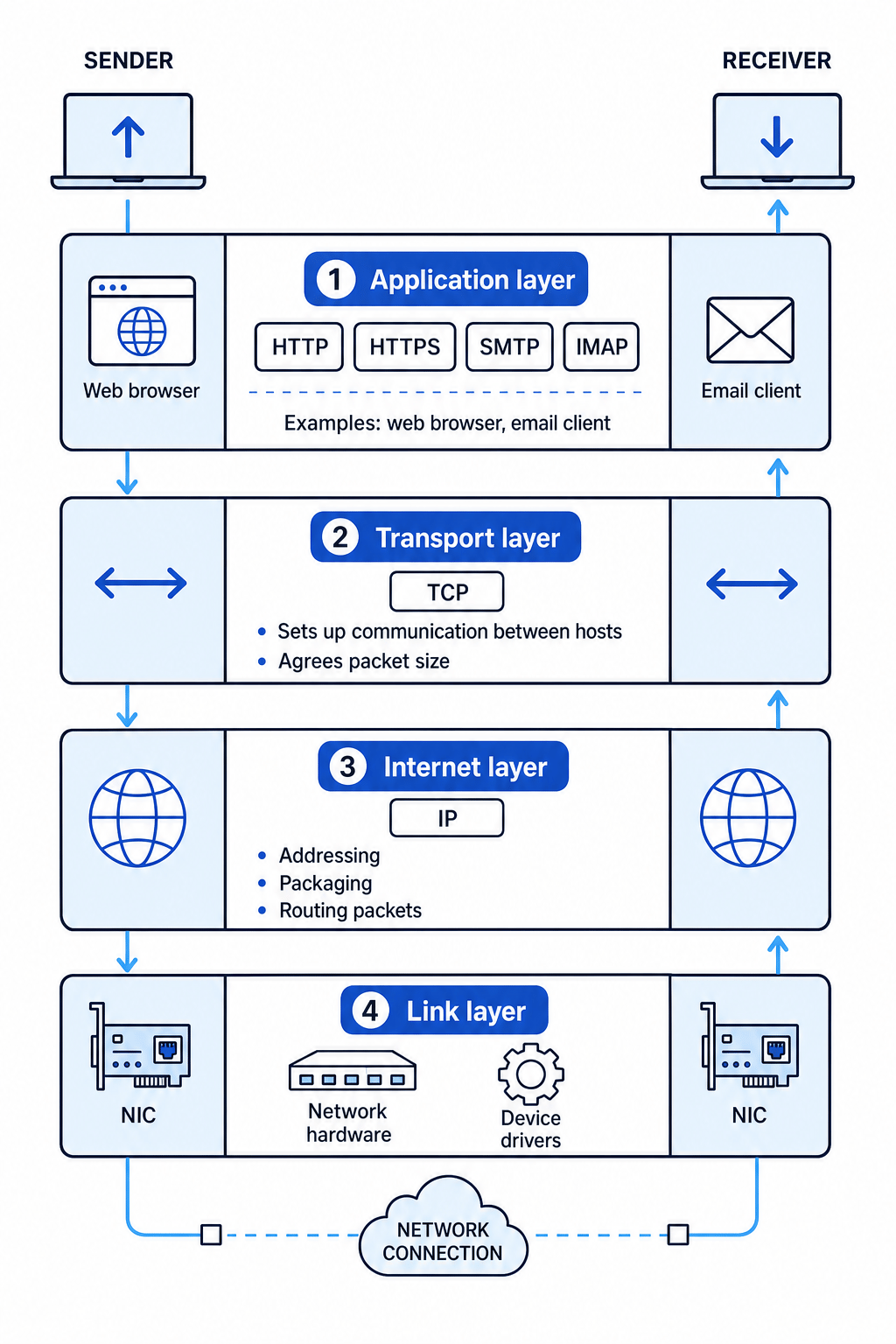
1. Application layer
This is where network applications operate, such as web browsers and email programs.
Protocols at this layer include:
- HTTP
- HTTPS
- SMTP
- IMAP
2. Transport layer
The transport layer sets up communication between two hosts. It agrees settings such as the size of packets.
The key protocol here is:
- TCP
3. Internet layer
The internet layer addresses and packages data for transmission. It also routes packets across the network.
The key protocol here is:
- IP
4. Link layer
The link layer deals with the physical network connection and local network hardware.
This includes:
- the NIC, or Network Interface Card, which connects a device to a network
- network hardware
- operating system device drivers
Example
Sending an HTTPS request through the layers
A laptop browser requests a secure web page from a server.
- At the application layer, the browser uses HTTPS to create a secure web request.
- At the transport layer, TCP sets up communication between the laptop and server and agrees packet-related settings.
- At the internet layer, IP adds addressing information and routes packets across networks.
- At the link layer, the laptop’s NIC and network hardware send the data over the local wired or wireless connection. The receiving server processes the data back up through the layers.
Key Idea
Protocol layers
Each layer has a job. Application protocols handle user services like web and email, TCP manages communication between hosts, IP handles addressing and routing, and the link layer uses the network hardware.
Exam technique
In the exam
- If asked for a type of network, justify it using area and ownership: PAN is personal/Bluetooth, LAN is small and usually one organisation, WAN is wide area and often distributed.
- If asked about wired versus wireless, compare speed, reliability, security, mobility, installation and cost.
- If asked about security, explain how the method works and give a realistic use case, not just its name.
Self review
Check yourself
- What is the difference between a LAN and a WAN?
- Why might fibre optic cable be chosen instead of copper cable?
- Which TCP/IP layer contains HTTP, HTTPS, SMTP and IMAP?

Recap questions
Test yourself with 5 quick questions on this guide. Answer them all correctly to complete it.
You've reached the end
Test yourself on this topic, or move on to the next guide.
How was this guide?