Revision notes for AQA GCSE Computer Science Social engineering. Open the guide for explanations and worked examples. Written against the AQA GCSE Computer Science (8525) specification, so the content matches what's examinable rather than general Computer Science background.
Social engineering
What you'll learn
- What social engineering means in cyber security.
- How attackers use trust, fear, urgency, and observation to get information.
- The differences between blagging/pretexting, phishing, and shouldering/shoulder surfing.
- How to choose sensible protections for each type of attack.
Cyber security is about people too
Cyber security means protecting computer systems, networks, and data from unauthorised access, damage, or disruption. Unauthorised means “without permission”.
A lot of cyber security focuses on technical protections, such as passwords, access rights, and anti-malware software. But attackers do not always attack the computer directly. Sometimes it is easier to trick a person into opening the door for them.
Confidential information is information that should only be known by authorised people. Examples include passwords, PINs, bank details, usernames, security answers, personal data, and one-time login codes.
What is social engineering?
Definition
Social engineering
Social engineering is the art of manipulating people so they give up confidential information or perform an action that helps an attacker.
A social engineering attack relies on human behaviour. The attacker may pretend to be trustworthy, create panic, act like someone in authority, or make the victim feel they must respond quickly.
A victim is the person being targeted by the attacker. In social engineering, the victim may not realise they are helping the attacker.
Common tricks include:
- Authority — “I’m from IT support.”
- Urgency — “Your account will be locked in 10 minutes.”
- Fear — “There has been suspicious activity on your bank account.”
- Helpfulness — “Can you just confirm your details so I can fix this?”
- Curiosity — “Open this file to see the photos.”
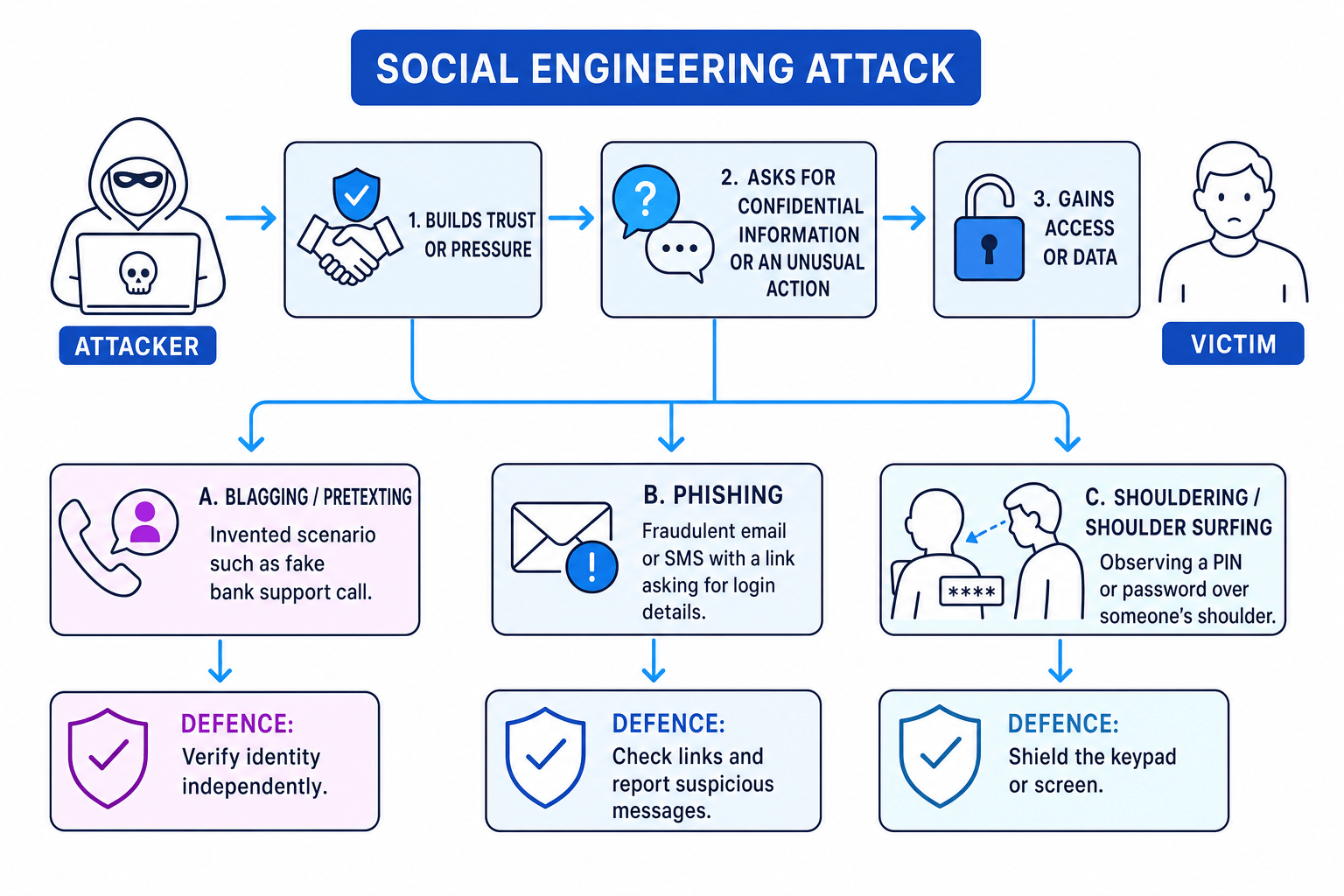
The pattern is often: build trust or pressure, ask for information or an unusual action, then use that to gain access or data.
Key Idea
The main idea
Social engineering attacks the person, not just the technology. Even strong technical security can fail if someone is persuaded to reveal a password or approve access.
Example
Identifying a social engineering attack
A student receives a text message saying: “Your school account will be deleted today. Click this link and enter your username and password to keep it active.”
- The attacker is asking for a username and password, so the information at risk is confidential login data.
- The message uses a threat and a deadline: the account will be deleted “today”. That pressure is designed to stop the victim thinking carefully.
- The attack depends on the student choosing to enter details into a link, so it is social engineering rather than just a technical break-in.
- A suitable response is to avoid the link, check the account through the school’s normal login page or IT support, and report the message.
Blagging / pretexting
Definition
Blagging / pretexting
Blagging, also called pretexting, is when an attacker creates and uses an invented scenario to persuade a target to reveal information or do something they would not normally do.
A pretext is a made-up reason or story. The attacker may pretend to be from a bank, a delivery company, IT support, the police, or another trusted organisation.
The key feature is the invented scenario. The attacker is not just asking directly; they are building a story that makes the request seem reasonable.
Examples:
- “I’m from IT. We are upgrading accounts, so I need your password.”
- “I’m from your bank’s fraud team. Confirm your security answers now.”
- “I’m a new employee and I’ve forgotten my access card. Can you let me in?”
- “I’m calling about your parcel. Please confirm your full address and date of birth.”
Good protections include:
- Verify the person’s identity using a trusted route, such as an official phone number.
- Follow company or school procedures for sharing information.
- Refuse to share passwords, PINs, or one-time codes.
- Report suspicious calls or requests.
Example
Spotting blagging in a phone call
An employee gets a call from someone claiming to be “new IT support”. The caller says there is a network problem and asks for the employee’s password to “test the account”.
- The caller has invented a scenario: they claim to be IT support fixing a network problem.
- The requested action is unusual because staff should not need to give their password to anyone.
- This fits blagging/pretexting because the attacker uses a false story to make the victim cooperate.
- The employee should end the call, contact IT using the official helpdesk details, and report the attempted attack.
Common Mistake
Calling every fake request phishing
Do not call every social engineering attack “phishing”. If the main feature is a made-up story used to persuade someone, especially by phone or in person, blagging/pretexting is often the better answer.
Phishing
Definition
Phishing
Phishing is a technique for fraudulently obtaining private information, often using email or SMS text messages.
SMS means a text message sent to a mobile phone. In phishing, the attacker usually pretends to be a trusted organisation and asks the victim to click a link, open an attachment, reply with details, or log in to a fake website.
The fake website may look similar to a real one, but it is controlled by the attacker. Any details typed into it can be stolen.
Common signs of phishing include:
- A suspicious sender address or phone number.
- A link that does not match the real organisation’s website.
- A request for passwords, PINs, bank details, or one-time codes.
- Urgent or threatening wording.
- Unexpected attachments.
- Poor spelling or unusual formatting, although some phishing messages look very professional.
Example
Analysing a phishing message
An email says: “Your online payment account is locked. Click pay-secure-login.example and confirm your password within 30 minutes.”
- The message is delivered by email and contains a link asking the user to log in, which matches a common phishing method.
- The request is for a password, so the attacker is trying to obtain private login information.
- The “within 30 minutes” deadline creates urgency, making the victim more likely to act without checking.
- The safest action is not to click the link. The user should visit the service using a known address or app, then report and delete the email.
Tip
Safe checking
If a message says there is a problem with an account, do not use the link in the message. Go to the official website or app yourself, or contact the organisation using trusted details.
Shouldering / shoulder surfing
Definition
Shouldering / shoulder surfing
Shouldering, also called shoulder surfing, is observing someone’s private information over their shoulder, such as watching them type a PIN at a cashpoint.
This is a physical or visual attack. The attacker may stand nearby, watch a keyboard, look at a phone screen, or use a reflection to see what is being entered.
Examples:
- Watching a PIN being entered at a cashpoint.
- Looking at someone’s phone while they unlock it.
- Reading a password as it is typed in a classroom or café.
- Watching a security code displayed on a screen.
Good protections include:
- Cover the keypad or keyboard when entering a PIN or password.
- Be aware of people standing close behind you.
- Use privacy screens where appropriate.
- Avoid entering sensitive information in crowded public places.
- Lock the screen when stepping away.
Example
Reducing shouldering risk
A person is using a cashpoint and someone is standing very close behind them while they enter their PIN.
- The threat is that the nearby person can directly observe the PIN, so the attack is shouldering.
- A matching protection is to shield the keypad with the other hand and check whether the person behind is too close.
- If the situation still feels unsafe, using a different cashpoint is better because it removes the opportunity for observation.
- Anti-malware software would not solve this problem because the attacker is watching the person, not infecting the machine.
Comparing the three forms
| Form of social engineering | Main idea | Typical example | Useful protection |
|---|---|---|---|
| Blagging / pretexting | Invented story to persuade the victim | Fake IT support phone call asking for a password | Verify identity independently |
| Phishing | Fraudulent email or SMS to obtain private information | Fake bank text with a login link | Do not click suspicious links; report the message |
| Shouldering / shoulder surfing | Observing private information | Watching someone type a PIN | Shield the keypad or screen |
A scenario may contain more than one feature. For GCSE questions, focus on the strongest clue in the scenario. If someone is watching, it is likely shouldering. If it is a fake email or SMS asking for details, it is likely phishing. If it relies on a made-up story, it is likely blagging/pretexting.
Protecting against social engineering
Protection works best when people and systems support each other. The aim is to make it harder for the attacker to manipulate someone and to reduce the damage if someone is tricked.
Verify identity before trusting
Do not rely only on what the caller, email, or text message claims. Check using an independent channel, which means a separate trusted method such as an official website, known phone number, or in-person check.
For example, if someone phones claiming to be from a bank, hang up and call the bank using the number on the back of the bank card.
Limit what you reveal
A strong rule is: never share passwords, PINs, or one-time login codes. Genuine support staff should not need your password.
Organisations can also use access rights so users only see the data they need. If one account is compromised, the attacker cannot access everything.
Slow down urgent requests
Social engineering often depends on panic. A good procedure gives people permission to pause, check, and report. Real organisations should not pressure you into revealing confidential information immediately.
Train users and report attacks
Training helps people recognise suspicious requests. Reporting matters because one report can protect many other users from the same attack.
Examples of useful policies include:
- Staff must not disclose personal data over the phone without checks.
- Password resets must follow a set procedure.
- Visitors must wear passes and be challenged if unknown.
- Suspicious emails should be reported to IT rather than forwarded casually.
Use technical support measures
Technical tools can help, especially against phishing. Examples include spam filters, web filters, automatic screen locks, privacy screens, and two-factor authentication. Two-factor authentication means needing two different proofs of identity, such as a password and a code from an app.
Common Mistake
Relying only on technical defences
Anti-malware software and firewalls are useful, but they do not stop someone voluntarily giving away a password. Social engineering needs human checks, training, and clear procedures too.
Example
Choosing layered defences
A school office is worried that attackers may phone pretending to be parents and may also send fake password-reset emails to staff.
- The phone calls are likely blagging/pretexting because the attacker invents an identity and a reason to request information.
- The fake password-reset emails are likely phishing because they use email to obtain login details.
- A suitable procedure is to verify callers using the school’s official records before discussing pupil information.
- A suitable email defence is to train staff not to click unexpected reset links and to report suspicious messages to IT.
- Extra protection such as two-factor authentication and limited access rights reduces the damage if one account is tricked.
Exam technique
In the exam
- Start definitions with the key idea: social engineering manipulates people into giving up confidential information or doing an action.
- For scenario questions, name the method and use evidence: fake story = blagging/pretexting, fake email or SMS = phishing, watching over someone’s shoulder = shouldering.
- Match the protection to the attack: verify identity for blagging, avoid suspicious links for phishing, and shield the keypad or screen for shouldering.
Self review
Check yourself
- What makes social engineering different from a purely technical cyber attack?
- How can you tell the difference between blagging/pretexting and phishing?
- Give one suitable protection against shouldering and explain why it works.
Cyber security threats
Guide 1 of 2
You've reached the end
Test yourself on this topic, or move on to the next guide.
How was this guide?