

What you'll learn
- How to describe and justify suitable application software for a particular purpose.
- What utilities do and why they are classed as system software.
- The difference between open source and closed source software.
- How translators, compilers, linkers, loaders and libraries help turn code into a running program.
What is an application?
An application is software designed to help a user carry out a particular task. This is different from system software, which manages the computer itself and provides a platform for applications to run.
Application software
Application software is software that performs user-focused tasks, such as word processing, image editing, web browsing, accounting, gaming or controlling a specific business process.
Applications can be:
- General-purpose: useful for many tasks, such as spreadsheets, word processors and database packages.
- Specialist: designed for a particular industry or type of task, such as CAD software for engineering or medical imaging software.
- Bespoke: custom-made for one client or organisation.
- Off-the-shelf: already developed and sold to many users.
Choosing suitable applications
When you justify a suitable application, do not just name software. You need to link the features of the application to the user’s needs.
Useful criteria include:
- Functionality: does it do the required tasks?
- Usability: can the target users operate it effectively?
- Compatibility: does it work with existing hardware, operating systems and file formats?
- Performance: will it run quickly enough on the available system?
- Cost: purchase price, licence fees, training and support.
- Security: access control, encryption, updates and data protection features.
- Maintainability: how easily it can be updated or adapted.
Choosing an application for a small charity
A small charity needs to store donor details, record donations and produce mail-merge letters.
- A spreadsheet could store simple lists and perform calculations, but it may become hard to validate data and avoid duplicate donor records as the charity grows.
- A database application is more suitable because donor, donation and campaign data can be stored in related tables, reducing duplication and allowing more reliable searching and reporting.
- The charity should prefer an off-the-shelf database package if its needs are standard, because it will be cheaper and quicker to deploy than bespoke software.
- Bespoke software may be justified if the charity needs unusual workflows, integration with an existing website, or highly customised reporting that off-the-shelf software cannot provide.
Naming without justifying
In exam answers, “use a database” is usually not enough. Add why: for example, “because it supports structured records, validation, queries and reports for large volumes of donor data.”
Utilities
A utility is system software that performs maintenance, security or optimisation tasks for the computer system. Utilities are not usually used to create documents or carry out user business tasks directly; instead, they help keep the system working well.
Utility software
Utility software is system software designed to maintain, analyse, configure, protect or optimise a computer system.
Common utilities include:
- Anti-malware / antivirus: detects, quarantines or removes malicious software.
- Backup software: creates copies of files so they can be restored after loss or damage.
- Compression software: reduces file sizes, often for storage or transfer.
- Encryption tools: scramble data so it cannot be understood without the correct key.
- Disk cleanup tools: remove temporary or unnecessary files.
- File management tools: copy, move, rename, search and organise files.
- Defragmentation tools: reorganise fragmented files on magnetic hard disks to improve access speed. This is not normally useful for SSDs.
Applications vs utilities
Applications help the user complete a task. Utilities help manage, protect or optimise the computer system that the applications depend on.
Open source and closed source software
The source code of a program is the human-readable code written by programmers before it is translated into machine-executable form.
Open source software
Open source software is released with source code that users are allowed to inspect, modify and redistribute, subject to the licence terms.
Closed source software
Closed source software is released without giving users access to the source code. The owner controls modification and redistribution through licensing.
Open source: typical advantages and disadvantages
Advantages:
- Users can inspect the code, which may increase trust and transparency.
- Communities can fix bugs and add features.
- It can be customised for a specific organisation.
- It is often free to acquire, though support and training may still cost money.
Disadvantages:
- Support may be less predictable unless paid support is available.
- Quality can vary between projects.
- Documentation may be weaker for smaller projects.
- Organisations may need technical expertise to adapt or maintain it.
Closed source: typical advantages and disadvantages
Advantages:
- Usually has a clear vendor responsible for support, updates and warranties.
- May have polished user interfaces and professional documentation.
- Can be easier for non-technical users to install and use.
- Often integrates well with other products from the same vendor.
Disadvantages:
- Users cannot inspect or modify the source code.
- Licence fees can be expensive.
- The user may depend heavily on one supplier.
- Bugs or missing features can only be fixed by the vendor.
Choosing between open source and closed source
A school needs image editing software for a computer room.
- If the school has a limited budget and basic editing needs, open source software may be suitable because it avoids high licence fees and can be installed on many machines legally under its licence.
- If teachers need a specific industry-standard package for an exam course or workplace preparation, closed source software may be justified because compatibility and familiar tools are more important than cost.
- If the school has weak technical support, closed source software with vendor support may reduce risk, whereas open source software may require more local expertise.
Translators
Computers execute machine code, which consists of binary instructions that the CPU can fetch, decode and execute. Most programmers write in high-level languages or assembly language, so software must be translated before or during execution.
Translator
A translator is system software that converts program code from one language or representation into another, usually towards machine code.
The three translators you need are:
- Interpreter
- Compiler
- Assembler
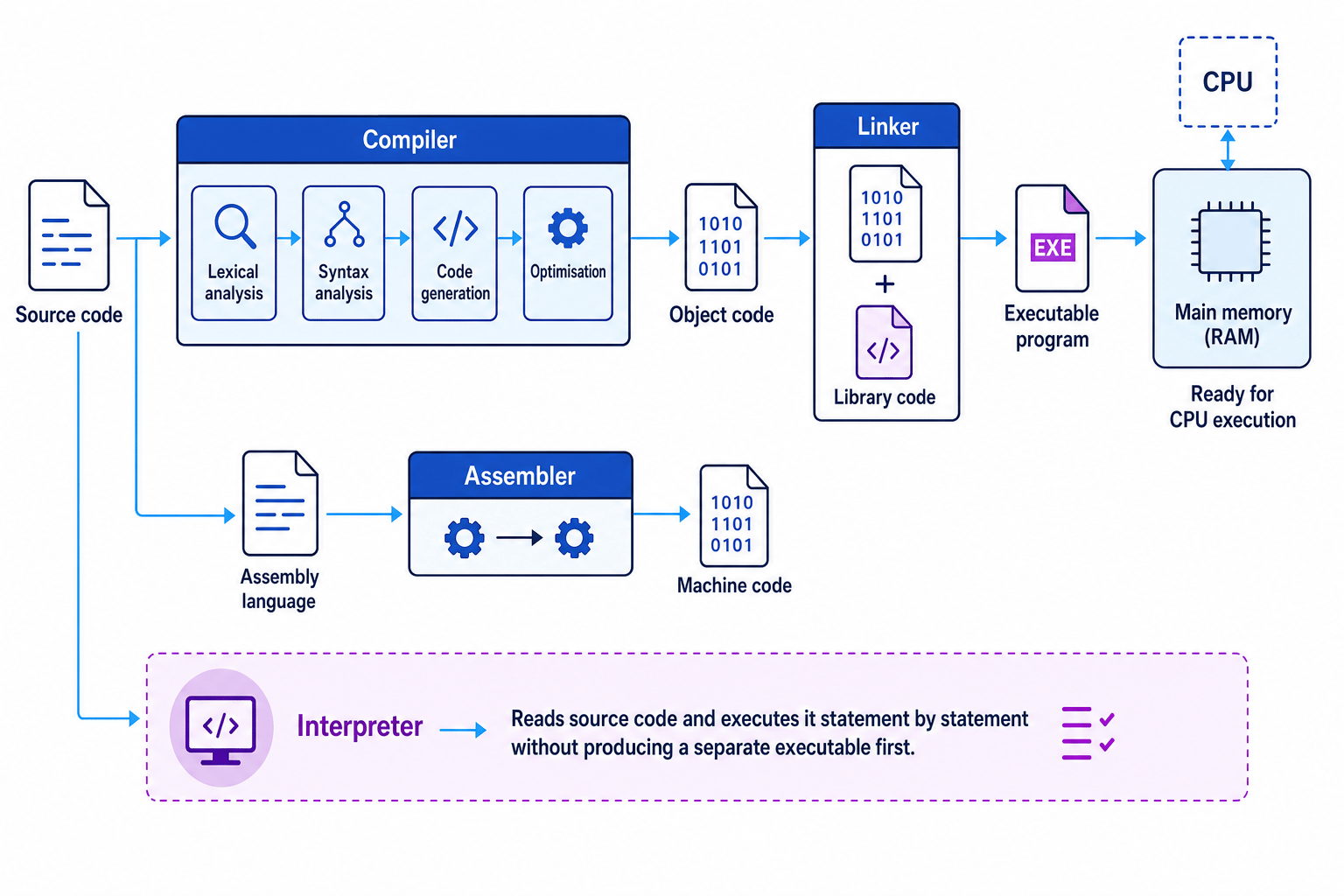
The following schematic shows how source code can become a program running in memory.
Interpreters
An interpreter translates and executes source code statement by statement. It does not normally create a separate executable file before running.
Advantages:
- Easier to test and debug because execution can stop at the line where an error occurs.
- Useful during development and for scripting.
- Can be more portable if an interpreter exists for each platform.
Disadvantages:
- Usually slower at runtime because translation happens while the program runs.
- Source code may need to be distributed, which can expose the program logic.
Compilers
A compiler translates the whole source program into object code or executable machine code before execution.
Advantages:
- The final executable usually runs faster.
- The source code does not need to be supplied to users.
- Many errors can be detected before the program is run.
Disadvantages:
- Compilation can take time, especially for large programs.
- Debugging may be less immediate than with an interpreter.
- The compiled output may be platform-specific.
Assemblers
An assembler translates assembly language into machine code. Assembly language is a low-level language where each instruction usually corresponds closely to a machine-code instruction.
For example, in Little Man Computer, the mnemonic ADD represents an addition instruction, while STA stores a value in memory. The assembler converts these mnemonics into the numeric machine-code instructions the processor can execute.
Choosing a translator
A developer is creating a game and a short automation script.
- For the game’s final release, a compiler is suitable because runtime speed matters and users should receive an executable rather than the original source code.
- During early testing, an interpreter or interpreted environment may be useful because the developer can run small changes quickly and identify errors line by line.
- For code that directly controls hardware registers or uses processor-specific instructions, an assembler may be needed because assembly language maps closely to machine instructions.
Stages of compilation
A compiler does more than “convert code”. OCR expects you to know four key stages: lexical analysis, syntax analysis, code generation and optimisation.
Lexical analysis
Lexical analysis breaks the source code into meaningful units called tokens. Tokens include identifiers, keywords, operators, constants and punctuation.
For example, the line total = price * quantity contains tokens such as:
- identifier:
total - assignment operator:
= - identifier:
price - multiplication operator:
* - identifier:
quantity
The lexical analyser may also remove comments and unnecessary whitespace, and it may create or update a symbol table, which stores information about identifiers such as variable names.
Syntax analysis
Syntax analysis checks whether the tokens follow the grammar rules of the programming language. It may build a parse tree or similar structure.
For example, total = * price quantity would fail syntax analysis because the operator is not used in a valid position.
Code generation
Code generation produces low-level code, such as machine code or assembly-like intermediate code, from the checked source program.
This stage chooses instructions that the target processor can execute. It may decide which registers to use and how memory should be accessed.
Optimisation
Optimisation improves the generated code while keeping the program’s meaning the same. It might reduce memory use, remove unnecessary instructions or make execution faster.
For example, if a calculation inside a loop always gives the same result, the compiler may move it outside the loop so it is not repeated unnecessarily.
Following compilation stages
Consider the source statement area = width * height.
- Lexical analysis splits the statement into tokens: identifier
area, assignment operator=, identifierwidth, multiplication operator*, identifierheight. - Syntax analysis checks that the statement matches the language grammar: an identifier is assigned the result of a valid expression.
- Code generation produces low-level instructions that load
width, multiply byheight, and store the result inarea. - Optimisation may improve the low-level instructions, for example by using a CPU register efficiently so fewer memory accesses are needed.
Remembering compilation stages
A useful order is L-S-C-O: Lexical, Syntax, Code generation, Optimisation. The first two analyse the source; the last two produce and improve target code.
Linkers, loaders and libraries
Modern programs are rarely compiled as one single block of code. They often use separate modules and pre-written code.
Library
A library is a collection of pre-written routines, classes or resources that can be reused by programs.
Libraries save development time and reduce errors because programmers can use tested code for common tasks, such as sorting, drawing graphics, handling dates or connecting to a database.
Linkers
A linker combines separately compiled object code files and required library code into one executable program, or prepares references to shared libraries that will be connected when the program runs.
The linker resolves references between modules. For example, if one part of the program calls a function stored in a library, the linker ensures the executable knows where that function is.
Loaders
A loader is part of the operating system that places a program into main memory ready for execution. It may also set up memory addresses, load required shared libraries and initialise the program’s runtime environment.
Linking and loading a program
A program uses a library function to display a window.
- The compiler translates the programmer’s source files into object code, but the object code may still contain a reference to the external window-display routine.
- The linker combines the object code with the required library code, or records that a shared library must be used at runtime.
- When the user starts the program, the loader places the executable into RAM and loads any required shared libraries so the CPU can begin executing the program.
Confusing linker and loader
The linker prepares the executable by connecting object code and libraries. The loader places the executable into main memory so it can run.
Pulling it together
Application generation is the process of getting from a user need to usable software, and then from program code to a running process. At this level, you should be able to explain both the human choice — what software is suitable and why — and the technical pipeline — how code is translated, linked, loaded and executed.
The big picture
Applications solve user problems, utilities maintain the system, and translators plus linkers and loaders turn program code into something the CPU can actually execute.
In the exam
- When asked to justify an application, link features to the specific user, task, constraints and data being handled.
- For translators, compare how they work and when they are useful: interpreter for line-by-line execution, compiler for whole-program translation, assembler for assembly language.
- For compilation stages, keep the order clear: lexical analysis, syntax analysis, code generation, then optimisation.
Check yourself
- Why might a database be more suitable than a spreadsheet for a growing organisation?
- What is the difference between a compiler and an interpreter?
- At what point are libraries connected to a program, and what does the loader do afterwards?