Revision notes for AQA A Level Computer Science TCP/IP stack and application layer protocols. Open the guide for explanations and worked examples. Written against the AQA A Level Computer Science specification, so the content matches what's examinable rather than general Computer Science background.
TCP/IP stack and application layer protocols
What you'll learn
- What each layer of the TCP/IP stack does: application, transport, network and link.
- How sockets, ports, IP addresses and MAC addresses work together.
- What common application layer protocols such as HTTP, FTP, SMTP, POP3 and SSH are used for.
- How web browsers, web servers and email servers use these protocols in practice.
Prerequisites: clients, servers and protocols
A client is software that requests a service, such as a web browser requesting a web page. A server is software, often running on a dedicated computer, that provides a service, such as sending back web pages or storing email.
A host is any device on a network that can send or receive data, such as a laptop, phone, server or router.
Definition
Protocol
A protocol is an agreed set of rules for communication. It defines things like message format, order of messages, error handling and what each side should do next.
The Internet relies on many protocols working together. Instead of one huge protocol doing everything, networking is split into layers. Each layer has a specific job and passes data to the layer above or below it.
4.9.4.1 TCP/IP
The four-layer TCP/IP stack
TCP/IP stands for Transmission Control Protocol/Internet Protocol. In A-Level terms, the TCP/IP stack is a four-layer model used to describe how data moves between applications across networks.
The diagram shows the four layers, how data is encapsulated, and where ports, IP addresses and MAC addresses fit in.
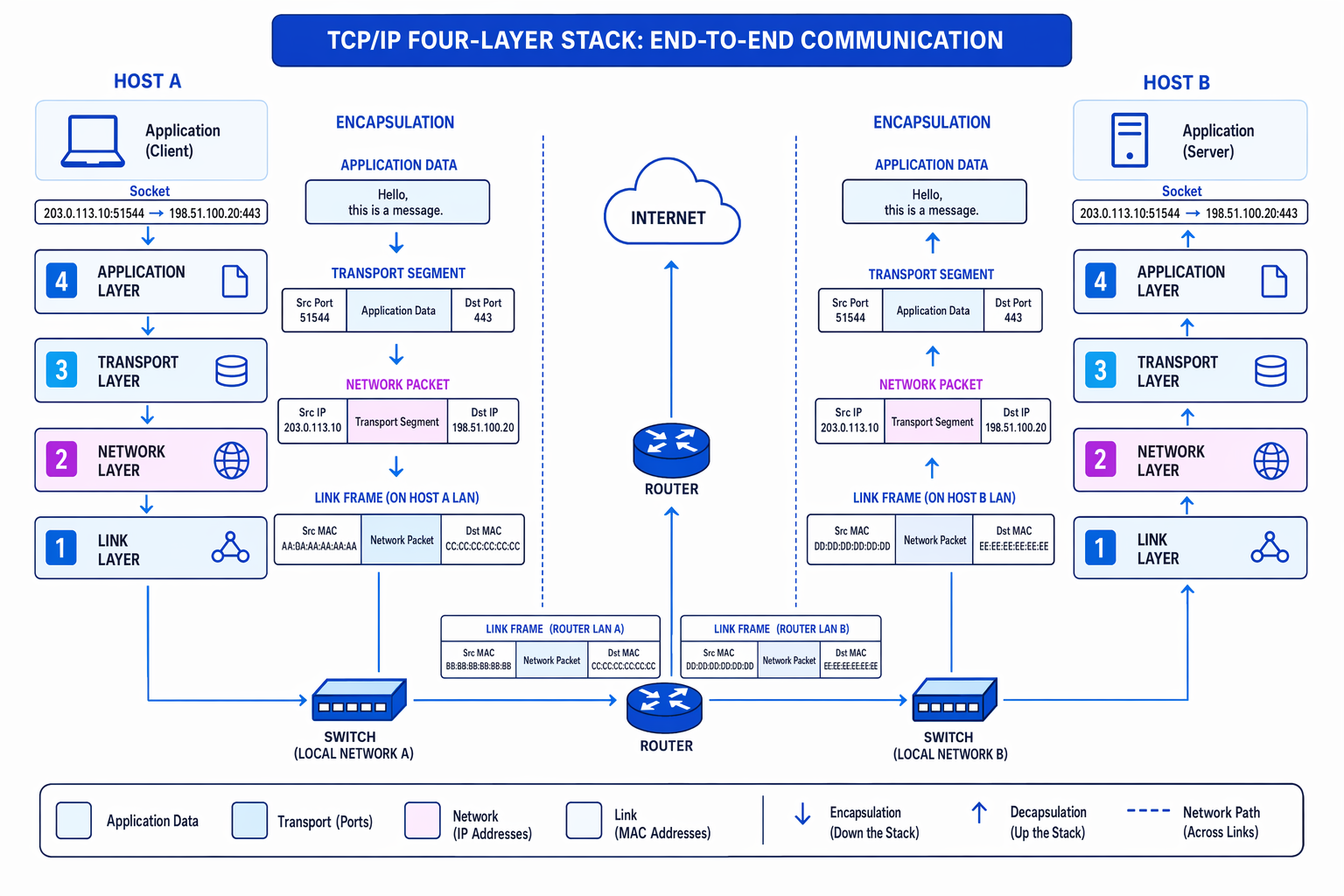
| Layer | Main role | Addressing or data unit |
|---|---|---|
| Application | Provides network services to user applications, such as web, email, file transfer and remote login. | Application data, such as an HTTP request |
| Transport | Provides end-to-end communication between processes on hosts. TCP uses ports and can provide reliable, ordered delivery. | TCP segment with source and destination ports |
| Network | Routes data between networks using IP addresses. | IP packet with source and destination IP addresses |
| Link | Transfers data across one local network link, such as Ethernet or Wi-Fi. | Frame with source and destination MAC addresses |
Definition
Encapsulation
Encapsulation is the process of wrapping data with extra control information as it moves down the stack. For example, application data is placed inside a TCP segment, which is placed inside an IP packet, which is placed inside a link-layer frame.
Key Idea
Layer responsibilities
The layers do different jobs: ports identify applications, IP addresses identify hosts across networks, and MAC addresses identify devices on a local network link.
Example
Tracing a web request through the stack
-
The browser creates an HTTP request such as
GET /index.html. This is application-layer data because it describes what the web application wants. -
The transport layer adds a TCP header. The destination port is the web server’s well-known HTTP port, port 80, and the source port is a temporary client port chosen by the client’s operating system.
-
The network layer adds source and destination IP addresses. These allow routers to forward the packet across different networks towards the web server.
-
The link layer places the packet in a frame for the next local hop. The frame uses MAC addresses for local delivery. If the packet passes through a router, the MAC addresses change for the next link, but the IP addresses still identify the end hosts.
Sockets
A port is a number used by the transport layer to identify a particular process or service on a host. For example, a web server may listen on port 80 for HTTP requests.
Definition
Socket
A socket is an endpoint for network communication. In this topic, you can think of it as an IP address plus a port number, usually with a transport protocol such as TCP.
Sockets are the bridge between an application and the transport layer. A browser does not manually build TCP segments; it uses a socket provided by the operating system. The operating system then handles the transport-layer communication.
A TCP connection is identified by the combination of source IP address, source port, destination IP address and destination port. This is why one computer can have many connections to the same server at the same time.
Example
Distinguishing two browser connections
-
Suppose your browser opens two HTTPS connections to the same server. Both connections have the same destination IP address and destination port, port 443.
-
Your operating system chooses different client ports, for example 51544 and 51545. The two connections therefore have different source ports.
-
When replies arrive from the server, the destination port in each reply tells your operating system which socket, and therefore which browser connection, should receive the data.
MAC addresses
Definition
MAC address
A MAC address is a hardware address used at the link layer to identify a network interface on a local network. MAC stands for Media Access Control.
A MAC address belongs to a network interface card, often shortened to NIC. It is commonly written as hexadecimal pairs, for example 3C:52:82:1A:7F:09.
MAC addresses are used for local delivery. A switch on a local area network can forward a frame to the correct device using its MAC address. Routers forward IP packets between networks, but each separate local link still uses link-layer frames with MAC addresses.
Common Mistake
Mixing up IP and MAC addresses
Do not say that MAC addresses are used to route packets across the Internet. MAC addresses are for local link delivery; IP addresses are used for routing between networks.
Well-known ports and client ports
Well-known ports are standard server-side ports associated with common services. For example, HTTP commonly uses port 80, HTTPS uses port 443, and SSH uses port 22. They let clients know where to contact a service.
Client ports, also called ephemeral ports, are temporary ports chosen by the client’s operating system when starting a connection. They allow replies to be delivered back to the correct client process.
Tip
Port direction shortcut
For a client request, the destination port is usually the server’s well-known port. For the server’s reply, the destination port is the client’s temporary port.
4.9.4.2 Standard application layer protocols
Protocols you should recognise
An application layer protocol defines the rules used by applications to exchange meaningful data. The lower layers move bytes; the application layer decides what those bytes mean.
The diagram summarises the main protocols in this section and the typical services they connect to.
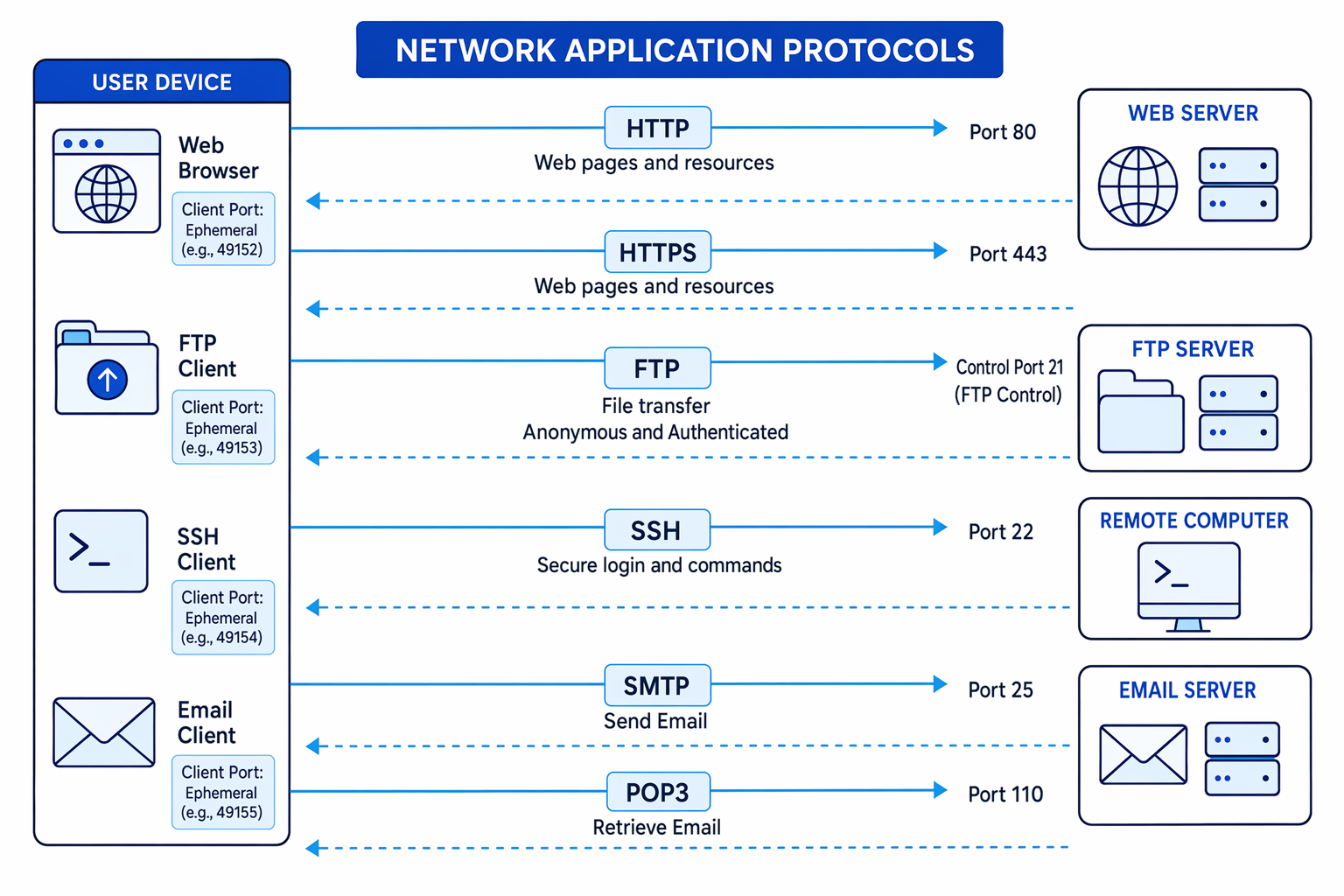
| Protocol | Full name | Main use |
|---|---|---|
| FTP | File Transfer Protocol | Transfers files between an FTP client and FTP server. |
| HTTP | Hypertext Transfer Protocol | Retrieves web pages and web resources from a web server. |
| HTTPS | Hypertext Transfer Protocol Secure | Secure version of HTTP, using encryption and authentication. |
| POP3 | Post Office Protocol version 3 | Retrieves email from an email server to an email client. |
| SMTP | Simple Mail Transfer Protocol | Sends email from a client to a server, and between email servers. |
| SSH | Secure Shell | Secure remote login and command execution on another computer. |
FTP clients and FTP servers
An FTP client is software used to connect to an FTP server and transfer files. The user may upload files to the server, download files from the server, or manage directories if they have permission.
With anonymous access, the user does not need a personal account. This is useful for public downloads, where the server owner is happy for anyone to retrieve files.
With non-anonymous access, the user logs in with credentials such as a username and password. The server can then apply permissions, such as read-only access or access to a private folder.
Common Mistake
Assuming FTP is secure
Standard FTP is not the same as SSH. FTP is for file transfer, while SSH is for secure remote login and commands. Secure file-transfer variants exist, but they are not the basic FTP described here.
SSH and remote management
SSH, or Secure Shell, is used to log in securely to a remote computer. The SSH client makes a TCP connection, usually to port 22 on the remote host. After authentication, commands typed locally are executed on the remote computer, and the output is sent back securely.
This is useful for remote management, such as checking logs, changing configuration files, restarting services or running administrative commands on a server without physically being there.
SSH tools can also be used in contexts where a TCP connection is made to a remote port and text-based application protocol commands are sent. For example, HTTP uses commands such as GET, SMTP uses commands for sending email, and POP3 uses commands for retrieving email.
Common Mistake
Connecting to the right service
A secure SSH login itself speaks the SSH protocol, normally on port 22. If you send HTTP, SMTP or POP3 commands to another port, the service listening on that port must understand that application protocol.
Example
Sending a text protocol command to a remote port
-
Choose the remote host and the service port. For example, an HTTP server commonly listens on port 80.
-
A TCP connection is made to that port. The text you type is carried as application-layer data inside the TCP stream.
-
If you send an HTTP command such as
GET / HTTP/1.1, the web server interprets it as a request and can return a text response containing status information and HTML.
Email servers: sending and retrieving email
An email server handles the storage, sending and retrieval of email messages. It normally has mailboxes for users and communicates with email clients and other email servers.
SMTP is used for sending email. POP3 is used by an email client to retrieve email from a mailbox on a server.
Example
Sending and retrieving an email
-
Alice writes an email in her email client. Her client sends the message to Alice’s email server using SMTP.
-
Alice’s email server sends the message onwards to Bob’s email server, also using SMTP. Bob’s server stores the message in Bob’s mailbox.
-
Bob’s email client later connects to Bob’s email server using POP3 and retrieves the messages from his mailbox.
Web servers and web browsers
A web server responds to HTTP or HTTPS requests. Its role is to serve web pages, commonly as text such as HTML, and to provide resources requested by the browser.
A web resource is a file or item needed by a page, such as an HTML file, CSS stylesheet, image or JavaScript file.
A web browser retrieves web pages and resources, then renders them. Rendering means converting the received HTML, CSS, images and other resources into the visual page you see.
Example
Retrieving and rendering a web page
-
You enter a URL. The browser identifies the protocol, such as HTTPS, the server name, and the path of the page being requested.
-
The browser sends a request to the web server. The server returns a response, often including HTML text for the page.
-
The browser parses the HTML, requests any extra resources it refers to, then renders the final page on screen.
Common Mistake
Server versus browser roles
A web server serves web page data. The browser retrieves that data and renders it for the user. Do not describe the server as displaying the page to the user.
Exam technique
In the exam
-
When asked about the TCP/IP stack, name the layer and its role: application for services, transport for ports and end-to-end communication, network for IP routing, and link for local frames and MAC addresses.
-
For port questions, state both sides: well-known ports identify server services, while client ports are temporary ports chosen so replies return to the correct process.
-
For protocol questions, connect the protocol to its job: SMTP sends email, POP3 retrieves email, HTTP/HTTPS retrieves web content, FTP transfers files, and SSH provides secure remote login and commands.
Self review
Check yourself
- Why does a TCP connection need port numbers as well as IP addresses?
- What changes at each router: the IP addresses, the MAC addresses, or both?
- Which protocols are involved when one user sends an email and another user retrieves it?