Revision notes for AQA A Level Computer Science IP addressing, DHCP, NAT and the client server model. Open the guide for explanations and worked examples. Written against the AQA A Level Computer Science specification, so the content matches what's examinable rather than general Computer Science background.
IP addressing, DHCP, NAT and the client server model
What you'll learn
- How IP addresses are split into network and host parts.
- How subnet masks, DHCP, NAT and port forwarding support everyday networking.
- Why IPv4 and IPv6 both exist.
- How client-server web apps use REST, WebSockets, JSON and XML.
Quick prerequisites: packets, routers and networks
A packet is a small unit of data sent across a network, containing data plus addressing/control information. A router is a device that forwards packets between different networks. A LAN is a local area network, such as a school or home network.
4.9.4.3 IP address structure
Definition
IP address
An IP address (Internet Protocol address) is a numeric label for a device’s network interface. It is split into a network identifier part, which says which network the device is on, and a host identifier part, which identifies the device on that network.
For example, in a typical IPv4 home network such as 192.168.1.37, the network might be 192.168.1 and the host might be 37. The exact split is not guessed from the dots; it is determined using a subnet mask.
The network identifier lets routers decide where to send packets next. The host identifier is only meaningful within that network.
4.9.4.4 Subnet masking
A subnet is a smaller logical division of a larger network. A subnet mask is a bit pattern used to identify which part of an IP address is the network identifier.
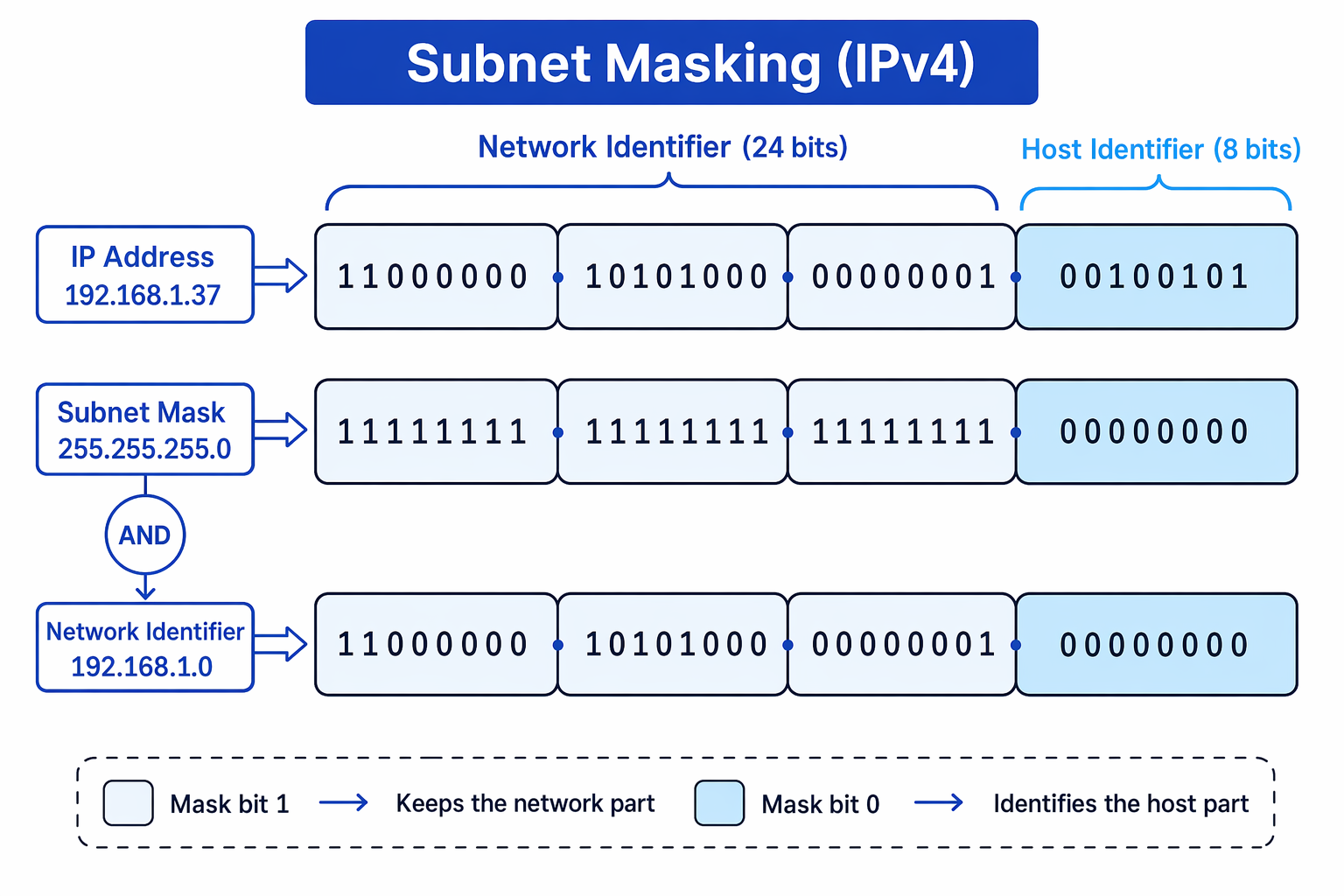
In IPv4, a mask bit of 1 keeps the matching IP address bit as part of the network identifier. A mask bit of 0 marks the host part. You may also see prefix notation such as 192.168.1.0/24, meaning the first 24 bits are the network part.
The diagram shows how an IPv4 address and subnet mask are combined using bitwise AND to find the network identifier.
Key Idea
Subnet mask rule
To find the network identifier, apply bitwise AND between the IP address and the subnet mask: 1 bits in the mask preserve the network part, while 0 bits force the host part to zero.
Example
Applying a subnet mask
-
Convert the address
192.168.1.37and mask255.255.255.0into binary octets. The final IP octet is 00100101200100101_2001001012, and the final mask octet is 00000000200000000_2000000002. -
Apply bitwise AND to each octet. The first three mask octets are 11111111211111111_2111111112, so they keep the original bits. The final octet becomes 001001012 AND 000000002=00000000200100101_2 \text{ AND } 00000000_2 = 00000000_2001001012 AND 000000002=000000002.
-
Convert the result back to dotted decimal. The network identifier is
192.168.1.0, and the host identifier part of the original address is37.
4.9.4.5 IP standards
There are currently two standards of IP address:
- IPv4: the older 32-bit address standard, commonly written in dotted decimal, for example
203.0.113.5. - IPv6: the newer 128-bit address standard, commonly written using hexadecimal groups.
IPv6 was introduced mainly because IPv4 has a limited address space. The growth of the Internet, smartphones, cloud services and Internet-connected devices meant there were not enough unique IPv4 addresses for every device to have one permanently.
Key Idea
Why IPv6 exists
IPv6 was introduced to solve IPv4 address exhaustion by providing a vastly larger address space.
4.9.4.6 Public and private IP addresses
A routable IP address can be routed across the public Internet. These are usually called public IP addresses.
A non-routable IP address is not forwarded by Internet routers. These are usually called private IP addresses and are used inside LANs. Common private ranges include 10.x.x.x, 172.16.x.x to 172.31.x.x, and 192.168.x.x.
Common Mistake
Private does not mean secret
A private IP address is “private” because it is not routable on the public Internet, not because it encrypts or protects the data.
4.9.4.7 Dynamic Host Configuration Protocol (DHCP)
DHCP stands for Dynamic Host Configuration Protocol. It automatically gives a device the network settings it needs when it joins a network.
A DHCP server can supply:
- an IP address
- a subnet mask
- a default gateway, which is the router used to reach other networks
- a DNS server, which helps translate domain names into IP addresses
- a lease time, meaning how long the device may use that address
A typical DHCP process is: the client asks for configuration, the server offers settings, the client accepts, and the server confirms the lease. This avoids manual configuration and reduces the risk of two devices accidentally using the same IP address.
4.9.4.8 Network Address Translation (NAT)
A port is a number used to identify a particular application or service on a device. For example, web traffic using HTTPS often uses port 443.
Network Address Translation (NAT) is when a router changes IP address information in packets as they pass between a private LAN and the public Internet. It is mainly used so many private devices can share one public IPv4 address.
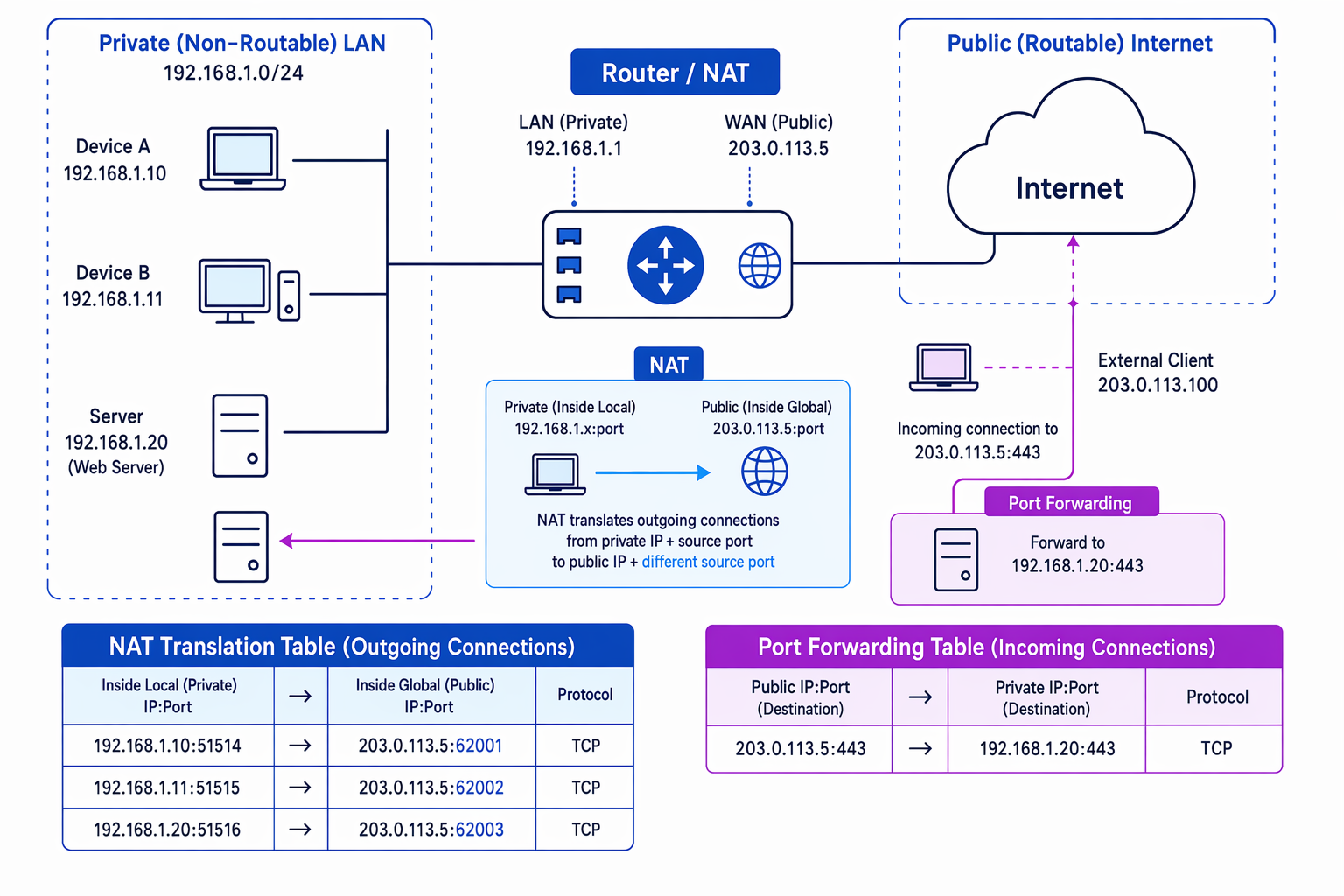
The diagram links NAT for outgoing traffic with port forwarding for incoming traffic.
Example
Following a NAT translation
-
A laptop
192.168.1.10opens a web connection from source port51514to a public web server on port443. -
The router replaces the private source address and port with its own public address and a chosen source port, such as
203.0.113.5:62001, then stores this mapping in a NAT table. -
When the web server replies to
203.0.113.5:62001, the router looks up the table and forwards the packet back to192.168.1.10:51514.
NAT also hides internal private addresses from the public Internet, but it should not be described as a replacement for proper security controls such as firewalls.
4.9.4.9 Port forwarding
Port forwarding is a router rule that sends incoming traffic arriving at a particular public IP address and port to a chosen private IP address and port inside the LAN.
It is used when an internal device needs to run a service that outside clients can access, such as a web server, game server or remote access service.
For example, a rule might say: traffic arriving at 203.0.113.5:443 should be forwarded to 192.168.1.20:443.
Common Mistake
NAT and port forwarding are different directions
NAT is often used for outgoing traffic from many private devices to the Internet. Port forwarding is a deliberate rule for incoming traffic from the Internet to a specific internal device.
4.9.4.10 Client server model
In the client-server model, a client sends a request message to a server. The server processes the request and replies with a response message.
A web browser requesting a web page is a client. The machine or service hosting the website is the server.
WebSocket protocol
TCP is the Transmission Control Protocol, which provides a reliable connection between applications. A socket is an endpoint for network communication between processes.
The WebSocket protocol defines an API — Application Programming Interface — that establishes a full-duplex socket connection between a web browser and a server over TCP. Full-duplex means both sides can send data at any time. Persistent means the connection stays open rather than being repeatedly created and closed.
WebSockets are used where live two-way communication is needed, such as chat apps, multiplayer games, live dashboards, collaborative editing and notifications.
Web CRUD applications and REST
CRUD stands for:
- Create
- Retrieve
- Update
- Delete
REST stands for Representational State Transfer. In a web application, browser JavaScript calls a REST API running on the server using HTTP request methods. HTTP is the Hypertext Transfer Protocol used for web requests and responses.
The server-side API talks to the database using SQL, while data is commonly transmitted between browser and server as JSON or XML.
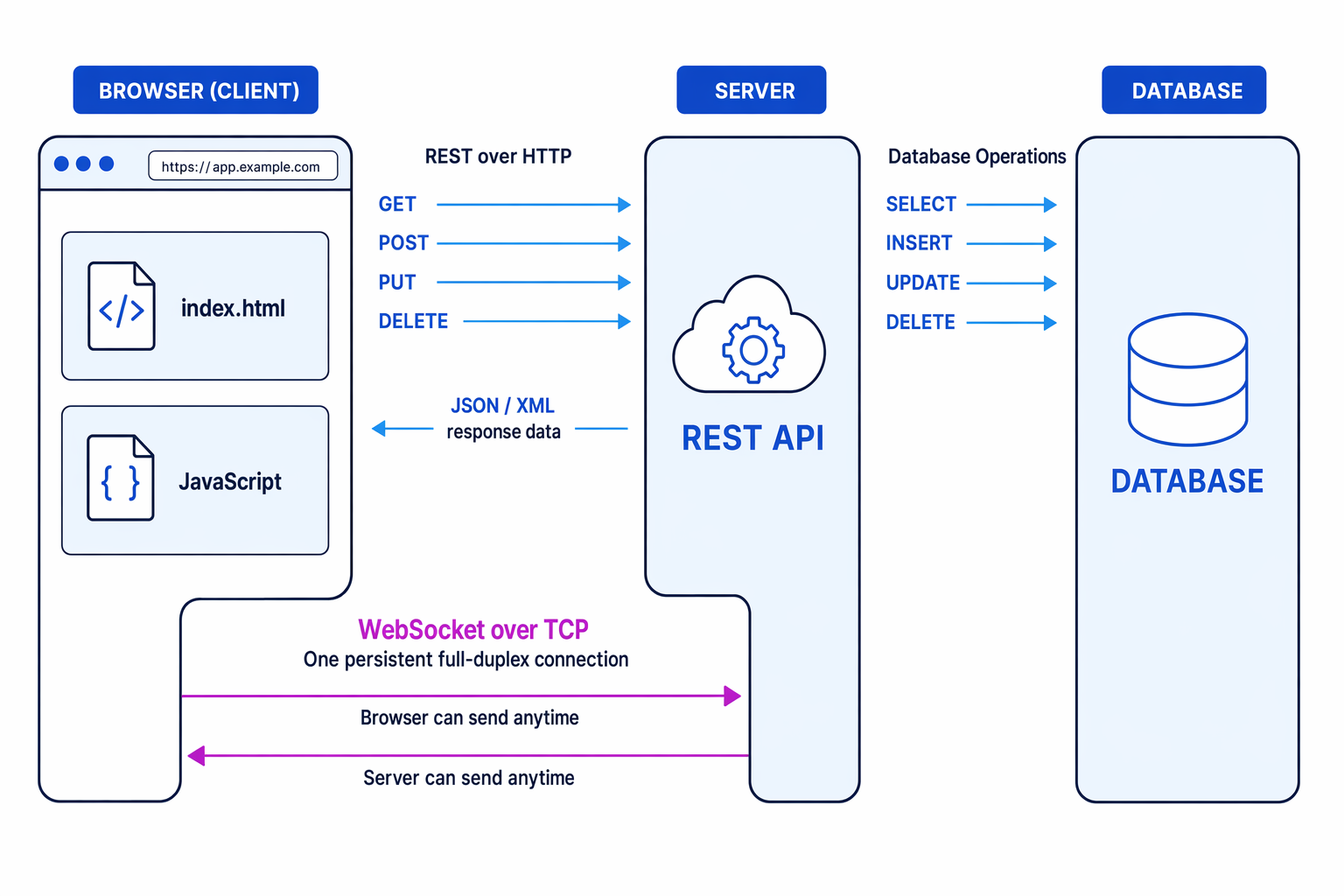
| CRUD purpose | HTTP request method | SQL operation |
|---|---|---|
| Create a new record | POST | INSERT |
| Retrieve existing data | GET | SELECT |
| Update existing data | PUT | UPDATE |
| Delete existing data | DELETE | DELETE |
Common Mistake
Do not put SQL in the browser
In a REST web application, browser JavaScript calls the server’s REST API. The server performs the SQL database operations; the browser should not connect directly to the database.
Example
Choosing HTTP methods
-
To show a user’s profile, the browser needs to retrieve existing data, so it sends a
GETrequest and the server performs aSELECT. -
To create a new account, the browser sends a
POSTrequest and the server performs anINSERT. -
To change the user’s email address, the browser sends a
PUTrequest and the server performs anUPDATE.
JSON compared with XML
JSON stands for JavaScript Object Notation. It stores data using key-value pairs and arrays, for example {"name": "Asha", "year": 12}.
XML stands for Extensible Markup Language. It stores data using tags, for example <name>Asha</name>.
Compared with XML, JSON is generally:
- easier for a human to read
- more compact
- easier to create
- easier and quicker for computers to parse
4.9.4.11 Thin- versus thick-client computing
A thin client does relatively little processing locally. Most processing and data storage happen on the server. A web browser accessing a server-based application is a common example.
A thick client does significant processing locally on the client machine. It may store data locally and only contact a server when synchronisation or shared data is needed.
| Feature | Thin client | Thick client |
|---|---|---|
| Processing | Mostly on server | Mostly or partly on client |
| Network dependence | Usually needs a reliable connection | May work offline |
| Client hardware | Lower specification can be enough | Usually needs more capable hardware |
| Updates | Centralised on server | Must update client software |
| Server load | Higher | Lower for local tasks |
Thin clients are useful for central management, consistent versions and low-cost devices. Thick clients are useful for rich interfaces, offline work, and tasks needing local processing power.
Exam technique
In the exam
- For subnet masking, say that the mask identifies the network part and use bitwise AND if asked to calculate it.
- Keep NAT and port forwarding separate: NAT usually supports outgoing sharing of one public IP; port forwarding allows incoming access to a named internal service.
- For REST, keep the layers clear: browser JavaScript calls a server API over HTTP; the server performs SQL; JSON or XML carries data.
- In comparison questions, give paired points for both sides rather than only listing advantages of one.
Self review
Check yourself
- Why can’t an Internet router deliver a packet directly to
192.168.1.20? - What settings might a DHCP server give to a device joining a network?
- Which HTTP method and SQL operation would you use to update an existing database record?