Revision notes for AQA A Level Computer Science Communication. Open each subtopic for explanations, worked examples, and summaries of Communication. Written against the AQA A Level Computer Science specification, so the content matches what's examinable rather than general Computer Science background.
Communication
What you'll learn
- How data can be sent using serial or parallel transmission.
- How synchronous and asynchronous transmission handle timing.
- Why asynchronous transmission uses start bits and stop bits.
- How to use the terms baud rate, bit rate, bandwidth, latency and protocol accurately.
The basic idea: sending bits as signals
When two devices communicate, they do not send “a file” in one go. They send data as a sequence of bits. A bit is a single binary digit: either 0 or 1.
A bit is represented physically by a signal, such as a voltage level in a wire, a pulse of light in fibre optic cable, or a radio wave.
Definition
Communication link
- A sender is the device that transmits data.
- A receiver is the device that accepts data.
- A channel or link is the physical or wireless path between them.
- A signal is a physical representation of data on that channel.
The key question in this topic is: how are the bits arranged and timed so that the receiver can interpret them correctly?
4.9.1.1 Communication methods
Serial and parallel transmission
A transmission method describes how bits are sent across a communication channel.
Definition
Serial and parallel transmission
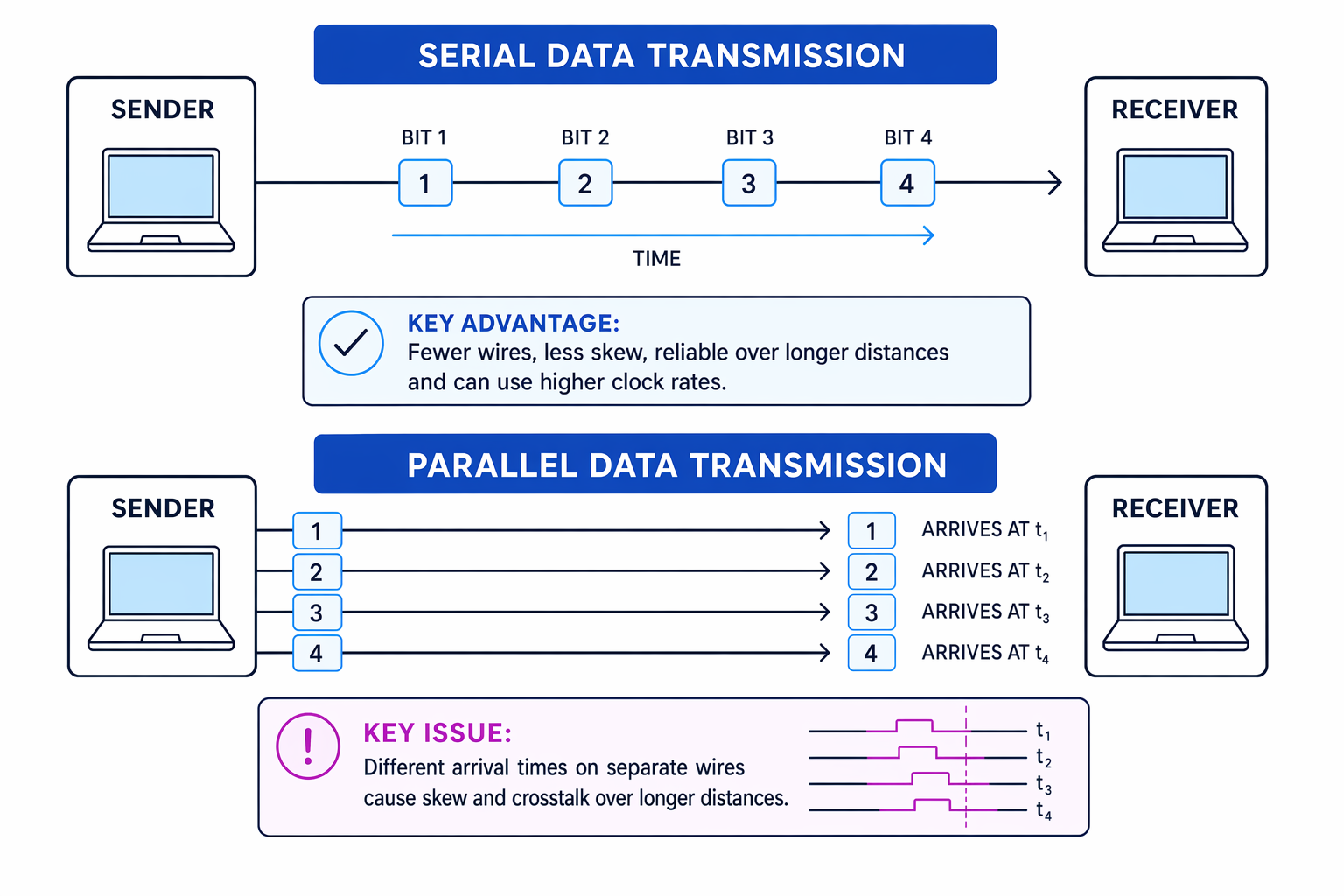
- Serial transmission sends bits one after another over a single channel or data line.
- Parallel transmission sends several bits at the same time over several channels or data lines.
For example, to send one byte, serial transmission sends the 8 bits in sequence. Parallel transmission could send all 8 bits at once, using 8 separate data lines.
The diagram compares the two methods and shows why parallel transmission becomes harder to manage over longer distances.
Why serial transmission is often preferred
At first, parallel transmission sounds faster because several bits are sent at once. However, modern communication often favours serial transmission.
Parallel transmission needs more wires or channels. That increases cost, cable size and connector complexity.
It can also suffer from skew, where signals travelling along different wires arrive at slightly different times. The receiver may then read the group of bits incorrectly. Parallel wires close together can also suffer from crosstalk, where a signal on one wire interferes with a signal on another.
Serial transmission avoids many of these problems because there is only one main data path to keep in time. This means it can often use much higher clock rates and work reliably over longer distances.
Key Idea
Serial is not automatically slower
Serial transmission sends one bit at a time, but it can often be clocked much faster than parallel transmission because it avoids skew and reduces interference between wires.
Common Mistake
Assuming parallel is always faster
Parallel transmission can be fast over very short distances, such as inside a computer, but over longer distances serial transmission is usually more reliable and may achieve a higher overall data rate.
Example
Choosing a transmission method for a long cable
A laptop needs to communicate with an external device using a cable several metres long. Decide whether serial or parallel transmission is the better design choice.
-
Compare the wiring required: parallel transmission would need several separate data lines, while serial transmission can use fewer wires, making the cable cheaper and less bulky.
-
Consider timing over distance: in a parallel cable, different wires may have slightly different delays, causing skew. The receiver could read some bits from one group and some from the next.
-
Choose the more suitable method: serial transmission is preferred because it reduces skew and crosstalk, so it is more reliable over a longer cable.
Synchronous and asynchronous transmission
A clock is a regular timing signal used to decide when bits should be sent or sampled. “Sampling” means reading the signal at a particular instant to decide whether the bit is 0 or 1.
Definition
Synchronous and asynchronous transmission
- Synchronous transmission uses shared timing between sender and receiver. Data is sent in a continuous stream or in larger blocks at regular intervals.
- Asynchronous transmission does not rely on a shared clock for the whole transmission. Data is sent in separate units when needed, and each unit contains extra timing information.
A unit of transmitted data plus any control bits is called a frame.
| Feature | Synchronous transmission | Asynchronous transmission |
|---|---|---|
| Timing | Sender and receiver stay synchronised using a clock or agreed timing method | Receiver resynchronises for each frame |
| Data pattern | Often continuous or block-based | Can be sent with gaps between frames |
| Extra bits | Less overhead per data item | Needs start and stop bits around each frame |
| Typical benefit | Efficient for large amounts of data | Simple and flexible for occasional data |
Common Mistake
Asynchronous does not mean unplanned
Asynchronous transmission still follows rules. The sender and receiver must agree things like bit rate, number of data bits, and how many stop bits are used.
Start and stop bits
In asynchronous transmission, the receiver may not know exactly when the next data item will arrive. Start and stop bits solve this timing problem.
Definition
Start and stop bits
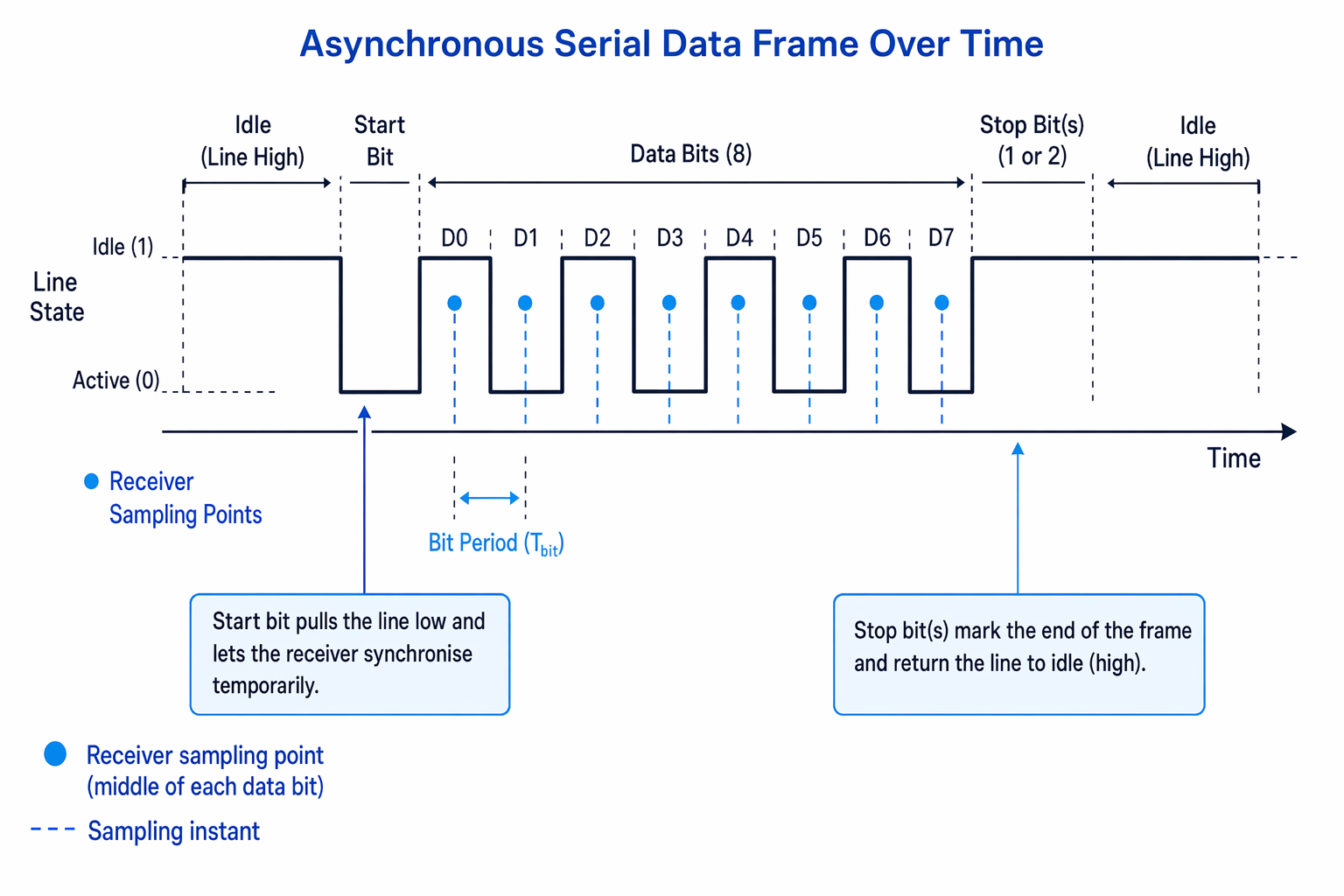
A start bit is an extra bit at the beginning of an asynchronous frame that alerts the receiver that data is about to arrive. A stop bit is one or more extra bits at the end of the frame that mark the end and return the line to its idle state.
Typically, the line sits idle at 1. A start bit changes the line to 0, creating a clear transition for the receiver. The receiver then samples the following data bits at the agreed bit intervals. Stop bit or bits return the line to idle, giving a clear boundary before the next frame.
The diagram shows a typical asynchronous serial frame.
Example
Calculating asynchronous framing overhead
A system sends 100 bytes. Each byte is sent using 1 start bit, 8 data bits and 1 stop bit. Calculate the total number of transmitted bits and the efficiency.
-
Convert the useful data into bits: 100 bytes contains 100×8=800100 \times 8 = 800100×8=800 data bits.
-
Work out the frame size for each byte: each frame has 1 start bit, 8 data bits and 1 stop bit, so each byte requires 1+8+1=101 + 8 + 1 = 101+8+1=10 transmitted bits.
-
Multiply by the number of bytes: 100×10=1000100 \times 10 = 1000100×10=1000 bits are transmitted in total.
-
Compare useful data with total transmission: the efficiency is 8001000=0.8=80%\frac{800}{1000} = 0.8 = 80\%1000800=0.8=80%.
4.9.1.2 Communication basics
Core communication terms
These terms describe the speed, delay and rules of a communication link.
Definition
Baud rate, bit rate, bandwidth, latency and protocol
- A symbol is one signal state or signal change that can represent data.
- Baud rate is the number of symbols sent per second. It is measured in baud.
- Bit rate is the number of bits transmitted per second, usually measured in bit/s or bps.
- Bandwidth is the capacity of a channel to carry data; in signal terms, it relates to the range of frequencies available. Higher bandwidth allows a higher bit rate.
- Latency is the delay between data being sent and it arriving or beginning to be received.
- A protocol is an agreed set of rules for communication, such as data format, timing, error handling and what responses are expected.
Baud rate versus bit rate
Baud rate and bit rate are related, but they are not always the same.
If each signal change represents exactly 1 bit, then the numerical baud rate and bit rate are the same. But if each signal change represents more than 1 bit, the bit rate is higher than the baud rate.
For example, if a system has four possible signal states, it could use them to represent 00200_2002, 01201_2012, 10210_2102 and 11211_2112. Each signal change would then carry 2 bits.
Using symbols:
Rb=Rs×bR_b = R_s \times bRb=Rs×bwhere RbR_bRb is the bit rate, RsR_sRs is the baud rate, and bbb is the number of bits represented by each symbol.
Example
Calculating bit rate from baud rate
A modem transmits at 2400 baud. Each signal change represents 4 bits. Calculate the bit rate.
-
Interpret the baud rate: 2400 baud means 2400 symbols are sent each second.
-
Identify the bits per symbol: each symbol carries 4 bits, so b=4b = 4b=4.
-
Substitute into the relationship: Rb=2400×4=9600R_b = 2400 \times 4 = 9600Rb=2400×4=9600.
-
State the result: the bit rate is 9600 bit/s, which is higher than the baud rate because each symbol carries more than 1 bit.
Common Mistake
Mixing up baud and bit rate
Baud rate counts signal changes per second. Bit rate counts bits per second. They are only equal when each signal change carries exactly 1 bit.
Bandwidth and bit rate
For AQA, you should know that bit rate is directly proportional to bandwidth.
That means if the bandwidth doubles, the possible bit rate doubles, assuming the same encoding and conditions.
R∝BR \propto BR∝Bwhere RRR is bit rate and BBB is bandwidth.
Key Idea
More bandwidth means more possible bits per second
A wider bandwidth gives the channel more capacity, so it can support a higher bit rate.
Example
Using direct proportion with bandwidth
A communication link achieves 80 Mbit/s using 20 MHz of bandwidth. If the bandwidth is increased to 50 MHz using the same encoding method, estimate the new bit rate.
-
Find the scale factor for the bandwidth: 5020=2.5\frac{50}{20} = 2.52050=2.5.
-
Apply direct proportion: R2=R1×2.5R_2 = R_1 \times 2.5R2=R1×2.5.
-
Substitute the original bit rate: R2=80×2.5=200R_2 = 80 \times 2.5 = 200R2=80×2.5=200.
-
State the result: the estimated new bit rate is 200 Mbit/s.
Latency and protocols in practice
A high bit rate does not automatically mean communication feels instant. Latency is about delay, not capacity.
For example, a satellite link may have high bandwidth but noticeable latency because signals travel a long distance. This matters for interactive tasks like online gaming, video calls or remote control systems.
A protocol makes communication predictable. Without protocols, devices might disagree about when data starts, how fast bits are arriving, how errors are detected, or what a response means.
Common Mistake
Confusing bandwidth with latency
Bandwidth is about how much data can be carried per second. Latency is about how long data takes to start arriving. A link can have high bandwidth and still have high latency.
Exam technique
In the exam
-
When comparing serial and parallel transmission, mention reliability issues such as skew and crosstalk, not just the number of wires.
-
For asynchronous transmission, explain the purpose of both start and stop bits: start synchronises the receiver; stop marks the end and returns the line to idle.
-
Keep baud rate and bit rate separate. Use Rb=Rs×bR_b = R_s \times bRb=Rs×b when one signal change represents more than one bit.
Self review
Check yourself
- Why can serial transmission be better than parallel transmission over longer distances?
- What does a start bit allow the receiver to do in asynchronous transmission?
- A system has a baud rate of 1200 and sends 3 bits per symbol. What is the bit rate?