Revision notes for AQA A Level Computer Science Networking. Open each subtopic for explanations, worked examples, and summaries of Networking. Written against the AQA A Level Computer Science specification, so the content matches what's examinable rather than general Computer Science background.
Networking
What you'll learn
- How physical star and logical bus topologies differ.
- When peer-to-peer and client-server networking are suitable.
- What WiFi is used for, and the hardware it needs.
- How wireless networks use security and CSMA/CA to manage shared radio communication.
4.9.2.1 Network topology
Networks, hosts and topology
A network is a set of connected devices that can communicate and share resources. A host is a device on a network that can send or receive data, such as a laptop, phone, printer or server.
A topology describes the arrangement of a network. In AQA networking questions, you must be careful to separate the physical layout from the way data actually behaves.
Definition
Network topology
A physical topology describes how the devices are physically connected. A logical topology describes how data travels through the network from the point of view of the devices and protocol.
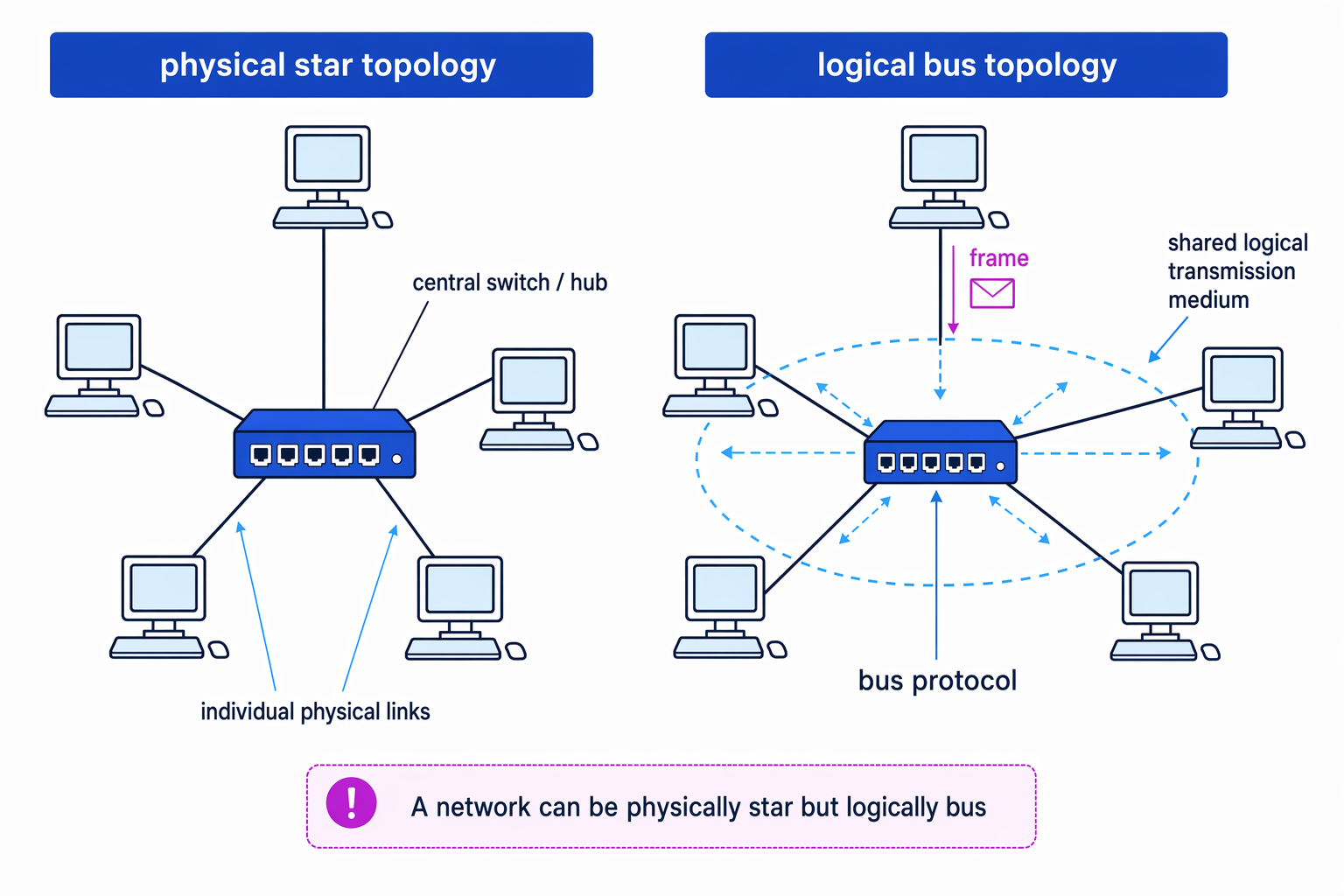
The diagram below shows the key distinction: the cabling can form a star, while the data behaviour can still be bus-like.
Physical star topology
In a physical star topology, every host has its own physical connection to a central device, usually a switch or wireless access point. A host does not normally connect directly to every other host.
When one host sends data, it sends it to the central device first. The central device then forwards or repeats the data towards the destination.
Key Idea
Physical star operation
In a physical star, the central device is the hub of the physical connections. Individual hosts connect to the centre, not directly to each other.
This means one broken cable usually affects only the host using that cable. However, if the central device fails, the network segment can stop working.
Logical bus topology
In a logical bus topology, the devices behave as if they share one communication medium. A message sent by one device is made available across that shared logical path, and devices use addressing to decide whether to accept or ignore it.
A network can be physically wired as a star but logically behave as a bus if it uses a bus protocol and suitable physical switching. For example, a central device might make a transmission available to multiple hosts so that, logically, they are sharing the same communication channel.
Common Mistake
Physical is not the same as logical
Do not identify a topology only from the cabling. If every device plugs into one central box, that is a physical star, but the logical topology depends on how data is transmitted.
Example
Classifying a topology description
A classroom has six PCs, each connected by its own cable to one central network device. When one PC sends a frame, the central device makes that frame available to all PCs, and only the addressed PC accepts it.
- The physical clue is that each PC has its own cable to one central device, so the physical topology is star.
- The data-flow clue is that the frame is made available to all PCs, so the devices behave as if they share one transmission medium.
- Therefore, the network is physically star but logically bus.
4.9.2.2 Types of networking between hosts
Peer-to-peer networking
In peer-to-peer networking, each computer has equal status. There is no required central server controlling the network. A device can both request resources from other devices and provide resources to them.
Definition
Peer-to-peer network
A peer-to-peer network is a network where hosts have equal status and can share resources directly with each other.
Peer-to-peer networking is useful for small or informal situations, such as:
- a few home computers sharing files
- two devices sharing a printer
- a small temporary network where central administration is not needed
The main benefit is simplicity: you do not need a dedicated server. The downside is that management, security and backups are usually less centralised. If a peer is switched off, its shared files or printer may become unavailable.
Client-server networking
In client-server networking, most computers are clients, and one or more computers are servers.
Definition
Client and server
A client requests a service. A server provides a service, such as file storage, email, authentication or printing.
For example:
- a file server stores shared files
- an email server sends and receives email
- an authentication server checks usernames and passwords
- a web server provides web pages to browsers
Client-server networking is used in schools, companies, websites and many online services because it supports central control. User accounts, permissions, backups and security policies can be managed in one place.
Key Idea
Choosing the networking model
Ask: who provides the service? If any host can provide and request resources, it is peer-to-peer. If nominated servers provide services to many clients, it is client-server.
Example
Choosing a network model
A school wants 900 students to log in with school accounts, access shared files, and have work backed up every night.
- Central logins require a service that checks identities for many users, so a dedicated server is suitable.
- Shared files and regular backups need reliable storage that is available even when individual student computers are switched off.
- The best model is client-server networking, with clients requesting services from servers such as file and authentication servers.
4.9.2.3 Wireless networking
Purpose of WiFi
WiFi is used to let devices connect to a network wirelessly. It is a wireless local area network technology based on international standards.
Definition
WiFi
WiFi is a wireless local area network technology, based on international standards, that enables devices to connect to a network without using a physical cable.
A local area network, or LAN, covers a relatively small area such as a home, school, office or building.
Components required for wireless networking
Wireless networking needs two key components.
A wireless network adapter is the hardware in a device that allows it to send and receive WiFi radio signals. This might be built into a laptop or phone, or added using a separate adapter.
A wireless access point, often shortened to WAP or AP, allows wireless devices to connect to a network. It receives wireless transmissions and forwards data between wireless devices and the wider network.
SSID
An SSID, or Service Set Identifier, is the name used to identify a wireless network. When you choose a WiFi network from a list, you are usually choosing by SSID.
Definition
SSID
The Service Set Identifier is the network name that identifies a particular wireless network.
An access point may broadcast its SSID so that nearby devices can discover it automatically. SSID broadcast can be disabled, meaning users must already know the network name to connect.
Securing wireless networks
Wireless signals travel through the air, so they can potentially be received by devices that are not physically connected to the network. Security is therefore especially important.
Common wireless security measures include:
- WPA/WPA2 encryption: data transmitted wirelessly is encrypted so that it cannot be read easily by someone intercepting the radio signal.
- SSID broadcast disabled: the access point does not openly advertise the network name.
- MAC address allow list: only devices with approved network interface addresses are allowed to connect.
A MAC address, meaning Media Access Control address, is a hardware address associated with a network interface.
Common Mistake
Hiding the SSID is not encryption
Disabling SSID broadcast may make a network less visible to casual users, but it does not protect the contents of transmitted data. For confidentiality, mention WPA or WPA2 encryption.
Example
Selecting wireless security measures
A business wants staff laptops to connect over WiFi, but it does not want visitors nearby to read transmitted data or join the network.
- The need to stop intercepted data being read points to WPA/WPA2 encryption.
- The need to restrict which devices can connect points to a MAC address allow list.
- Disabling SSID broadcast could make the network less obvious, but it should not be treated as the main protection because it does not encrypt the data.
CSMA/CA
Wireless devices share radio channels. If two devices transmit at the same time on the same channel, their transmissions can interfere. WiFi therefore uses CSMA/CA, which stands for Carrier Sense Multiple Access with Collision Avoidance.
Definition
CSMA/CA
Carrier Sense Multiple Access with Collision Avoidance is a wireless protocol where devices listen before transmitting and use waiting rules to reduce the chance of collisions.
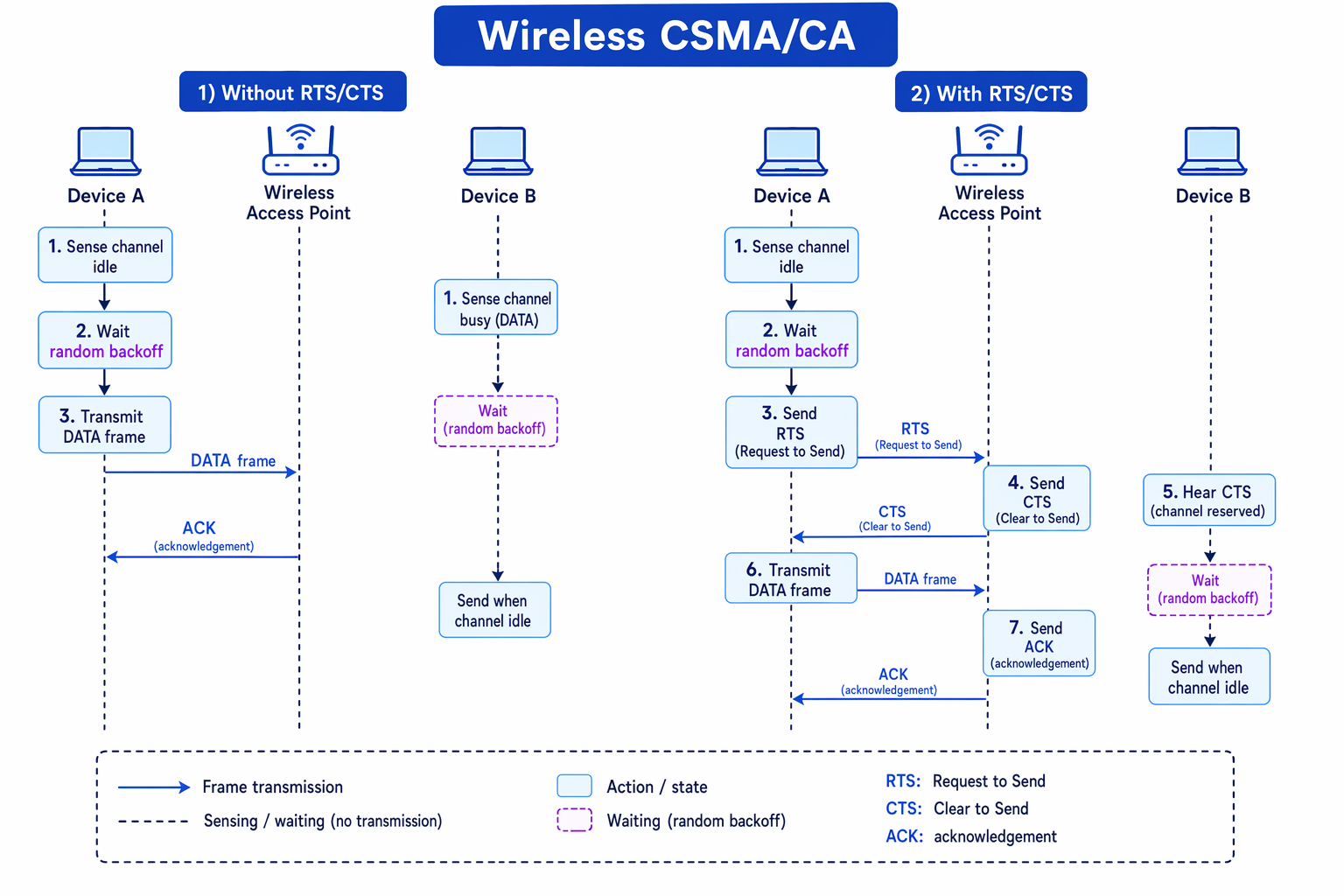
The sequence below shows CSMA/CA without and with RTS/CTS.
CSMA/CA without RTS/CTS
Without RTS/CTS, the process is:
- A device checks whether the wireless channel appears to be idle.
- If the channel is busy, it waits.
- If the channel is idle, it waits for a random backoff period before transmitting.
- If the channel is still idle, it transmits the data frame.
- The receiver sends an acknowledgement, often called an ACK.
- If no ACK is received, the sender assumes the transmission failed and tries again after another wait.
The random backoff is important because if several devices are waiting, they are unlikely to all choose exactly the same waiting time.
CSMA/CA with RTS/CTS
RTS/CTS adds a short reservation step before the main data frame.
Definition
RTS/CTS
RTS means Request to Send. CTS means Clear to Send. They are short control messages used to reserve the wireless channel before the main data is sent.
With RTS/CTS:
- The sender senses the channel and waits using CSMA/CA rules.
- The sender sends an RTS message.
- The access point or receiver replies with a CTS message if transmission is allowed.
- Other devices that hear the CTS wait and do not transmit.
- The sender transmits the main data frame.
- The receiver sends an ACK.
RTS/CTS is especially useful for the hidden node problem, where two wireless devices cannot hear each other but can both communicate with the same access point. Without RTS/CTS, both devices might think the channel is free and transmit at the same time.
Example
Using RTS/CTS for hidden nodes
Two laptops are far apart in a building. Each can communicate with the wireless access point, but they cannot detect each other’s transmissions. Large file transfers are failing and being retried.
- Because the laptops cannot hear each other but can both reach the access point, this is a hidden node situation.
- Without RTS/CTS, each laptop may sense the channel as idle and transmit, causing interference at the access point.
- With RTS/CTS, a laptop first sends a short RTS, and the access point replies with CTS.
- The other laptop can hear the CTS from the access point and waits, so the main data frame is less likely to collide.
Tip
Stay in WiFi mode
For this subsection, focus on CSMA/CA. Knowledge of CSMA/CD, the collision-detection approach associated with some wired Ethernet contexts, is not required here.
Exam technique
In the exam
- Separate physical topology from logical topology: cabling layout is not always the same as data behaviour.
- For peer-to-peer versus client-server, identify who provides services and give a suitable situation where that model is used.
- For WiFi security, pair each method with its purpose: WPA/WPA2 encrypts, SSID broadcast affects visibility, and MAC allow lists restrict devices.
- For CSMA/CA, describe the sequence: sense the channel, wait using random backoff, transmit, then receive an ACK. Add RTS/CTS before the data frame when asked.
Self review
Check yourself
- A network has devices cabled to one central switch, but frames are made available to all devices. What are its physical and logical topologies?
- Give one situation where peer-to-peer networking is suitable and one where client-server networking is better.
- How does RTS/CTS reduce problems caused by hidden nodes in a wireless network?