Here is an image of the Casio Classwiz Calculator, it is a popular calculator for GCSE maths.
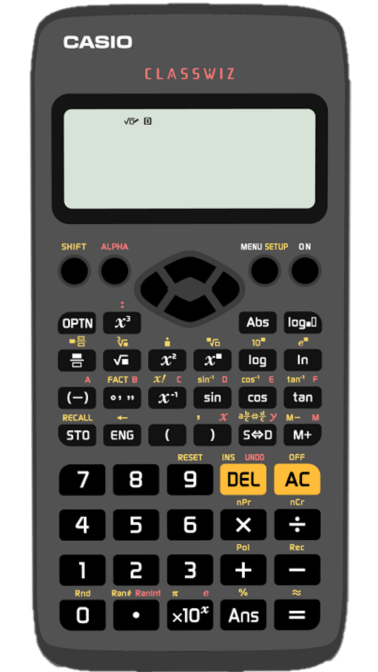
You should have a calculator similar to this. If your calculator is slightly different it should still have all the same buttons, they may just be in different places.
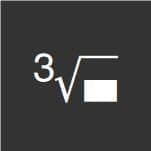
Above the buttons you can see more functions in yellow. These are accessed by pressing SHIFT and then the button. The cube root button is pressed by pressing SHIFT then the square root button (one after the other, not at the same time).
 =
= 

Squaring Numbers
We can square numbers on our calculator using the square button. Find the button on your calculator that looks like this:
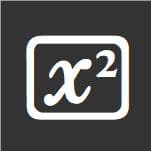
If you type a number into your calculator followed by the square button and the equals button the calculator will return answer.
Example: Use your calculator to work out the value of 5.62²
We type into the calculator





You calculator should give an answer of 31.5844
Cubing Numbers
We can cube numbers in the same way using the cube button:
Example: Use your calculator to work out the value of 7.8³
We type into the calculator

You calculator should give an answer of 474.552
Other Powers
We can raise a number to any power using the power button:
Example: Use your calculator to work out the value of 2.9⁴
We type into the calculator

You calculator should give an answer of 70.7281
Try these:
Square Rooting
We can square root numbers on our calculator using the square root button. Find the button on your calculator that looks like this:
Press the square root button first, then type in the number that you want to square root, then press equals.
Example: Use your calculator to work out the value of √562
We type into the calculator
You calculator may give an answer of √562
To convert this to a decimal we need to use the SD button:

If we press this button we should get an answer of 23.70653918
Cube Rooting
To cube root numbers we need to find the cube root button. On the calculator above it is accessed by pressing SHIFT then square root.
Press SHIFT, then square root, then type in the number that you want to cube root, then press equals.
Example: Use your calculator to work out the value of ∛68
We type into the calculator:
We should get an answer of 4.081655102
Other Roots
There is also a way to find other roots. On the calculator above it is SHIFT then the power button.
 =
=
Press SHIFT, then the power button, then type in the root you want, then press the right button (from the direction pad at the top, in the middle, of the calculator), then the number you want to root.
Example: Use your calculator to work out the value of ∜100
We type into the calculator:
We should get an answer of 3.16227766
Try these:
The Fraction Button
The calculator has a fraction button which can be used to write fractions. The button looks like this:
If you press the fraction button you should see a fraction in the input area. We can move between the numerator and denominator of the fraction by pressing the direction buttons.
Example: Convert 3⁄8 to a decimal.
We need to write 3⁄8 into the calculator.
We type into the calculator:
This will give an answer of 3⁄8 to convert to a decimal we need to press the SD button.
This will give an answer of 0.375
Example: Work out the value of: 3.25 + 1.2⁄0.7²
Give your answer as a decimal.
We can type this into the calculator exactly how it looks in the question:
We type into the calculator:
This will give an answer as a fraction, so we press the SD button to convert to a decimal
This will give an answer of 9.081632653
Mixed Numbers
We can also write mixed numbers into the calculator by pressing SHIFT then the fraction button.
 =
=
Example: Convert 3 2⁄5 to an improper fraction.
To type the improper fraction into the calculator we press:
This gives an answer of 17⁄5
If we want to convert an improper fraction back to a mixed number we can press SHIFT then SD. This will convert between improper fractions and mixed numbers.
Try these:
The Time Button
We can use this button to calculate with time:
We can use the time button to convert a decimal answer into hours and minutes
Example: Convert 7.2 hours into hours and minutes
We can type 7.2 into the calculator:
Then press the time button
We can read the answer as 7 hours and 12 minutes.
Example: Convert 3 hours and 48 minutes into hours
To type a time into the calculator we write the number of hours, then the time button, then the number of minutes, then the time button (then the number of seconds and the time button)
To type in 3 hours and 48 minutes we press:
We can then press the SD button (twice)
This gives an answer of 3.8 hours.
We can also use the time button to add up times.
Example: A film starts at 8:30pm and runs for 105 minutes, work out the time when the film ends.
We can type this into the calculator:
The answer can be read as 10:15 pm
Try these:
The ANS button
The ANS button stores your last answer

We can use this button when we want to use our answer for another calculation.
If we type 3 × 5 into the calculator and then press equals:

The answer (15) is now stored as ANS
We can then do calculations using the ANS button
We should get an answer of 18
Storing Numbers in the Memory
We can also store numbers in the calculator using the STO button.
When we have an answer we can press STO and then one of the keys with a pink letter above. We have the letters A, B, C, D, E, F, X, Y and M.
We can type 2 × 5 into the calculator and press equals to get an answer of 10
We want to store the answer so we press STO and the letter we want to store it as. We will store the answer as A so we press:
Our answer will now be stored as A.
We can use A in calculations by pressing ALPHA then A: