Revision notes for OCR GCSE Computer Science Wired and wireless networks, protocols and layers. Open the guide for explanations and worked examples. Written against the OCR GCSE Computer Science (J277) specification, so the content matches what's examinable rather than general Computer Science background.
Wired and wireless networks, protocols and layers
What you'll learn
- How wired and wireless connections compare, including Ethernet, Wi-Fi and Bluetooth.
- How encryption, IP addresses and MAC addresses help data travel securely and to the right place.
- Why standards and protocols are needed for devices and software to communicate.
- How the idea of layers helps organise network communication.
The basic idea: connecting devices
A computer network is a group of connected devices that can communicate and share data or resources. Devices can connect using a wired connection, where data travels through a physical cable, or a wireless connection, where data travels using radio signals.
Wired connections: Ethernet
Definition
Ethernet
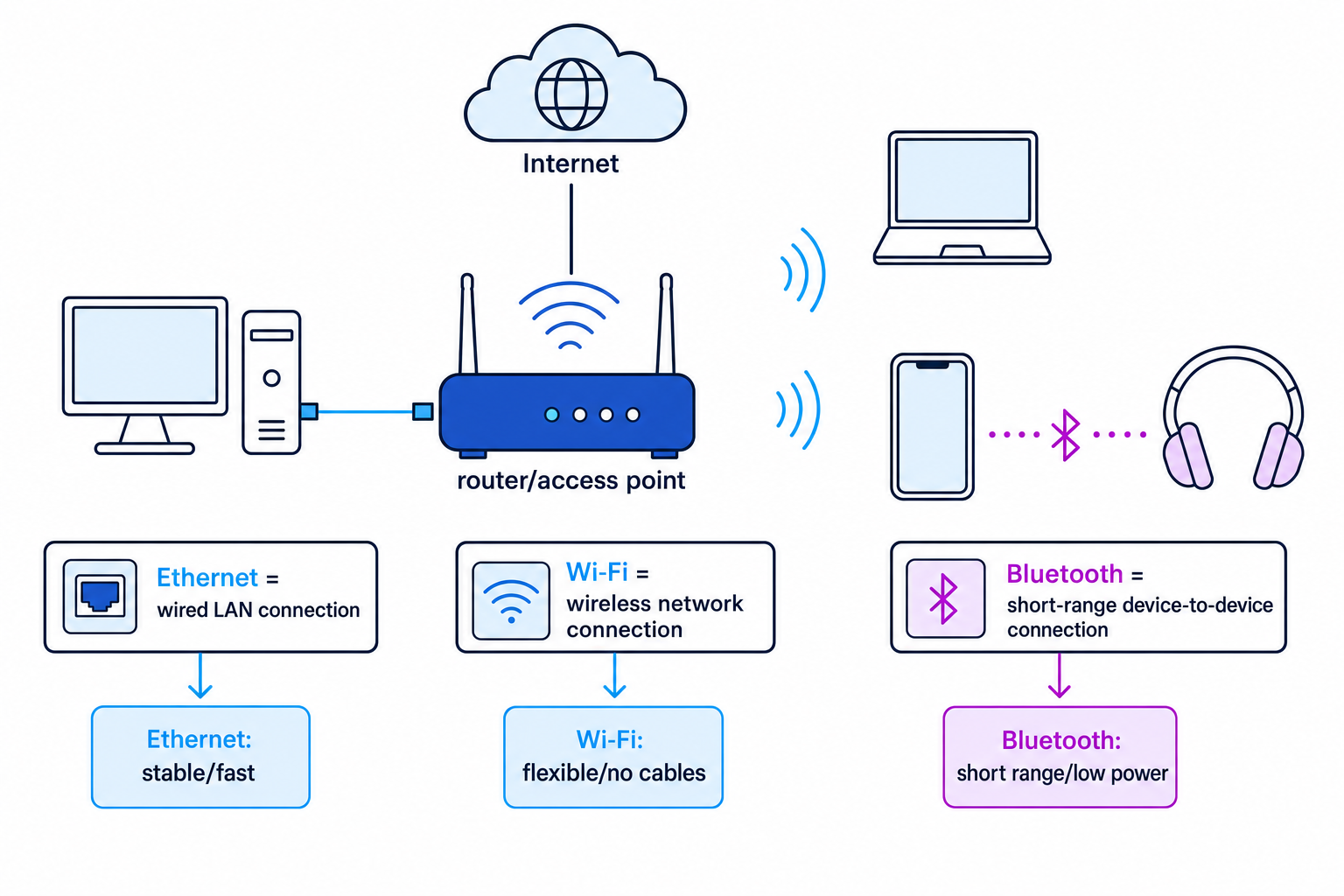
Ethernet is a common wired method for connecting devices in a local area network, usually using network cables.
Ethernet is often used for desktop PCs, servers, games consoles and other devices that do not need to move around.
Benefits of Ethernet:
- Usually fast and reliable.
- Less affected by interference than wireless.
- More secure than wireless in the sense that an attacker normally needs physical access to the cable or network equipment.
- Good for devices that need a stable connection.
Drawbacks of Ethernet:
- Devices are less portable because they must be near a cable.
- Installing cables can be expensive or inconvenient.
- Cables can be damaged or create clutter.
Wireless connections: Wi-Fi and Bluetooth
Definition
Wi-Fi and Bluetooth
Wi-Fi connects devices wirelessly to a network, often through a router or wireless access point. Bluetooth is a short-range wireless connection commonly used between nearby devices, such as a phone and headphones.
Wi-Fi is useful for laptops, tablets and phones because users can move around. Bluetooth is useful when the devices are very close together and only need a low-power connection.
Benefits of wireless connections:
- No cables are needed.
- Devices are easier to move around.
- Usually quicker and cheaper to set up in an existing building.
Drawbacks of wireless connections:
- Signals can be affected by walls, distance and interference.
- Speeds may be lower or less consistent than wired connections.
- Wireless networks need security settings to reduce unauthorised access.
- Bluetooth has a short range and is not designed for large amounts of network traffic.
Example
Recommending a connection type
A school wants to connect a computer room of desktop PCs, staff laptops and wireless keyboards. Recommend suitable connection types.
- The desktop PCs do not need to move and need stable access to shared files and the internet, so Ethernet is the best choice for them.
- The staff laptops need mobility around the building, so Wi-Fi is more suitable than Ethernet.
- The wireless keyboards only need to communicate over a very short distance with one computer, so Bluetooth is suitable.
- A good final recommendation is to use Ethernet for fixed desktop PCs, Wi-Fi for mobile laptops and Bluetooth for short-range peripherals.
Common Mistake
Wireless does not always mean Wi-Fi
Bluetooth is wireless, but it is not the same as Wi-Fi. Wi-Fi is normally used to join a network; Bluetooth is normally used for short-range device-to-device connections.
Encryption
When data travels across a network, it may pass through equipment that is not controlled by the sender or receiver. This creates a risk that the data could be intercepted.
Definition
Encryption
Encryption is the process of converting readable data, called plaintext, into an unreadable form, called ciphertext, so that only authorised users can understand it.
Encryption uses rules and a key. A key is extra information needed to encrypt or decrypt the data. The main GCSE principle is that encryption protects data if it is intercepted during transmission.
HTTPS uses encryption to make web communication more secure than HTTP.
Key Idea
Encryption protects confidentiality
Encryption does not stop data being intercepted. It makes intercepted data difficult to understand without the correct key.
IP addresses and MAC addresses
Networks need addresses so that data can be sent to the correct destination.
IP addresses
Definition
IP address
An IP address identifies a device on a network so data can be sent to it. IP addresses are used when sending data across networks, including the internet.
There are two formats you need to recognise.
IPv4
An IPv4 address is written as four denary numbers separated by full stops. Each number is from 0 to 255.
Example: 192.168.1.25
IPv6
An IPv6 address is written in hexadecimal, using groups separated by colons.
Example: 2001:0db8:0000:0000:0000:0000:0000:0042
IPv6 was introduced because the number of possible IPv4 addresses is limited.
MAC addresses
Definition
MAC address
A MAC address is a hardware address assigned to a device’s network interface. It is used within a local network to identify the correct device.
A MAC address is usually written as six pairs of hexadecimal digits, separated by hyphens or colons.
Example: 3A-7F-00-9B-C2-10
A device can have more than one network interface. For example, a laptop may have one MAC address for Wi-Fi and another for Ethernet.
Example
Recognising address formats
Classify these addresses: 172.16.4.9, 192.168.0.300, 3A-7F-00-9B-C2-10, 2001:0DB8:0000:0000:0000:0000:0000:0042.
172.16.4.9has four denary numbers separated by full stops, and each number is between 0 and 255, so it could be an IPv4 address.192.168.0.300has four denary numbers, but 300 is outside the allowed IPv4 range of 0 to 255, so it is not a valid IPv4 address.3A-7F-00-9B-C2-10has six pairs of hexadecimal digits separated by hyphens, so it matches the usual MAC address format.2001:0DB8:0000:0000:0000:0000:0000:0042uses hexadecimal groups separated by colons, so it matches the IPv6 format.
Common Mistake
IP address versus MAC address
An IP address is used for sending data across networks. A MAC address identifies a device’s network interface within a local network.
Standards
Definition
Standard
A standard is an agreed set of rules or specifications for how something should work.
In computing, standards allow hardware and software from different manufacturers or producers to work together. Without standards, one company’s laptop might not be able to connect to another company’s router, or one browser might not understand the same web data as another browser.
You do not need to memorise individual standards for this section. Focus on the principle: standards make systems compatible.
Key Idea
Why standards matter
Standards support interoperability, meaning different devices, software and systems can work together correctly.
Communication protocols
Definition
Protocol
A communication protocol is a set of rules for transferring data between devices.
Protocols define things such as how data is formatted, how devices begin communication and what should happen when data is received. Different protocols are used for different purposes.
A client is a device or program that requests a service. A server is a device or program that provides a service.
| Protocol | Name | Main purpose and key features |
|---|---|---|
| TCP/IP | Transmission Control Protocol / Internet Protocol | The main protocol suite used for communication across networks and the internet. TCP helps manage reliable delivery of data packets; IP handles addressing and routing. |
| HTTP | Hyper Text Transfer Protocol | Transfers web pages and web resources between a web server and a browser. It is not encrypted by itself. |
| HTTPS | Hyper Text Transfer Protocol Secure | A secure version of HTTP that uses encryption to protect web data. Used for logins, payments and private information. |
| FTP | File Transfer Protocol | Transfers files between a client and a server. |
| POP | Post Office Protocol | Retrieves email from a mail server, often downloading it to one device. |
| IMAP | Internet Message Access Protocol | Accesses and synchronises email stored on a mail server, useful when reading email on multiple devices. |
| SMTP | Simple Mail Transfer Protocol | Sends email from a client to a mail server and between mail servers. |
Example
Choosing suitable protocols
A user logs in to an online shop, uploads a product image, and receives an email confirmation that they read on both a phone and laptop.
- The login should use HTTPS because it is web communication and the password needs encryption.
- Uploading the product image could use FTP because FTP is designed for file transfer between a client and server.
- Sending the confirmation email uses SMTP because SMTP is used for sending email.
- Reading the email on both a phone and laptop is best matched with IMAP because messages stay on the server and can be synchronised across multiple devices.
Tip
Remembering email protocols
SMTP is for sending mail. POP and IMAP are for receiving or accessing mail.
Layers
Network communication is complex. Many jobs have to happen: applications create data, addresses are used, data is split up, data travels through hardware, and the receiving device rebuilds the message.
Definition
Layer
A layer is one level in a networking model. Each layer handles part of the communication process and works with the layers above and below it.
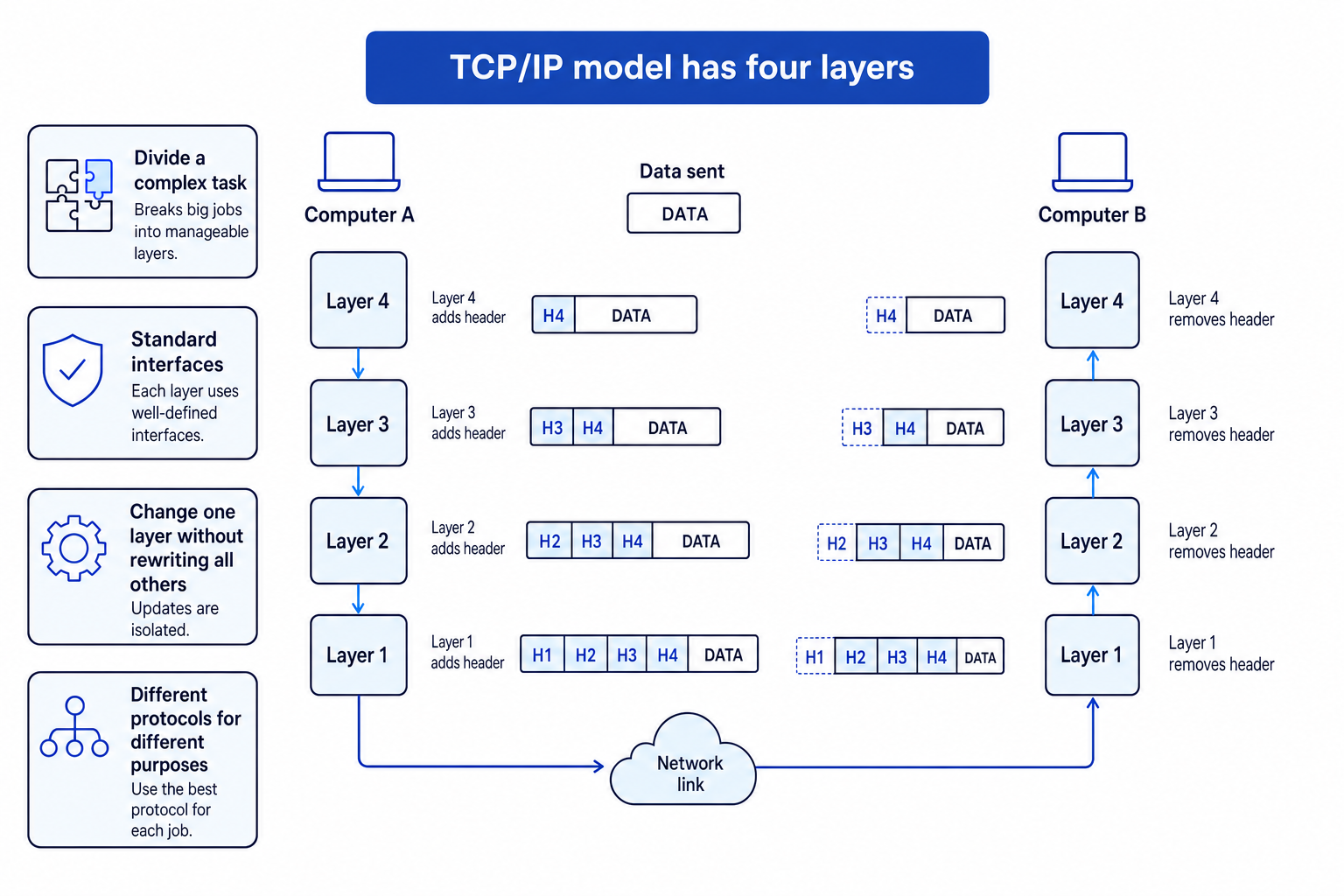
In a layered model, data passes down through the layers on the sending device, across the network, and up through the layers on the receiving device. Each layer follows rules and may add extra control information. The receiving device removes and uses that control information.
The TCP/IP model has four layers. For OCR GCSE, you need the concept of layers and their benefits; you do not need to learn the names and functions of each TCP/IP layer.
Benefits of layers:
- They break a complex process into smaller, manageable parts.
- Each layer can be developed, tested or changed separately.
- They allow different protocols to be used for different tasks.
- They support standards, so hardware and software from different producers can work together.
- A change in one layer does not necessarily require every other layer to be rewritten.
Example
Explaining why layers help
A laptop changes from Wi-Fi to Ethernet, but the user can still browse the same secure website.
- The user is still requesting web pages securely, so the same high-level web protocol, HTTPS, can still be used.
- The physical connection method has changed from wireless to wired, but the layered model separates that part of the process from the web communication.
- Because layers use agreed interfaces, the browser and website do not need to be redesigned just because the connection method changed.
- This shows one benefit of layers: one part of network communication can change while other parts continue to work.
Common Mistake
Stay within GCSE depth
You do not need to explain how Ethernet, Wi-Fi or Bluetooth work internally, and you do not need to memorise the names and functions of each TCP/IP layer.
Exam technique
In the exam
- For comparison questions, give both a benefit and a drawback, then link your point to the scenario.
- For protocol questions, name the protocol and state its purpose, such as HTTPS for encrypted web pages or SMTP for sending email.
- For addressing questions, check the format carefully: IPv4 uses four denary numbers from 0 to 255, IPv6 uses hexadecimal groups with colons, and MAC addresses use hexadecimal pairs.
Self review
Check yourself
- When would Ethernet be a better choice than Wi-Fi?
- What is the difference between an IP address and a MAC address?
- Which protocols are used for sending email, accessing email and secure web pages?

Recap questions
Test yourself with 5 quick questions on this guide. Answer them all correctly to complete it.
You've reached the end
Test yourself on this topic, or move on to the next guide.
How was this guide?