Revision notes for OCR GCSE Computer Science Threats to computer systems and networks. Open the guide for explanations and worked examples. Written against the OCR GCSE Computer Science (J277) specification, so the content matches what's examinable rather than general Computer Science background.
Threats to computer systems and networks
No matter how sophisticated a computer network is, it is always vulnerable to security threats. Developers and network managers must constantly defend against threats that target hardware, software, data, and the human beings who run them.
In this section, we will break down the primary threats to computer systems and networks as defined by the OCR GCSE Computer Science specification (J277).
What you'll learn
- The definitions, purposes, and impacts of different types of malware.
- How social engineering attacks, such as phishing, exploit human vulnerabilities.
- How technical attacks—like brute-force, Denial of Service (DoS), data interception, and SQL injection—are executed.
1. Malware
The term "malware" is a portmanteau of two words: malicious and software.
Definition
Malware
Malware is an umbrella term for any hostile or intrusive software designed to disrupt, damage, or gain unauthorized access to a computer system or network.
Malware is installed on a device without the user’s knowledge or consent. This usually happens when a user clicks a malicious link, downloads an infected email attachment, or plugs in a compromised USB drive.
Types of Malware
You need to be able to identify and explain the specific purposes of these common types of malware:
- Viruses: Malicious programs that attach themselves to clean files (such as programs or documents) and spread across a system by replicating themselves when the host file is executed.
- Worms: Similar to viruses, but with one key difference: they do not need a host file. Worms are self-replicating programs that travel independently across network connections, rapidly exploiting security vulnerabilities in network protocols.
- Trojans: Malicious software disguised as legitimate, harmless software (named after the Trojan Horse of Greek mythology). Users are tricked into downloading and running them, which then unleashes their payload (e.g., opening a backdoor for an attacker).
- Spyware: Software that secretly monitors and records a user's activity (such as webcam usage or websites visited).
- Keyloggers: A specific subtype of spyware that records every keystroke made by the user. This is highly effective at stealing usernames, passwords, and credit card details.
- Ransomware: Malware that encrypts a user's files or locks their screen, making their system unusable. The attacker then demands a payment (a ransom) to provide the decryption key.
Common Mistake
Viruses vs. Worms
Do not use "virus" as a generic word for all malware. In the exam, if you write that a system is infected with a "virus" when the scenario describes a self-replicating threat over a network without host files, you may lose marks. Remember: viruses require human action and a host file to execute; worms exploit network vulnerabilities to spread automatically.
2. Social Engineering
Many people think of hacking as a purely technical activity. However, cybercriminals often find it much easier to hack the people using the computers rather than the security software itself.
Definition
Social Engineering
Social engineering is the art of manipulating, tricking, or deceiving people into giving away confidential information, or performing actions that compromise network security.
In any computer network, people are often the weakest point. Even if a company installs millions of pounds of security hardware, a single employee clicking on a bad link or giving away their password can compromise the entire network.
Phishing
The most common form of social engineering is phishing.
- How it is used: Attackers send fraudulent communications (usually emails, but sometimes SMS or phone calls) designed to look like they come from a trustworthy, legitimate organization (such as a bank, utility company, or school). These messages often contain a link to a fake, look-alike website.
- The purpose: To trick the recipient into entering sensitive personal data (like login credentials or credit card numbers) or installing malware (by tricking them into opening a malicious email attachment).
Key Idea
Spotting a Phishing Attack
Phishing emails often share common red flags:
- Urgency: Threatening that an account will be closed or a fine will be issued if action isn't taken immediately.
- Generic Greetings: Addressing the recipient as "Dear Customer" instead of using their actual name.
- Spoofed Senders: Email addresses that look close to, but are not exactly, the official domain name (e.g.,
security@paypa1.cominstead ofsecurity@paypal.com). - Suspicious Links: Hyperlinks that point to an unexpected web address when hovered over.
3. Brute-Force Attacks
A technical form of attack that targets access controls is the brute-force attack.
Definition
Brute-force Attack
A brute-force attack is a trial-and-error method used by attackers to decode encrypted data or gain access to a system by systematically trying every possible combination of passwords or keys until the correct one is found.
- How it is used: Attackers use automated software tools that can input thousands of password combinations per second. They may use a dictionary attack (trying common words and previously leaked passwords) or a true brute-force approach (trying every possible sequence of letters, numbers, and symbols).
- The purpose: To crack passwords, bypass authentication barriers, and gain unauthorized access to accounts, administrative panels, or encrypted files.
Tip
Defending against Brute-Force
Networks defend against brute-force attacks by using account lockouts (locking the account after 3 or 5 failed attempts) or requiring a reCAPTCHA to ensure a human is logging in, which prevents automated software from spamming the system.
4. Denial of Service (DoS) Attacks
While some attacks aim to steal data, others simply want to stop a business or service from functioning.
Definition
Denial of Service (DoS)
A Denial of Service (DoS) attack is an attempt to make a machine or network resource unavailable to its intended users by temporarily or indefinitely disrupting services of a host connected to the Internet.
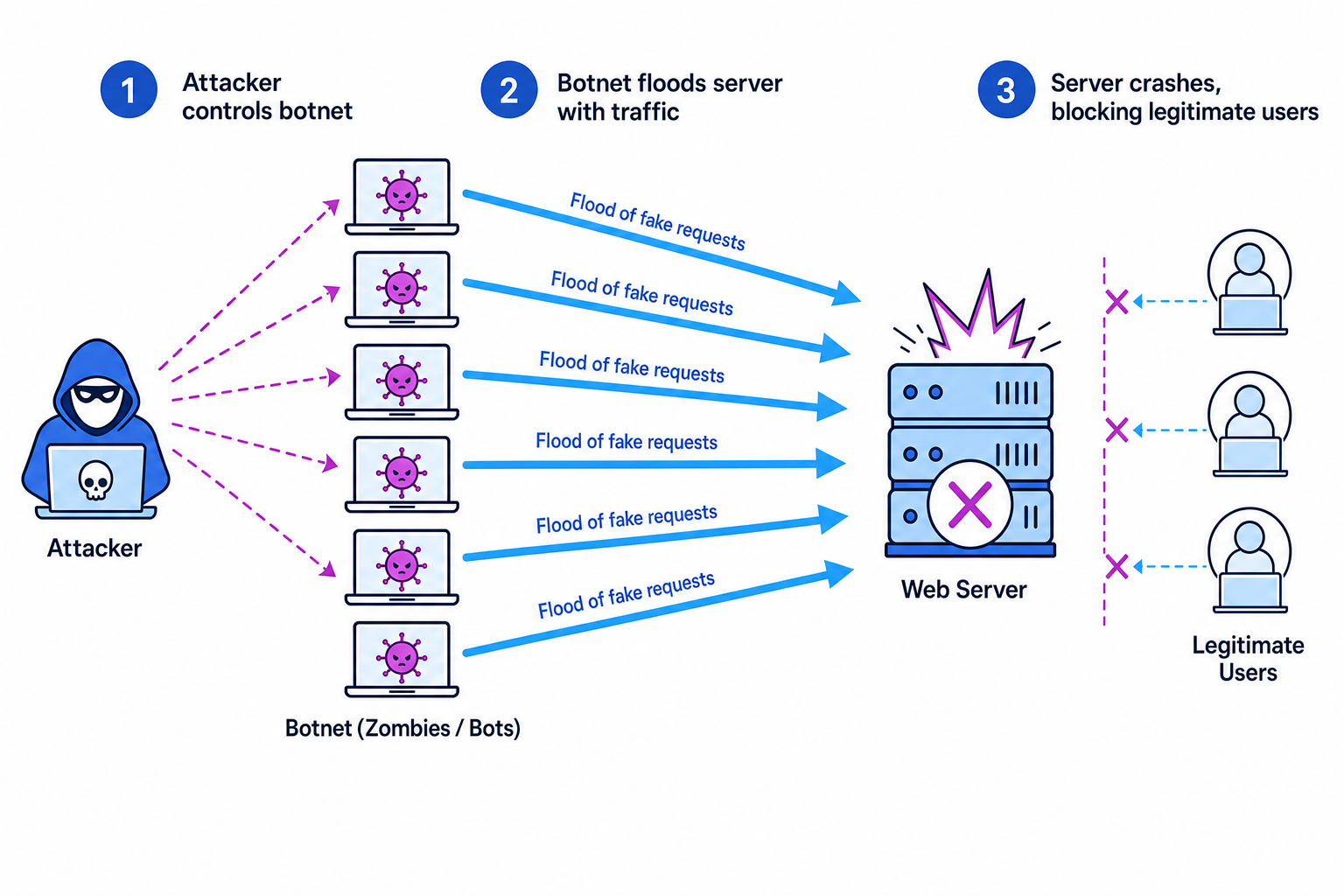
- How it is used: The attacker sends a massive flood of dummy requests or fake data packets to a target server. This completely overloads the server’s processing power and internet bandwidth.
- Distributed Denial of Service (DDoS): Because a server can easily block traffic coming from a single computer, hackers use malware to infect thousands of ordinary computers worldwide. These infected computers form a botnet (a network of "zombies"). When the attacker gives the command, the entire botnet floods the target server simultaneously.
- The purpose: To cause severe financial damage, ruin a company's reputation, or distract IT staff while another, more subtle attack is being carried out.
5. Data Interception and Theft
When data travels across a network (such as Wi-Fi or the Internet), it is split into packets and sent along communication lines. If these lines are unprotected, they can be listened to.
Definition
Data Interception
Data interception (sometimes called packet sniffing) is the act of monitoring and capturing data packets as they travel across a network.
- How it is used: Attackers connect hardware or software called a packet sniffer to a network transmission medium (such as an open public Wi-Fi network). The packet sniffer copies packets as they pass by.
- The purpose: To steal sensitive data—such as passwords, credit card numbers, or confidential emails—that is being transmitted in unencrypted "plain text".
Key Idea
Encryption is the Shield
The primary defence against data interception is encryption. If data packets are intercepted but are encrypted, they will appear to the attacker as useless, unreadable scrambled code.
6. SQL Injection
Many modern websites rely on databases to function. For example, when you log in, the website takes your input and queries a database to see if your password matches. This querying is done using a database language called SQL (Structured Query Language).
Definition
SQL Injection
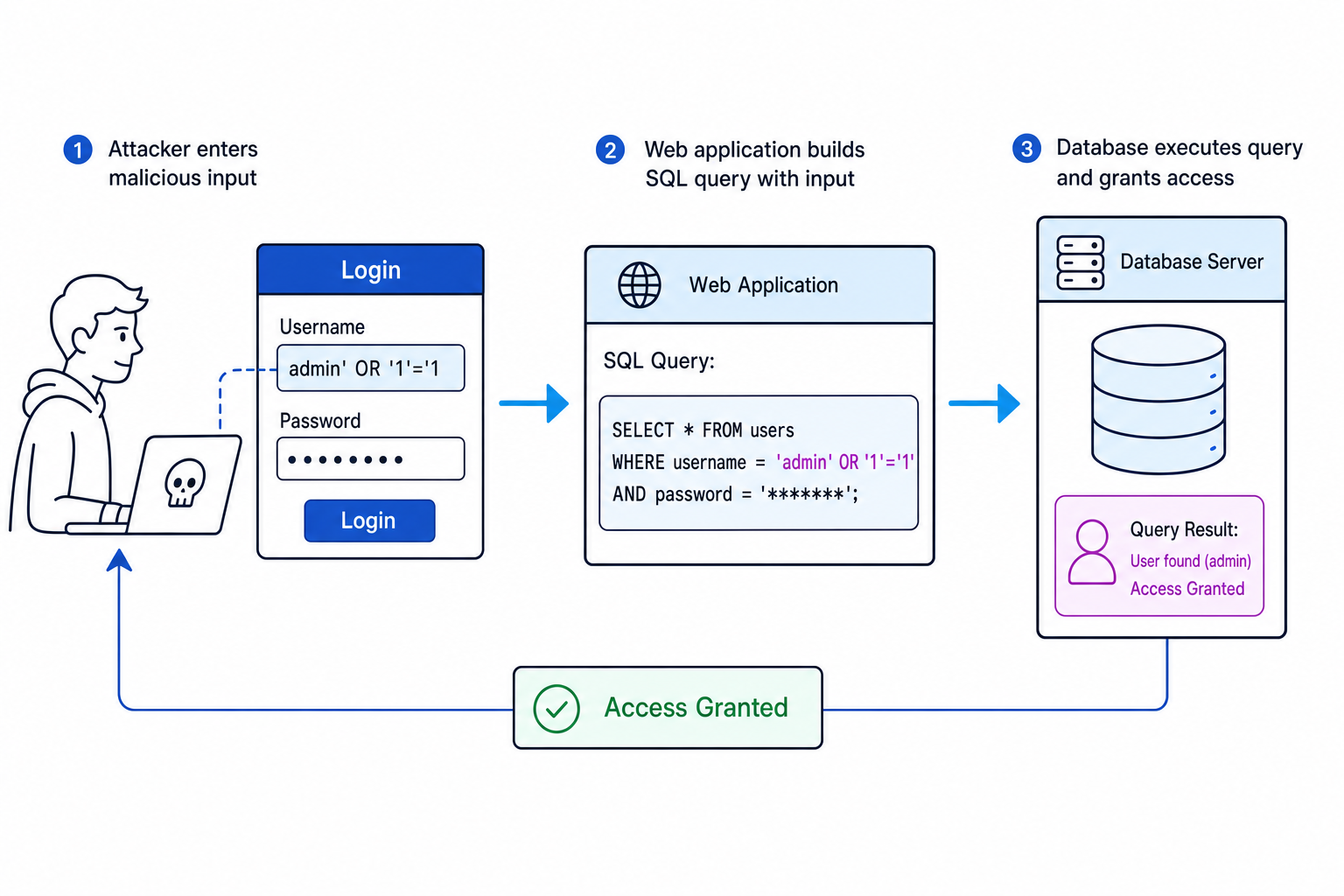
An SQL injection is an attack technique where malicious SQL statements are inserted into entry fields (like login forms or search boxes) to manipulate the database database query executed by the web application.
- How it is used: If a website has poorly written input validation, an attacker can type SQL commands (such as
' OR '1'='1) into a text input box instead of a standard username. If the website does not clean this input, it will combine the attacker's text directly with the SQL query string and execute it. - The purpose: To bypass login screens without a password, view private user databases, modify records, or delete entire database tables.
Common Mistake
Input Validation
To prevent SQL injection, software developers must use input validation (checking that inputs contain only permitted characters, like letters and numbers, and do not contain database commands) and prepared statements (parameterised queries that treat inputs strictly as data, never as executable code).
Worked Example: Identifying and Analyzing Security Threats
When tackling scenario-based exam questions, you must accurately match a real-world scenario to the specific technical attack and justify your answer based on its technical characteristics.
Example
Analyzing a network breach scenario
Scenario: An online retail company notices that its server logs are filled with millions of incomplete page requests coming from thousands of different IP addresses globally. As a result, genuine customers are unable to access the checkout page, and the site has crashed.
Task: Identify the form of attack occurring in this scenario and explain how the system has been compromised.
Step-by-step Solution:
- Identify the core system symptom: Observe the main effect of the attack. Here, the target server is overwhelmed by massive, fake traffic ("millions of incomplete page requests"), resulting in the system crashing and becoming unavailable to actual clients ("genuine customers are unable to access").
- Determine the scope of the sources: Note where the traffic is originating. The prompt states the requests are coming from "thousands of different IP addresses globally". This indicates a highly coordinated effort using multiple devices (a botnet), rather than a single source machine.
- Select the correct term: Combine the symptoms (overloading a resource to make it unavailable) and the multi-source delivery method. The correct term is a Distributed Denial of Service (DDoS) attack.
- Formulate the explanation: Explain the mechanics of the attack in detail. State that an attacker has hijacked thousands of devices using malware to create a botnet. This botnet was directed to flood the online retailer's server with fake requests, consuming all of its processing capability and network bandwidth so that legitimate requests are blocked.
Exam technique
In the exam
- Be precise with terminology: Do not use vague terms like "hacker" or "virus" to describe every threat. Use the precise terms from the spec, such as phishing, brute-force, DDoS, SQL injection, or malware.
- Explain "Purpose" vs "Method": Exam questions often ask for either how an attack works (method) or why the hacker does it (purpose). Keep them separate: SQL injection's method is inputting database commands; its purpose is stealing, viewing, or modifying database records.
- People are key: If a question asks about the "weak point" of a network, discuss social engineering and how users are manipulated due to a lack of awareness or training.
Self review
Check yourself
- Why are "worms" considered more dangerous to a local area network (LAN) than a traditional file-based virus?
- Describe step-by-step how a phisher might use a look-alike URL to steal a user's banking password.
- How does input validation protect a web application's database from an SQL injection attack?

Recap questions
Test yourself with 5 quick questions on this guide. Answer them all correctly to complete it.
You've reached the end
Test yourself on this topic, or move on to the next guide.
How was this guide?