Revision notes for OCR GCSE Computer Science Utility software. Open the guide for explanations and worked examples. Written against the OCR GCSE Computer Science (J277) specification, so the content matches what's examinable rather than general Computer Science background.
Utility software
What you'll learn
- What utility software is and how it fits into systems software.
- Why computers often include utilities for routine “housekeeping” tasks.
- The purpose of encryption, defragmentation and data compression software.
- How to choose the correct utility for a given problem in an exam scenario.
Systems software recap
Systems software is software that helps the computer manage its hardware and provide a platform for other programs. The main example is the operating system.
The operating system controls jobs such as managing files, memory, processes and devices. However, computers often need extra maintenance, security or optimisation tasks. These are handled by utility software.
Definition
Utility software
Utility software is a type of systems software that performs maintenance, security or optimisation tasks to help a computer system run safely and efficiently.
Utilities may come already installed with the operating system, be provided by the computer manufacturer, or be installed separately by the user. They often perform housekeeping tasks, meaning routine jobs that keep the system organised, protected or working well.
Key Idea
Utility software adds specialist support
Utility software is needed for additional tasks that may not be carried out fully by the operating system itself, such as encrypting files, defragmenting a hard disk drive, or compressing data.
Common Mistake
Utility software is not just any useful program
A word processor is useful, but it is application software because it helps the user create documents. Utility software maintains, protects or optimises the computer system or its data.
The three utilities you need for J277
For OCR J277 section 1.5.2, focus on these three utility software types:
| Utility | Main purpose | Typical reason it is needed |
|---|---|---|
| Encryption software | Makes data unreadable without the correct key or password | Protects sensitive data from unauthorised access |
| Defragmentation software | Rearranges file fragments on a hard disk drive | Improves access speed on magnetic hard disks |
| Data compression software | Reduces the size of files or folders | Saves storage space and reduces transfer time |
Example
Choosing the right utility
A school wants to send a confidential spreadsheet to a teacher, but the file is also too large to email.
- The word confidential tells you the data needs protection from unauthorised access, so encryption software should be used.
- The file being too large means its size needs reducing, so data compression software should also be used.
- Defragmentation would not solve either problem because it only rearranges how files are stored on a hard disk drive; it does not protect the spreadsheet or reduce its email attachment size.
Encryption software
Encryption protects data by converting it into a form that cannot be understood without the correct method of reversing it.
Definition
Encryption
Encryption is the process of converting readable data, called plaintext, into unreadable data, called ciphertext, so that only authorised users can access the original data.
To read the data again, it must be decrypted, meaning converted back from ciphertext into plaintext. This usually requires a correct key or password. You do not need to know specific encryption algorithms for this section.
Encryption software can be used to protect individual files, folders, removable drives, backups or whole storage devices.
Why encryption is required
Encryption is required because data can be stolen, lost or intercepted. For example:
- A laptop containing personal data might be left on a train.
- A USB drive might be lost.
- A file might be sent over a network.
- A backup might be stored somewhere outside the organisation.
If the data is encrypted, someone who finds or intercepts it should not be able to understand it without the correct key or password.
Example
Protecting a lost laptop
A company laptop stores customer addresses and payment details. The laptop is lost on a train.
- The data is sensitive because it includes personal and financial information, so unauthorised access would be a serious risk.
- Encryption software can convert the stored files into ciphertext, so the data is not readable just by opening the storage device.
- If the finder does not have the correct key or password, they should not be able to decrypt the files, reducing the risk of a data breach.
Common Mistake
Encryption does not stop data being deleted
Encryption protects the confidentiality of data by making it unreadable to unauthorised users. It does not automatically stop someone deleting the encrypted file or damaging the device.
Defragmentation software
A hard disk drive, often shortened to HDD, is a magnetic secondary storage device with moving parts. Files on an HDD are stored in small sections across the disk.
Over time, as files are created, deleted and changed, a file may become split into separate pieces stored in different places. This is called fragmentation.
Definition
Defragmentation
Defragmentation is the process of rearranging file fragments on a magnetic hard disk drive so that each file is stored more contiguously and free space is grouped together.
The word contiguous means “next to each other”. If the parts of a file are stored close together, the HDD’s read/write head does not need to move around as much to load the file.
Defragmentation is useful for magnetic hard disk drives because they have moving parts. It is not needed for solid state drives, or SSDs, because SSDs use flash memory and do not have a moving read/write head.
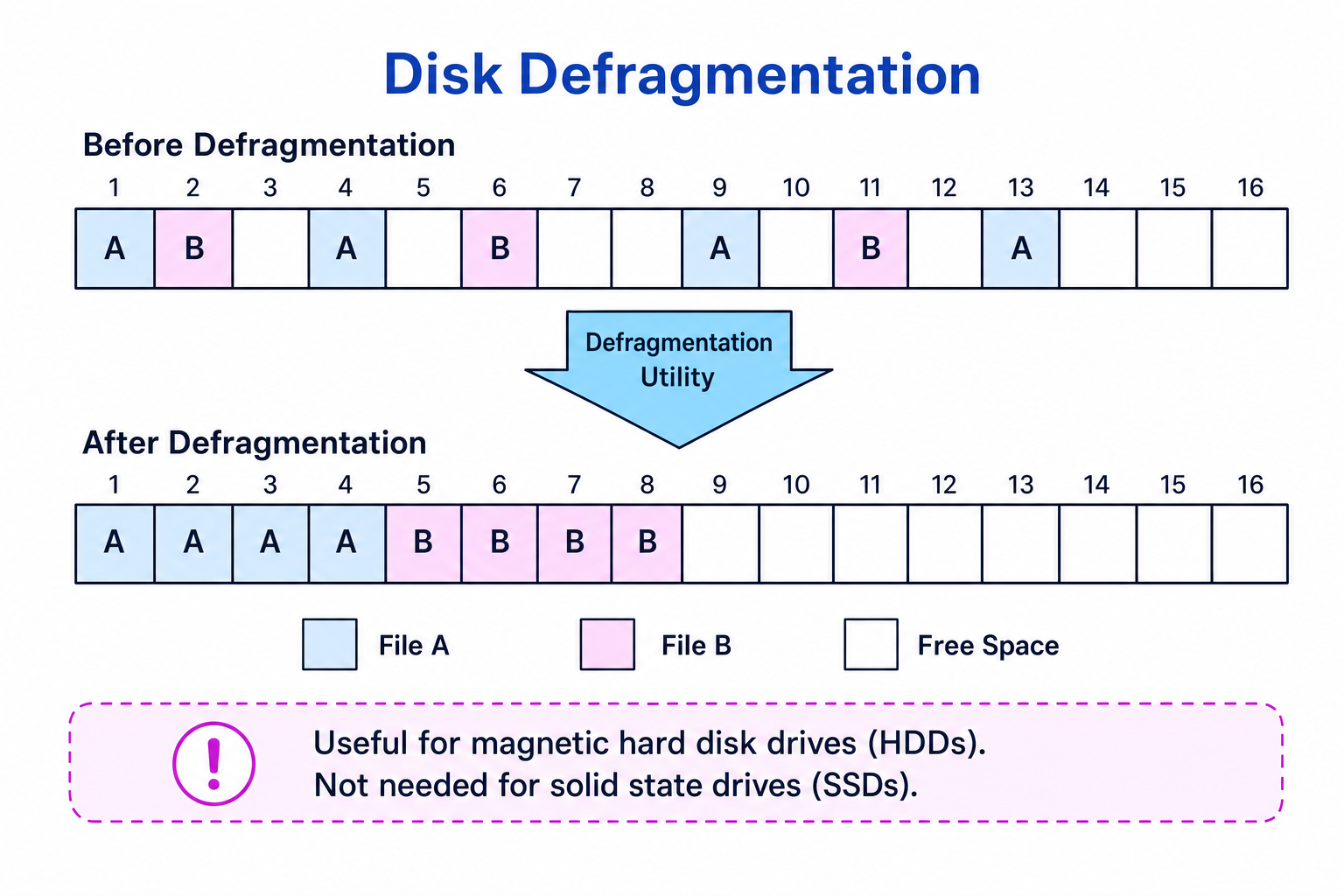
Why defragmentation is required
Defragmentation may be required when a magnetic HDD has become fragmented and file access has slowed down. The utility reorganises the disk so that files can be read more efficiently.
Example
Explaining a fragmented file
A file is stored in blocks 2, 9 and 15 on a magnetic hard disk drive.
- The file is fragmented because its parts are not stored next to each other.
- To read the whole file, the HDD’s read/write head must move to several different positions on the disk, which can make access slower.
- A defragmentation utility can move the file parts into consecutive blocks, reducing unnecessary movement and improving access speed.
Common Mistake
Do not recommend defragmenting an SSD
In an exam, link defragmentation to magnetic hard disk drives. SSDs do not benefit in the same way because they have no moving read/write head.
Common Mistake
Defragmentation is not compression
Defragmentation rearranges where file parts are stored on a disk. It does not reduce the amount of data in the file.
Data compression software
Data compression reduces the size of data. Compression software may compress a single file or combine several files into a smaller compressed archive, such as a zipped folder.
Definition
Data compression
Data compression is the process of reducing the number of bits needed to store or transmit data.
A compressed file may need to be decompressed before it can be used normally. Decompression means restoring the data into a usable form.
Why data compression is required
Compression is required when file size matters. It can:
- save storage space
- reduce upload and download time
- reduce network bandwidth usage
- make files small enough to send as email attachments
- make backups quicker or smaller
Some compression is lossless, meaning the original data can be restored exactly. Some is lossy, meaning some detail is permanently removed to reduce the file size further. You are not required to know specific compression algorithms here.
Tip
Storage unit convention
In OCR J277, file-size prefixes use powers of 10: 1 kB = 1,000 B, 1 MB = 1,000 kB, and so on up to petabyte. Using 1,024 is accepted as an alternative, but powers of 10 are the specification’s convention.
Example
Calculating storage saved by compression
A folder is 100 MB before compression. After compression, it is 60 MB.
- Find the storage saved by subtracting the compressed size from the original size: 100−60=40100 - 60 = 40100−60=40 MB.
- Compare the saving with the original size: 40100=0.4\frac{40}{100} = 0.410040=0.4.
- Convert to a percentage: 0.4×100=40%0.4 \times 100 = 40\%0.4×100=40%, so the compression has reduced the storage needed by 40%.
Common Mistake
Compression is not the same as encryption
Compression reduces file size. Encryption protects data by making it unreadable without the correct key or password. A file can be compressed, encrypted, both, or neither.
Bringing it together
Utility software is part of systems software because it supports the computer system rather than directly creating user work like a presentation or spreadsheet. The key exam skill is to connect the problem in the scenario to the utility’s purpose.
| Scenario | Best utility | Why |
|---|---|---|
| A lost USB drive contains private medical data | Encryption | Stops unauthorised users reading the data |
| An old magnetic HDD is slow because files are scattered | Defragmentation | Rearranges file fragments to improve access speed |
| A video file is too large to upload quickly | Data compression | Reduces file size and transfer time |
| A company wants smaller backups | Data compression | Uses less storage space |
| A business laptop stores confidential documents | Encryption | Protects sensitive files if the device is stolen |
Exam technique
In the exam
- Link the utility to the problem: security means encryption, scattered files on an HDD means defragmentation, large file size means compression.
- Explain the effect, not just the name: for example, encryption makes data unreadable without the correct key.
- Avoid going beyond the spec: you do not need to describe specific encryption or compression algorithms.
Self review
Check yourself
- Why might a computer need utility software in addition to its operating system?
- What does encryption do to plaintext data?
- Why is defragmentation useful for an HDD but not needed for an SSD?

Recap questions
Test yourself with 5 quick questions on this guide. Answer them all correctly to complete it.
You've reached the end
Test yourself on this topic, or move on to the next guide.
How was this guide?