Revision notes for OCR GCSE Computer Science Identifying and preventing vulnerabilities. Open the guide for explanations and worked examples. Written against the OCR GCSE Computer Science (J277) specification, so the content matches what's examinable rather than general Computer Science background.
Identifying and preventing vulnerabilities
What you'll learn
- What a vulnerability is, and how it differs from a threat.
- How common prevention methods reduce attacks such as malware, brute-force attacks and data interception.
- Why security is usually strongest when several methods are combined.
- How to explain how a method limits an attack in an exam answer.
Threats, vulnerabilities and controls
Network security means protecting networked computers, users, data and services from unauthorised access, damage or theft.
A threat is a possible danger to a system, such as malware, phishing, brute-force attacks, denial of service, data interception or SQL injection. A vulnerability is a weakness that could allow a threat to cause harm. An exploit is when an attacker uses a vulnerability.
Definition
Vulnerability
A vulnerability is a weakness in a computer system, network, software, user behaviour or physical setup that could be exploited by an attacker.
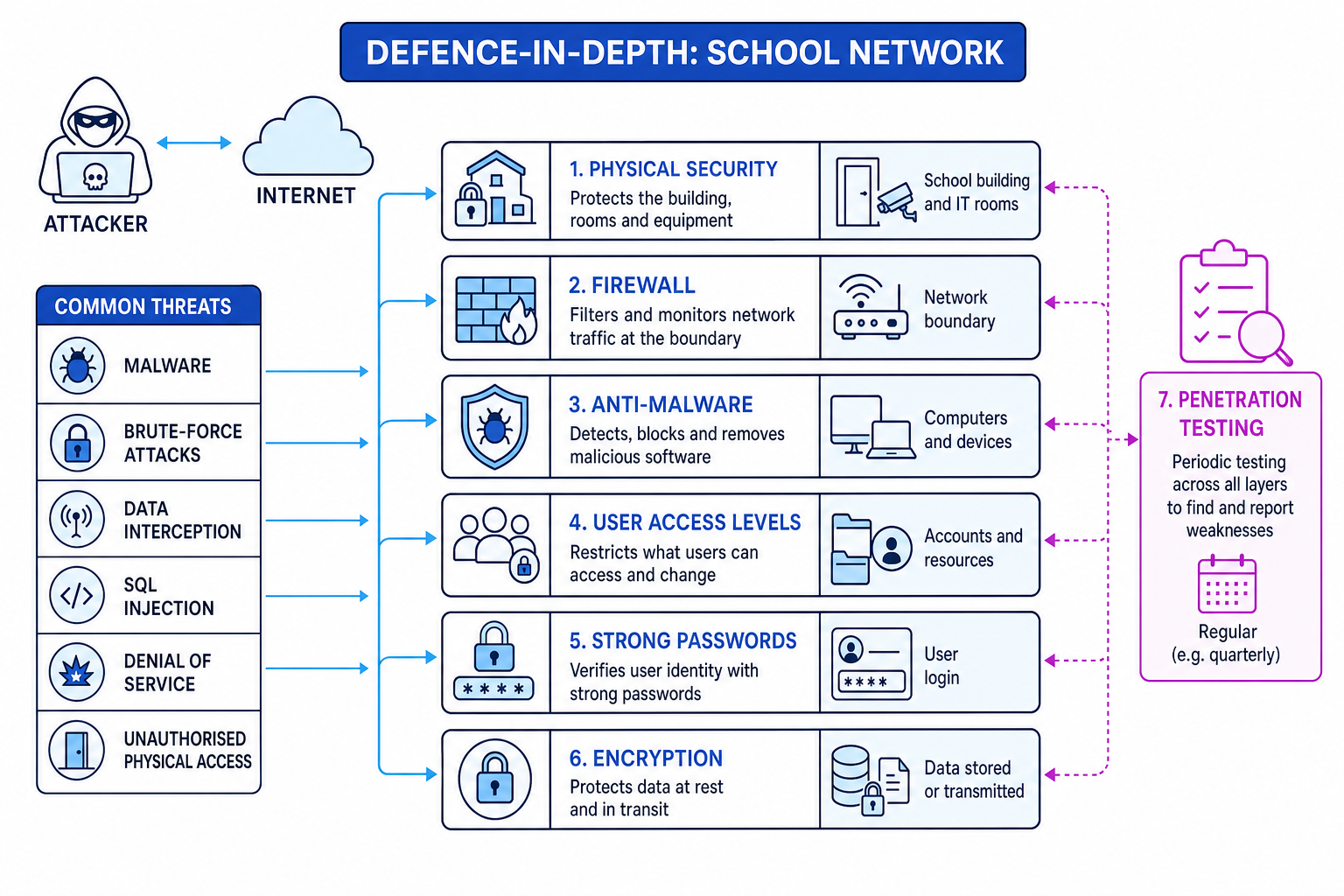
A control is a security measure used to reduce risk. In this topic, the main controls are penetration testing, anti-malware software, firewalls, user access levels, passwords, encryption and physical security.
Removing a vulnerability means fixing the weakness, not just noticing it. For example, an organisation might change a default password, update software, close an unnecessary network service, restrict permissions, or lock equipment in a secure room.
Defence in depth
One security method is rarely enough. Defence in depth means using several layers of protection so that if one layer fails, another layer can still reduce the damage.
For example, a strong password may stop many unauthorised logins, but if a password is stolen through phishing, user access levels can still limit what the attacker can reach.
Key Idea
Security reduces risk
Prevention methods do not guarantee that an attack is impossible. They reduce the chance of success, reduce the damage caused, or help find weaknesses before attackers do.
Penetration testing
Penetration testing is an authorised attempt to find vulnerabilities by testing a system in a controlled way. The tester acts like an attacker, but with permission and agreed limits.
It may identify weaknesses such as:
- weak or default passwords
- insecure firewall settings
- software that has not been updated
- SQL injection vulnerabilities
- pages or files that should not be publicly accessible
A penetration test limits attacks because the organisation can fix vulnerabilities before a real attacker finds them.
Example
Using penetration testing to find a website weakness
- The school gives a tester permission to test its website login and search pages, so the activity is legal and controlled.
- The tester enters unexpected input into a form and checks whether the website behaves incorrectly or reveals database information.
- If the form input can affect the database query, the tester reports a possible SQL injection vulnerability.
- The developers fix the input handling and retest the page to check the vulnerability has been removed.
Anti-malware software
Malware is malicious software designed to damage, disrupt, spy on or gain unauthorised access to a computer system. Examples include viruses, worms, Trojans, ransomware and spyware.
Anti-malware software is software that detects, blocks, quarantines or removes malware. To quarantine a file means to isolate it so it cannot run or spread.
Anti-malware software limits malware by:
- scanning files, downloads and email attachments
- checking running programs for suspicious behaviour
- blocking known malicious files
- removing or quarantining infected files
- updating itself so it can recognise newer threats
Common Mistake
Anti-malware is not a complete solution
Anti-malware helps against malware, but it does not automatically stop phishing, weak passwords, SQL injection or all denial-of-service attacks.
Firewalls
A firewall is hardware or software that monitors and filters network traffic using rules. Network traffic means the data moving across a network, usually split into small units called packets.
A firewall can limit attacks by:
- blocking unauthorised incoming connections
- blocking suspicious outgoing connections from malware
- allowing only necessary services through
- filtering traffic from known malicious sources
- helping reduce some denial-of-service traffic
A firewall is often placed at the boundary between a private network and the Internet. Individual devices can also have software firewalls.
Example
Applying firewall rules
- The organisation identifies that public users only need to access the web server, not the internal file server.
- The firewall is configured to allow Internet traffic to the web server for normal web requests.
- The firewall blocks Internet traffic trying to reach the internal file server.
- This reduces unauthorised access because external attackers cannot directly connect to the file server.
Common Mistake
Denial of service limits
A firewall may block or filter some denial-of-service traffic, but a very large attack can still overwhelm the network connection before the firewall can help.
User access levels
User access levels are permissions that control what a user account is allowed to do. Permissions might include reading files, changing files, deleting files, installing software or changing system settings.
The key principle is least privilege: users should only have the access they need to do their job.
For example:
- a student account should not be able to install software on school computers
- a teacher may access class resources but not network administration tools
- an administrator account can change system settings, so it should be carefully protected
User access levels limit attacks because a compromised account causes less damage if it has fewer permissions.
Passwords
A password is a secret string used for authentication, which means checking that a user really is who they claim to be.
Strong password controls can include:
- using long, hard-to-guess passwords
- avoiding common passwords such as
password123 - locking an account after repeated failed login attempts
- changing default passwords on new devices and accounts
Passwords mainly limit unauthorised access and brute-force attacks. A brute-force attack is when an attacker tries many possible passwords until one works.
Example
Limiting damage from a stolen account
- An attacker tricks a student into giving away their password through phishing, which is social engineering using fake messages or websites.
- Because the student account has low access levels, the attacker cannot access staff records or change network settings.
- Account lockout rules also reduce brute-force attacks because repeated wrong guesses are blocked.
- The combined controls reduce both the chance of access and the damage if access happens.
Encryption
Encryption is the process of scrambling readable data into an unreadable form using a key. The readable original is plaintext. The scrambled version is ciphertext. Decryption changes ciphertext back into plaintext for someone with the correct key.
Encryption protects data:
- in transit — while it is being sent across a network
- at rest — while it is stored on a device or server
Encryption limits data interception and theft. If an attacker intercepts encrypted data, they should not be able to understand it without the key.
Example
Protecting intercepted data
- A user sends login details to a website, so the data is in transit across a network.
- The data is encrypted before it is transmitted, turning the readable login details into ciphertext.
- If an attacker intercepts the packets, they capture ciphertext rather than useful plaintext.
- Only the intended system with the correct key can decrypt the data.
Physical security
Physical security means protecting buildings, rooms, devices and network equipment from unauthorised physical access, theft, damage or tampering.
Examples include:
- locked server rooms
- ID badges or swipe cards
- CCTV
- security guards
- locks on laptops or cabinets
- keeping network equipment away from public areas
Physical security limits attacks where someone tries to steal a device, plug in unauthorised equipment, damage hardware, or access a computer that is already logged in.
Matching methods to threats
In exams, several prevention methods may be valid. The important part is explaining how the method limits the threat.
| Threat or vulnerability | Useful prevention methods | How they help |
|---|---|---|
| Malware | Anti-malware, firewall, user access levels | Detects/removes malicious software, blocks suspicious traffic, limits what malware can change |
| Social engineering or phishing | Password rules, user access levels, physical security | Makes accounts harder to misuse and limits damage if a user is tricked |
| Brute-force attack | Strong passwords, account lockout, firewall | Makes guessing harder and can block repeated attempts |
| Denial of service | Firewall | Filters or blocks some suspicious traffic, though it may not stop very large attacks |
| Data interception and theft | Encryption, access levels, physical security | Makes intercepted data unreadable and restricts who can access stored data |
| SQL injection | Penetration testing, improved input handling | Finds the weakness so developers can stop input from changing database queries |
| Unauthorised physical access | Physical security, passwords, encryption | Stops people reaching devices; protects data if a device is stolen |
Tip
Explain the link
A strong answer links the method to the threat: “Encryption protects data interception because intercepted ciphertext cannot be understood without the key.”
Exam technique
In the exam
- Identify the threat or vulnerability in the scenario before choosing a prevention method.
- Name a suitable method and explain the mechanism, such as “filters network traffic”, “restricts permissions” or “scrambles data”.
- Avoid claiming any method is perfect; say it limits, reduces or helps prevent the attack.
Self review
Check yourself
- Which prevention method is best for finding vulnerabilities before attackers do?
- How does encryption reduce the risk of data interception?
- Why are user access levels useful even when passwords are stolen?

Recap questions
Test yourself with 5 quick questions on this guide. Answer them all correctly to complete it.
You've reached the end
Test yourself on this topic, or move on to the next guide.
How was this guide?