Revision notes for OCR GCSE Computer Science Testing. Open the guide for explanations and worked examples. Written against the OCR GCSE Computer Science (J277) specification, so the content matches what's examinable rather than general Computer Science background.
Testing
What you'll learn
- Why programmers test programs and algorithms.
- The difference between iterative testing and final/terminal testing.
- How to identify syntax errors and logic errors.
- How to choose normal, boundary, invalid, and erroneous test data, then use a test plan.
Why testing matters
A program usually starts as an algorithm: a step-by-step method for solving a problem. When that algorithm is turned into code, mistakes can happen. Requirements are the behaviours the program is supposed to have, such as “only accept ages from 11 to 18”.
A robust program behaves sensibly even when the user enters unusual or unacceptable data. Testing helps you check that.
Definition
Testing
Testing is the process of running a program or algorithm with selected inputs to check whether it produces the expected results and handles errors appropriately.
Testing is used to:
- find errors before users meet them
- check that the program meets its requirements
- check that valid data is accepted
- check that invalid or erroneous data is rejected
- provide evidence that the program is more reliable
Common Mistake
Testing cannot prove perfection
Passing a set of tests does not prove a program has no errors. It only shows that the program worked correctly for the test data chosen.
Iterative and final/terminal testing
A module is a separate part of a program, such as a login section, a score calculation section, or a menu system.
There are two main testing stages in this topic:
| Type of testing | When it happens | What is tested | Main purpose |
|---|---|---|---|
| Iterative testing | During development | Individual modules or small sections | Find and fix problems early |
| Final/terminal testing | At the end of production | The complete program | Check the whole program meets the requirements |
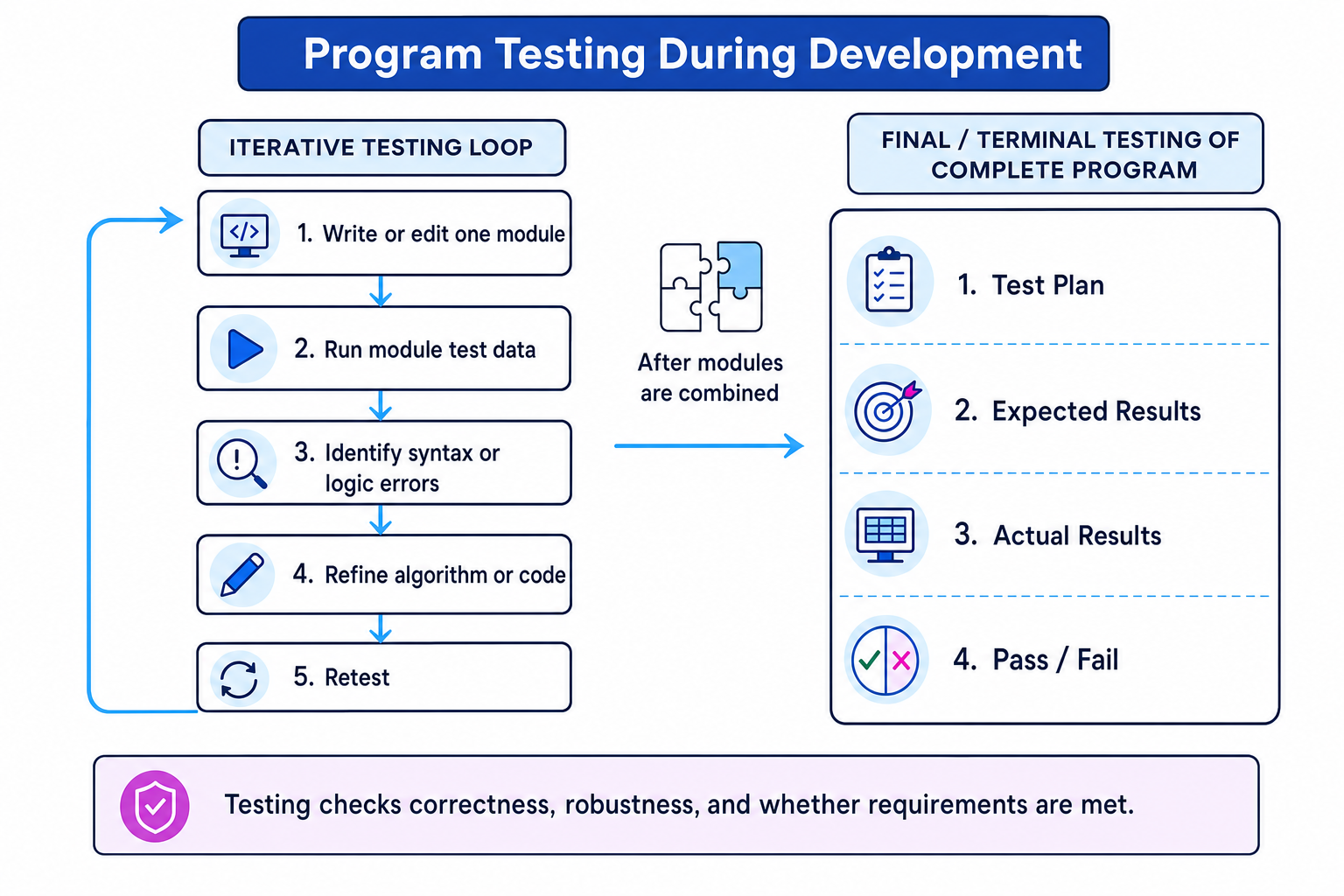
Iterative testing is repeated as the program is built. You write a section, test it, fix it, and test again. Final/terminal testing happens after the program has been completed and the modules have been combined.
This diagram shows how iterative testing fits into development before final/terminal testing of the whole program.
Example
Choosing when to test
A student is creating a quiz program with a login module, a question module, and a score module.
- The score module can be tested while it is being written by entering known answers and checking whether the calculated score is correct.
- If the score is wrong at this stage, the fault is likely to be inside the score module, so it is easier to locate and fix.
- After login, questions, scoring, and menus are combined, final/terminal testing checks a full quiz from start to finish.
- If the complete quiz fails at the end, the programmer may need to check how modules pass control between each other, not just whether one module works alone.
Syntax and logic errors
Syntax errors
A syntax error breaks the grammatical rules of the programming language. Because the language rules have been broken, the program cannot be run or translated correctly.
Examples include:
- misspelling a keyword
- missing a bracket
- missing required punctuation
- writing an instruction in the wrong structure
Definition
Syntax error
A syntax error is an error that breaks the grammatical rules of the programming language and stops the program from being run or translated.
Logic errors
A logic error does not necessarily stop the program from running. Instead, the program runs but produces an unexpected or incorrect output.
Examples include:
- using
>when the requirement needs>= - calculating an average by dividing by the wrong number
- updating the wrong variable
- putting steps in the wrong order
Definition
Logic error
A logic error is an error where the program runs but produces unexpected or incorrect output.
Example
Classifying errors
A program should output "Pass" when a score is 50 or more.
- If the code uses
THNinstead of the keywordTHEN, the programming language cannot recognise the instruction structure. - Because the program cannot be translated or run correctly, this is a syntax error.
- If the code uses the condition
score > 50, the instruction is written using valid grammar, so the program can run. - For a score of 50,
score > 50is false, so the program outputs the wrong result. - Because the program runs but gives an unexpected output, this is a logic error.
Key Idea
Syntax vs logic
A syntax error stops the program from running or being translated. A logic error allows the program to run, but the output is wrong or unexpected.
Choosing suitable test data
Test data means the input values you choose to test a program. Good test data is not random — it is chosen to check important cases.
A data type is the kind of data expected, such as an integer number or text.
For a requirement such as “score must be an integer from 0 to 100 inclusive”, you could choose:
| Test data type | Meaning | Example |
|---|---|---|
| Normal | Correct type and should be accepted without errors | 73 |
| Boundary | Correct type and on the very edge of being valid | 0 and 100 |
| Invalid | Correct type but should be rejected | -1 and 101 |
| Erroneous | Incorrect data type and should be rejected | "seventy" |
Inclusive means the endpoints are allowed. So “0 to 100 inclusive” means both 0 and 100 are valid.
Common Mistake
Invalid is not the same as erroneous
For OCR J277, invalid data is the correct data type but should be rejected. Erroneous data is the wrong data type and should be rejected.
Tip
Finding boundary data
For an inclusive range, the valid boundary values are usually the minimum and maximum allowed values. The values just outside the range are invalid, not boundary.
Example
Choosing test data for an age check
A cinema booking program accepts ages from 11 to 18 inclusive. The age must be an integer.
- The required data type is integer, and the valid range is 11 to 18 inclusive.
- A normal value such as 15 should be accepted because it is inside the range and not on an edge.
- The boundary values 11 and 18 should be accepted because they are the exact valid edges.
- The invalid values 10 and 19 should be rejected because they are integers but outside the valid range.
- The erroneous value
"sixteen"should be rejected because it is text, not an integer.
Creating and completing a test plan
A test plan records what will be tested and what happened when the test was run.
Definition
Test plan
A test plan is a table that usually includes the test data, the reason for the test, the expected result, the actual result, and whether the test passed or failed.
The expected result is what should happen according to the requirements. It should be decided before running the test. The actual result is what really happens when the program runs.
Example requirement: “The number of tickets must be an integer from 1 to 10 inclusive.”
| Test no. | Type | Test data | Expected result | Actual result | Pass/fail |
|---|---|---|---|---|---|
| 1 | Normal | 5 | Accepted | Accepted | Pass |
| 2 | Boundary | 1 | Accepted | Accepted | Pass |
| 3 | Boundary | 10 | Accepted | Accepted | Pass |
| 4 | Invalid | 0 | Rejected | Accepted | Fail |
| 5 | Invalid | 11 | Rejected | Rejected | Pass |
| 6 | Erroneous | "five" | Rejected | Rejected | Pass |
Example
Completing a failed test row
For test number 4, the input is 0.
- The data type is correct because 0 is an integer.
- The value is below the minimum allowed value of 1, so the expected result is Rejected.
- The actual result is Accepted, which does not match the expected result.
- The test is marked Fail, and the lower-bound validation needs to be checked.
Refining algorithms
Refining an algorithm means improving or correcting its steps after testing shows a problem. This is a normal part of development: test, find a problem, refine, and retest.
For the ticket example, suppose the original condition was:
quantity >= 0 AND quantity <= 10
This accepts 0, which should be rejected. A refined condition would be:
quantity >= 1 AND quantity <= 10
Example
Refining a range check
Using the failed ticket test where the input was 0:
- Apply the original condition:
quantity >= 0is true for 0, andquantity <= 10is also true. - Because both parts are true, the algorithm accepts 0, which contradicts the requirement.
- Change the lower-bound comparison from
quantity >= 0toquantity >= 1. - Retest 0, 1, and 10 to check that 0 is rejected while both boundary values are still accepted.
If erroneous data causes a crash, the algorithm may need extra validation before range checking, such as checking that the input is an integer before comparing it with the minimum and maximum.
Exam technique
In the exam
- Start with the requirement: identify the expected data type, valid range, and expected outcome.
- For test data questions, include normal data, boundary data, invalid data, and erroneous data when appropriate.
- Classify errors by asking whether the program is stopped from running or translated, or whether it runs with the wrong output.
- In a test plan, mark pass or fail only by comparing the actual result with the expected result.
Self review
Check yourself
- For a mark from 0 to 100 inclusive, what normal, boundary, invalid, and erroneous test data could you choose?
- What is the difference between iterative testing and final/terminal testing?
- A program accepts 18 when the maximum valid age is 17. Is this likely to be a syntax error or a logic error, and how could the algorithm be refined?

Recap questions
Test yourself with 5 quick questions on this guide. Answer them all correctly to complete it.
You've reached the end
Test yourself on this topic, or move on to the next guide.
How was this guide?