Revision notes for OCR GCSE Computer Science Searching and sorting algorithms. Open the guide for explanations and worked examples. Written against the OCR GCSE Computer Science (J277) specification, so the content matches what's examinable rather than general Computer Science background.
Searching and sorting algorithms
What you'll learn
- How linear search and binary search find an item in a list.
- How bubble sort, insertion sort and merge sort put data into order.
- The pre-requisites for each algorithm, especially when data must already be sorted.
- How to recognise these algorithms from short code or pseudocode without memorising exact code.
Before you start: lists, indexes and algorithms
An algorithm is a clear set of steps for solving a problem.
In this topic, the problem is usually about a list of data, such as:
[12, 5, 23, 7, 30, 1]
Each item has a position called an index. In OCR Exam Reference Language and Python-style pseudocode, indexes usually start at 0, so the first item is at index 0.
Definition
Search key
The search key is the value you are trying to find in a list. For example, if you are looking for 23, then 23 is the search key.
Definition
Sorted data
A list is sorted if it is already in a particular order, such as ascending order: smallest to largest.
Searching algorithms
A searching algorithm tries to find whether a value is in a list, and often returns its position.
OCR J277 requires you to understand:
- linear search
- binary search
You do not need to memorise the exact code, but you should understand the steps and recognise the pattern in code or pseudocode.
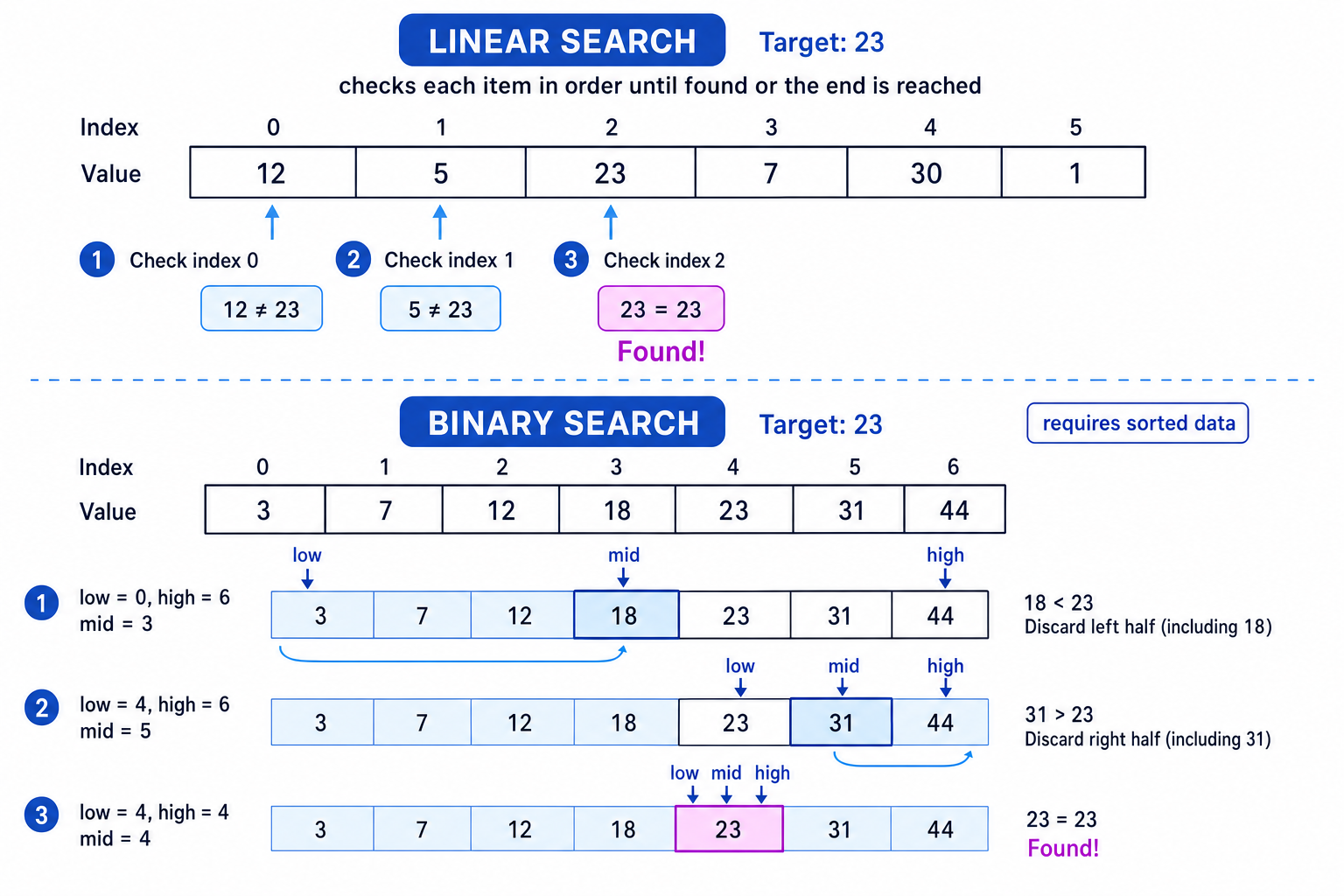
Linear search
Linear search checks each item in a list one by one, from the start, until the target is found or the end is reached.
Key Idea
Linear search
Linear search works on unsorted or sorted data because it does not assume anything about the order of the list.
Main steps
- Start at the first item.
- Compare the current item with the search key.
- If they match, the item has been found.
- If not, move to the next item.
- Stop when the item is found or the list ends.
Recognising linear search in code
Look for a loop that moves through the list in order, such as index 0, then 1, then 2, comparing each item with the target.
Typical code clues include:
- a loop from the first item to the last item
- a comparison like
items[index] == target - stopping when a match is found
Example
Tracing a linear search
Search for 10 in the list [17, 4, 29, 10, 8].
- Compare the first item, 17, with the target 10. They are not equal, so the search continues.
- Compare the next items in order: 4 is not 10, then 29 is not 10.
- Compare 10 with the target 10. They match, so the value is found at index 3.
Common Mistake
Stopping too late
Once linear search finds the target, it can stop. You do not need to keep checking the rest of the list unless the question asks for every occurrence.
Binary search
Binary search repeatedly halves the part of the list that still needs to be searched.
Common Mistake
Binary search needs sorted data
Binary search only works if the list is already sorted. If the list is unsorted, halving the search area may throw away the part containing the target.
Main steps
For an ascending sorted list:
- Set
lowto the first index andhighto the last index. - Find the middle index:
mid = (low + high) DIV 2. - Compare the middle item with the search key.
- If the middle item is the target, stop.
- If the target is smaller, continue searching the left half.
- If the target is larger, continue searching the right half.
- If
lowbecomes greater thanhigh, the target is not in the list.
Definition
DIV
DIV means integer division: divide and keep only the whole-number quotient. For example, 5 DIV 2 gives 2.
Recognising binary search in code
Binary search code often contains:
- variables such as
low,highandmid - a calculation like
mid = (low + high) DIV 2 - decisions that move
loworhigh - repeated halving of the search area
Example
Tracing a binary search
Search for 18 in the sorted list [2, 6, 9, 13, 18, 21, 30].
- The first search area is index 0 to index 6. The middle index is
(0 + 6) DIV 2, somid = 3. The middle value is 13. - Since 18 is greater than 13, discard the left half up to and including 13. The new search area is index 4 to index 6.
- The new middle index is
(4 + 6) DIV 2, somid = 5. The middle value is 21. - Since 18 is less than 21, discard index 5 and everything to its right. The new search area is index 4 to index 4.
- The middle value is now 18, which matches the target, so the item is found at index 4.
Tip
Binary search sanity check
If the question gives an unsorted list and asks which search can be used immediately, the safe answer is linear search, not binary search.
Sorting algorithms
A sorting algorithm puts data into a chosen order, usually ascending order for GCSE questions.
OCR J277 requires you to understand:
- bubble sort
- merge sort
- insertion sort
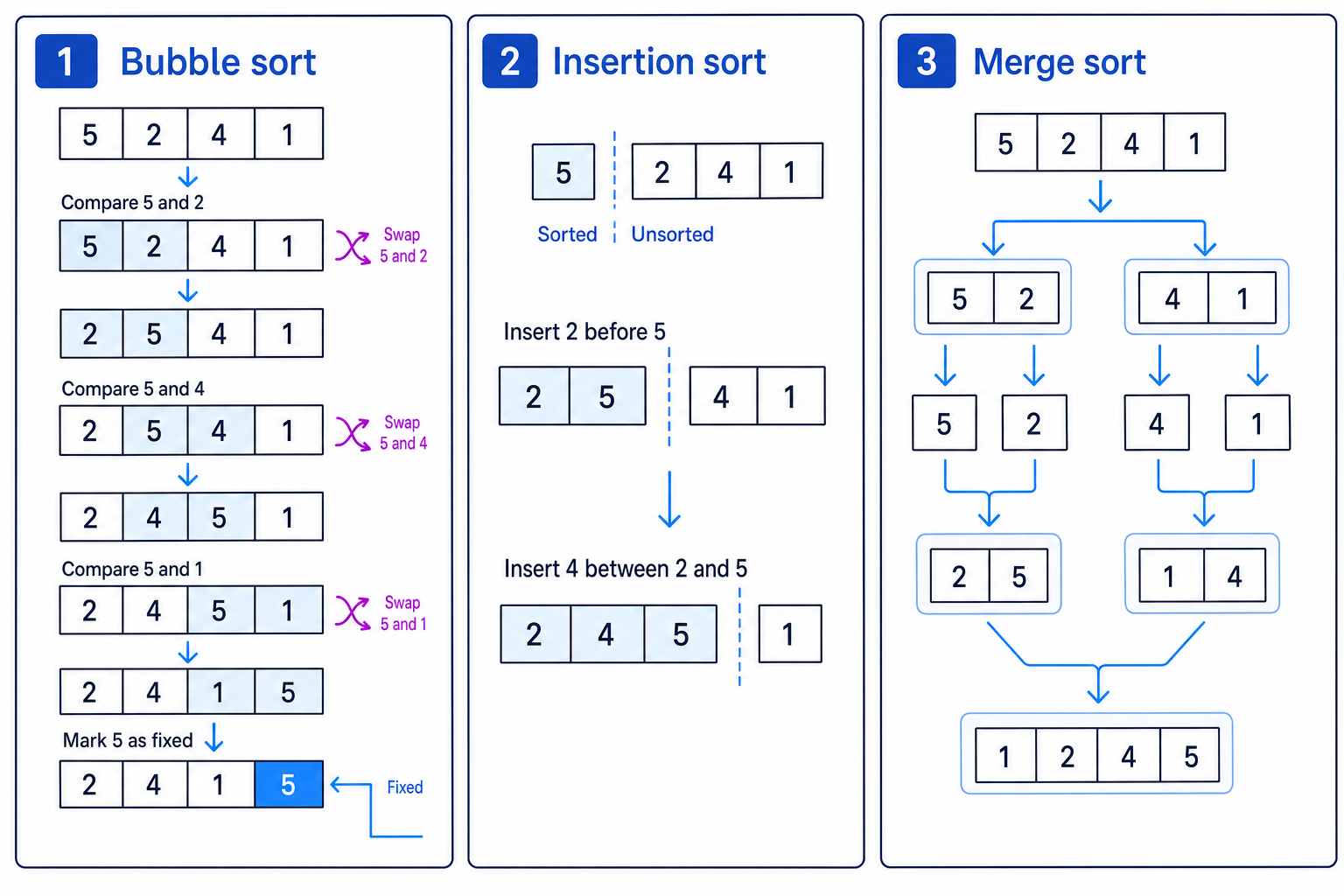
Bubble sort
Bubble sort repeatedly compares neighbouring items and swaps them if they are in the wrong order.
Definition
Pass
A pass is one full movement through the list, comparing adjacent pairs.
Main steps
For ascending order:
- Compare the first pair of adjacent items.
- Swap them if the left item is greater than the right item.
- Move one position along and compare the next pair.
- Continue to the end of the list.
- After one pass, the largest item has moved to the end.
- Repeat passes until the list is sorted.
Recognising bubble sort in code
Bubble sort code often has:
- repeated passes through the list
- comparisons of adjacent items, such as
items[j]anditems[j + 1] - swaps using a temporary variable
- sometimes a Boolean flag such as
swapped
Example
Applying bubble sort
Sort [4, 1, 3, 2] into ascending order.
- First pass: compare 4 and 1, then swap to get
[1, 4, 3, 2]. Compare 4 and 3, then swap to get[1, 3, 4, 2]. Compare 4 and 2, then swap to get[1, 3, 2, 4]. - The largest value, 4, is now fixed at the end. Second pass: compare 1 and 3, no swap. Compare 3 and 2, then swap to get
[1, 2, 3, 4]. - A further pass would make no swaps, confirming the list is sorted.
Common Mistake
Only doing one pass
One pass of bubble sort does not usually sort the whole list. It normally only guarantees that the largest unsorted item has moved to the correct end position.
Insertion sort
Insertion sort builds up a sorted section at the start of the list. It takes the next unsorted item and inserts it into the correct position within the sorted section.
Key Idea
Insertion sort
Think of insertion sort like sorting playing cards in your hand: keep the left side sorted, then insert each new card where it belongs.
Main steps
For ascending order:
- Treat the first item as already sorted.
- Take the next item as the value to insert.
- Compare it with items in the sorted section.
- Shift larger items one place to the right.
- Insert the value into the gap.
- Repeat until every item has been inserted.
Recognising insertion sort in code
Insertion sort code often contains:
- a
keyorcurrentvalue being stored - a sorted left section
- items being shifted right
- the key being inserted into the correct gap
Example
Applying insertion sort
Sort [6, 3, 5, 2] into ascending order.
- Treat
[6]as the sorted section. Insert 3 before 6, giving[3, 6, 5, 2]. - Now
[3, 6]is sorted. Insert 5 between 3 and 6, giving[3, 5, 6, 2]. - Now
[3, 5, 6]is sorted. Insert 2 before 3, shifting 3, 5 and 6 right, giving[2, 3, 5, 6].
Merge sort
Merge sort splits a list into smaller lists, then merges them back together in order.
Definition
Divide and conquer
A divide and conquer algorithm breaks a problem into smaller parts, solves those parts, then combines the results.
Merge sort does not need the original list to be sorted. However, when merging two lists, each smaller list being merged should already be sorted.
Main steps
- Split the list into two halves.
- Keep splitting until each sub-list has one item.
- Merge pairs of sub-lists back together in sorted order.
- Continue merging until there is one sorted list.
Recognising merge sort in code
Merge sort code often contains:
- splitting a list into left and right halves
- a procedure or function that may call itself on each half
- a separate merge step
- comparisons between the first remaining items in two smaller sorted lists
Example
Applying merge sort
Sort [8, 3, 7, 2] into ascending order.
- Split the list into
[8, 3]and[7, 2], then split again into[8],[3],[7]and[2]. - Merge single-item lists in order:
[8]and[3]become[3, 8];[7]and[2]become[2, 7]. - Merge
[3, 8]and[2, 7]: take 2, then 3, then 7, then 8, giving[2, 3, 7, 8].
Quick comparison
| Algorithm | Main idea | Pre-requisite | Code pattern to spot |
|---|---|---|---|
| Linear search | Check each item in order | None | Loop through every item comparing with target |
| Binary search | Check middle, discard half | Data must be sorted | low, high, mid, and DIV |
| Bubble sort | Swap adjacent items | None | Adjacent comparisons and repeated passes |
| Insertion sort | Insert each item into a sorted left section | None | key value and shifting items right |
| Merge sort | Split, then merge in order | None for the original list | Halves, single-item lists, merge step |
Exam technique
In the exam
- Check the data first: if a search uses halves, the list must be sorted, so it is binary search.
- When tracing a sort, write the list after each meaningful swap, insertion or merge so you do not lose track.
- You do not need to memorise exact code; focus on recognising the algorithm’s structure and applying its steps accurately.
Self review
Check yourself
- Why would binary search fail on an unsorted list?
- In bubble sort, what is guaranteed after one full pass through the list?
- How is insertion sort different from merge sort?

Recap questions
Test yourself with 5 quick questions on this guide. Answer them all correctly to complete it.
You've reached the end
Test yourself on this topic, or move on to the next guide.
How was this guide?