Revision notes for OCR GCSE Computer Science Programming fundamentals. Open the guide for explanations and worked examples. Written against the OCR GCSE Computer Science (J277) specification, so the content matches what's examinable rather than general Computer Science background.
Programming fundamentals
What you'll learn
- How programs use variables, constants, inputs, outputs and assignments.
- How to control the order instructions run using sequence, selection and iteration.
- How to recognise and use arithmetic, comparison and Boolean operators.
- How to trace small programs accurately, like you would in an exam.
The building blocks of a program
A program is a set of instructions that a computer can follow. In GCSE Computer Science, you usually write programs in a high-level language, which means a language designed to be readable by humans, such as Python or OCR-style pseudocode.
The computer still follows the instructions very literally, in the order and structure you give it.
Definition
High-level language
A high-level language is a programming language that is closer to human language than machine code. It hides many low-level hardware details, so you can focus on solving the problem.
Variables, constants and assignment
Programs need to store data while they run. That data is usually stored using named locations.
Definition
Variables, constants and assignment
A variable is a named storage location whose value can change while a program runs. A constant is a named value that should stay the same. Assignment means storing the result of a value or expression in a variable or constant name.
An expression is a piece of code that produces a value, such as score + 5 or length * width.
For example:
CONSTANT PASS_MARK = 50
score = 42
score = score + 10
After the final line, score stores 52. The old value, 42, has been overwritten.
Common Mistake
Assignment is not equality
In programming, score = score + 10 does not mean “score is equal to score plus 10” in a maths sense. It means: work out the right-hand side first, then store the result back into score.
Example
Tracing assignments
score = 10
score = score + 5
bonus = score DIV 4
OUTPUT bonus
- The first assignment stores 10 in
score. - In
score = score + 5, the old value ofscoreis used first: 10 plus 5 gives 15, soscorebecomes 15. bonus = score DIV 4uses whole-number quotient division: 15 DIV 4 gives 3.- The program outputs the value stored in
bonus, so the output is 3.
Inputs and outputs
An input is data that enters a program, such as a value typed by a user. An output is data sent out by a program, such as text displayed on a screen.
In OCR-style pseudocode, you may see:
INPUT length
INPUT width
area = length * width
OUTPUT area
This program takes two inputs, calculates an area, and outputs the result.
Key Idea
Programs process data
Most simple programs follow this pattern: get input, store data in variables, process it using operators, then output a result.
Operators
An operator is a symbol or word that performs an action on one or more values. For example, + adds values and > compares values.
Arithmetic operators
Arithmetic operators are used for calculations.
| Operator | Meaning | Example result |
|---|---|---|
+ | Addition | 7 + 3 gives 10 |
- | Subtraction | 7 - 3 gives 4 |
* | Multiplication | 7 * 3 gives 21 |
/ | Division | 8 / 2 gives 4 |
MOD | Modulo: the remainder after division | 17 MOD 5 gives 2 |
DIV | Quotient: whole-number division | 17 DIV 5 gives 3 |
^ | Exponentiation: to the power of | 2 ^ 3 gives 8 |
Tip
DIV and MOD work as a pair
For 17 DIV 5 and 17 MOD 5, ask: how many whole 5s fit into 17, and what is left over? Three 5s fit into 17, with 2 left over.
Comparison operators
A comparison operator compares two values and gives a Boolean result: either True or False.
| Operator | Meaning |
|---|---|
== | Equal to |
!= | Not equal to |
< | Less than |
<= | Less than or equal to |
> | Greater than |
>= | Greater than or equal to |
Common Mistake
Using = instead of ==
Use = for assignment, such as age = 15. Use == for comparison, such as age == 15. In exam questions, this difference is often important.
Boolean operators: AND, OR and NOT
A Boolean value is a value that can only be True or False.
Boolean operators combine or change Boolean values:
| A | B | A AND B | A OR B |
|---|---|---|---|
| True | True | True | True |
| True | False | False | True |
| False | True | False | True |
| False | False | False | False |
| A | NOT A |
|---|---|
| True | False |
| False | True |
ANDis onlyTrueif both sides areTrue.ORisTrueif at least one side isTrue.NOTreverses a Boolean value.
Example
Evaluating Boolean logic
Given:
mark = 62
attendance = 88
lateWork = False
result = (mark >= 50 AND attendance >= 90) OR NOT lateWork
- Evaluate the comparisons:
mark >= 50isTrue, butattendance >= 90isFalse. - Combine them with
AND:True AND FalsegivesFalse. - Evaluate
NOT lateWork: sincelateWorkisFalse,NOT lateWorkgivesTrue. - Combine the final parts with
OR:False OR TruegivesTrue, soresultstoresTrue.
Control flow
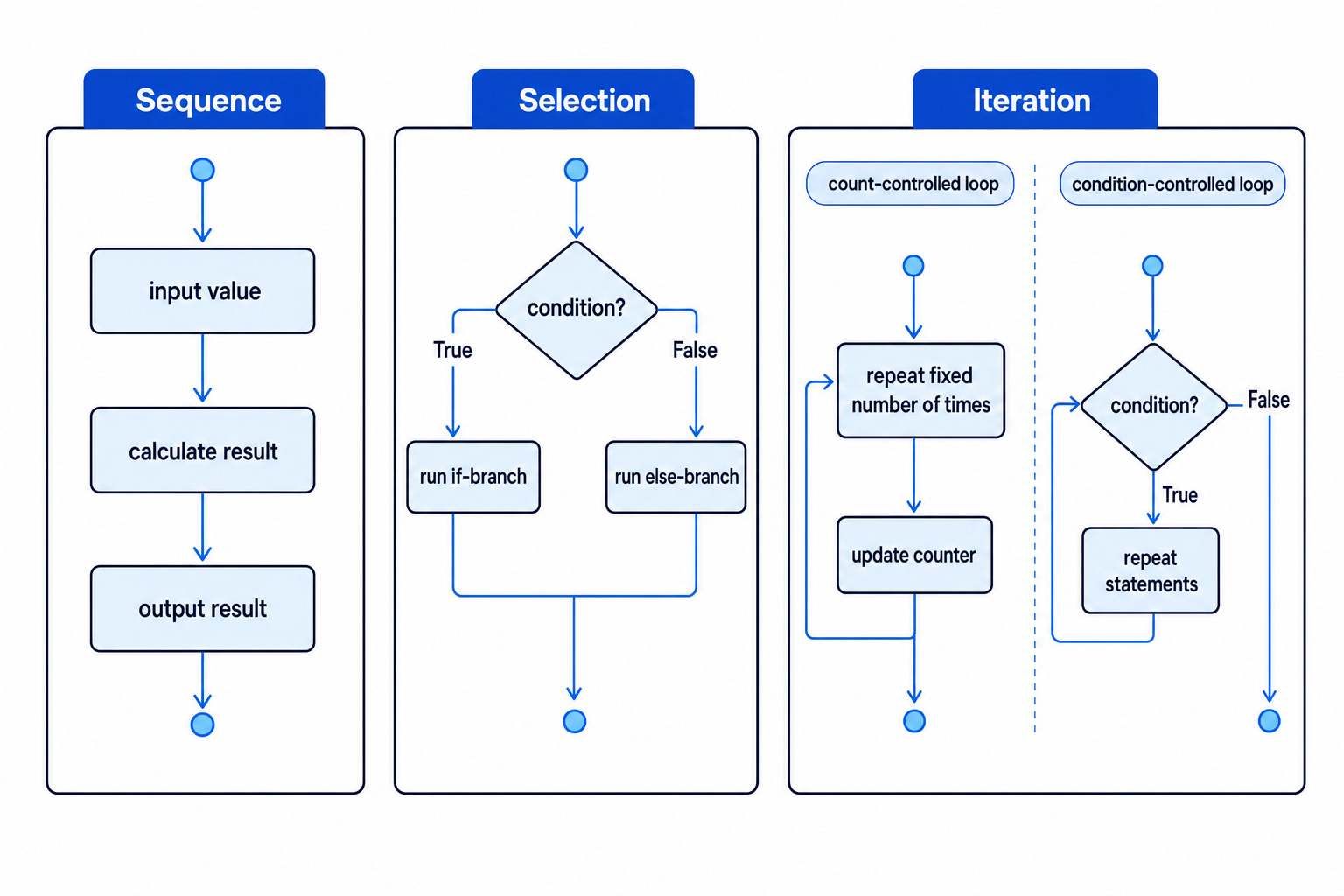
Control flow means the order in which the instructions in a program are executed. GCSE programming uses three basic programming constructs: sequence, selection and iteration.
Sequence
Sequence means instructions run one after another, from top to bottom.
INPUT length
INPUT width
area = length * width
OUTPUT area
Here, the program must get the inputs before it can calculate the area. If the order is wrong, the program may use missing or incorrect values.
Selection
Selection means the program chooses between different paths using a condition. A condition is an expression that evaluates to True or False.
IF temperature < 18 THEN
    OUTPUT "Wear a coat"
ELSE
    OUTPUT "No coat needed"
ENDIF
The IF branch runs when the condition is True. The ELSE branch runs when the condition is False.
Example
Choosing a branch
Given:
temperature = 17

IF temperature < 18 THEN
    OUTPUT "Wear a coat"
ELSE
    OUTPUT "No coat needed"
ENDIF
- Evaluate the condition
temperature < 18using the stored value 17. - Since 17 is less than 18, the condition is
True. - The program follows the
IFbranch and outputs"Wear a coat"; theELSEbranch is skipped.
You may also see multiple branches using ELSE IF, ELIF or similar wording, depending on the language.
Iteration
Iteration means repetition. A repeated section of code is called a loop.
There are two GCSE loop types you need to know: count-controlled loops and condition-controlled loops.
Count-controlled loops
A count-controlled loop repeats a set number of times. It usually uses a counter variable.
total = 0

FOR counter = 1 TO 4
    total = total + counter
NEXT counter

OUTPUT total
Example
Tracing a count-controlled loop
- On the first repetition,
counteris 1, sototal = total + counterchangestotalfrom 0 to 1. - On the second repetition,
counteris 2, sototalchanges from 1 to 3. - On the third repetition,
counteris 3, sototalchanges from 3 to 6. - On the fourth repetition,
counteris 4, sototalchanges from 6 to 10. The loop has now completed, so the program outputs 10.
Common Mistake
Off-by-one errors
Check the start and end values of a count-controlled loop carefully. FOR counter = 1 TO 4 runs four times, but FOR counter = 0 TO 4 runs five times.
Condition-controlled loops
A condition-controlled loop repeats while, or until, a condition is met. A common form is a WHILE loop.
password = ""

WHILE password != "letmein"
    INPUT password
ENDWHILE

OUTPUT "Unlocked"
Example
Tracing a condition-controlled loop
Suppose the user enters "cat" first, then "letmein".
- At the start,
passwordis"", sopassword != "letmein"isTrue; the loop runs and the user inputs"cat". - The condition is checked again.
"cat" != "letmein"is stillTrue, so the loop runs again and the user inputs"letmein". - The condition is checked again.
"letmein" != "letmein"isFalse, so the loop stops and the program outputs"Unlocked".
Common Mistake
Loops may not run
A WHILE loop checks its condition before running the loop body. If the condition is already False at the start, the loop body will not run at all.
Combining the fundamentals
Real programs usually combine several fundamentals together:
CONSTANT PASS_MARK = 50
total = 0

FOR counter = 1 TO 3
    INPUT mark
    total = total + mark
NEXT counter

average = total DIV 3

IF average >= PASS_MARK THEN
    OUTPUT "Pass"
ELSE
    OUTPUT "Not yet"
ENDIF
This program uses a constant, variables, input, output, assignment, arithmetic operators, comparison operators, selection and iteration.
Exam technique
In the exam
- Trace variables carefully: whenever you see an assignment, update the stored value.
- For conditions, work out each comparison first, then apply
AND,ORandNOT. - For loops, count how many times the loop body runs and watch for off-by-one errors.
Self review
Check yourself
- What is the difference between
=and==in a program? - When would you use a count-controlled loop instead of a condition-controlled loop?
- What are the results of
19 DIV 4and19 MOD 4?

Recap questions
Test yourself with 5 quick questions on this guide. Answer them all correctly to complete it.
You've reached the end
Test yourself on this topic, or move on to the next guide.
How was this guide?