Revision notes for OCR GCSE Computer Science Networks and topologies. Open the guide for explanations and worked examples. Written against the OCR GCSE Computer Science (J277) specification, so the content matches what's examinable rather than general Computer Science background.
Networks and topologies
What you'll learn
- The difference between a LAN and a WAN, with common examples.
- What hardware is needed to build a local network.
- How client-server and peer-to-peer networks organise devices.
- How the Internet, DNS, cloud services, and star / mesh topologies work.
What is a computer network?
A stand-alone computer is a computer that is not connected to other computers. A network connects computers and other devices so they can communicate and share resources.
Definition
Computer network
A computer network is a group of connected devices that can exchange data and share resources such as files, printers, storage, software or an Internet connection.
Networks are useful because users can share files, use shared printers, communicate, access central storage, and connect to online services.
LANs and WANs
Local Area Network (LAN)
A LAN, or Local Area Network, covers a small geographical area, usually one site or building.
Common examples include:
- A home network
- A school network
- A small office network
- A network inside one library or shop
A LAN is often owned and managed by one person or organisation, such as a school managing its own network.
Wide Area Network (WAN)
A WAN, or Wide Area Network, covers a large geographical area. It connects networks across towns, countries or even the world.
Common examples include:
- The Internet
- A bank connecting branches in different cities
- A company connecting offices in different countries
A WAN often uses third-party communication infrastructure, such as telecoms links, rather than being fully owned by one organisation.
Key Idea
LAN vs WAN
A LAN is local and usually privately managed. A WAN connects networks over a much wider area, often using external communication links.
Example
Classifying a network scenario
A school has 500 computers connected across one campus. The same school also connects to an exam board’s online system over the Internet.
- The 500 computers on the school site form a LAN because they are in one local area and are managed by the school.
- The connection from the school to the exam board uses a WAN because it goes beyond the local site.
- The Internet is the best example of a WAN because it connects many networks across the world.
Hardware needed to build a LAN
To connect stand-alone computers into a LAN, you need hardware that lets devices send, receive and direct data.
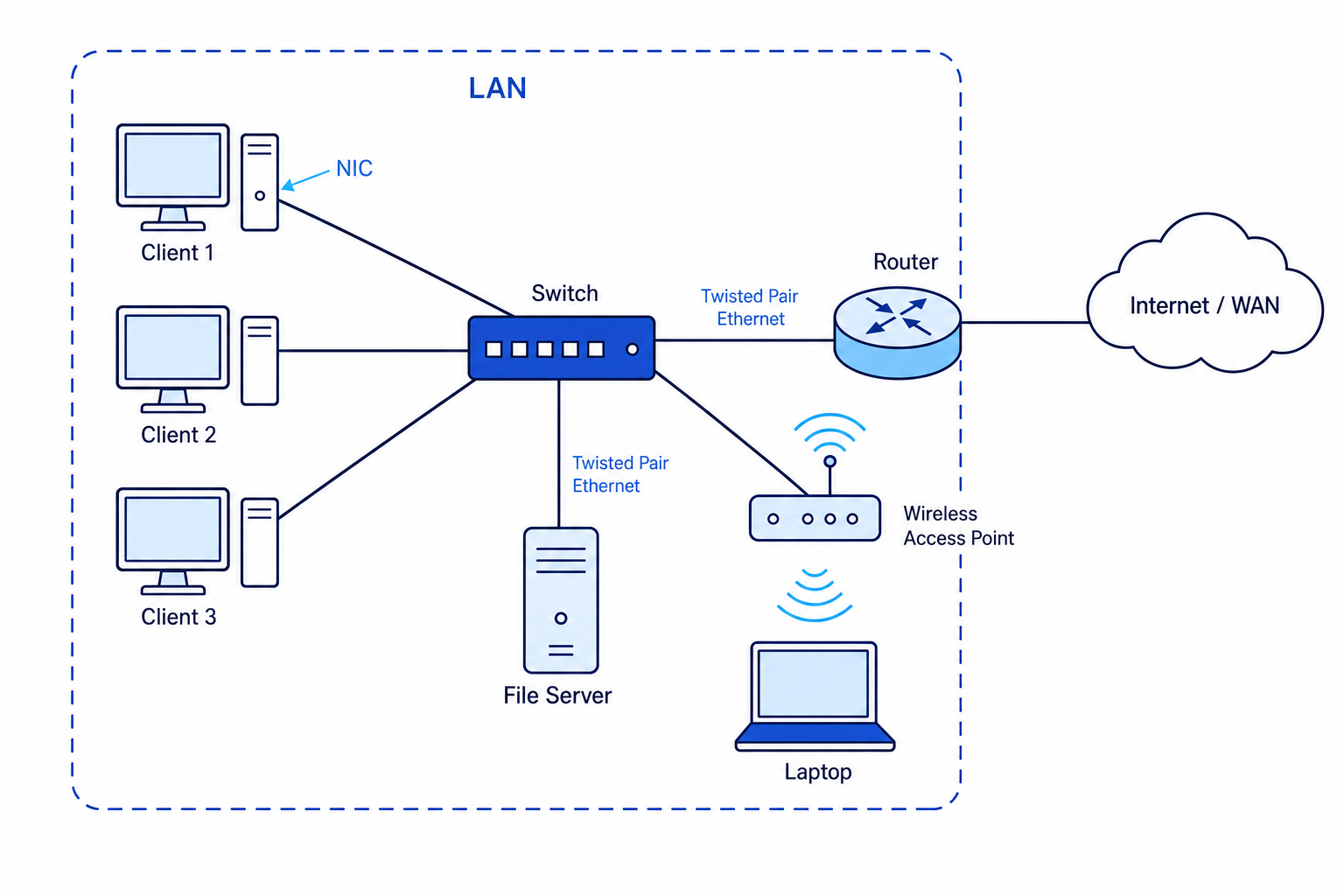
A typical LAN has client devices connected to a switch, possibly a wireless access point, a server, and a router connecting the LAN to the wider Internet/WAN.
NIC: Network Interface Controller/Card
A NIC is the hardware inside or attached to a device that allows it to connect to a network.
It may support a wired connection, a wireless connection, or both.
Transmission media
Transmission media are the physical or wireless methods used to carry data between devices.
Examples include:
- Copper cables
- Fibre optic cables
- Wireless radio signals
You do not need to learn how Ethernet, Wi-Fi or Bluetooth protocols work for this section.
Switch
A switch connects devices together within a LAN. It receives data and forwards it to the correct device on the local network.
Switches are commonly used in star topologies, where each device has its own connection to the central switch.
Wireless access point
A wireless access point allows wireless devices, such as laptops and tablets, to connect to a wired LAN.
It is not the same as “the Internet”; it is just a way for wireless devices to join the local network.
Router
A router connects different networks together. In a home or school, the router often connects the LAN to the Internet.
Example
Choosing hardware for a small office
A small office has eight desktop PCs, two wireless laptops, a printer and an Internet connection.
- The desktop PCs and printer need to connect inside the LAN, so a switch is needed to join the wired devices together.
- The wireless laptops need to join the LAN without cables, so a wireless access point is needed.
- The LAN needs access to the Internet, so a router is needed to connect the office LAN to the wider network.
Factors that affect network performance
Network performance describes how well a network carries data. A poor-performing network may feel slow, unreliable or delayed.
Definition
Bandwidth
Bandwidth is the maximum amount of data that can be transmitted over a network connection in a given time. Higher bandwidth usually allows more data to be sent at once.
Important factors include:
- Number of devices connected: more devices can mean more traffic sharing the same network resources.
- Bandwidth: low bandwidth can limit how quickly data can be transferred.
- Type of transmission media: some media can carry data faster or over longer distances than others.
- Network traffic: streaming video, large downloads or backups can use a lot of capacity.
- Hardware performance: old switches, routers or servers may slow the network down.
- Wireless signal quality: distance, walls and interference can reduce wireless performance.
Common Mistake
More devices does not always mean failure
Adding devices does not automatically break a network, but it can reduce performance if those devices create more traffic than the network can handle.
Example
Explaining a slow network
A school network becomes slow at lunchtime when many students stream videos and download files.
- The number of connected devices has increased, so more users are trying to share the same network resources.
- Video streaming and downloads create heavy network traffic, using a lot of bandwidth.
- If the available bandwidth is not enough for this demand, each user may experience slower loading times.
Client-server and peer-to-peer networks
Client-server network
A server is a computer that provides services or resources to other computers. A client is a device that requests and uses those services.
In a client-server network, servers provide services such as:
- Web server → web pages
- File server → file storage and retrieval
- Print server → access to shared printers
- Email server → sending and receiving email
Advantages include central management, easier backups, better control over security, and easier sharing of resources.
Disadvantages include the cost of server hardware and the risk that users lose access to services if the server fails.
Peer-to-peer network
In a peer-to-peer network, devices have equal status. Each computer can act as both a client and a server by requesting and sharing resources directly with other devices.
Peer-to-peer networks can be cheaper and simpler for very small networks, but they are harder to manage, secure and back up as the network grows.
Example
Choosing client-server or peer-to-peer
A business has 80 employees who need shared files, user accounts, regular backups and controlled access to sensitive documents.
- The business needs central control of users and permissions, which suits a client-server network.
- Shared files and backups should be managed reliably in one place, which also suits a file server.
- A peer-to-peer network would be less suitable because managing security and backups across 80 separate computers would be difficult.
The Internet, web servers and DNS
The Internet is a worldwide collection of connected computer networks. It is not one single network owned by one person; it is a “network of networks”.
The World Wide Web is one service that runs on the Internet. When you visit a website, your device acts as a web client and requests web pages from a web server.
Definition
Hosting
Hosting means storing a website, application or data on a server so that clients can access it over a network, often over the Internet.
DNS: Domain Name Service
An IP address is a numerical address used to identify a device or server on a network. A URL is the address you type into a browser, such as www.example.com.
Definition
DNS
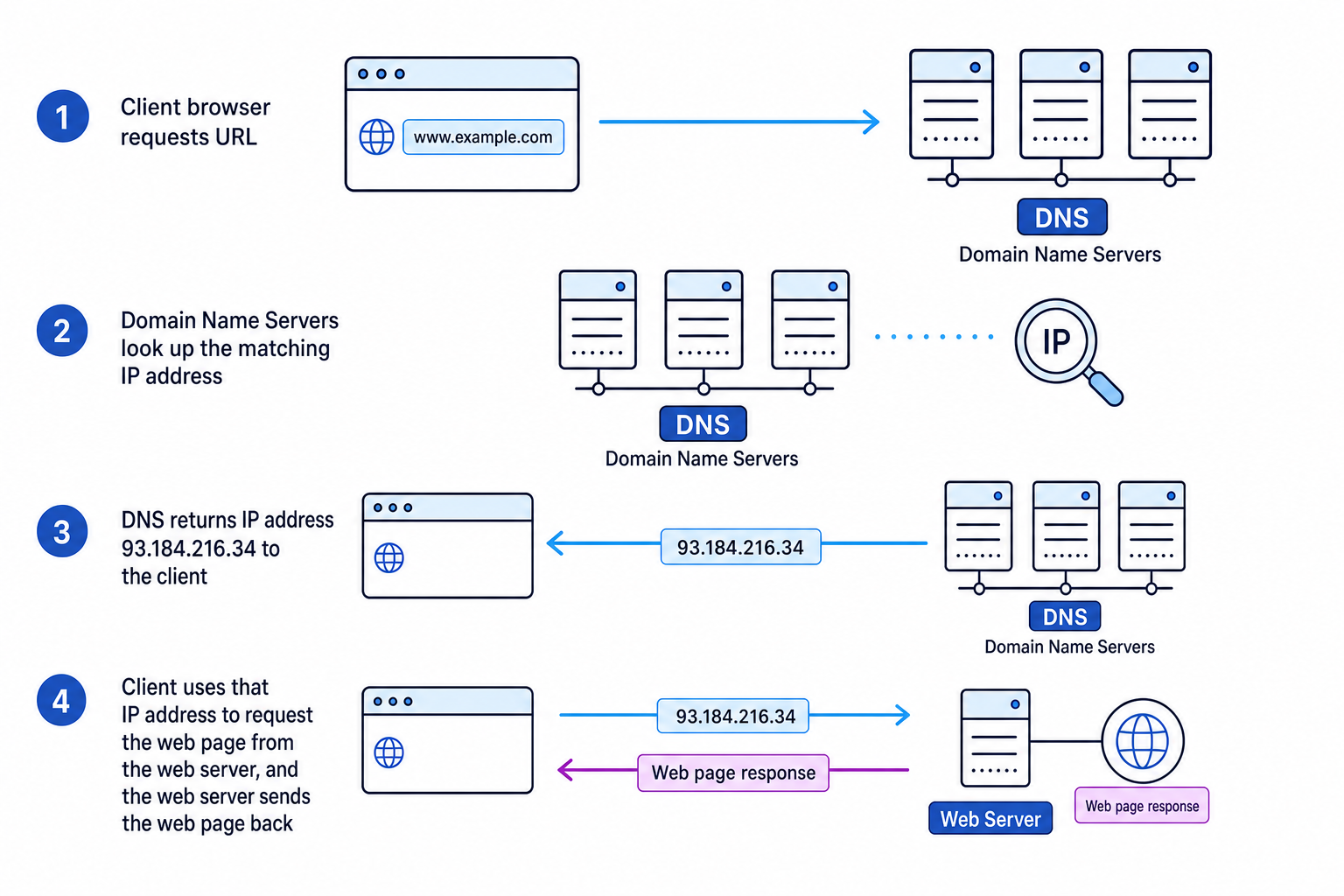
The Domain Name Service (DNS) is made up of multiple Domain Name Servers. Its role is to match the domain name in a URL to the correct IP address.
DNS is useful because humans prefer names like www.example.com, but computers need IP addresses to find servers.
This diagram shows the basic idea: the client uses DNS to find the IP address of the web server, then requests the web page.
Example
Loading a web page using DNS
You type www.example.com into a browser.
- The browser needs the server’s IP address, so it sends a request to DNS using the domain name from the URL.
- DNS checks its records and returns the matching IP address, such as
93.184.216.34. - The client then uses that IP address to contact the web server.
- The web server sends the requested web page back to the client.
Common Mistake
DNS is not the web server
DNS helps find the IP address of the server. It does not usually store or send the actual web page — that is the role of the web server.
The Cloud
The Cloud means remote service provision over a network, usually the Internet. Instead of using only your own local computer, you use remote servers for services.
Cloud services can provide:
- Storage, such as saving files online
- Software, such as browser-based office apps
- Processing, such as remote servers doing demanding tasks
Advantages of the Cloud include access from different devices, easier collaboration, less need for local storage, and services that can scale up when more capacity is needed.
Disadvantages include needing a reliable Internet connection, possible ongoing subscription costs, less direct control over data, and privacy/security concerns if data is stored by another organisation.
Tip
Cloud exam answers
For Cloud questions, always link the advantage or disadvantage to the scenario. “Access from anywhere” is stronger if you explain why that helps a travelling employee or a student working from home.
Network topologies
A topology is the layout of a network: how devices are connected.
For OCR J277, you need to know star and mesh topologies.
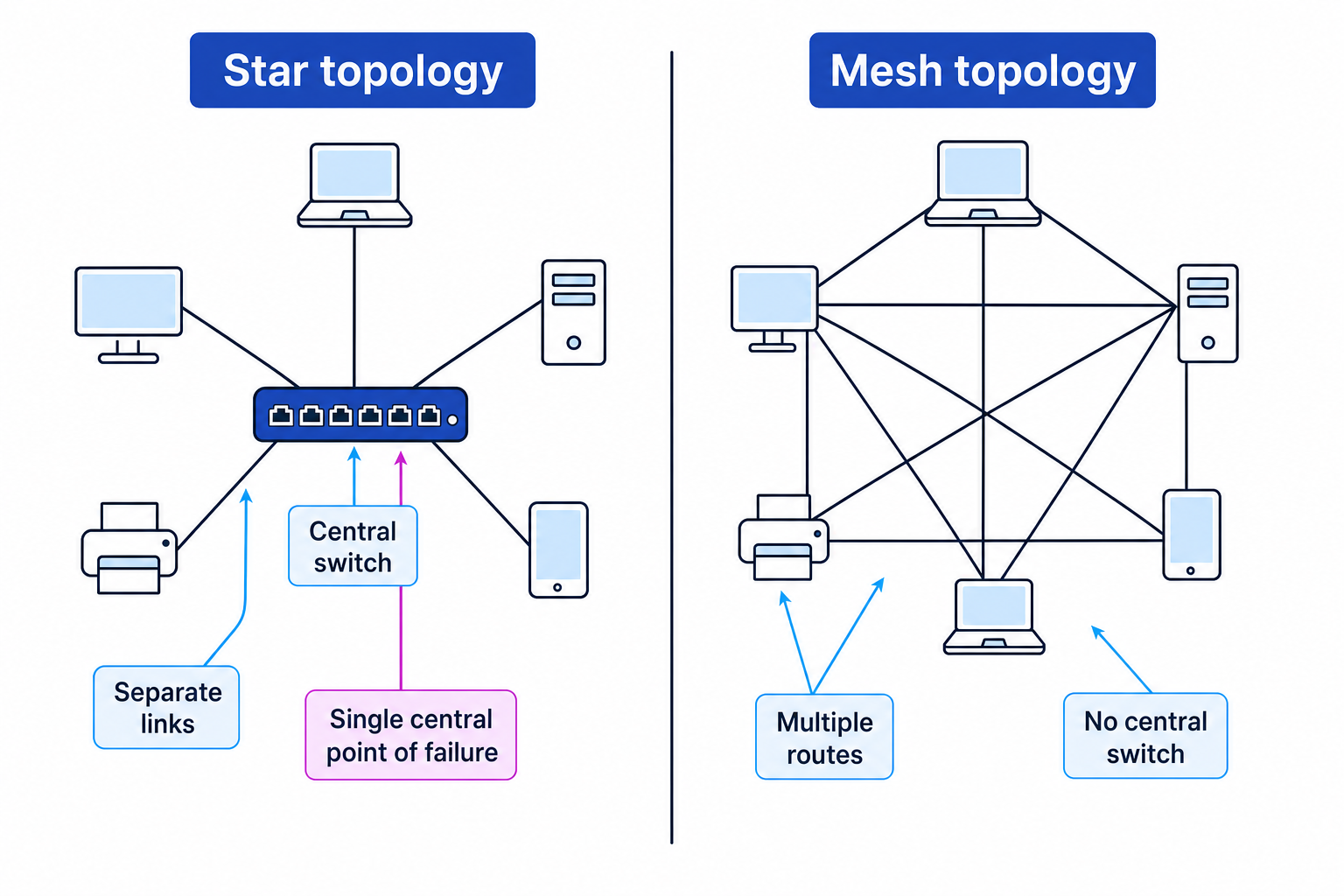
The diagram below compares the main structure of a star topology and a mesh topology.
Star topology
In a star topology, each device connects to a central device, usually a switch.
Advantages:
- Easy to add or remove devices.
- If one cable fails, usually only that one device is affected.
- Performance can be good because each device has its own link to the switch.
Disadvantages:
- If the central switch fails, the whole network can be affected.
- The central switch can become a bottleneck if too much traffic passes through it.
- Extra hardware is needed for the central switch.
Mesh topology
In a mesh topology, devices are connected to several other devices, creating multiple routes for data.
Advantages:
- Very reliable because data can take another route if one connection fails.
- No single central device is required.
- Good for networks where resilience is important.
Disadvantages:
- Expensive because it needs many connections.
- More complex to set up and maintain.
- Adding devices can require many extra links.
Example
Choosing a topology for a scenario
A hospital needs a network for critical systems where communication must continue even if one connection fails.
- Reliability is the priority, so a topology with multiple possible routes is useful.
- A mesh topology is suitable because data may be able to travel by another path if one link fails.
- A star topology would be cheaper and simpler, but the central switch could become a single point of failure.
Exam technique
In the exam
- Read the scenario carefully and link your answer to it: size, cost, reliability, number of users and need for central control are all clues.
- For “explain” questions, give a point and a reason: “A router is needed because it connects the LAN to the Internet.”
- For topology questions, compare trade-offs: star is simpler and cheaper, mesh is more resilient but more expensive/complex.
Self review
Check yourself
- What makes a LAN different from a WAN?
- Which hardware device connects a LAN to the Internet?
- Why might a mesh topology be chosen even though it is expensive?

Recap questions
Test yourself with 5 quick questions on this guide. Answer them all correctly to complete it.
You've reached the end
Test yourself on this topic, or move on to the next guide.
How was this guide?