Revision notes for OCR GCSE Computer Science Designing, creating and refining algorithms. Open the guide for explanations and worked examples. Written against the OCR GCSE Computer Science (J277) specification, so the content matches what's examinable rather than general Computer Science background.
Designing, creating and refining algorithms
What you'll learn
- How to break a problem into inputs, processes and outputs
- How to represent algorithm designs using structure diagrams, pseudocode and flowcharts
- How to use selection, iteration and nesting clearly
- How to find common errors and use trace tables to test an algorithm
What is an algorithm?
An algorithm is a precise set of steps for solving a problem. In GCSE Computer Science, you might design an algorithm before writing real code, or you might be asked to interpret, complete, correct or refine one.
Definition
Algorithm
An algorithm is a finite sequence of unambiguous instructions that solves a problem or completes a task.
Good algorithms are clear enough that another person could follow them without guessing.
Starting with inputs, processes and outputs
Before writing any pseudocode, ask: what data goes in, what happens to it, and what comes out?
- An input is data given to the algorithm, such as a user’s age or a list of scores.
- A process is an action or calculation performed on the data.
- An output is information produced by the algorithm, such as a total, message or result.
Key Idea
IPO thinking
Most algorithm design starts with Input → Process → Output. If you cannot describe these clearly, your algorithm is likely to become vague or incomplete.
Example
Planning a ticket total algorithm
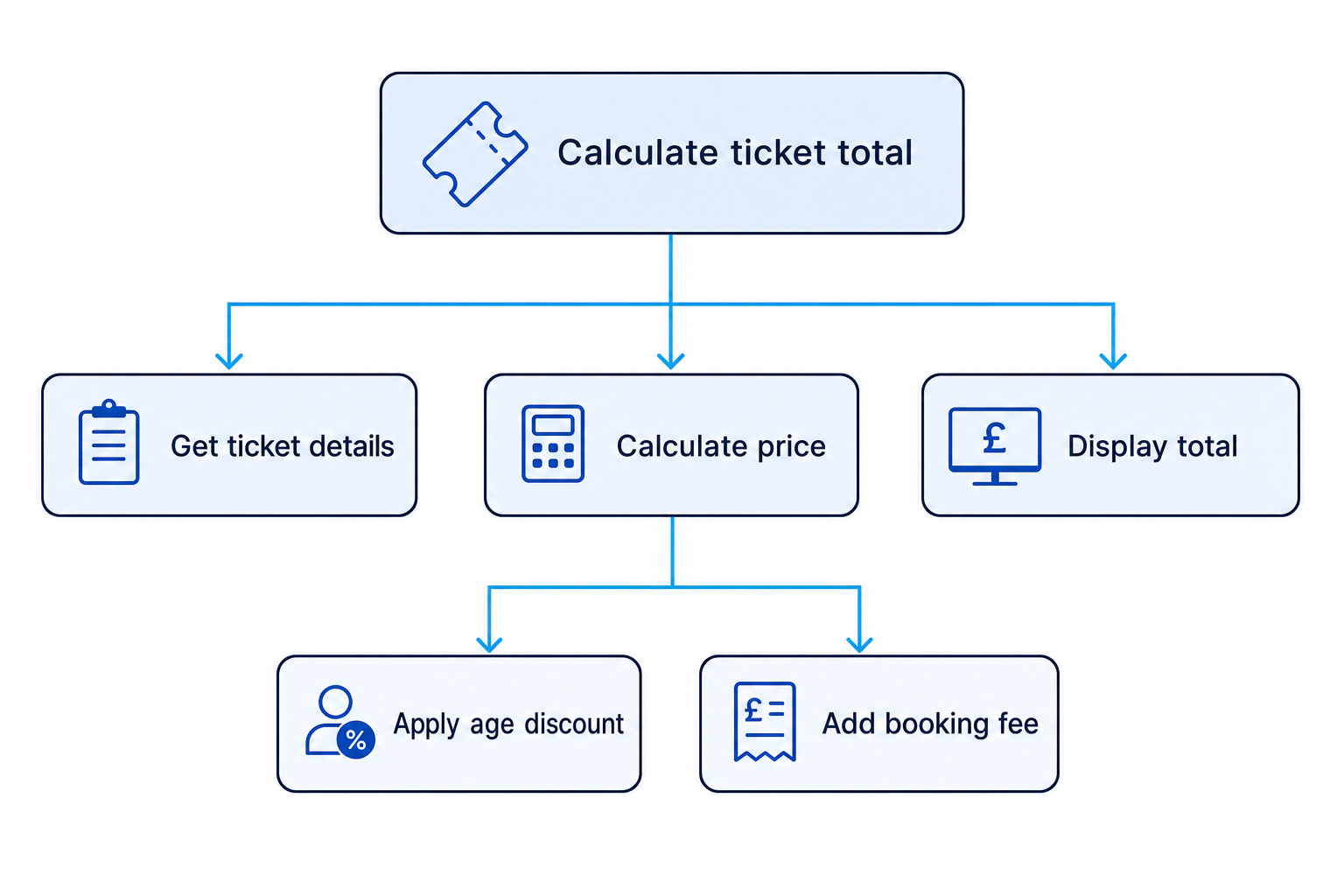
A cinema wants an algorithm to calculate the total cost of tickets, including an age discount and a booking fee.
- Identify the inputs: number of tickets, customer age, ticket price, discount rule and booking fee.
- Work out the processes: multiply tickets by price, apply the age discount if needed, then add the booking fee.
- Decide the output: the final total cost to display to the customer.
Structure diagrams
A structure diagram shows how a larger problem is split into smaller linked subsections. This is also called decomposition, which means breaking a problem into manageable parts.
Each subsection should have a clear job. Later, a subsection might become a subprogram, meaning a named part of a program that carries out one task.
Example
Breaking a problem into subsections
Suppose you are designing a quiz program.
- Put the overall problem at the top:
Run quiz. - Split it into main subsections:
Get player name,Ask questions,Calculate score,Display result. - Look for subsections that can be broken down further:
Ask questionsmight link toDisplay question,Get answerandCheck answer.
Ways to write or show algorithms
For OCR J277, you should be comfortable with three common representations.
Pseudocode
Pseudocode is a human-readable way of writing an algorithm. It looks like code but does not have to follow one exact programming language.
You should use meaningful identifiers, such as totalScore rather than x.
Common operators include:
- Arithmetic:
+,-,*,/,MOD,DIV,^ - Relational:
==,!=,<,<=,>,>= - Boolean:
AND,OR,NOT
MOD gives the remainder after division. For example, 7 MOD 2 gives 1. DIV gives the whole-number quotient, so 7 DIV 2 gives 3.
Flowcharts
A flowchart is a diagram showing the order of steps in an algorithm. You follow the arrows from a start terminal to an end terminal.
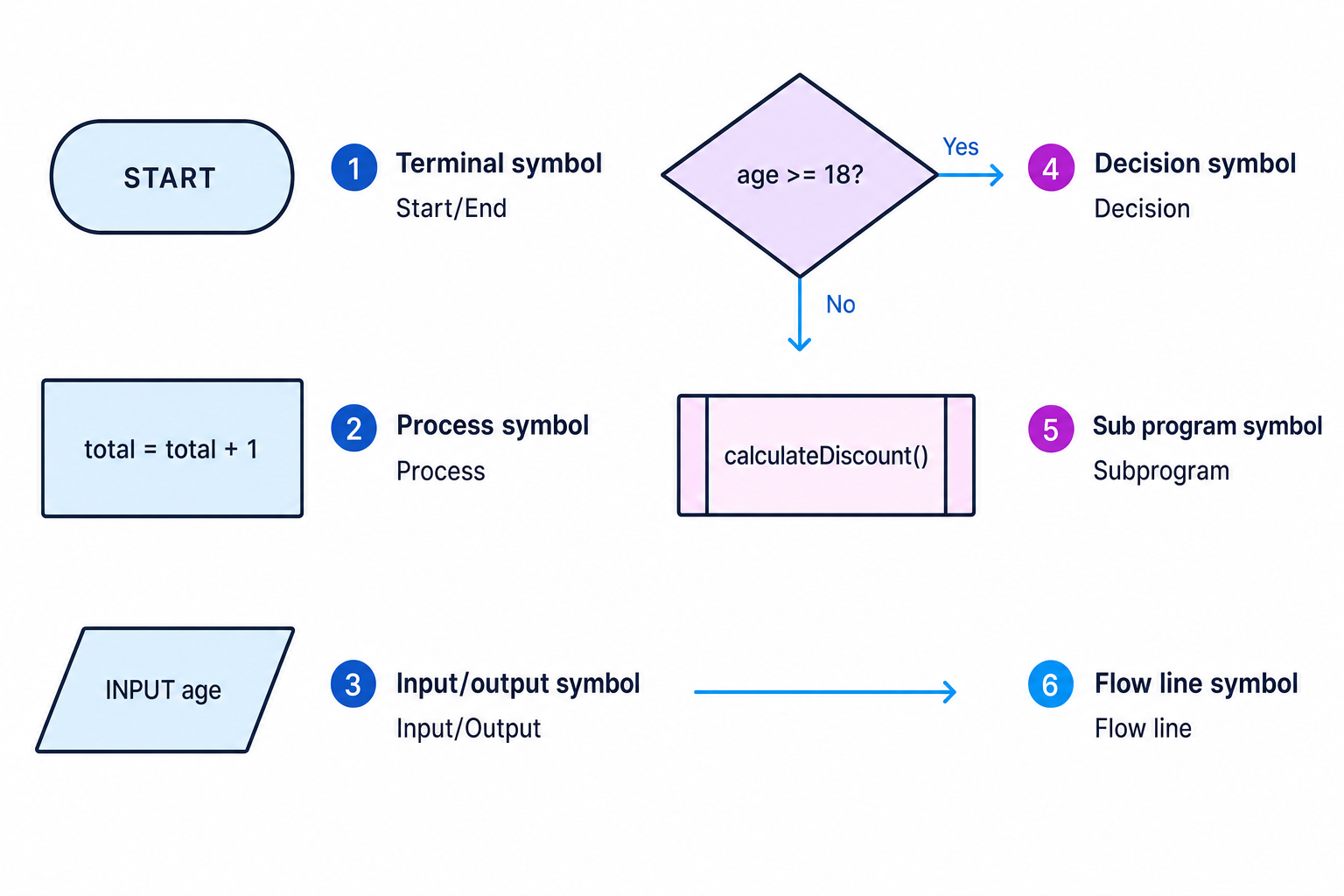
You need to recognise these flowchart symbols:
- Terminal: start or end
- Process: an instruction or calculation
- Input/output: data entering or leaving the algorithm
- Decision: a condition with branches, usually Yes/No or True/False
- Sub program: a call to a named subsection
- Line / flow line: shows the direction of control
High-level programming language
A high-level programming language is a language such as Python, Java or VB.NET that is closer to human language than machine code. In the exam, pseudocode or OCR-style reference language is usually enough unless the question gives you a specific language.
Sequence, selection and iteration
Most algorithms are built from three basic control structures.
Definition
Control structures
Sequence means instructions run in order. Selection means the algorithm chooses between paths using IF, ELSE or similar. Iteration means instructions repeat using a loop, such as WHILE or FOR.
A Boolean expression is an expression that evaluates to either true or false, such as score >= 10.
Nesting
Nesting means putting one control structure inside another. For example, an IF statement inside a WHILE loop is nested selection inside iteration.
attempts = 0
loggedIn = FALSE

WHILE attempts < 3 AND loggedIn == FALSE
    pin = INPUT("Enter PIN")

    IF pin == correctPIN THEN
        loggedIn = TRUE
    ELSE
        attempts = attempts + 1

        IF attempts == 3 THEN
            OUTPUT "Card locked"
        ELSE
            OUTPUT "Try again"
        ENDIF
    ENDIF
ENDWHILE
Example
Understanding nested selection inside a loop
- The
WHILEloop repeats while the user has fewer than 3 failed attempts and is not logged in. - The first
IFchecks whether the entered PIN matchescorrectPIN; if it does,loggedInbecomesTRUE. - If the PIN is wrong, the algorithm increases
attempts, then uses a nestedIFto decide whether to lock the card or allow another try.
Tip
Indentation helps
Indent nested code so the structure is visible. Each IF should clearly match its own ELSE and ENDIF, and each loop should clearly show what repeats.
Common errors
When correcting or refining algorithms, you need to spot both syntax errors and logic errors.
Definition
Syntax and logic errors
A syntax error breaks the rules of the language or notation, so the algorithm cannot be understood or run properly. A logic error means the algorithm is valid but gives the wrong result.
Common logic errors include:
- Using
>when the problem says “or more”, which needs>= - Forgetting to update a loop counter
- Putting an instruction outside a loop when it should repeat
- Using the wrong variable in a calculation
- Reversing the
IFandELSEoutputs
Example
Fixing boundary and syntax errors
The algorithm should output Adult if age is 18 or over, otherwise Child.
age = INPUT("Age"
IF age > 18 THEN
    OUTPUT "Child"
ELSE
    OUTPUT "Adult"
ENDIF
- The first line has a syntax error because the closing bracket is missing, so it should be
age = INPUT("Age"). - The condition
age > 18is a logic error because age 18 should count as adult; useage >= 18. - The outputs are reversed: when the condition is true, the algorithm should output
Adult, and theELSEbranch should outputChild.
Common Mistake
Missing the boundary value
If a question says “at least”, “or more”, “18 and over” or “no more than”, test the exact boundary value. Many logic errors happen at the edge.
Common Mistake
Infinite loops
A loop may never stop if the condition never becomes false. Check that something inside the loop changes the value being tested.
Trace tables
A trace table is a table used to follow an algorithm step by step. It records how variable values change as each instruction runs.
Trace tables are useful for:
- Predicting the output of an algorithm
- Finding logic errors
- Checking loops and nested conditions
- Testing boundary cases
Example
Tracing a loop with selection
Trace this algorithm using the inputs 3, 6, 4 and 5.
total = 0

FOR count = 1 TO 4
    number = INPUT("Number")

    IF number MOD 2 == 0 THEN
        total = total + number
    ENDIF
NEXT count

OUTPUT total
- Start with
total = 0. For input 3,3 MOD 2gives 1, so the condition is false andtotalstays 0. - For input 6,
6 MOD 2gives 0, so the condition is true andtotalbecomes 6. - For input 4, the condition is true again, so
totalbecomes 10; for input 5, the condition is false sototalstays 10. - After the loop finishes, the algorithm outputs 10.
| count | number | Condition true? | total after iteration | output |
|---|---|---|---|---|
| 1 | 3 | No | 0 | |
| 2 | 6 | Yes | 6 | |
| 3 | 4 | Yes | 10 | |
| 4 | 5 | No | 10 | |
| after loop | 10 | 10 |
Refining an algorithm
To refine an algorithm means to improve it. This might mean adding missing detail, correcting errors, making the logic clearer, or changing it so it works for more test cases.
A sensible refinement cycle is:
- Design the algorithm using IPO and possibly a structure diagram.
- Write it as pseudocode, a flowchart or high-level code.
- Trace it with normal, boundary and unusual data.
- Fix errors and improve clarity.
Key Idea
Design, test, improve
Algorithm work is not just writing steps once. You are expected to design, test, correct and refine until the algorithm matches the problem.
Exam technique
In the exam
- Start by identifying the inputs, processes and outputs before you write the full algorithm.
- Use clear indentation and meaningful variable names, especially when nesting
IFstatements or loops. - When asked to trace or correct code, update variables in order and test boundary values carefully.
Self review
Check yourself
- Can you split a “calculate the average of five marks” problem into inputs, processes and outputs?
- Which parts of the PIN algorithm above are nested?
- What columns would you include in a trace table for an algorithm using
count,numberandtotal?

Recap questions
Test yourself with 5 quick questions on this guide. Answer them all correctly to complete it.
You've reached the end
Test yourself on this topic, or move on to the next guide.
How was this guide?