Revision notes for OCR GCSE Computer Science Computational thinking. Open the guide for explanations and worked examples. Written against the OCR GCSE Computer Science (J277) specification, so the content matches what's examinable rather than general Computer Science background.
Computational thinking
What you'll learn
- How computational thinking helps you turn a vague task into something a computer can solve.
- Decomposition: breaking a problem into smaller sub-problems.
- Abstraction: keeping the important details and ignoring irrelevant ones.
- Algorithmic thinking: planning precise ordered steps, called an algorithm, for a solution.
Why computational thinking comes before coding
Before you write any program, you need to understand the problem. Real-world problems are often messy: people describe them vaguely, important details are mixed with irrelevant details, and the solution is not obvious at first.
Definition
Computational thinking
Computational thinking is a way of analysing problems so that they can be solved using a computer. It uses ideas such as decomposition, abstraction and algorithmic thinking.
Computational thinking is not the same as programming. Programming is writing code. Computational thinking is the planning and reasoning you do before, during and after coding.
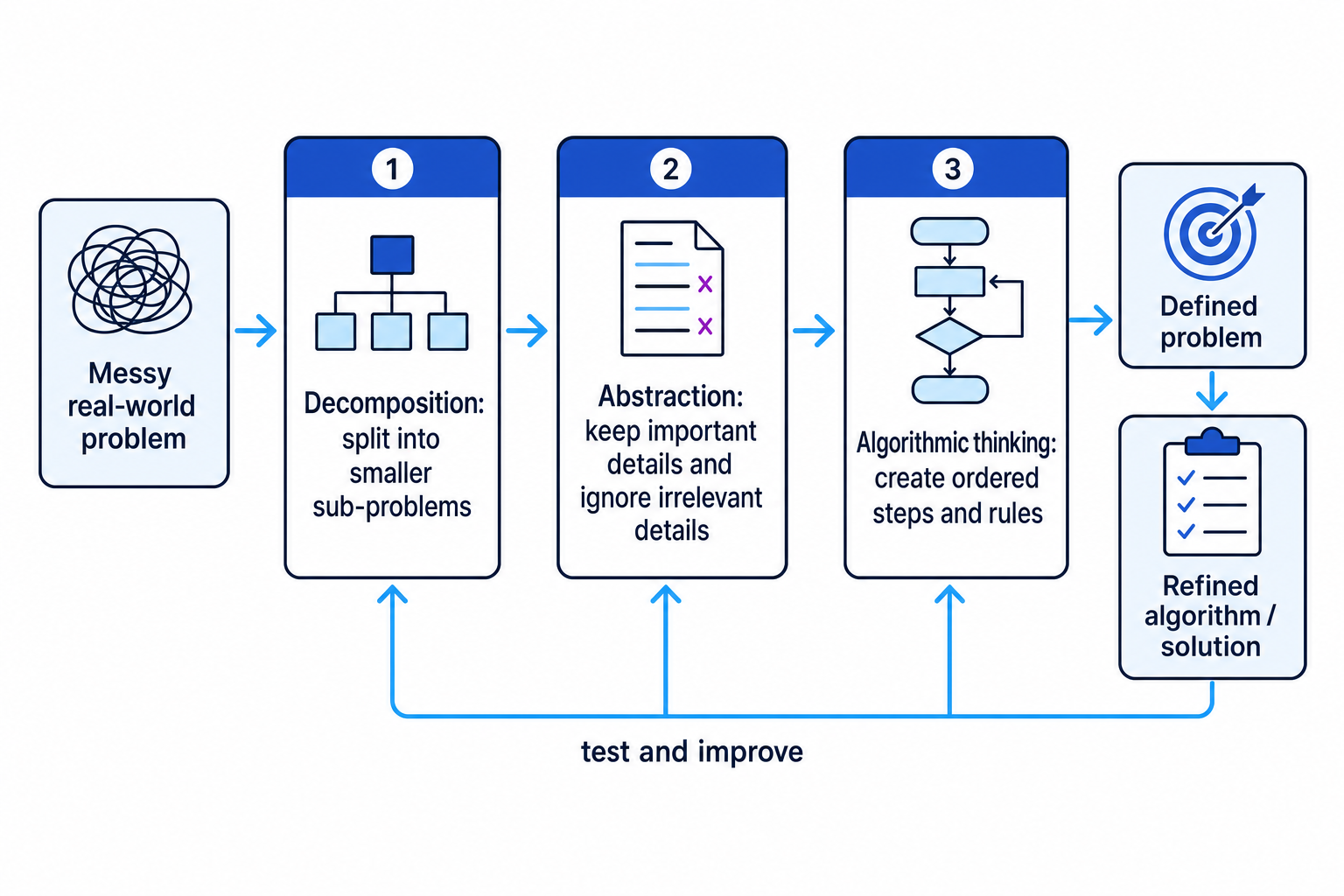
The three principles work together: split the problem up, focus on the right details, then create clear steps for the computer to follow.
Key Idea
The big picture
Computational thinking helps you define a problem clearly and then refine the solution until it is precise enough to turn into an algorithm or program.
Defining the problem
A problem is the task you want the computer system to help solve. To define it properly, you usually need to identify:
- inputs: data that goes into the system
- outputs: information the system produces
- requirements: things the solution must do
- constraints: limits or rules the solution must work within
For example, “make a quiz app” is vague. A better problem definition would say who uses it, what questions are asked, how answers are marked, what score is shown, and whether the quiz has a time limit.
Example
Defining a quiz program
- Identify the inputs: the player’s name and their answers to each question are needed because the program cannot mark the quiz without them.
- Identify the outputs: the program should output the final score and perhaps a message such as “Well done” or “Try again”.
- Add requirements and constraints: each correct answer gives 1 mark, there are 10 questions, and the score must be shown at the end.
- Write a clearer problem statement: “Create a 10-question quiz that accepts a player’s answers, marks each answer, keeps a score, and displays the final result.”
Principle 1: Decomposition
Definition
Decomposition
Decomposition means breaking a large problem down into smaller, more manageable sub-problems.
This makes a problem less overwhelming. Each sub-problem can be understood, designed, tested and improved separately.
For example, a food-ordering app could be decomposed into:
- displaying the menu
- selecting items
- calculating the total price
- taking payment
- confirming the order
This helps you refine the problem because you can notice missing parts. If you forget “confirming the order”, users might pay but not know whether the order was accepted.
Example
Breaking down a library borrowing system
- Start with the main task: the system must allow students to borrow and return library books.
- Split it into major sub-problems: searching for a book, checking whether it is available, borrowing it, returning it, and updating the book record.
- Refine one sub-problem: “borrowing a book” needs the student ID, the book ID, the date borrowed, and a change to the book’s status.
- Check the connections between sub-problems: searching must happen before borrowing, and returning must update the same book record used by borrowing.
Common Mistake
Listing random features
Do not just list everything the system might contain. Decomposition should split the problem into useful sub-problems that help you design the solution.
Principle 2: Abstraction
Definition
Abstraction
Abstraction means focusing on the important details of a problem and ignoring details that are not relevant to the solution.
A computer solution does not need every detail from the real world. It needs the details that affect the result.
Suppose you are designing a cinema booking system. The system probably needs the film, show time, seat number, ticket type and price. It does not need the colour of the cinema carpet or the customer’s favourite snack unless those details affect the booking.
Example
Choosing details for a cinema booking system
- Decide the purpose of the system: it must reserve seats and calculate the correct ticket price.
- Keep details that affect that purpose: film, date, time, seat number, customer age group, and ticket type all affect booking or price.
- Ignore details that do not affect that purpose: the customer’s hair colour and the shape of the popcorn box do not change the seat reservation or ticket price.
- Refine the model: represent each booking using only the necessary data, such as customer ID, screening ID, seat number and price.
Tip
A useful abstraction question
Ask: “Would changing this detail change the output of the program?” If not, it is probably irrelevant for this solution.
Common Mistake
Removing too much detail
Abstraction does not mean deleting details at random. If a detail affects the result, rules or output, it should usually be kept.
Principle 3: Algorithmic thinking
Definition
Algorithmic thinking
Algorithmic thinking means designing a clear, ordered set of steps that can solve a problem.
Definition
Algorithm
An algorithm is a finite sequence of precise instructions for solving a problem.
Algorithms often use three basic structures:
- sequence: instructions carried out in order
- selection: choosing between paths, usually using
IF,ELSEor a condition - iteration: repeating instructions, usually using a loop
A computer needs precise steps. “Check the password” is not detailed enough. The algorithm needs to say what data is compared, what happens if it matches, and what happens if it does not.
Example
Planning a password check
- Choose the data needed: the algorithm needs the entered password, the stored correct password, a count of attempts, and whether the user has logged in.
- Add selection: if
enteredPassword == storedPassword, setloggedInto true; otherwise the attempt has failed. - Add iteration: repeat the password check while
attempts < 3 AND loggedIn == false. - Define the final outputs: if
loggedIn == true, output “Access granted”; otherwise, after 3 failed attempts, output “Account locked”.
Common Mistake
Vague instructions
Instructions such as “deal with the user” or “sort it out” are not algorithmic. A computer needs precise actions and conditions.
Using the principles together
In real problem solving, you usually move between the three principles rather than using them once in a fixed order.
| Principle | Question to ask | How it helps refine the problem |
|---|---|---|
| Decomposition | What smaller parts are inside this problem? | Reveals missing tasks and connections |
| Abstraction | Which details actually matter? | Removes clutter and focuses the design |
| Algorithmic thinking | What exact steps solve each part? | Turns the plan into something implementable |
Refining a solution
To refine a solution means to improve it by making it clearer, more complete or more precise. Refining often happens after testing your idea against examples.
For instance, a ticket-price algorithm might seem finished until you test edge cases such as someone exactly 16 years old, or someone with a discount card.
Example
Refining a ticket-price algorithm
- Decompose the problem: the system needs to input the customer’s age, check whether they have a discount card, calculate the price, and output the result.
- Use abstraction: keep age and discount-card status because they affect the price; ignore the customer’s name because it does not affect this calculation.
- Create initial rules: under 16 gets a child ticket, 16 and over gets an adult ticket, and a discount card reduces the final price.
- Test a boundary case: a customer aged exactly 16 is not under 16, so they should receive an adult ticket.
- Refine the condition: use
age < 16for a child ticket, notage <= 16, if the rule says “under 16”.
Key Idea
Define, then refine
A strong solution usually starts as a clear problem definition, then improves through decomposition, abstraction, algorithmic thinking and testing.
Why this matters in GCSE questions
In OCR J277, you may be asked to describe these principles, identify them in a scenario, or explain how they help solve a problem. You do not need to memorise a single “perfect” wording, but you do need to use the terms accurately.
For example:
- If a scenario says a programmer splits a game into movement, scoring and collision detection, that is decomposition.
- If a scenario says a map app ignores building colours but keeps road names and distances, that is abstraction.
- If a scenario says a programmer writes ordered steps with decisions and loops, that is algorithmic thinking.
Exam technique
In the exam
- Use the correct keyword: decomposition, abstraction or algorithmic thinking.
- Link your answer to the scenario: say which part is being split up, ignored, kept, or turned into steps.
- For “explain” questions, add the benefit: it makes the problem easier to understand, removes irrelevant detail, or produces a clearer algorithm.
Self review
Check yourself
- What is the difference between decomposition and abstraction?
- Why is “make a game” not a clear enough problem definition?
- How can testing examples help refine an algorithm?

Recap questions
Test yourself with 5 quick questions on this guide. Answer them all correctly to complete it.
You've reached the end
Test yourself on this topic, or move on to the next guide.
How was this guide?