Revision notes for OCR GCSE Computer Science Compression. Open the guide for explanations and worked examples. Written against the OCR GCSE Computer Science (J277) specification, so the content matches what's examinable rather than general Computer Science background.
Compression
What you'll learn
- Why computers compress files to save storage space and speed up transmission.
- The difference between lossless and lossy compression.
- The advantages, disadvantages, and effects of each type.
- How to choose the right compression type for a scenario in an exam.
Starting point: files and file size
A file is a named collection of data stored on a computer, such as an image, song, video, document, or program.
A bit is the smallest unit of data, either 0 or 1. A byte is 8 bits. A file’s file size is the amount of storage space it takes up, usually measured in bytes, kilobytes, megabytes, gigabytes, and so on.
For OCR J277, storage prefixes are normally treated as decimal powers of ten, so 1 kB = 1,000 bytes and 1 MB = 1,000 kB. Using 1,024 as the multiplier is also accepted, but follow the question if it gives a value.
Definition
Compression
Compression is the process of reducing the file size of data so it takes up less storage space or can be transmitted more quickly.
To decompress a file means to turn compressed data back into a usable form. A compression algorithm is the set of rules or software method used to compress data, but for this topic you do not need to carry out any specific compression algorithm.
Why compression is needed
Compression is useful because large files can cause practical problems. They take longer to send, use more storage, and may cost more to transfer or store.
Common scenarios where compression may be needed include:
- Sending attachments by email when there is a file size limit.
- Uploading and downloading files more quickly over the internet.
- Streaming audio or video, where data must arrive fast enough to play smoothly.
- Storing photos and videos on a phone, laptop, or cloud storage account.
- Backing up large amounts of data while using less storage space.
- Reducing website loading times, especially for images and video.
Bandwidth means the amount of data that can be transmitted across a network in a given time. If a file is smaller, it usually needs less bandwidth and takes less time to transfer.
Key Idea
Why bother?
Compression is mainly needed to reduce storage requirements and reduce transmission time.
Calculating storage saved
You may be asked to compare an original file size with a compressed file size.
space saved=original size−compressed sizepercentage reduction=space savedoriginal size×100\begin{aligned} \text{space saved} &= \text{original size} - \text{compressed size} \\ \text{percentage reduction} &= \frac{\text{space saved}}{\text{original size}} \times 100 \end{aligned}space savedpercentage reduction=original size−compressed size=original sizespace saved×100Example
Calculating storage saved
A video file is compressed from 120 MB to 45 MB.
- Find the space saved by subtracting the compressed size from the original size: 120 MB - 45 MB = 75 MB.
- Find the fraction of the original file that was saved: 75120\frac{75}{120}12075.
- Convert the fraction to a percentage: 75120×100=62.5\frac{75}{120} \times 100 = 62.512075×100=62.5.
- The compressed file saves 75 MB, which is a 62.5% reduction in file size.
Two main types of compression
There are two types of compression you need to know for OCR J277:
- Lossless compression
- Lossy compression
The key difference is whether the original data can be restored exactly.
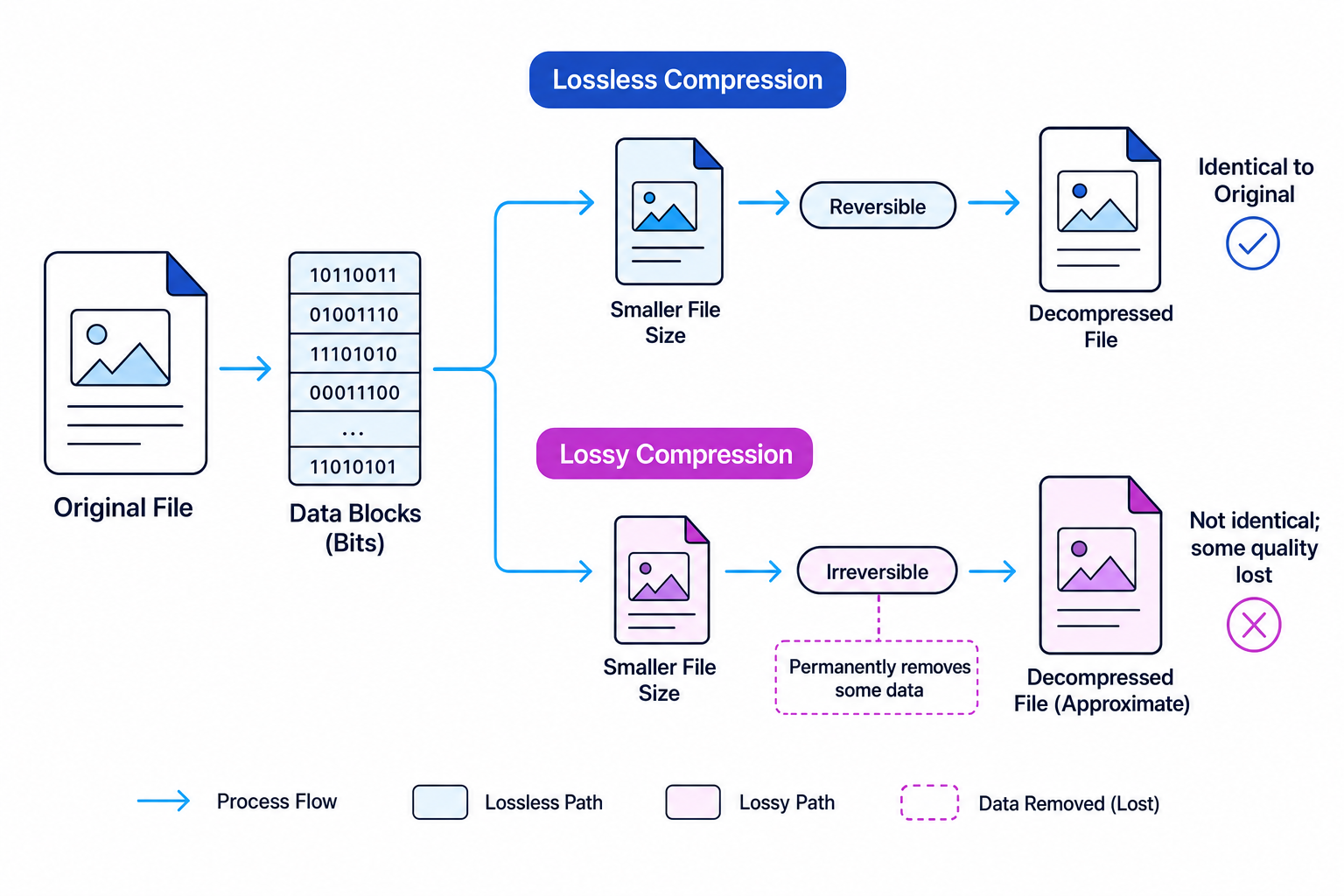
Key Idea
Exact or acceptable?
Use lossless compression when the original file must be restored exactly. Use lossy compression when a much smaller file is more important than perfect quality.
Lossless compression
Definition
Lossless compression
Lossless compression reduces file size while allowing the original data to be restored exactly after decompression.
With lossless compression, no data is permanently removed. After decompression, the file should be identical to the original, bit-for-bit.
Effects on the file
Lossless compression affects the file like this:
- The compressed file is smaller than the original.
- The original file can be recreated exactly.
- There is no loss of quality.
- The amount of compression may be limited, especially if the data cannot be reduced much.
Advantages of lossless compression
Lossless compression is useful because:
- It preserves all original data.
- It is suitable for files where accuracy matters.
- It avoids quality loss.
- It can be used for text, programs, spreadsheets, databases, and important images.
For example, a program file must not lose data. If even one important bit changed, the program might not run correctly.
Disadvantages of lossless compression
Lossless compression also has limitations:
- It usually does not reduce file size as much as lossy compression.
- The compressed file may still be too large for some uses.
- The file may need to be decompressed before it can be used.
Common Mistake
Compressed does not always mean lower quality
Do not assume that every compressed file has lost quality. With lossless compression, the original data can be restored exactly.
Lossy compression
Definition
Lossy compression
Lossy compression reduces file size by permanently removing some data, so the original file cannot be restored exactly.
Lossy compression is often used for media files where humans may not notice small changes, such as images, audio, and video. The compressed version is an approximation of the original.
Effects on the file
Lossy compression affects the file like this:
- The compressed file is usually much smaller than the original.
- Some data is permanently lost.
- The original file cannot be recreated exactly.
- Quality may be reduced.
- Repeated lossy compression can make quality worse over time.
In images, quality loss might appear as blur, blocky areas, or less detail. In audio, quality loss might sound less clear. In video, quality loss might appear as blur, blockiness, or reduced sharpness.
Advantages of lossy compression
Lossy compression is useful because:
- It can create much smaller files than lossless compression.
- It reduces storage space significantly.
- It makes files quicker to upload, download, and stream.
- It is suitable when perfect accuracy is not required.
For example, a music streaming service may use lossy compression so songs load quickly and use less mobile data.
Disadvantages of lossy compression
Lossy compression has important drawbacks:
- Data is permanently removed.
- The original file cannot be recovered exactly.
- Quality can decrease.
- It is unsuitable for files where every bit matters, such as program files, databases, or legal documents.
Common Mistake
Do not use lossy when exact data matters
Lossy compression is unsafe for files that must be restored perfectly. A compressed photo may still look acceptable, but a compressed program or database could become unusable if data is lost.
Choosing the right type
In an exam, the best compression type depends on the purpose of the file. Ask yourself: does the file need to be restored exactly, or is a slight quality loss acceptable?
Example
Choosing a compression type
A school wants to compress three types of files: a student database, a set of website images, and a video for online streaming.
- The student database must keep every value exactly correct, so lossless compression is suitable. Losing or changing data could make student records inaccurate.
- The website images can usually tolerate a small reduction in quality, especially if it makes the page load faster, so lossy compression may be suitable.
- The streaming video needs to be transmitted quickly and does not need to be identical to the original, so lossy compression is usually the better choice.
- The choices depend on the trade-off: lossless keeps perfect data, while lossy gives a greater reduction in file size but may reduce quality.
Quick comparison
| Type | Main effect | Advantages | Disadvantages | Good for |
|---|---|---|---|---|
| Lossless | Reduces file size without permanently losing data | Original can be restored exactly; no quality loss | Smaller reduction in file size | Text files, programs, databases, important documents |
| Lossy | Reduces file size by permanently removing data | Much smaller files; faster transfer and streaming | Quality loss; original cannot be restored exactly | Images, audio, video where some quality loss is acceptable |
Tip
A simple exam test
If the file must be identical after decompression, choose lossless. If the main aim is a much smaller media file, and some quality loss is acceptable, choose lossy.
What OCR expects you to focus on
For this sub-topic, you need to understand:
- why compression is needed;
- common scenarios where compression is useful;
- the difference between lossy and lossless compression;
- the advantages and disadvantages of each type;
- the effect each type has on the file.
You do not need to perform specific compression algorithms. So do not spend revision time memorising algorithm steps for this topic. Focus on explaining the choice and its consequences.
Exam technique
In the exam
- State the compression type clearly: lossy or lossless.
- Link your answer to the scenario, such as storage space, transmission time, streaming, or preserving exact data.
- For lossless, mention that the original data can be restored exactly and there is no quality loss.
- For lossy, mention that data is permanently removed, the file is usually much smaller, and quality may be reduced.
- Do not describe or carry out a compression algorithm unless the question specifically gives you one to discuss.
Self review
Check yourself
- Why might a website compress images before publishing them?
- Which compression type should be used for a program file, and why?
- What happens to the original data when lossy compression is used?

Recap questions
Test yourself with 5 quick questions on this guide. Answer them all correctly to complete it.
You've reached the end
Test yourself on this topic, or move on to the next guide.
How was this guide?