Revision notes for Edexcel GCSE Computer Science Wired and wireless connectivity performance. Open the guide for explanations and worked examples. Written against the Edexcel GCSE Computer Science (1CP2) specification, so the content matches what's examinable rather than general Computer Science background.
Wired and wireless connectivity performance
What you'll learn
- What wired and wireless connectivity mean in a network.
- How speed, bandwidth, latency, and range describe network performance.
- Why wired connections are often more stable, while wireless connections are more flexible.
- How to explain the best connection type for a given scenario.
Networks and connectivity: the starting point
A network is a group of devices connected together so they can share data, software, hardware, or an internet connection.
Connectivity means the way devices are connected so they can communicate.
Definition
Wired and wireless connectivity
A wired connection uses a physical cable, such as an Ethernet cable, to carry data between devices. A wireless connection uses radio waves to carry data through the air, such as Wi-Fi between a laptop and a wireless access point.
An access point is a device that lets wireless devices connect to a network. In many homes, the wireless access point is built into the router.
This diagram compares the main performance effects of wired and wireless connectivity.
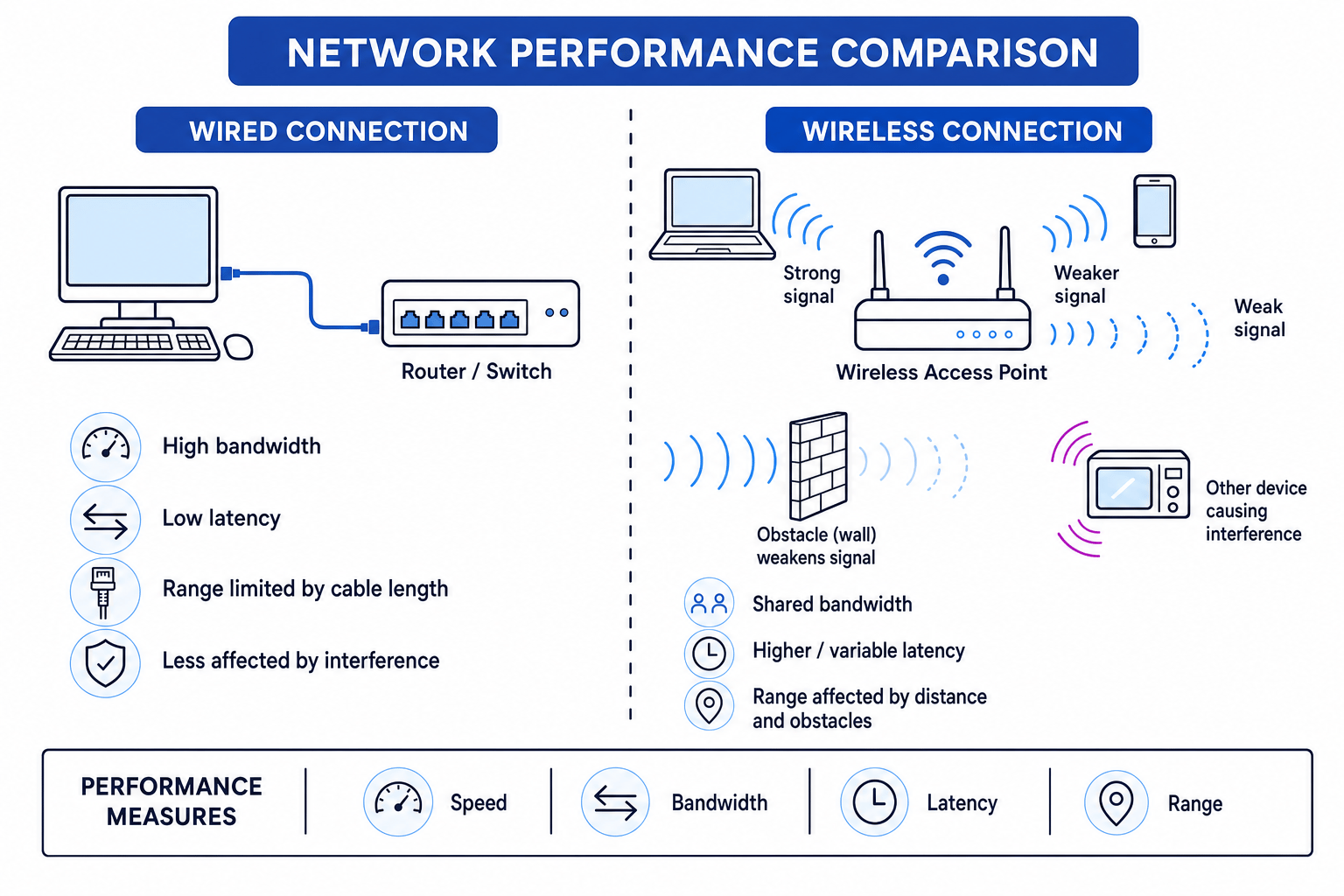
The four performance measures
When an exam asks about network performance, it usually wants you to talk about one or more of these four ideas.
Definition
Performance measures
- Speed is the actual rate at which data is transferred in real use. This is often called throughput.
- Bandwidth is the maximum amount of data that a connection can carry per second. It is usually measured in bits per second, such as Mbit/s.
- Latency is the delay before data starts to arrive after it is sent. It is often measured in milliseconds.
- Range is the distance over which a connection can still work reliably.
A bit is the smallest unit of data, either 0 or 1. A packet is a small block of data sent across a network.
Bandwidth is not the same as latency
A connection can have high bandwidth but still feel slow for interactive tasks if it has high latency.
For example, downloading a large file mainly needs high bandwidth. Online gaming, video calls, and remote control systems need low latency because lots of small packets must arrive quickly.
Key Idea
Bandwidth vs latency
Bandwidth is about how much data can be carried per second. Latency is about how long the delay is before data arrives. They affect performance in different ways.
Example
Comparing bandwidth and latency
A satellite connection has bandwidth of 100 Mbit/s but latency of 600 ms. A wired fibre connection has bandwidth of 30 Mbit/s but latency of 10 ms.
- For a 300 Mbit download, compare the download time using time=databandwidthtime = \frac{data}{bandwidth}time=bandwidthdata. The satellite connection takes 300÷100=3300 \div 100 = 3300÷100=3 seconds.
- The wired fibre connection takes 300÷30=10300 \div 30 = 10300÷30=10 seconds, so the satellite connection is better for this large download.
- For online gaming, compare latency instead. 10 ms is much lower than 600 ms, so the wired fibre connection is better for fast reactions.
- The “best” connection depends on the task: large downloads need bandwidth, while live interaction needs low latency.
How wired connectivity affects performance
A wired connection normally uses a cable between the device and a router, switch, or network socket. Ethernet is a common wired networking standard used in local area networks.
Because the signal travels through a cable, wired connections are usually more predictable than wireless connections.
Speed and bandwidth on wired connections
Wired connections often provide high bandwidth and consistent actual speed. This is because the cable gives the device a direct communication path and is less affected by other nearby devices.
A wired desktop computer connected to a switch is usually better for large file transfers, backups, or streaming high-quality media than the same device using weak Wi-Fi.
Latency on wired connections
Wired connections usually have low latency. Data does not have to compete as much with other wireless signals, and fewer packets need to be resent because of signal errors.
This is why gamers, video editors working with network storage, and offices with fixed desktop PCs often prefer Ethernet.
Range on wired connections
The range of a wired connection is limited by cable length and where network sockets are installed. A cable is excellent for a fixed device, but it is inconvenient for a moving device such as a phone or tablet.
Wired networks can be extended using extra equipment, but the key GCSE point is that a wired connection physically depends on cables.
Example
Choosing wired for a fixed computer
A school computer room has desktop PCs used for online exams, large file downloads, and access to a shared printer.
- The PCs are fixed in one place, so lack of mobility is not a major problem.
- Online exams benefit from stable speed and low latency, because disconnections or delays could interrupt students.
- Large downloads benefit from high bandwidth, which wired Ethernet usually provides more consistently than Wi-Fi.
- A wired connection is the better choice because the performance needs are more important than being able to move around.
How wireless connectivity affects performance
A wireless connection sends data using radio waves. This is useful because devices can move around and do not need a cable.
However, wireless performance can change depending on distance, obstacles, interference, and how many devices are sharing the connection.
Speed and bandwidth on wireless connections
Wireless connections can have good advertised bandwidth, but the actual speed may be lower.
This can happen because:
- the device is far from the access point
- walls, floors, metal, or water weaken the signal
- other Wi-Fi networks use the same channel
- many users share the same wireless bandwidth
- the device has to resend data after errors
Interference means unwanted signals that disrupt communication. Retransmission means sending data again because the first attempt failed or was corrupted.
Latency on wireless connections
Wireless latency is often higher and less consistent than wired latency.
This is because wireless devices may have to wait before transmitting, avoid clashes with other devices, or resend packets when the signal is poor. This creates variable delay, which is especially noticeable in online games and video calls.
Range on wireless connections
Wireless has a useful range because devices do not need to be physically plugged in. This makes it ideal for phones, tablets, laptops, and guest devices.
But wireless range is not just about distance. A laptop in the next room might get poor performance if there are thick walls or electrical interference between it and the access point.
Example
Explaining poor wireless performance
A student’s laptop has slow Wi-Fi in an upstairs bedroom. The router is downstairs, several people are streaming video, and there are thick walls between the laptop and router.
- The distance and thick walls weaken the wireless signal, so the usable range is being stretched.
- A weaker signal can reduce actual speed because the laptop may use a slower connection rate and may need retransmissions.
- Several people streaming video share the available bandwidth, so each device gets less of the total capacity.
- The extra waiting and retransmissions can increase latency, making video calls freeze or games lag.
Common Mistake
Saying only “wired is faster”
Do not just write “wired is faster” without explaining the performance measure. Say whether you mean higher bandwidth, lower latency, more consistent speed, or better range for a particular layout.
Comparing wired and wireless
| Performance measure | Wired connectivity | Wireless connectivity |
|---|---|---|
| Speed | Usually more consistent actual speed | Can vary with signal strength and interference |
| Bandwidth | Often high and stable for fixed devices | Shared between wireless devices and affected by conditions |
| Latency | Usually low and predictable | Often higher and more variable |
| Range | Limited by cable length and socket locations | Flexible, but weakens with distance and obstacles |
Tip
Use cause, measure, consequence
A strong explanation follows this pattern: because of a connection characteristic, a performance measure changes, so the user experiences a result. For example: “Because the laptop is far from the access point, the signal is weaker, so bandwidth may decrease and video streaming may buffer.”
Choosing the right connection
For GCSE questions, do not assume one type is always best. Match the connection to the situation.
Wired is often best when...
- the device stays in one place
- high and consistent bandwidth is needed
- low latency is important
- security and reliability are important
- the building already has network cabling
Examples include desktop PCs, servers, games consoles, smart TVs, and network printers.
Wireless is often best when...
- devices need to move around
- installing cables would be difficult or expensive
- users need convenient access across a room or building
- the task does not require very low latency or maximum bandwidth
Examples include phones, tablets, laptops, visitor devices, and sensors.
Common Mistake
Assuming radio waves are slow
Wireless is not usually worse because radio waves “travel slowly”. Radio waves travel very fast. Wireless performance is often worse because the signal is shared, weakened by obstacles, affected by interference, and may need retransmissions.
Applying the idea to exam scenarios
If a question gives you a scenario, look for clues:
- Gaming / video call / remote control → latency matters.
- Downloading / backups / streaming high-quality video → bandwidth and actual speed matter.
- Walking around / phones / tablets / visitors → wireless range and mobility matter.
- Desktop PCs / servers / fixed equipment → wired stability is often better.
- Walls / distance / other devices / crowded area → wireless performance may drop.
Example
Selecting the better connection for a scenario
A hospital has desktop computers at nurses’ stations and tablets used by doctors on ward rounds. Which connectivity type is better for each?
- The nurses’ station computers are fixed, so a wired connection is suitable because mobility is not needed.
- These computers may need reliable access to patient records, so stable speed and low latency are important.
- The doctors’ tablets need to move between rooms, so wireless connectivity is more suitable despite possible changes in signal strength.
- The best answer uses both types: wired for fixed, reliability-focused devices; wireless for mobile devices needing range and flexibility.
Exam technique
In the exam
- Name the performance measure: speed, bandwidth, latency, or range.
- Link the connection characteristic to the measure, such as cable stability, signal strength, distance, obstacles, interference, or shared bandwidth.
- Explain the consequence for the user, such as faster downloads, less lag, better mobility, or more buffering.
- Avoid vague answers like “better connection”; write “higher bandwidth”, “lower latency”, or “more reliable over this distance”.
Self review
Check yourself
- Why can a wireless connection have high advertised bandwidth but poor actual speed?
- Why might an online gamer choose Ethernet instead of Wi-Fi?
- What factors can reduce wireless range, and how can that affect latency or bandwidth?
Networks
Guide 4 of 8
You've reached the end
Test yourself on this topic, or move on to the next guide.
How was this guide?