Revision notes for Edexcel GCSE Computer Science Network speeds and transmission calculations. Open the guide for explanations and worked examples. Written against the Edexcel GCSE Computer Science (1CP2) specification, so the content matches what's examinable rather than general Computer Science background.
Network speeds and transmission calculations
What you'll learn
- What network speed means: how many bits of data can be sent each second.
- How to convert between file-size units and transmission-speed units.
- How to use the relationship between file size, transmission rate and time.
- How to build clear expressions before calculating an answer.
The basic idea
When a file is sent across a network, data is transmitted from one device to another. A larger file usually takes longer to send. A faster connection usually sends the same file in less time.
So transmission calculations are all about three quantities:
- file size — how much data is being sent
- transmission rate — how quickly data is being sent
- time — how long the transfer takes
Bits, bytes and file size
Before you calculate anything, you must know what unit the data is in.
Definition
Bit, byte and file size
A bit is the smallest unit of data, either 0 or 1. A byte (B) is 8 bits. File size is the amount of data stored in a file.
For file sizes, Edexcel uses binary storage units:
- 1 kibibyte (KiB) = 1024 bytes
- 1 mebibyte (MiB) = 1024 KiB
- 1 gibibyte (GiB) = 1024 MiB
Network speeds, however, are measured in bits per second, so file sizes often need converting into bits first.
Key Idea
Convert the file size into bits
If the transmission rate is in bit/s, the file size must be in bits before you use the formula. Convert bytes to bits by multiplying by 8.
Example
Converting a file size into bits
- Convert the file size from KiB into bytes: 512×1024=524288 bytes512 \times 1024 = 524288\text{ bytes}512×1024=524288 bytes.
- Convert bytes into bits because network speeds use bits per second: 524288×8=4194304 bits524288 \times 8 = 4194304\text{ bits}524288×8=4194304 bits.
- Use 4,194,304 bits as the file size in a transmission calculation.
Network speed and transmission rate
Definition
Transmission rate
Transmission rate, often called network speed, is the amount of data that can be sent across a network connection each second. It is measured in bits per second, written as bit/s.
The speed units in this topic use decimal steps of 1000:
- 1 kilobit per second (kbit/s) = 1,000 bit/s
- 1 megabit per second (Mbit/s) = 1,000,000 bit/s
- 1 gigabit per second (Gbit/s) = 1,000,000,000 bit/s
Example
Converting a network speed
- Identify the unit: 75 Mbit/s means 75 megabits are sent each second.
- Convert megabits to bits using the decimal network-speed unit: 75×1000000=75000000 bit/s75 \times 1000000 = 75000000\text{ bit/s}75×1000000=75000000 bit/s.
- Use 75,000,000 bit/s in the calculation if the file size is in bits.
Common Mistake
Mixing up b, B, 1000 and 1024
Lowercase b means bit, while uppercase B means byte. Also, KiB and MiB are 1024-based file-size units, but kbit/s and Mbit/s are 1000-based network-speed units.
The main relationship
A variable is a letter used to stand for a value. We can use:
- FFF for file size in bits
- RRR for transmission rate in bit/s
- TTT for time in seconds
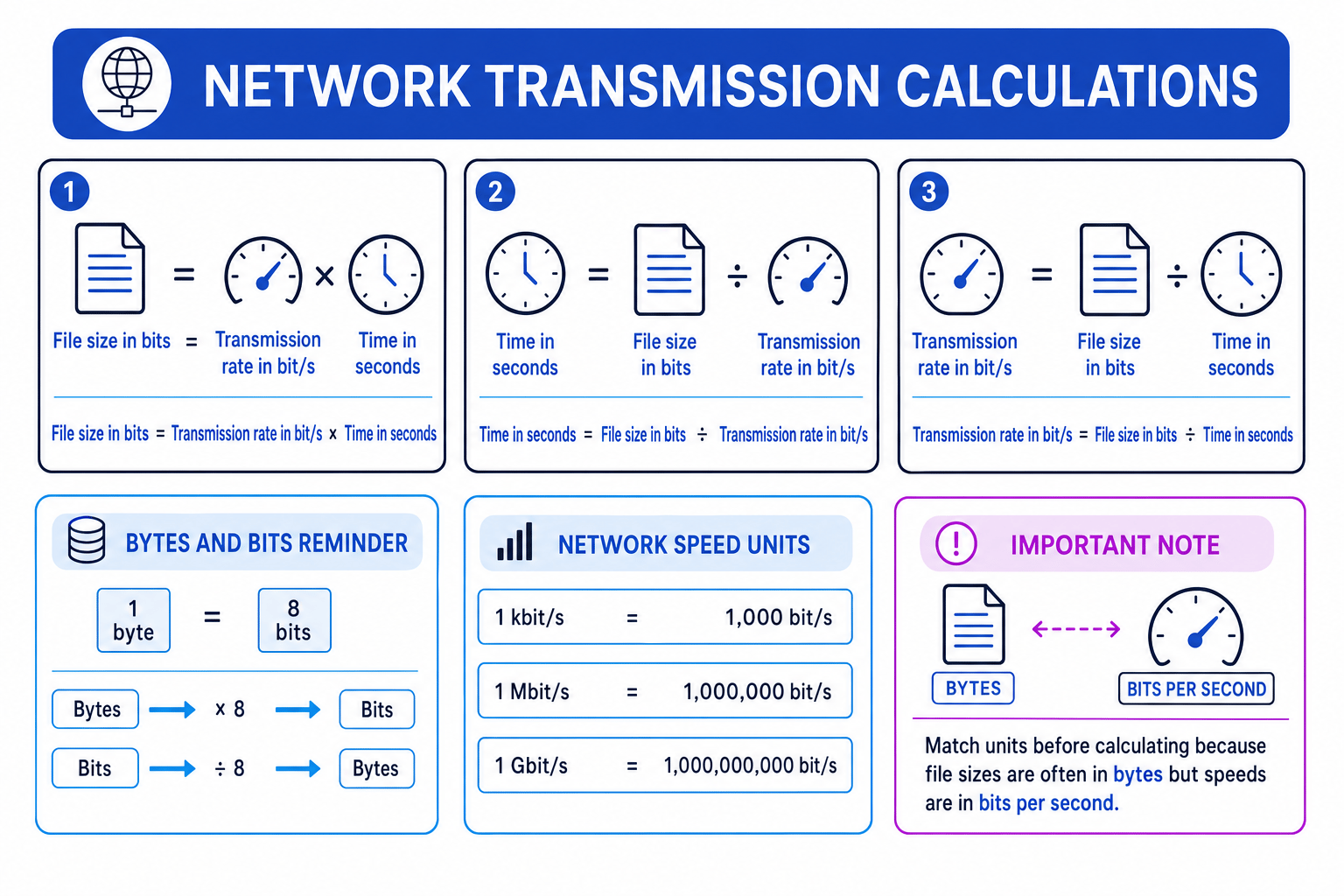
The main relationship is:
F=R×TF = R \times TF=R×TYou can rearrange it depending on what the question asks for:
T=FRT = \frac{F}{R}T=RF R=FTR = \frac{F}{T}R=TFKey Idea
Units must match
The formula works when file size is in bits, transmission rate is in bits per second, and time is in seconds.
This diagram summarises the formula and the key unit conversions you need.
Constructing expressions
Definition
Expression
An expression is a calculation written using values, variables and operations. In this topic, an expression often shows the unit conversions and the transmission formula in one line.
Building the expression first is useful because it shows your method clearly, especially when the units need converting.
Example
Building a transmission-time expression
A 6 MiB file is sent over a 12 Mbit/s connection. Calculate the transmission time.
- Choose the correct formula because the unknown quantity is time: T=FRT = \frac{F}{R}T=RF.
- Convert the file size into bits inside the expression: 6×1024×1024×86 \times 1024 \times 1024 \times 86×1024×1024×8.
- Convert the transmission rate into bit/s inside the expression: 12×100000012 \times 100000012×1000000.
- Combine these into one expression: T=6×1024×1024×812×1000000T = \frac{6 \times 1024 \times 1024 \times 8}{12 \times 1000000}T=12×10000006×1024×1024×8 seconds.
- Evaluate the expression: T≈4.19 sT \approx 4.19\text{ s}T≈4.19 s.
Tip
Convert time to seconds
Use seconds in the formula. If a question gives minutes, convert them to seconds before substituting into the expression.
Calculating file size
If you know the transmission rate and the time, use:
F=R×TF = R \times TF=R×TThis gives the amount of data transmitted.
Example
Calculating file size from rate and time
A connection sends data at 5 Mbit/s for 40 seconds. Calculate the file size in bytes.
- Convert the rate into bit/s: 5×1000000=5000000 bit/s5 \times 1000000 = 5000000\text{ bit/s}5×1000000=5000000 bit/s.
- Use the file-size formula: F=5000000×40=200000000 bitsF = 5000000 \times 40 = 200000000\text{ bits}F=5000000×40=200000000 bits.
- Convert bits into bytes because the question asks for bytes: 200000000÷8=25000000 bytes200000000 \div 8 = 25000000\text{ bytes}200000000÷8=25000000 bytes.
Calculating transmission rate
If you know the file size and the time, use:
R=FTR = \frac{F}{T}R=TFThis gives the speed needed to transmit the file in that time.
Tip
Matching units are enough
If the file size is already in Mbit and the answer should be in Mbit/s, you can use Mbit directly. The units match, so they cancel cleanly with seconds.
Example
Calculating transmission rate
A 96 Mbit file is transmitted in 12 seconds. Calculate the transmission rate in Mbit/s.
- Choose the correct formula because the unknown quantity is rate: R=FTR = \frac{F}{T}R=TF.
- Substitute the matching units directly: R=96÷12R = 96 \div 12R=96÷12.
- Calculate the rate: R=8 Mbit/sR = 8\text{ Mbit/s}R=8 Mbit/s.
- If needed in bit/s, convert it: 8×1000000=8000000 bit/s8 \times 1000000 = 8000000\text{ bit/s}8×1000000=8000000 bit/s.
Common Mistake
Assumed constant speed
GCSE calculation questions normally assume the connection runs at the stated speed for the whole transfer. Real networks may be slower because of congestion, interference or extra protocol data.
Exam technique
In the exam
- Underline the units: bits, bytes, KiB, MiB, seconds, minutes, kbit/s, Mbit/s or Gbit/s.
- Convert before calculating: file size to bits, speed to bit/s, and time to seconds unless the units already match.
- Write the formula or full expression first, then calculate and include the final unit.
Self review
Check yourself
- What expression would you use to find time if you know file size and transmission rate?
- Why is a 4 MiB file not the same as 4 million bits?
- In 100 Mbit/s, does the b mean bits or bytes?
You've reached the end
Test yourself on this topic, or move on to the next guide.
How was this guide?