Revision notes for Edexcel GCSE Computer Science Why computers are networked. Open the guide for explanations and worked examples. Written against the Edexcel GCSE Computer Science (1CP2) specification, so the content matches what's examinable rather than general Computer Science background.
Why computers are networked
What you'll learn
- What a computer network is, and how it differs from a standalone computer.
- The main reasons computers are connected together.
- How networking helps with sharing data, hardware, communication, and central management.
- How to explain network benefits clearly in a GCSE answer.
Starting point: standalone computers
A standalone computer is a computer that is not connected to other computers or devices. It can run programs and store files locally, but it cannot directly share data or resources with other computers.
That might be fine for one person working alone. But in schools, homes, offices, shops, hospitals, and online services, computers usually need to work together.
Definition
Computer network
A computer network is two or more computers or devices connected together so that they can exchange data and share resources.
A device connected to a network is often called a node. A node could be a desktop computer, laptop, tablet, smartphone, printer, server, router, or other connected device.
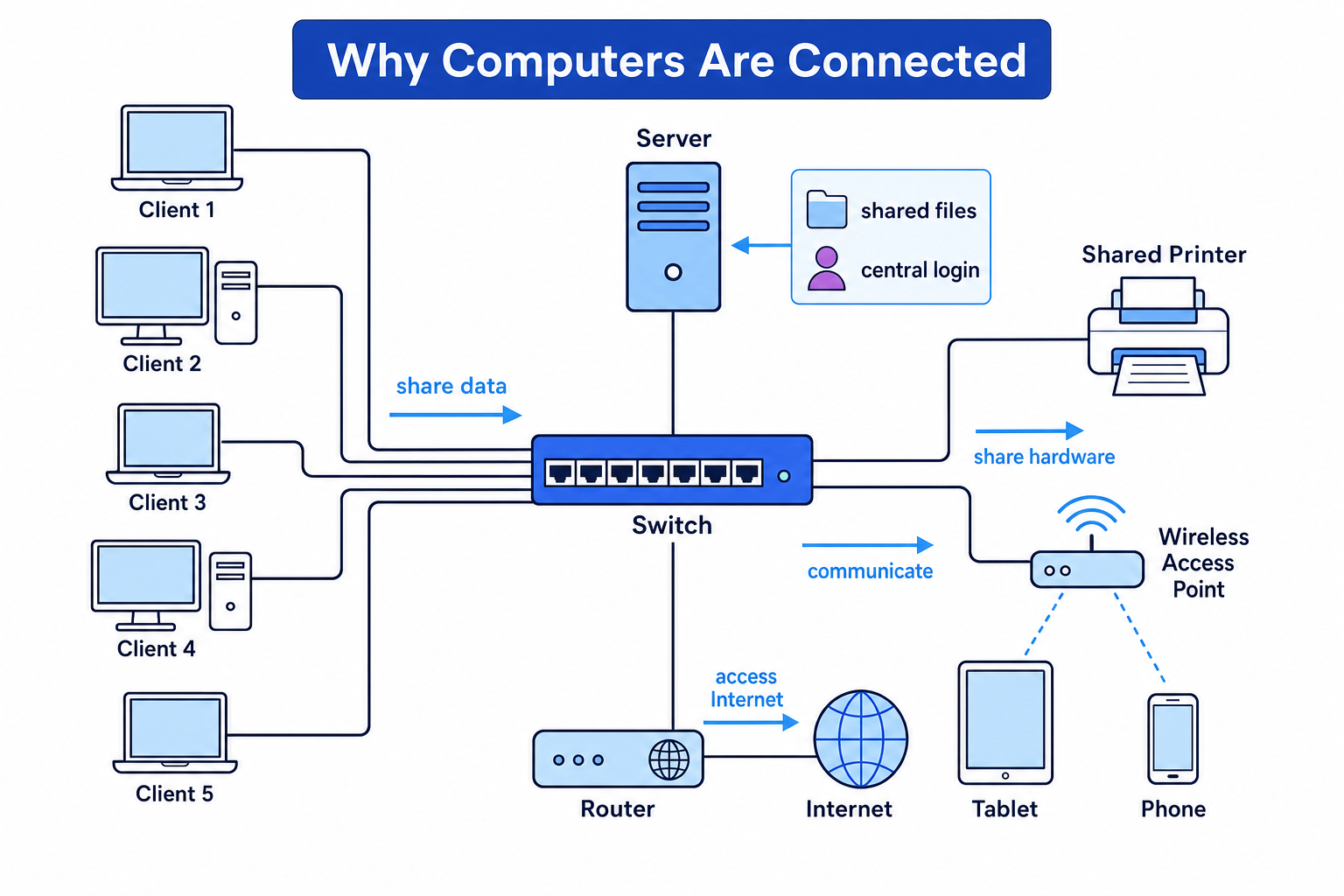
Key Idea
Main reason for networking
Computers are networked so users and devices can share data, share resources, communicate, access services, and be managed centrally.
Sharing data and files
One of the biggest reasons for networking computers is to allow users to share data.
For example, in a school network, a student might save a document in their user area and then open it later from a different classroom computer. In an office, several people might work from the same shared folder instead of emailing different versions of a file to each other.
Definition
Data sharing
Data sharing means making files or information available to other users or devices on a network.
Data sharing can make work easier because:
- users can access the same files from different computers
- teams can collaborate on shared documents
- files can be stored in a central location
- backups can be managed more easily
- there is less need to copy files using USB drives or email attachments
Servers and clients
In many networks, important resources are provided by a server.
Definition
Server and client
A server is a computer or device that provides services or resources to other devices on a network. A client is a device that requests and uses those services.
For example, a file server may store students’ documents. The classroom computers are clients because they request files from the server.
Common Mistake
Thinking a server must be huge
A server does not have to be a massive computer in a data centre. It is called a server because of the role it performs: providing services to other devices.
Sharing hardware resources
A resource is something on a network that can be used by devices or users. This could be hardware, software, storage, or data.
Networks allow hardware resources to be shared. A common example is a shared printer. Instead of buying one printer for every computer, many computers can send print jobs to one networked printer.
Other shared hardware or services might include:
- printers
- scanners
- file storage
- an Internet connection
- specialist equipment, such as a card reader or networked camera
This can reduce costs and make resources easier to manage.
Example
Choosing shared resources for a classroom
A school has 30 classroom computers, but only needs occasional printing and Internet access.
- The school identifies resources that many users need but do not need all the time: printing and Internet access.
- Instead of buying 30 separate printers and 30 separate Internet connections, the computers are connected to a network.
- The network allows all 30 computers to use a shared printer and a shared connection to the Internet, reducing cost and making the setup easier to manage.
Communication between users
Networks also allow users to communicate.
This could include:
- instant messaging
- video calls
- shared calendars
- collaborative documents
- multiplayer games
- announcements or notifications on a school system
Without a network, a computer can still run programs locally, but it cannot easily exchange messages or updates with other computers.
In a business, communication is often the main reason for networking. Staff may need to send files, arrange meetings, update shared records, or contact customers.
Tip
Link the benefit to the user
If you are asked why a network is useful, do not just write “communication”. Explain who is communicating and why it helps, such as “teachers can send work to students” or “staff can update the same customer records”.
Central management
Networking computers also makes them easier to manage.
If every computer is standalone, each one must be managed separately. That means setting up users, installing software, changing settings, and backing up files on each individual machine.
On a network, many of these tasks can be controlled centrally.
Definition
Central management
Central management means controlling users, devices, files, settings, security, or software from one main place on the network.
Central management can include:
- creating user accounts
- setting passwords
- controlling access rights
- installing or updating software
- applying security settings
- backing up files stored on a server
- monitoring network activity
User accounts and permissions
A user account identifies a person on a computer system. It usually has a username and password.
Permissions are rules that control what a user is allowed to access or change.
For example, a student might be able to read a shared worksheet but not delete it. A teacher might have permission to edit the worksheet. A network administrator might be able to manage all user accounts.
Key Idea
Why central control matters
A network lets an organisation manage many computers as one system, rather than treating every computer as a separate machine.
Accessing the Internet and online services
Computers are often networked so they can access the Internet.
The Internet is a worldwide network of connected networks. A school, home, or business network can connect to the Internet through a device such as a router.
Once connected, users can access:
- websites
- email servers
- cloud storage
- online learning platforms
- software updates
- online databases
- remote services
A network can also allow many local devices to share one Internet connection.
Definition
Router
A router is a network device that forwards data between networks, such as between a home or school network and the Internet.
Sharing software and services
Some networks allow users to access software or services from a central location.
For example:
- a school may provide shared access to learning software
- a company may use a central database
- staff may log into a web-based system from different computers
- software updates may be distributed across the network
This can make it easier to keep software consistent across many computers.
However, it also means the network must be reliable. If a key server or connection fails, users may lose access to important services.
Common Mistake
Networks create dependence
A network can make sharing easier, but it can also create dependence. If the network, server, or Internet connection fails, users may be unable to access shared files, printers, or services.
Security and backups
Networks can improve security when they are managed well.
For example, a network administrator can:
- require users to log in
- set password rules
- control who can access certain folders
- install security updates
- back up important files from a central server
A backup is a copy of data kept so it can be restored if the original data is lost, damaged, or deleted.
Central backups are useful because users may forget to back up files stored only on their own computer. If files are stored on a server, the organisation can back them up regularly.
But networking can also introduce risks. If a network is poorly protected, malware or unauthorised users may be able to affect several devices.
Common Mistake
Only listing advantages
The question is about why computers are connected, so focus on benefits. But strong answers often show awareness that networks also need security, maintenance, and protection from faults.
Putting it together: why network a set of computers?
When deciding why computers should be connected in a network, think about what the users need to do.
A network is useful when users need to:
- share files
- use shared hardware
- communicate
- access the Internet
- log in from different devices
- have files backed up centrally
- use shared software or databases
- be managed by an administrator
Example
Explaining why an office uses a network
An office has 20 employees who work with customer records, shared documents, email, and one high-quality printer.
- The employees need access to the same customer records, so a network allows shared data to be stored centrally rather than separately on each computer.
- The office only needs one high-quality printer, so networking allows all employees to send print jobs to the same shared printer.
- Staff need email and shared documents, so networking supports communication and collaboration between users.
- The business needs security and backups, so a server can manage user accounts, permissions, and central file backups.
Quick summary
Computers are connected in a network because networking makes them more useful together than they are alone.
The main reasons are:
- sharing data such as files and databases
- sharing hardware such as printers and storage
- communicating using email, messaging, calls, or collaboration tools
- accessing the Internet and online services
- central management of users, software, settings, and security
- central backups to protect important data
Exam technique
In the exam
- Match your answer to the scenario: a school, home, hospital, shop, or office may need different network benefits.
- Give a reason and then explain the benefit, such as “shared printer, so the organisation does not need to buy one for every computer”.
- Avoid vague answers like “it is better” or “it is faster”; name a specific networking purpose such as file sharing, communication, Internet access, or central management.
Self review
Check yourself
- What is the difference between a standalone computer and a networked computer?
- Give two resources that computers might share on a network.
- Why might central management be useful in a school or business network?
You've reached the end
Test yourself on this topic, or move on to the next guide.
How was this guide?