Revision notes for Edexcel GCSE Computer Science Types of network (LAN, WAN). Open the guide for explanations and worked examples. Written against the Edexcel GCSE Computer Science (1CP2) specification, so the content matches what's examinable rather than general Computer Science background.
Types of network (LAN, WAN)
What you'll learn
- What a network is and why devices are connected together.
- The meaning of LAN and WAN.
- How to compare LANs and WANs by geographical area, ownership, and use.
- How to spot LANs and WANs in GCSE exam scenarios.
The basic idea: what is a network?
A computer network is a group of connected computing devices that can communicate with each other.
A computing device on a network is often called a node. Examples include desktop computers, laptops, smartphones, printers, servers, switches, and routers.
Networks are useful because they allow devices to:
- Share data, such as files or messages.
- Share hardware, such as printers.
- Share an internet connection.
- Communicate using services such as email, messaging, or video calls.
- Access centrally stored data, such as files saved on a school server.
Definition
Network
A network is two or more computing devices connected together so that they can exchange data and share resources.
A resource is something a device can use over a network, such as a printer, file storage, or an internet connection.
Types of network
In this topic, you need to understand two types of network:
- LAN: Local Area Network
- WAN: Wide Area Network
The difference is mainly about the geographical area covered and who owns or manages the network infrastructure.
Network infrastructure means the physical and technical parts that make the network work, such as cables, routers, switches, wireless access points, and communication links.
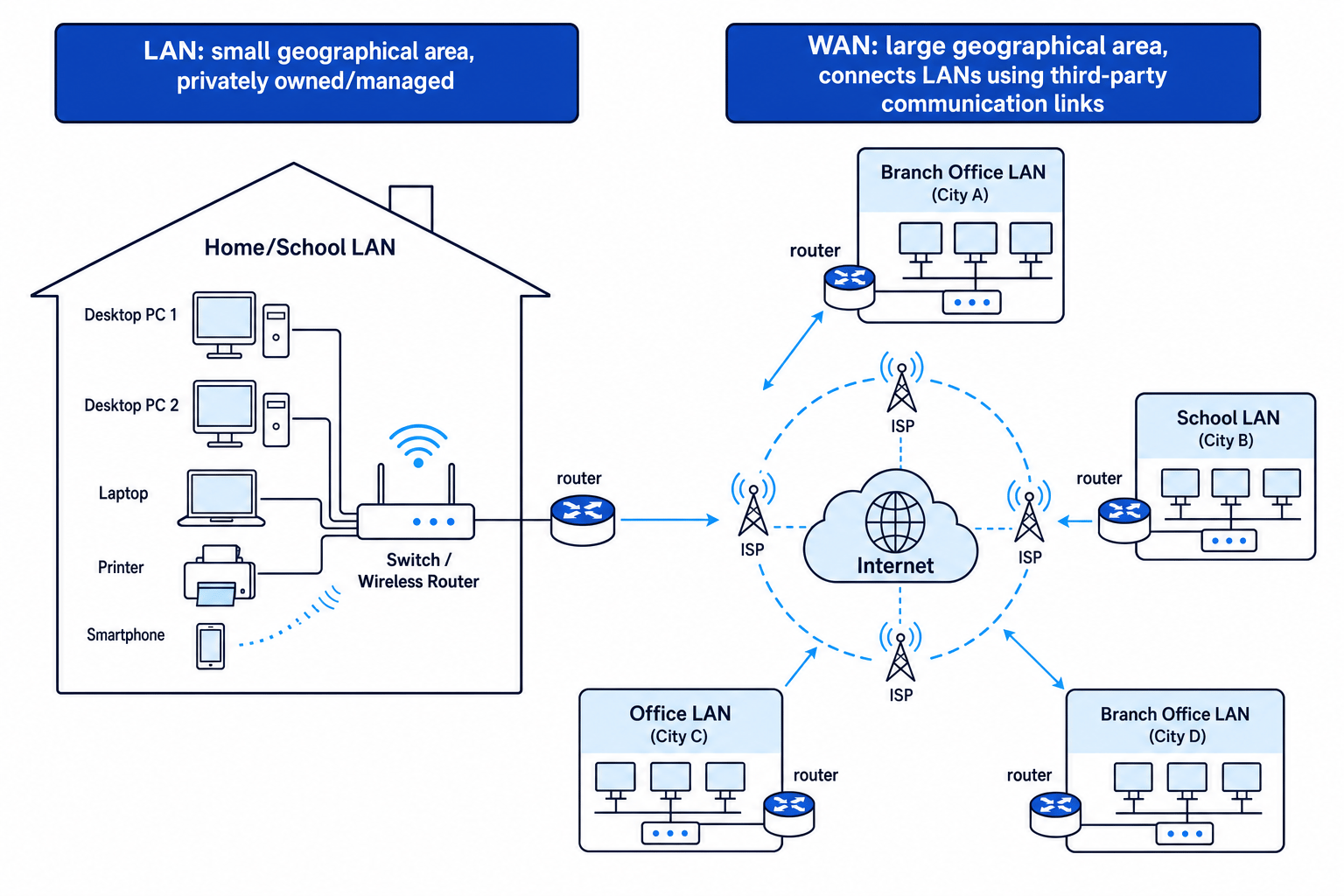
LAN: Local Area Network
A LAN, or Local Area Network, covers a small geographical area.
Typical examples include:
- A home network.
- A school network.
- A network in one office.
- A network across a small group of nearby buildings, such as a school campus.
Definition
LAN
A Local Area Network (LAN) is a network that connects devices within a small geographical area, usually owned or managed by one person or organisation.
A LAN is usually controlled by the organisation or person using it. For example, a school usually owns or manages its own classroom computers, network switches, wireless access points, and network cabling.
A switch is a network device that connects devices together within a LAN and forwards data to the correct device.
A wireless access point allows devices to connect to a network using wireless communication instead of a cable. In homes, this is often built into a wireless router.
Features of a LAN
LANs usually have these features:
- They cover a small area.
- They are usually privately owned or managed.
- They often have high data transfer speeds compared with wide-area links.
- They may use wired connections, wireless connections, or both.
- They let local users share resources such as files, printers, and internet access.
Key Idea
LAN takeaway
A LAN is local: think one home, one school, one office, or one small site controlled by the same person or organisation.
WAN: Wide Area Network
A WAN, or Wide Area Network, covers a large geographical area.
A WAN may connect networks across:
- A town or city.
- A country.
- Several countries.
- The whole world.
Definition
WAN
A Wide Area Network (WAN) is a network that connects devices or smaller networks over a large geographical area, often using third-party communication links.
A WAN often connects multiple LANs together. For example, a company might have one LAN in its London office and another LAN in its Manchester office. The connection between those sites forms part of a WAN.
A third-party communication link is a connection provided by another organisation, such as an Internet Service Provider.
An Internet Service Provider (ISP) is a company that provides access to the internet and network communication services.
The internet is the largest example of a WAN. It connects many smaller networks around the world.
Features of a WAN
WANs usually have these features:
- They cover a large geographical area.
- They often connect multiple LANs together.
- They commonly use communication links owned by third parties, such as ISPs or telecoms companies.
- They are more complex to manage than a single LAN.
- They may have slower speeds or higher delays than a LAN, depending on the connection.
Key Idea
WAN takeaway
A WAN is wide: it connects devices or LANs over a large area, often using links not owned by the user or organisation.
Routers: joining networks together
A router is a device that forwards data between different networks.
In a home, the router connects your LAN to your ISP, which then connects you to the internet. In a school, routers can connect the school LAN to wider networks, including the internet.
Definition
Router
A router is a network device that sends data between different networks, such as between a LAN and a WAN.
This is why routers are important when talking about LANs and WANs: they are often the boundary between the local network and the wider network.
LAN and WAN compared
| Feature | LAN | WAN |
|---|---|---|
| Full name | Local Area Network | Wide Area Network |
| Area covered | Small geographical area | Large geographical area |
| Typical example | Home, school, office | Internet, company sites in different cities |
| Ownership/control | Usually owned or managed by one person or organisation | Often uses third-party links, such as ISP infrastructure |
| Main purpose | Connect local devices and share local resources | Connect distant devices or connect multiple LANs |
| Complexity | Usually simpler | Usually more complex |
Common Mistake
Counting devices instead of considering area
Do not decide LAN or WAN just by counting how many devices there are. A large school LAN may have hundreds of devices, but it is still a LAN if it covers a small local area and is managed by the school.
How LANs and WANs work together
LAN and WAN are not opposites in the sense that you only ever have one. In real life, they often work together.
For example:
- Your home Wi-Fi is a LAN.
- Your school network is a LAN.
- The internet is a WAN.
- When your school LAN connects to a website hosted in another country, data travels from the school LAN onto a WAN.
A company with several offices may have a LAN at each office. These LANs can be connected together using a WAN.
Analogy
Roads between places
A LAN is like the roads inside one school site: local and controlled by the school. A WAN is like the motorway system connecting towns and cities: it links separate places over a much wider area.
Identifying LANs and WANs in scenarios
When you are given a scenario, focus on the area covered and ownership or management.
Example
Classifying network scenarios
A college has computers in three buildings on one campus, all connected using its own cabling. It also connects to a partner college in another city using an ISP connection. Identify the LAN and WAN parts.
- First, separate the local part from the distant part: the three campus buildings are close together, but the partner college is in another city.
- The computers in the three campus buildings form a LAN because they are in a small geographical area and the college manages the cabling.
- The connection to the partner college is part of a WAN because it covers a larger geographical area and uses an ISP connection.
- The full answer is that each college site can have its own LAN, and the connection between the sites is a WAN.
Typical GCSE wording
You may be asked to:
- Define a LAN.
- Define a WAN.
- Give an example of each.
- Explain whether a scenario describes a LAN or a WAN.
- Compare LANs and WANs.
A strong answer usually mentions geographical area. For WANs, it is also useful to mention that they may use third-party communication links.
Tip
Quick memory check
LAN = Local and WAN = Wide. If the network is within one home, school, office, or small site, think LAN. If it connects distant sites or networks, think WAN.
Precise examples
LAN examples
These are LANs:
- A home network connecting a laptop, games console, phone, and printer.
- A school network connecting classroom computers and printers.
- An office network where staff share files and printers.
- A small business network inside one building.
WAN examples
These are WANs:
- The internet.
- A bank connecting branches across the UK.
- A company connecting offices in London, Cardiff, and Edinburgh.
- A school trust connecting several schools in different towns.
Common traps
“Wireless” does not automatically mean WAN
A LAN can be wired, wireless, or a mixture of both. Your home Wi-Fi is usually part of a LAN, even though it is wireless.
“Internet access” does not make the whole network a WAN
Your home network is still a LAN. It connects to the internet, which is a WAN, through your router and ISP.
A LAN can cover more than one room
A LAN does not have to be a single room. A whole school building, office floor, or small campus can still be a LAN.
Common Mistake
Calling Wi-Fi a WAN
Wi-Fi is a way of connecting wirelessly. It does not tell you whether the network is a LAN or WAN. Most school and home Wi-Fi networks are LANs.
Summary
A LAN is a Local Area Network. It covers a small area, such as a home, school, or office, and is usually owned or managed by one person or organisation.
A WAN is a Wide Area Network. It covers a large area and often connects multiple LANs using third-party communication links. The internet is the biggest example of a WAN.
Exam technique
In the exam
- Identify the geographical area covered: small and local usually means LAN; large and spread out usually means WAN.
- For a WAN, mention that it may connect multiple LANs and often uses third-party links such as ISP infrastructure.
- Do not rely only on the number of devices or whether the connection is wireless; focus on area, ownership, and purpose.
Self review
Check yourself
- Why is a school network usually classed as a LAN?
- Why is the internet classed as a WAN?
- A company has separate office networks in Birmingham and Glasgow connected together. Which parts are LANs, and which part is the WAN?
You've reached the end
Test yourself on this topic, or move on to the next guide.
How was this guide?