Revision notes for Edexcel GCSE Computer Science Variables, constants and data structures. Open the guide for explanations and worked examples. Written against the Edexcel GCSE Computer Science (1CP2) specification, so the content matches what's examinable rather than general Computer Science background.
Variables, constants and data structures
What you'll learn
- Why algorithms need variables and constants
- How to follow algorithms by tracking changing values
- How strings, records and arrays organise data
- How to write simple algorithms using one-dimensional and two-dimensional structures
Algorithms work with data
An algorithm is a precise set of steps for solving a problem. In GCSE Computer Science, algorithms often use stored data: numbers, text, true/false values, or collections of related values.
A data type is the category of a value, such as an integer, real number, string or Boolean. The data type affects what operations make sense. For example, you can add two integers, but you would normally concatenate, or join, two strings.
Definition
Algorithm
An algorithm is a finite sequence of clear instructions that can be followed to complete a task or solve a problem.
In this topic, you are not just memorising names. You need to be able to follow algorithms that use stored data, and write algorithms that choose suitable ways to store that data.
Variables
A variable is a named storage location whose value can change while an algorithm runs. The name of a variable is an identifier: a meaningful label such as score, total or player_name.
Definition
Variable
A variable stores a value that may be read, used in a calculation, compared, or overwritten with a new value while the algorithm runs.
In Python 3, assignment uses =:
score = 0
score = score + 1
This does not mean “score is mathematically equal to score plus 1”. It means: calculate the right-hand side first, then store the result back into score.
You often need to initialise a variable, which means giving it a starting value before it is used.
Example
Tracing a running total
Algorithm:
total = 0
total = total + 6
total = total + 4
average = total / 2
total = 0initialisestotal, so the algorithm has a safe starting value.total = total + 6uses the old value 0, adds 6, then stores 6 back intototal.total = total + 4uses the current value 6, adds 4, then stores 10 back intototal.average = total / 2uses the final value oftotal, soaveragebecomes 5.
Common Mistake
Reading assignment as equality
In code, total = total + 4 is an instruction to update total. It is not a mathematical equation.
Constants
A constant is a named value that should not change while the algorithm runs. Constants are useful for fixed values such as a pass mark, VAT rate, maximum number of attempts, or board size in a game.
Definition
Constant
A constant is a named value that remains the same throughout the algorithm.
In Python, constants are usually written in capitals by convention:
PASS_MARK = 50
MAX_ATTEMPTS = 3
Python does not physically stop you changing them, but using capitals tells the programmer: “this value should stay fixed”.
Key Idea
Why constants are useful
Constants make algorithms clearer and easier to maintain. If the pass mark changes, you update PASS_MARK once instead of hunting through the algorithm for repeated numbers.
Example
Using a pass mark constant
Algorithm:
PASS_MARK = 50
percentage = 47 / 60 * 100

if percentage >= PASS_MARK:
    result = "pass"
else:
    result = "fail"
- The constant
PASS_MARKstores the fixed boundary, 50. - The algorithm calculates the student’s percentage from 47 out of 60, which is about 78.3.
- The condition
percentage >= PASS_MARKis true, soresultbecomes"pass".
Data structures
A data structure is a way of organising multiple pieces of data so an algorithm can use them efficiently.
If a class has 30 test scores, it would be poor design to create variables called score1, score2, score3 and so on. A data structure lets you store the scores together and process them using loops.
Definition
Data structure
A data structure is an organised collection of data, such as a string, record or array, that an algorithm can store, access and process.
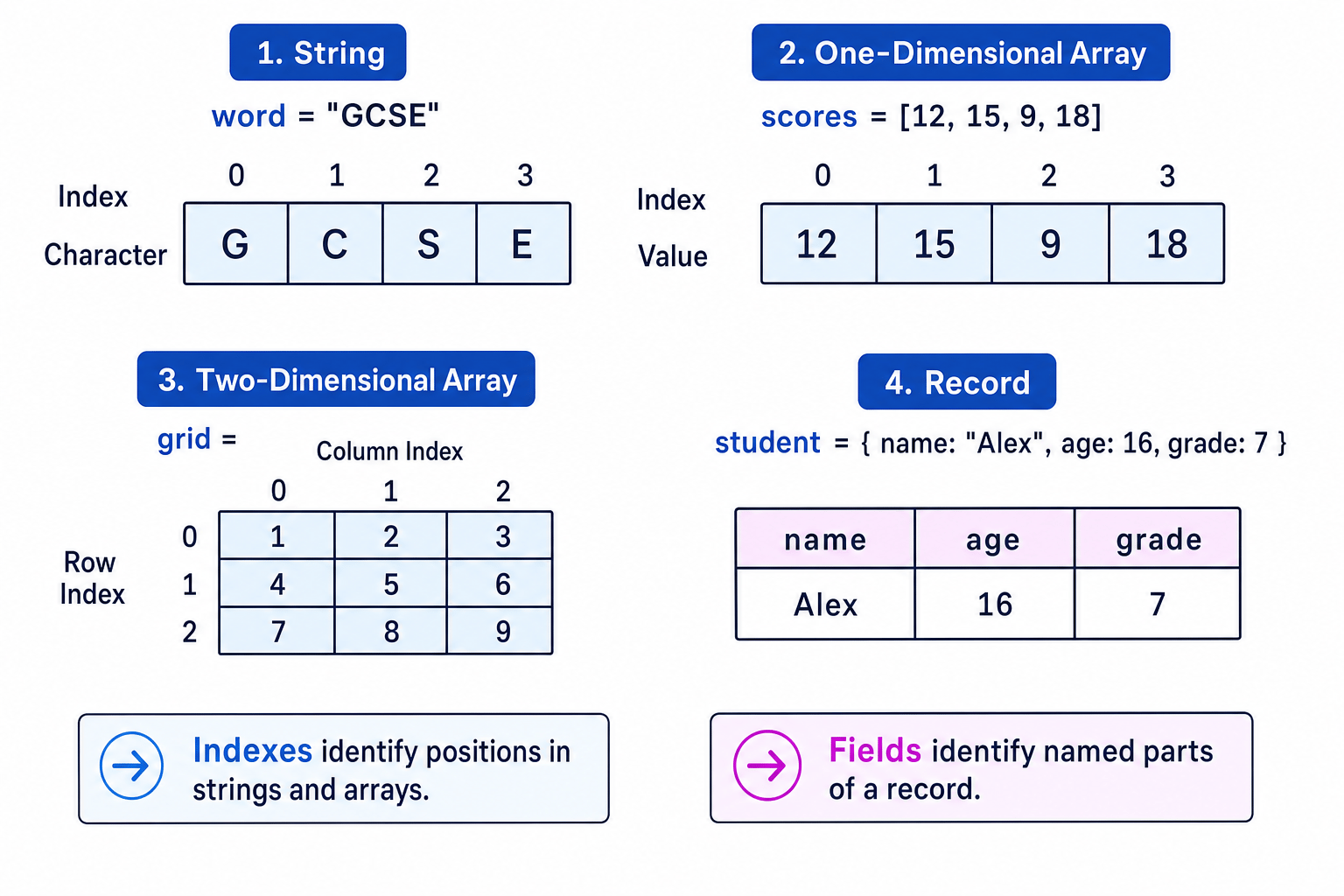
This diagram shows the main structures you need for this section.
Strings
A string is a sequence of characters. A character is a single letter, digit, symbol or space. Examples of strings include "GCSE", "Alex" and "Room 12".
Definition
String
A string is a data structure that stores characters in order.
Each character in a string has a position called an index. In Python, indexing starts at 0:
word = "GCSE"
So:
word[0]is"G"word[1]is"C"word[2]is"S"word[3]is"E"
You can also find the length of a string using len(word).
Example
Building initials from strings
Algorithm:
first_name = "Mina"
surname = "Patel"
initials = first_name[0] + surname[0]
first_name[0]accesses the character at index 0 of"Mina", which is"M".surname[0]accesses the character at index 0 of"Patel", which is"P".- The
+operator joins the two strings, soinitialsbecomes"MP".
Common Mistake
Starting at index 1
In Python, the first character is at index 0, not index 1. If word = "GCSE", then word[1] is "C", not "G".
Records
A record stores related pieces of data about one thing. Each part of the record is called a field.
For example, a student record might contain a name, age and grade. These fields can have different data types.
Definition
Record
A record is a data structure made from fields, where each field stores one item of data about the same entity.
In Python, a dictionary is often used to represent a record:
student = {
    "name": "Alex",
    "age": 16,
    "grade": 7
}
You access a field by its field name:
student["name"]
Records are useful when the data belongs together. A student’s name, age and grade describe the same student, so they make sense as one record.
Example
Updating a field in a record
Algorithm:
student = {"name": "Alex", "attendance": 96, "points": 12}

if student["attendance"] >= 95:
    student["points"] = student["points"] + 5
- The algorithm reads the
attendancefield, which stores 96. - It compares 96 with 95, so the condition
student["attendance"] >= 95is true. - The algorithm updates the
pointsfield by adding 5 to the old value 12, sopointsbecomes 17.
One-dimensional arrays
An array is an ordered collection of values. Each value is called an element, and each element is accessed using an index.
Definition
One-dimensional array
A one-dimensional array stores a list of elements in a single line, with each element accessed by one index.
In Python, a list is used like an array:
scores = [12, 15, 9, 18]
Using Python indexing:
scores[0]is 12scores[1]is 15scores[2]is 9scores[3]is 18
Arrays are useful when you want to apply the same process to lots of values, such as finding a total, searching for a value, or finding the highest score.
Example
Finding the highest score in a one-dimensional array
Algorithm:
scores = [12, 15, 9, 18]
highest = scores[0]

for score in scores:
    if score > highest:
        highest = score
highest = scores[0]starts with the first score, 12, rather than guessing a starting value.- The loop compares 12 with
highest. They are equal, sohigheststays 12. - The loop compares 15 with 12. Since 15 is larger,
highestbecomes 15. - The loop compares 9 with 15. Since 9 is not larger,
higheststays 15. - The loop compares 18 with 15. Since 18 is larger,
highestbecomes 18.
Tip
Loop pattern for arrays
For many array algorithms, set up a variable before the loop, update it inside the loop, then use it after the loop. Common examples are total, count, found and highest.
Two-dimensional arrays
A two-dimensional array stores data in rows and columns, like a table or grid. Each element is accessed using two indexes: one for the row and one for the column.
Definition
Two-dimensional array
A two-dimensional array stores elements in rows and columns, so each element is identified by a row index and a column index.
In Python, a two-dimensional array can be represented as a list of lists:
grid = [
    [1, 2, 3],
    [4, 5, 6],
    [7, 8, 9]
]
Using Python indexing:
grid[0][0]  # 1
grid[1][2]  # 6
grid[2][1]  # 8
The first index chooses the row. The second index chooses the column.
Example
Adding all values in a two-dimensional array
Algorithm:
rainfall = [
    [2, 0, 1],
    [3, 1, 4]
]

total = 0

for row in range(2):
    for column in range(3):
        total = total + rainfall[row][column]
- The variable
totalis initialised to 0 so the algorithm can build a running total. - For row 0, the algorithm adds 2, 0 and 1, so
totalbecomes 3. - For row 1, the algorithm adds 3, 1 and 4, so
totalbecomes 11. - After both rows and all three columns have been processed, the final value of
totalis 11.
Common Mistake
Swapping row and column
In a two-dimensional array, be clear about which index is the row and which is the column. In grid[row][column], the row normally comes first.
Choosing the right structure
Use the simplest structure that matches the problem:
| Need | Suitable choice |
|---|---|
| One value that changes | Variable |
| One fixed value | Constant |
| Text as characters | String |
| Several facts about one thing | Record |
| A list of similar values | One-dimensional array |
| A grid or table of values | Two-dimensional array |
Key Idea
Match the storage to the data
Good algorithms do not just contain correct instructions. They also choose sensible variables, constants and data structures so the instructions are clear and reliable.
Following and writing algorithms
When you follow an algorithm, track the value of each variable as it changes. For arrays and strings, pay close attention to indexes. For records, pay attention to field names.
When you write an algorithm, think about:
- what data needs to be remembered
- whether any values should be constants
- whether repeated data should be stored in an array
- whether related fields should be grouped in a record
- whether the data is a list or a grid
Exam technique
In the exam
- When tracing an algorithm, update a variable only when an assignment statement runs.
- For strings and arrays, write down the indexes if there is any chance of confusion, especially because Python starts at index 0.
- For two-dimensional arrays, label rows and columns before working out values such as
grid[1][2]. - When writing an algorithm, initialise totals, counters and Boolean flags before using them in loops.
Self review
Check yourself
- What is the difference between a variable and a constant?
- Why is
highest = scores[0]often better than startinghighestat 0? - In a two-dimensional array, what do the two indexes identify?
You've reached the end
Test yourself on this topic, or move on to the next guide.
How was this guide?