Revision notes for Edexcel GCSE Computer Science Arithmetic, relational and logical operators. Open the guide for explanations and worked examples. Written against the Edexcel GCSE Computer Science (1CP2) specification, so the content matches what's examinable rather than general Computer Science background.
Arithmetic, relational and logical operators
What you'll learn
- How arithmetic operators calculate numeric values in algorithms.
- How relational operators compare values and produce
TrueorFalse. - How logical operators
AND,ORandNOTcombine conditions. - How to follow and write Python 3 conditions correctly for GCSE algorithms.
The basics: algorithms, values and expressions
An algorithm is a finite set of ordered steps used to solve a problem. In this topic, you are mainly looking at the small “working parts” inside those steps: calculations and decisions.
A value is a piece of data, such as 42, "hello" or True. A variable is a named storage location for a value, such as score or age.
Definition
Operator
An operator is a symbol or word that performs an action on one or more values. The values it works on are called operands. For example, in score + 10, the operator is + and the operands are score and 10.
An expression is a combination of values, variables and operators that produces a result. For example, score + bonus * 2 is an arithmetic expression because it calculates a number.
This overview shows how the three operator families fit together: arithmetic calculates numbers, relational comparisons produce Boolean values, and logical operators combine those Boolean values for decisions.
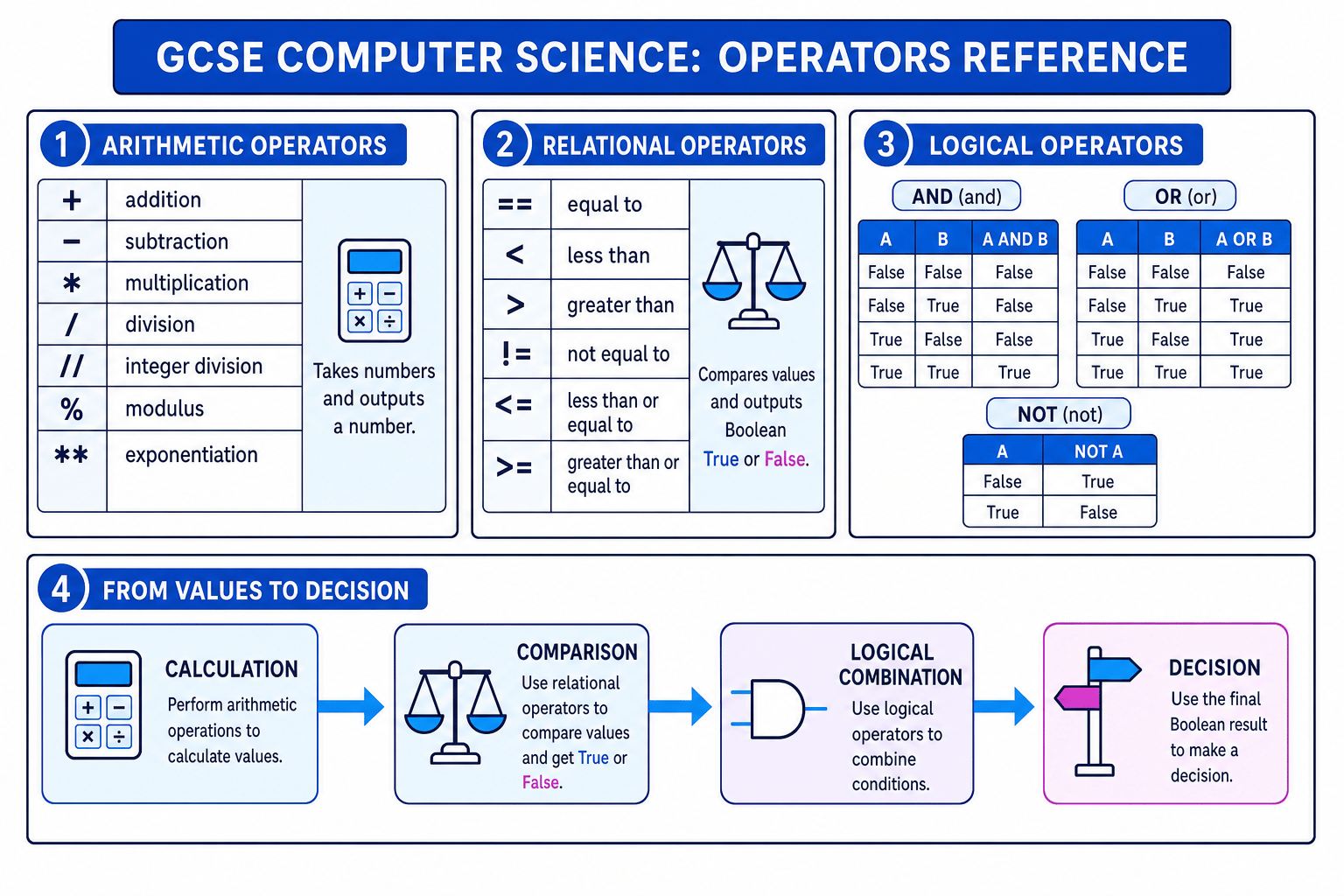
Definition
Boolean
A Boolean is a data type with only two possible values: True or False. Relational and logical operators produce Boolean results.
Arithmetic operators
Arithmetic operators are used for calculations. They usually take numbers as input and produce a number as output.
| Operator in Python 3 | Name | Meaning |
|---|---|---|
+ | addition | Add two values |
- | subtraction | Subtract one value from another |
* | multiplication | Multiply two values |
/ | division | Divide and allow a decimal result |
// | integer division | Divide and keep the whole-number quotient |
% | modulus | Find the remainder after division |
** | exponentiation | Raise to a power |
Integer division and modulus
Two operators are especially important in algorithms:
//gives how many whole groups fit.%gives what is left over.
For positive integers, if you divide 37 by 5, you can make 7 full groups with 2 left over. So 37 // 5 is 7, and 37 % 5 is 2.
Example
Splitting counters into full boxes
A program has 37 counters. Each box holds 5 counters. Work out how many full boxes can be made and how many counters are left over.
- Use integer division to find the number of full boxes:
37 // 5gives7, because 5 fits into 37 seven whole times. - Use modulus to find the remainder:
37 % 5gives2, because after making 7 full boxes, 2 counters are left. - Check the relationship: 37=7×5+237 = 7 \times 5 + 237=7×5+2, so the quotient and remainder make sense.
Tip
Remember // and % together
Think of // as “how many full groups?” and % as “what is left over?”
Order of operations
When an expression has several arithmetic operators, Python follows an order of operations:
- Brackets first.
- Exponentiation, such as
**. - Multiplication, division, integer division and modulus.
- Addition and subtraction.
Use brackets whenever they make your meaning clearer. This is especially useful in exams, because it reduces the chance of reading the expression incorrectly.
Example
Evaluating an arithmetic expression
Evaluate 3 + 4 * 2 ** 3.
- Apply exponentiation first:
2 ** 3gives8. - Apply multiplication next:
4 * 8gives32. - Apply addition last:
3 + 32gives35.
Common Mistake
Doing arithmetic strictly left to right
Do not evaluate 3 + 4 * 2 as if it were (3 + 4) * 2. Multiplication happens before addition unless brackets say otherwise.
Relational operators
Relational operators compare two values. The result is always a Boolean: True or False.
| Operator in Python 3 | Name | Example meaning |
|---|---|---|
== | equal to | score == 10 means score is equal to 10 |
< | less than | age < 18 means age is less than 18 |
> | greater than | height > 150 means height is greater than 150 |
!= | not equal to | choice != "Q" means choice is not Q |
<= | less than or equal to | mark <= 100 means mark is at most 100 |
>= | greater than or equal to | score >= pass_mark means score is at least the pass mark |
Definition
Condition
A condition is an expression that evaluates to True or False. Conditions are used in selection, such as if, and iteration, such as while.
Example
Comparing a score with boundaries
Suppose score = 64, pass_mark = 50 and merit_mark = 70. Evaluate score >= pass_mark and score >= merit_mark.
- Compare the score with the pass mark:
64 >= 50isTrue, because 64 is greater than 50. - Compare the score with the merit mark:
64 >= 70isFalse, because 64 is less than 70. - Use the Boolean results in decisions: the student has passed, but has not reached the merit mark.
Common Mistake
Using = instead of ==
In Python, = assigns a value to a variable, such as score = 10. To test equality, use ==, such as score == 10.
Logical operators
Logical operators work with Boolean values. They are used to combine or invert conditions.
The three logical operators you need are:
AND: result isTrueonly if both conditions areTrue.OR: result isTrueif at least one condition isTrue.NOT: reverses a Boolean value, soTruebecomesFalseandFalsebecomesTrue.
In informal algorithms and exam explanations, you may see AND, OR and NOT. In Python 3 code, write them in lowercase as and, or and not.
Key Idea
Logical operators make decisions more precise
Relational operators create individual True or False tests. Logical operators combine those tests so an algorithm can make more detailed decisions.
Example
Combining conditions for access
A game lets a player start a level only if they have at least one life, at least 10 energy, and the game is not paused. Suppose lives = 2, energy = 8 and game_paused = False.
- Evaluate the first comparison:
lives > 0isTrue, because 2 is greater than 0. - Evaluate the second comparison:
energy >= 10isFalse, because 8 is less than 10. - Evaluate the
NOTpart:not game_pausedisTrue, becausegame_pausedisFalse. - Combine using
and:True and False and TruegivesFalse, so the player cannot start the level.
Common Mistake
Treating OR as exclusive
In GCSE Computer Science, OR is inclusive. This means A OR B is True when A is true, when B is true, or when both are true.
Writing algorithms with operators
When you write an algorithm, operators often appear inside assignment statements, if statements and loops.
For example:
total = price * quantityuses arithmetic.if total >= 100:uses a relational operator.if total >= 100 and member == True:combines conditions with a logical operator.
You can often make Boolean conditions neater. Instead of writing member == True, you can simply write member if member already stores a Boolean value. Instead of member == False, you can write not member.
Range checks
A range check tests whether a value is inside an allowed range. For example, to check whether age is between 11 and 16 inclusive, both comparisons must be true:
age >= 11 and age <= 16
You can also write this in Python as:
11 <= age <= 16
Both versions are valid Python, but the first version makes the two separate relational comparisons very clear.
Example
Writing a condition for a discount
A shop gives a discount if a customer buys at least 3 items and the total cost is greater than 20. Write the condition.
- Translate “at least 3 items” into a comparison:
number_of_items >= 3. - Translate “total cost is greater than 20” into a comparison:
total_cost > 20. - Both conditions must be true, so combine them with
and:number_of_items >= 3 and total_cost > 20.
Following algorithms with mixed operators
In an exam, you may be asked to trace an algorithm. This means you carefully follow each line and keep track of variable values.
Consider this Python-style algorithm:
items = 14boxes = items // 4left_over = items % 4order_complete = left_over == 0needs_extra_box = boxes >= 3 and not order_complete
Example
Tracing mixed operators
Follow the algorithm and find the value of needs_extra_box.
- Calculate full boxes using integer division:
14 // 4gives3, soboxesbecomes3. - Calculate the remainder using modulus:
14 % 4gives2, soleft_overbecomes2. - Compare the remainder with zero:
left_over == 0is2 == 0, which isFalse, soorder_completebecomesFalse. - Evaluate the final logical expression:
boxes >= 3isTrue, andnot order_completeis alsoTrue. - Combine the two Boolean values:
True and TruegivesTrue, soneeds_extra_boxisTrue.
Tip
Use brackets for readability
not, and and or have their own precedence rules, but you should use brackets to make complex conditions clear, such as (age >= 11 and age <= 16) and not is_banned.
Exam technique
In the exam
- Work out arithmetic expressions first, then relational comparisons, then logical combinations.
- Be precise with Python symbols: use
==for equality,//for integer division,%for remainder, and lowercaseand,or,notin code. - When tracing, write down each new variable value and each Boolean result before combining conditions.
Self review
Check yourself
- What are the results of
23 // 5and23 % 5, and what do they mean? - Why does
score = 10mean something different fromscore == 10in Python? - For
A OR B, which input combinations make the resultTrue?
You've reached the end
Test yourself on this topic, or move on to the next guide.
How was this guide?