Revision notes for Edexcel GCSE Computer Science Using variables and constants. Open the guide for explanations and worked examples. Written against the Edexcel GCSE Computer Science (1CP2) specification, so the content matches what's examinable rather than general Computer Science background.
Using variables and constants
What you'll learn
- What variables and constants are, and why programs need them.
- How to use assignment in Python 3 to store and update values.
- How to choose clear names and suitable data types.
- How to decide when a value should be a variable and when it should be a constant.
The big idea: programs work with data
A program is a set of instructions that a computer can run. Most useful programs need to remember data while they run: a score, a username, a total price, whether a password was correct, and so on.
Instead of writing every value directly into the program, we usually give important values a name. This makes the program easier to read, test and change.
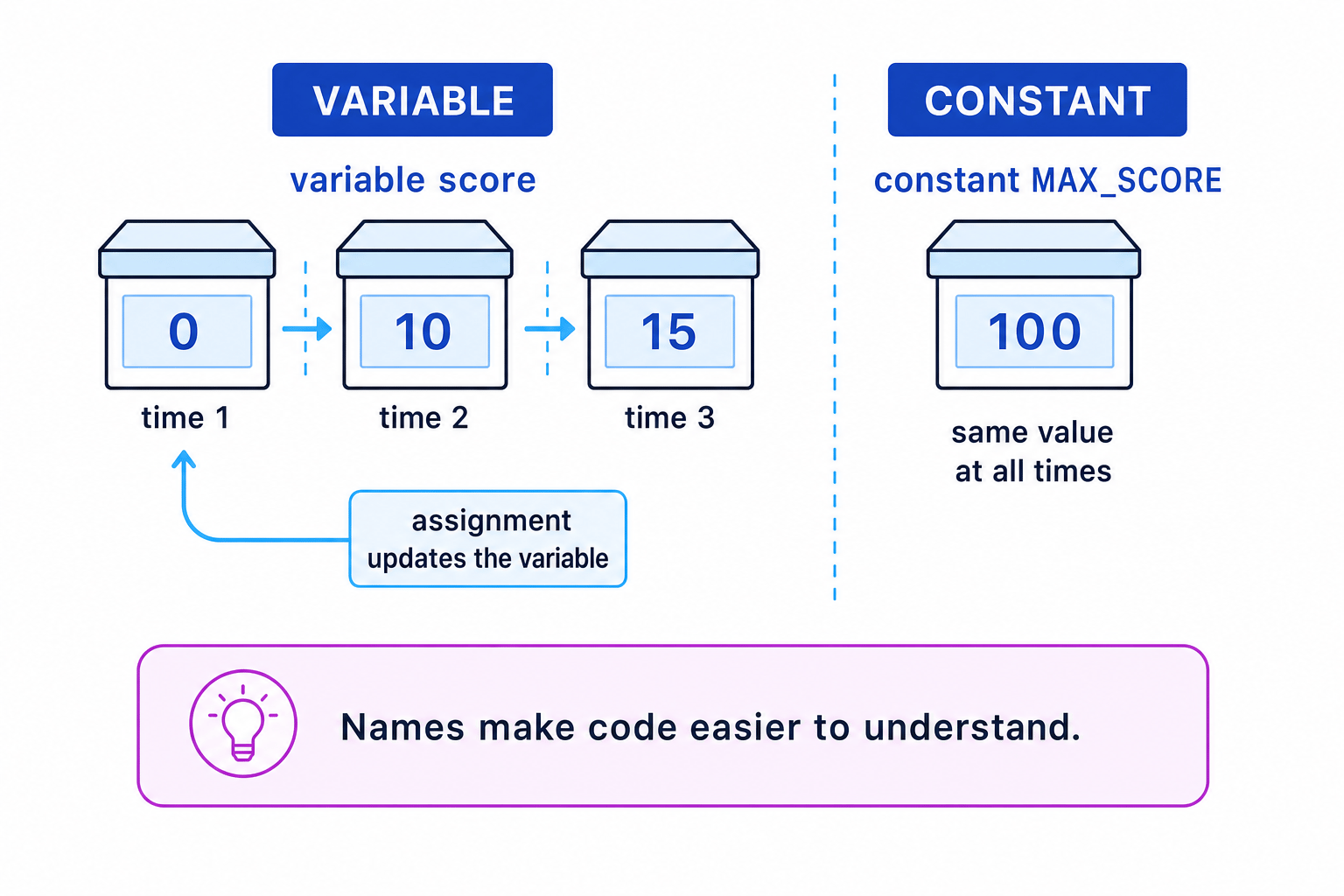
Definition
Variable
A variable is a named storage location in a program whose value can change while the program is running.
Definition
Constant
A constant is a named value that should stay the same while the program is running.
Values, names and identifiers
A value is a piece of data, such as 42, "Amira" or True.
An identifier is the name you give to something in a program, such as a variable or constant.
In Python, sensible identifiers usually use snake case, where words are lowercase and separated by underscores:
player_score = 0
number_of_lives = 3
user_name = "Sam"
Python identifiers:
- can contain letters, digits and underscores
- cannot start with a digit
- are case-sensitive, so
scoreandScoreare different names - should not be Python keywords such as
if,whileorfor
Tip
Good naming habit
Use names that explain the purpose of the value. total_cost is much clearer than tc or x.
Assignment: storing a value in a variable
In Python, the assignment operator is =. It means “store the value on the right in the name on the left”.
score = 0
This creates a variable called score and stores the integer value 0 in it.
Definition
Assignment
Assignment is the process of giving a value to a variable or constant name in a program.
The important rule is:
- Python works out the expression on the right-hand side.
- Python stores the result in the variable on the left-hand side.
- If the variable already had a value, the old value is replaced.
Example
Tracing assignment statements
score = 0
score = score + 10
score = score * 2
- The first statement stores
0inscore, soscoreis now0. - In
score = score + 10, Python uses the current value ofscore. It works out0 + 10, then stores10back intoscore. - In
score = score * 2, Python uses the current value again. It works out10 * 2, then stores20back intoscore.
Common Mistake
Thinking assignment means equality
In Python, score = score + 1 is not saying the two sides are mathematically equal. It means “take the old value of score, add 1, and store the new value back in score.”
Data types: what kind of value is being stored?
A data type describes what kind of data a value is. The type matters because it affects what operations the program can do with the value.
Definition
Data type
A data type is a category of data, such as integer, real, string or Boolean, that determines how the value can be stored and processed.
Common GCSE data types include:
| Data type | Meaning | Python example |
|---|---|---|
| Integer | A whole number | age = 15 |
| Real | A number with a decimal part | height = 1.72 |
| String | Text | name = "Aisha" |
| Boolean | True or False | logged_in = False |
Python uses the type name float for real numbers.
You should choose variables that match the data you need to store. For example, a number of attempts should be an integer, but a username should be a string.
Common Mistake
Forgetting that input is a string
In Python, input() always gives you a string. If you want to do arithmetic with the input, convert it using int() or float().
age = int(input("Enter your age: "))
height = float(input("Enter your height in metres: "))
name = input("Enter your name: ")
Updating variables
Variables are useful because they can change. Two very common uses are counters and running totals.
A counter stores how many times something has happened.
attempts = attempts + 1
A running total stores a total that builds up over time.
total_cost = total_cost + item_price
Example
Using a counter and a running total
total_score = 0
questions_answered = 0

total_score = total_score + 5
questions_answered = questions_answered + 1

total_score = total_score + 3
questions_answered = questions_answered + 1
- At the start,
total_scoreis0andquestions_answeredis0. - After the first question,
5is added tototal_score, so it becomes5. The counter increases from0to1. - After the second question,
3is added to the current total of5, sototal_scorebecomes8. The counter increases from1to2.
Constants: fixed values with clear names
A constant is used when a value has a fixed meaning in the program. Python does not have a special built-in constant command, so GCSE Python programs normally use a naming convention: constants are written in capital letters with underscores.
MAX_ATTEMPTS = 3
PASS_MARK = 50
VAT_RATE = 0.20
This tells other programmers: “this value should not be changed later in the program”.
Constants are especially useful for values that might need changing in the future. If the pass mark changes from 50 to 55, you only need to update one line.
Key Idea
Why constants matter
Constants avoid repeated “magic numbers” and make programs easier to maintain because important fixed values are named in one place.
A magic number is a value written directly into code without a clear explanation.
Less clear:
if mark >= 50:
    print("Pass")
Clearer:
PASS_MARK = 50

if mark >= PASS_MARK:
    print("Pass")
Choosing between variables and constants
Ask yourself: “Should this value change while the program runs?”
Use a variable if the value may change, comes from the user, or is calculated by the program.
Use a constant if the value is fixed for the whole program.
| Value needed in a program | Variable or constant? | Reason |
|---|---|---|
| The player’s current score | Variable | It changes during the game |
| The maximum score possible | Constant | It stays fixed |
| A user’s entered password | Variable | It is input while the program runs |
| The minimum password length | Constant | It is a fixed rule |
| The total cost of an order | Variable | It is calculated and may change |
| A delivery charge | Constant | It is a fixed amount in the program |
Example
Choosing suitable variables and constants
A program calculates the cost of cinema tickets. Adult tickets cost 12, child tickets cost 7, and there is a booking fee of 2. The user enters how many adult and child tickets they want.
- The ticket prices and booking fee should be constants because they are fixed rules of the program:
ADULT_TICKET_PRICE,CHILD_TICKET_PRICEandBOOKING_FEE. - The numbers of tickets should be variables because the user enters them when the program runs:
adult_ticketsandchild_tickets. - The total should be a variable because it is calculated from the inputs and may be different each time:
amount_to_pay.
A possible Python solution is:
ADULT_TICKET_PRICE = 12
CHILD_TICKET_PRICE = 7
BOOKING_FEE = 2

adult_tickets = int(input("Number of adult tickets: "))
child_tickets = int(input("Number of child tickets: "))

ticket_total = (adult_tickets * ADULT_TICKET_PRICE) + (child_tickets * CHILD_TICKET_PRICE)
amount_to_pay = ticket_total + BOOKING_FEE

print("Amount to pay: £", amount_to_pay)
Writing programs that use variables and constants appropriately
For Edexcel GCSE, you need to be able to write programs that make appropriate use of variables and constants. That means more than just knowing the definitions.
Your code should:
- store input values in clearly named variables
- store calculated results in variables when they are needed later
- use constants for fixed values such as limits, rates, fees and thresholds
- avoid repeating the same literal value many times
- use data types that fit the data being processed
- update variables correctly using assignment
Example
Improving a program with constants
Original version:
mark = int(input("Enter mark: "))

if mark >= 50:
    print("Pass")
else:
    print("Fail")

print("Pass mark:", 50)
Improved version:
PASS_MARK = 50

mark = int(input("Enter mark: "))

if mark >= PASS_MARK:
    print("Pass")
else:
    print("Fail")

print("Pass mark:", PASS_MARK)
- The value
50is a fixed rule, so it is better as a constant calledPASS_MARK. - The user’s
markis a variable because it is entered when the program runs and may be different each time. - The improved version is easier to maintain because if the pass mark changes, only the value of
PASS_MARKneeds editing.
A quick style checklist
Good variable and constant use is partly about correctness and partly about readability.
Prefer this:
MAX_LOGIN_ATTEMPTS = 3

attempts = 0
password_correct = False
Avoid this:
x = 0
pc = False
The second version might run, but it is harder for another person to understand.
Common Mistake
Constants are a convention in Python
Python will not stop you from changing a name like MAX_LOGIN_ATTEMPTS later. The capital letters are a convention that tells programmers not to change it.
Exam technique
In the exam
- Use meaningful names: write
total_cost,scoreorMAX_ATTEMPTS, not vague names likexunless the value is genuinely temporary. - Use constants for fixed values that are part of the rules of the program, especially if the value is used more than once.
- Remember that
input()returns a string, so convert withint()orfloat()before doing arithmetic.
Self review
Check yourself
- What is the difference between a variable and a constant?
- Why is
PASS_MARK = 50usually better than writing50several times in a program? - In Python, what does the statement
total = total + pricedo?
You've reached the end
Test yourself on this topic, or move on to the next guide.
How was this guide?