Revision notes for Edexcel GCSE Computer Science Manipulating strings. Open the guide for explanations and worked examples. Written against the Edexcel GCSE Computer Science (1CP2) specification, so the content matches what's examinable rather than general Computer Science background.
Manipulating strings
What you'll learn
- How strings are stored as ordered characters in Python 3.
- How to use length and position to access parts of a string.
- How to create substrings using slicing.
- How to convert text to upper case or lower case so comparisons work properly.
Before you start: strings and characters
A data type tells Python what kind of value something is, such as a number, Boolean, or text.
In Python, text is stored as a string. Strings are written inside quotes, such as "hello" or 'GCSE'.
Definition
String
A string is a sequence of characters. A character is one symbol, such as A, 7, a space, or ?.
A string can contain letters, digits, spaces, and punctuation. For example, "123" is a string because it is in quotes, even though the characters look like digits.
message = "Hello, world!"
postcode = "AB12 3CD"
Key Idea
Strings are ordered
A string is not just “one blob of text”. Python treats it as an ordered sequence, so each character has a position.
Positions and indexes
An index is the number Python uses to refer to a character’s position in a string. Python uses zero-based indexing, which means the first character is at index 0, not index 1.
Definition
Index
An index is an integer position used to access a character in a string. An integer is a whole number.
Keep this picture in mind: the string "Computer" has 8 characters, but the final character is at index 7.
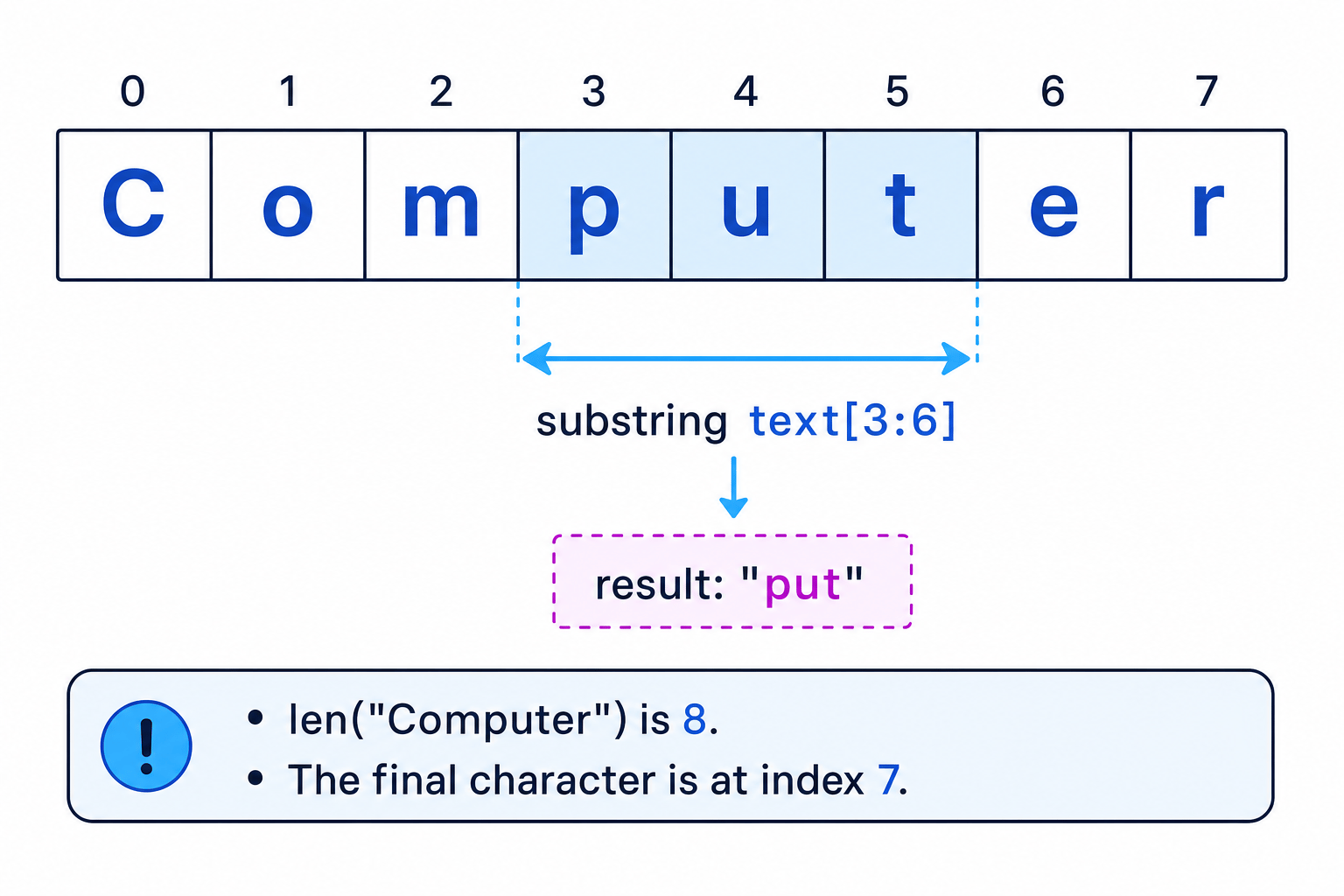
Finding the length of a string
The length of a string is the number of characters it contains. In Python, use len().
name = "Aisha"
print(len(name))
This outputs:
5
Spaces count as characters too:
phrase = "red fox"
print(len(phrase))
This outputs 7, because the space between red and fox is included.
Example
Checking a password length
A program asks for a password and checks whether it is at least 8 characters long.
password = "red fox7"

if len(password) >= 8:
    print("Long enough")
else:
    print("Too short")
- Count every character in
"red fox7", including the space:r,e,d, space,f,o,x,7. - The length is 8, so
len(password)returns 8. - The condition
len(password) >= 8is true, so the program prints"Long enough".
Common Mistake
Forgetting spaces count
If a string contains a space, Python counts it as a character. "GCSE CS" has 7 characters, not 6.
Accessing a character by position
To access one character, write the string name followed by the index in square brackets.
word = "Computer"

print(word[0])
print(word[3])
This outputs:
C
p
The expression word[0] means “the character at index 0”.
The final valid index is always one less than the length. So if a string has length 8, its indexes go from 0 to 7.
Example
Getting the final character
A program stores a student code and needs the final character.
student_code = "B7A42"
last_character = student_code[len(student_code) - 1]
print(last_character)
- The string
"B7A42"has length 5. - Because indexes start at 0, the final index is 4.
student_code[4]gives"2", so the program prints2.
Common Mistake
Index out of range
If you try to access an index that does not exist, Python gives an error. For "B7A42", index 5 is invalid because the last valid index is 4.
Finding the position of text
Sometimes you want to find where a character or substring appears. A substring is a smaller string found inside a larger string.
Python’s find() method returns the index where the search text starts.
Definition
Method
A method is an operation attached to a value using a dot, such as email.find("@") or name.upper().
email = "samir@example.com"
position = email.find("@")
print(position)
This outputs 5, because @ is at index 5.
If the search text is not found, find() returns -1.
Example
Finding the separator in an email address
A program needs to locate the @ symbol in an email address.
email = "samir@example.com"
at_position = email.find("@")
- Check the indexes:
sis 0,ais 1,mis 2,iis 3,ris 4. - The
@symbol comes next, so its index is 5. - Therefore
email.find("@")stores 5 inat_position.
Tip
Use find before slicing
If the position of a separator can change, such as @ in different email addresses, use find() first instead of guessing the index.
Creating substrings using slicing
A substring is part of a string. In Python, you usually create one using a slice.
A slice uses this pattern:
string_name[start:end]
The start index is included. The end index is not included.
word = "Computer"
part = word[3:6]
print(part)
This outputs:
put
Why? Index 3 is p, index 4 is u, and index 5 is t. The slice stops before index 6.
You can also leave out one side:
word = "Computer"

print(word[:3])   # from the start up to, but not including, index 3
print(word[3:])   # from index 3 to the end
This outputs:
Com
puter
Example
Extracting parts of an email address
A program separates an email address into the username and domain.
email = "samir@example.com"
at_position = email.find("@")

username = email[0:at_position]
domain = email[at_position + 1:]

print(username)
print(domain)
email.find("@")gives 5, soat_positionstores 5.email[0:5]takes indexes 0 to 4, giving"samir".email[at_position + 1:]starts after the@, so it gives"example.com".
Common Mistake
Including the end index
In a slice such as text[2:5], index 5 is not included. The slice includes indexes 2, 3, and 4 only.
Converting case
Case means whether letters are uppercase or lowercase.
- Uppercase:
"GCSE" - Lowercase:
"gcse"
Python has string methods for case conversion:
word = "Computer Science"

print(word.upper())
print(word.lower())
This outputs:
COMPUTER SCIENCE
computer science
Case conversion is very useful when comparing user input. A user might type "yes", "YES", or "Yes", and your program should treat them the same if that makes sense.
Example
Matching user input without case problems
A program asks whether the user wants to continue.
answer = input("Continue? ")
answer = answer.lower()

if answer == "yes":
    print("Continuing")
else:
    print("Stopping")
- If the user enters
"YES",answer.lower()converts it to"yes". - The comparison
answer == "yes"is then true. - The program prints
"Continuing".
Common Mistake
Not storing the converted string
String methods such as .upper() and .lower() return a new string. If you want to keep the changed version, assign it back to a variable, such as name = name.upper().
Putting the techniques together
In GCSE programming questions, you may need to combine length, position, substrings, and case conversion in one small program.
Here is a program that checks a product code. The code is accepted if:
- it is exactly 6 characters long
- the first 3 characters are
"ABC" - the final character is
"A" - it should work whether the user types uppercase or lowercase
code = input("Enter product code: ")
code = code.upper()

if len(code) == 6:
    prefix = code[0:3]
    final_character = code[5]

    if prefix == "ABC" and final_character == "A":
        print("Accepted")
    else:
        print("Rejected")
else:
    print("Wrong length")
Example
Tracing a product code check
Suppose the user enters "abc12a".
- The program converts the input to uppercase, so
"abc12a"becomes"ABC12A". len(code)is 6, so the program continues into the firstif.code[0:3]gives"ABC"andcode[5]gives"A", so both checks pass and the program prints"Accepted".
Notice that the program checks the length before using code[5]. This avoids an index error if the user enters something too short.
Exam technique
In the exam
- Translate carefully between everyday positions and Python indexes: the “first character” is index 0.
- For slices, remember that the start index is included but the end index is excluded.
- If comparing user input, consider converting both sides to the same case using
.lower()or.upper().
Self review
Check yourself
- What does
len("Hi there")return, and why? - If
word = "Algorithm", what isword[0]and what isword[3:6]? - Why might a program use
answer = answer.lower()before anifstatement?
You've reached the end
Test yourself on this topic, or move on to the next guide.
How was this guide?