Revision notes for Edexcel GCSE Computer Science Using logical operators. Open the guide for explanations and worked examples. Written against the Edexcel GCSE Computer Science (1CP2) specification, so the content matches what's examinable rather than general Computer Science background.
Using logical operators
What you'll learn
- How
TrueandFalsevalues are used in program decisions. - What the logical operators AND, OR and NOT mean.
- How to write Python 3 conditions using
and,orandnot. - How to trace compound conditions carefully.
Before logical operators: conditions and Boolean values
A condition is a test that a program can evaluate. It always gives one of two possible results: True or False.
For example:
age >= 13password == "computer"score < 0
These use relational operators, such as ==, !=, <, >, <= and >=, to compare values.
Definition
Boolean value
A Boolean value is a value that can only be True or False. Conditions in an if statement produce Boolean values.
In Python, True and False must start with capital letters.
Example
Evaluating a simple condition
Suppose age stores 15 and the condition is age >= 13.
- Substitute the value of
ageinto the condition:15 >= 13. - Compare the two values: 15 is greater than or equal to 13.
- The condition evaluates to
True, so anifstatement using this condition would run its true branch.
What logical operators do
A logical operator combines or changes Boolean values. In Edexcel GCSE Computer Science, the logical operators you need are AND, OR and NOT.
In Python 3, these are written in lowercase:
andornot
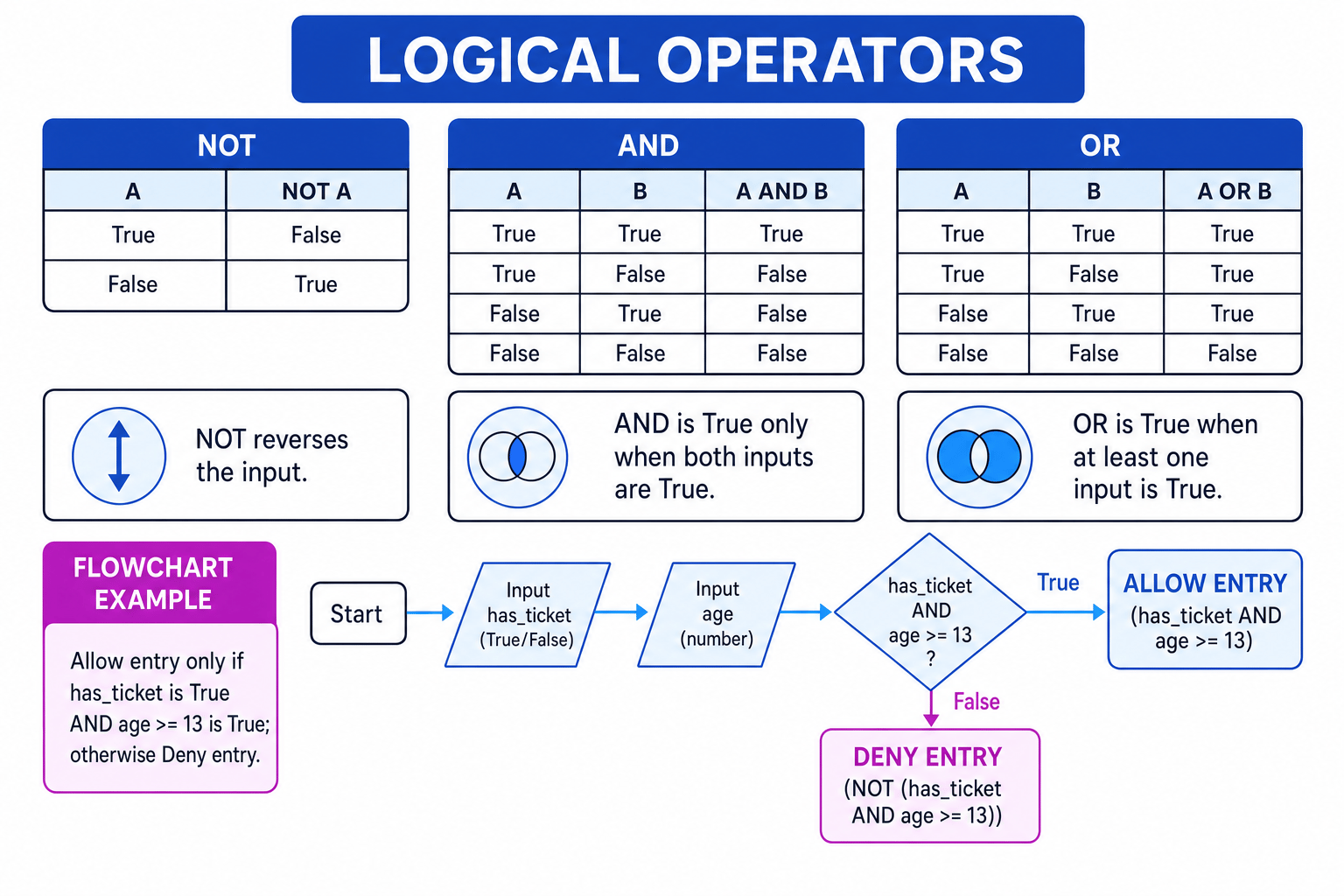
The diagram below summarises the truth tables for the three logical operators.
Definition
Truth table
A truth table lists every possible combination of input Boolean values and shows the output produced by a logical operator.
Common Mistake
Using exam notation in Python
In written explanations you may see AND, OR and NOT, but Python code must use and, or and not. For example, if age >= 13 AND has_ticket: will cause an error in Python.
AND: both conditions must be True
Use AND when every condition must be true.
In Python:
if age >= 13 and has_ticket:
    print("Allow entry")
else:
    print("Deny entry")
This only allows entry if:
age >= 13isTruehas_ticketisTrue
Key Idea
AND
A AND B is only True when A is True and B is True.
Example
Allowing entry with AND
A cinema program uses age >= 13 and has_ticket. The user’s age is 14 and has_ticket is True.
- Evaluate the first condition:
14 >= 13isTrue. - Evaluate the second condition:
has_ticketis alreadyTrue. - Apply AND:
True and TruegivesTrue. - The whole condition is
True, so the program prints"Allow entry".
OR: at least one condition must be True
Use OR when one or more conditions being true is enough.
For example, a shop might give a discount if the customer is under 16 or has a voucher:
if age < 16 or has_voucher:
    print("Discount applied")
else:
    print("No discount")
Key Idea
OR
A OR B is True when A is True, B is True, or both are True. It is only False when both inputs are False.
Example
Applying a discount with OR
A customer is 17 and has_voucher is True. The condition is age < 16 or has_voucher.
- Evaluate the age condition:
17 < 16isFalse. - Evaluate the voucher condition:
has_voucherisTrue. - Apply OR:
False or TruegivesTrue. - The program applies the discount because at least one condition is true.
Tip
OR is useful for invalid ranges
To reject a mark outside 0 to 100, use if mark < 0 or mark > 100:. A mark cannot be both below 0 and above 100 at the same time, so AND would be wrong here.
NOT: reverse a condition
Use NOT to reverse a Boolean value.
not TruebecomesFalsenot FalsebecomesTrue
In Python:
if not is_banned:
    print("Allow login")
else:
    print("Account blocked")
Here, the user is allowed to log in when is_banned is False.
Definition
Unary operator
A unary operator works on one value. NOT is unary because it only needs one Boolean input.
Example
Reversing a condition with NOT
A program uses not is_banned. The variable is_banned stores False.
- Start with the stored Boolean value:
is_bannedisFalse. - Apply NOT to reverse it:
not FalsebecomesTrue. - The condition is
True, so the program allows the login.
Writing compound conditions in Python
A compound condition is a condition made by combining smaller conditions with logical operators.
For example:
age = int(input("Age: "))
has_ticket = input("Do you have a ticket? yes/no: ") == "yes"

if has_ticket and age >= 13:
    print("Allow entry")
else:
    print("Deny entry")
Notice that has_ticket already stores a Boolean value. You do not need to write has_ticket == True, although Python will allow it.
Example
Writing a compound condition
A game should start only if the player has selected a character and has at least 1 life remaining.
- Identify the first condition: the player has selected a character, so use a Boolean such as
character_selected. - Identify the second condition: the player has at least 1 life, so use
lives >= 1. - The word “only if” means both conditions are required, so choose AND.
- Write the Python condition as
character_selected and lives >= 1.
Brackets make the meaning clear
When you mix logical operators, brackets help you show exactly what should be evaluated together.
Compare these two conditions:
age >= 13 and (has_ticket or has_vip_pass)(age >= 13 and has_ticket) or has_vip_pass
They look similar, but they do not always mean the same thing.
Example
Checking brackets in a compound condition
Suppose age is 12, has_ticket is False, and has_vip_pass is True.
- For
age >= 13 and (has_ticket or has_vip_pass), evaluate the brackets first:False or TruegivesTrue. - Now combine with the age check:
12 >= 13isFalse, soFalse and TruegivesFalse. - For
(age >= 13 and has_ticket) or has_vip_pass, evaluate the brackets first:False and FalsegivesFalse. - Now combine with the VIP pass:
False or TruegivesTrue. - The two conditions give different results, so the brackets change the program’s behaviour.
Common Mistake
Do not rely on guesswork
Python has an order of evaluation, but in GCSE answers it is safer to use brackets when mixing and, or and not. Brackets make your intention clear and reduce tracing mistakes.
Common patterns you should recognise
Access checks
Use and when all requirements must be met:
if username_correct and password_correct:
    print("Login successful")
Alternative choices
Use or when several different choices are acceptable:
if menu_choice == "A" or menu_choice == "B":
    print("Valid choice")
Blocking or rejecting
Use not when you want the opposite of a condition:
if not password_ok:
    print("Try again")
Exam technique
In the exam
- Break a compound condition into smaller conditions and evaluate each one as
TrueorFalse. - Apply
notby reversing the Boolean value, then combine conditions withandoror. - In Python questions, write lowercase
and,orandnot, and use brackets if the condition could be misunderstood.
Self review
Check yourself
- When would you choose
andinstead oforin anifstatement? - What is the result of
not False? - Why might
age >= 13 and (has_ticket or has_vip_pass)behave differently from(age >= 13 and has_ticket) or has_vip_pass?
Operators
Guide 3 of 3
You've reached the end
Test yourself on this topic, or move on to the next guide.
How was this guide?