Revision notes for Edexcel GCSE Computer Science Built-in and user-devised subprograms. Open the guide for explanations and worked examples. Written against the Edexcel GCSE Computer Science (1CP2) specification, so the content matches what's examinable rather than general Computer Science background.
Built-in and user-devised subprograms
What you'll learn
- What a subprogram is and why programs are split into smaller named parts.
- How to use pre-existing subprograms: built-in and library subprograms.
- How to write your own user-devised subprograms in Python 3.
- The difference between procedures and functions, including parameters, arguments and return values.
The big idea: programs can call smaller programs
A program does not have to be one long list of instructions. You can split it into smaller named sections, then call each section when you need it.
Definition
Subprogram
A subprogram is a named block of code designed to do a specific task. Calling a subprogram means running that named block of code from another part of the program.
Subprograms help with:
- decomposition — breaking a problem into smaller parts
- reuse — writing code once and using it many times
- readability — making the program easier to understand
- testing — checking one small part at a time
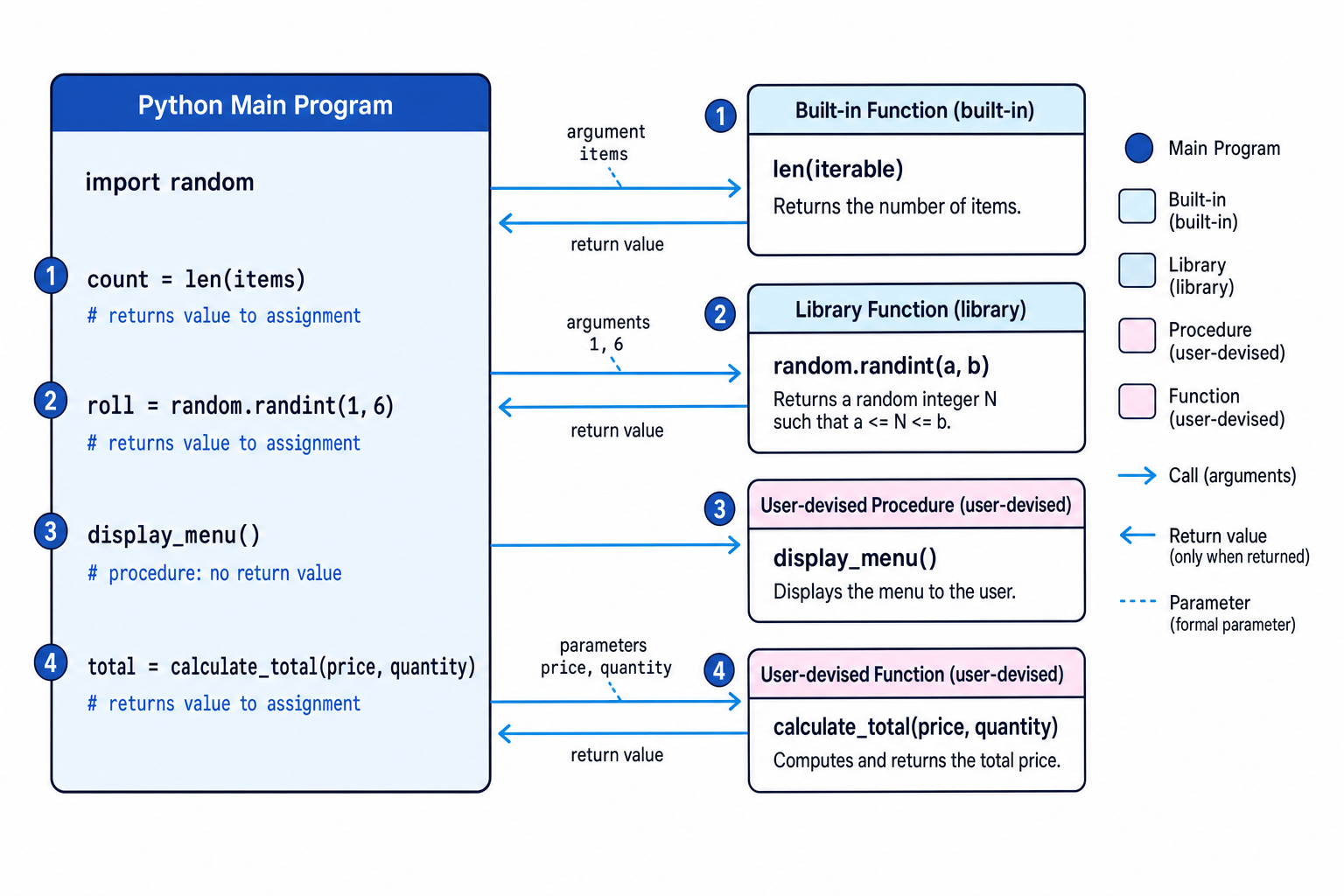
The diagram shows the main program calling different kinds of subprograms. Some return a value back to the main program; others just perform an action.
Key Idea
Subprograms reduce repetition
If the same logic is needed more than once, it is usually better to put it in a subprogram and call it when needed, rather than copying and pasting the same code.
Pre-existing subprograms
A pre-existing subprogram is one that has already been written for you. In Python, this includes built-in subprograms and library subprograms.
Built-in subprograms
Definition
Built-in subprogram
A built-in subprogram is available in Python without needing to import anything first.
Useful Python built-ins include:
print()— displays outputinput()— gets text input from the userint()— converts a suitable value to an integerstr()— converts a value to a stringlen()— returns the number of items in a sequence, such as a string or list
For example:
name = input("Enter your name: ")
number_of_letters = len(name)
print("Your name has", number_of_letters, "letters")
Here, input(), len() and print() are all built-in subprograms.
Library subprograms
Definition
Library subprogram
A library subprogram is a pre-written subprogram stored in a library or module. A module is a file or collection of Python code that can be imported into your program.
For example, Python’s random module contains subprograms for generating random values.
import random

dice_roll = random.randint(1, 6)
print("You rolled", dice_roll)
The line import random makes the random module available. The call random.randint(1, 6) returns a random integer from 1 to 6 inclusive.
Example
Using ready-made subprograms in a dice roll
-
The program needs a random whole number from 1 to 6, so
random.randint(1, 6)is a suitable library function. Because it is in therandommodule, the program must includeimport random. -
The user’s guess from
input()is text, but the dice roll is an integer. To compare them properly, convert the input usingint(). -
The comparison should be between two integer values using
==, so the program comparesguess == roll. -
The finished code uses built-in subprograms and a library subprogram together:
import random

roll = random.randint(1, 6)
guess = int(input("Guess the dice roll: "))

if guess == roll:
    print("Correct!")
else:
    print("Bad luck. The roll was", roll)
Common Mistake
Forgetting the import
If you use a library subprogram such as random.randint(), you must import the module first. Without import random, Python will not know what random refers to.
User-devised subprograms
A user-devised subprogram is one you write yourself. In Python, you define one using def.
Definition
User-devised subprogram
A user-devised subprogram is a subprogram created by the programmer to solve part of the problem.
A user-devised subprogram has:
- a name
- optional parameters
- an indented body of code
- sometimes a return value
For example:
def display_welcome():
    print("Welcome to the quiz!")
The subprogram above is called like this:
display_welcome()
Procedures and functions
At GCSE, you should know the difference between a procedure and a function.
Procedures
Definition
Procedure
A procedure is a subprogram that performs an action but does not return a value to be used elsewhere in the program.
For example, this procedure displays a menu:
def display_menu():
    print("1. Start game")
    print("2. View scores")
    print("3. Quit")
You call it like this:
display_menu()
The purpose is the action: displaying the menu.
Functions
Definition
Function
A function is a subprogram that returns a value to the part of the program that called it.
For example:
def calculate_total(price_pence, quantity):
    total = price_pence * quantity
    return total
You call it and store the returned value:
amount_to_pay = calculate_total(120, 3)
print(amount_to_pay)
The function returns 360, so amount_to_pay stores 360.
Tip
Procedure or function?
Use a procedure when you mainly want an action to happen, such as displaying a menu. Use a function when the calling code needs a result back, such as a calculated total.
Common Mistake
Printing instead of returning
print() displays a value on the screen. return sends a value back to the calling code. If the main program needs to store or compare the result, the subprogram should return it, not just print it.
Example
Choosing procedure or function
-
display_menu()only needs to show options to the user. The main program does not need a calculated result back, so this should be a procedure. -
calculate_total(price_pence, quantity)needs to work out a value that will be stored or used later. Because the result must go back to the main program, this should be a function. -
get_guess()may ask the user for input and convert it to an integer. The main program needs the user’s guess, so it should return the converted value and therefore act as a function.
Parameters, arguments and return values
Subprograms often need data to work with.
Definition
Parameters and arguments
A parameter is a variable listed in a subprogram definition. An argument is the actual value passed into the subprogram when it is called.
For example:
def calculate_total(price_pence, quantity):
    return price_pence * quantity

total_pence = calculate_total(120, 3)
In the definition, price_pence and quantity are parameters.
In the call, 120 and 3 are arguments.
The returned value is stored in total_pence.
Example
Tracing a function call
-
In the call
calculate_total(120, 3), the argument120is assigned to the parameterprice_pence, and the argument3is assigned toquantity. -
The expression
price_pence * quantityis evaluated as120 * 3, giving360. -
The statement
return price_pence * quantitysends360back to the call, sototal_pencestores360.
Putting it all together
A good GCSE program may use all three types:
- built-in subprograms, such as
print(),input()andint() - library subprograms, such as
random.randint() - user-devised procedures and functions written with
def
Here is a complete Python 3 example:
import random

def display_title():
    print("Number Guessing Game")

def get_guess():
    guess_text = input("Guess a number from 1 to 6: ")
    return int(guess_text)

def is_correct(guess, secret_number):
    return guess == secret_number

display_title()

secret_number = random.randint(1, 6)
player_guess = get_guess()

if is_correct(player_guess, secret_number):
    print("Correct!")
else:
    print("Bad luck. The number was", secret_number)
This program uses:
random.randint(1, 6)— a library functionprint(),input()andint()— built-in subprogramsdisplay_title()— a user-devised procedureget_guess()andis_correct()— user-devised functions
Common Mistake
Definition before call
In Python, the def statement must be executed before the subprogram is called. A common structure is to put user-devised subprogram definitions near the top of the file, then put the main program underneath.
Writing clear subprograms
Aim for each subprogram to do one clear job. Choose names that describe the task, such as calculate_score() rather than do_stuff().
Good habits include:
- using meaningful names for subprograms and parameters
- passing data into subprograms using parameters
- returning values from functions instead of relying on unnecessary global variables
- avoiding names that clash with built-ins, such as naming a variable
inputorlist - keeping the main program short and readable by moving repeated tasks into subprograms
Exam technique
In the exam
-
When asked to write a program using subprograms, include clear
defdefinitions and show where each subprogram is called. -
If you use a library subprogram such as
random.randint(), remember the import line and use the correct dot notation. -
In explanations, say that a procedure performs an action, while a function returns a value that can be stored, displayed, compared or used in a calculation.
Self review
Check yourself
- What is the difference between a built-in subprogram and a library subprogram?
- How would you write a procedure called
display_menu()and a function calledcalculate_points(goals, assists)? - In
total = calculate_total(120, 3), which parts are the function name, arguments and returned value?
You've reached the end
Test yourself on this topic, or move on to the next guide.
How was this guide?