Revision notes for Edexcel GCSE Computer Science Structure of the internet. Open the guide for explanations and worked examples. Written against the Edexcel GCSE Computer Science (1CP2) specification, so the content matches what's examinable rather than general Computer Science background.
Structure of the internet
What you'll learn
- What the internet actually is: a huge network of networks.
- How IP addresses identify where data should be sent.
- How routers move packets between different networks.
- The common exam mistakes to avoid when explaining internet structure.
Starting point: networks
A network is a group of connected devices that can communicate and share resources, such as files, printers, or internet access.
A small network in one place, such as a home, school, or office, is called a LAN.
Definition
LAN
A Local Area Network (LAN) is a network covering a small geographical area, usually owned and managed by one organisation or person.
A network that covers a large geographical area is called a WAN.
Definition
WAN
A Wide Area Network (WAN) is a network that connects devices or smaller networks over a large geographical area.
The internet is the largest example of a WAN, but it is not just one giant cable or one giant computer. It is made from many smaller networks joined together.
The internet as a network of networks
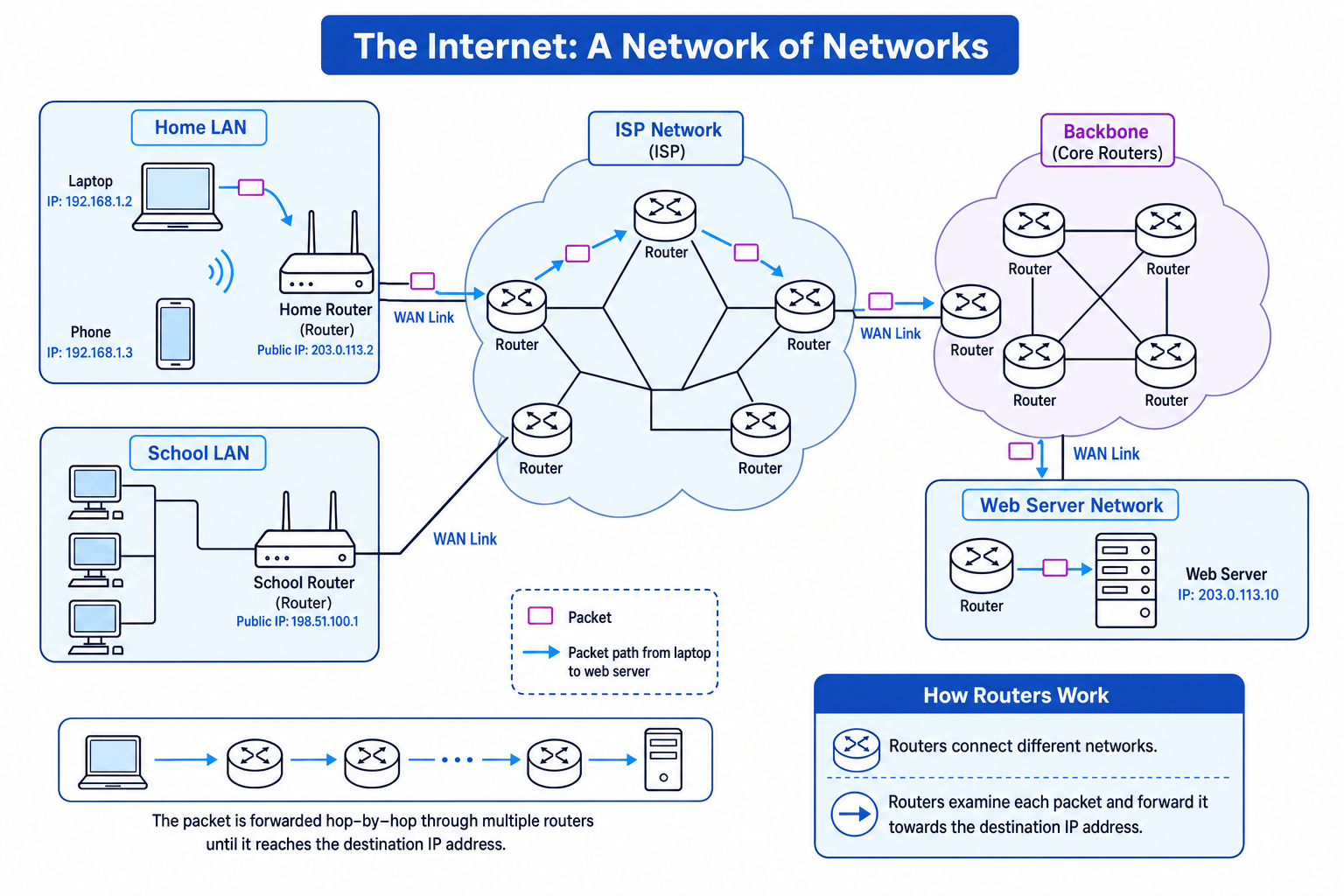
The internet is a global system of interconnected networks. Home networks, school networks, business networks, mobile networks, data centres, and Internet Service Provider networks are all connected together.
Definition
Internet
The internet is a worldwide network of networks that uses agreed communication rules so devices can send data to each other.
An Internet Service Provider (ISP) is a company that gives customers access to the internet. Your home router usually connects your LAN to your ISP’s wider network.
The internet is easier to understand if you picture many separate LANs connected through routers and ISP networks, with data travelling step by step between them.
Key Idea
The big picture
The internet is structured as many networks joined together. Data usually travels through several routers before reaching its destination.
Common Mistake
Internet vs World Wide Web
Do not say the internet and the World Wide Web are the same thing. The internet is the network infrastructure. The World Wide Web is one service that runs on it, using websites and web pages.
Data is sent in packets
When data is sent across the internet, it is usually split into smaller pieces called packets.
Definition
Packet
A packet is a small unit of data sent across a network. It contains part of the message plus extra information, such as the destination address.
Packets are useful because different packets from the same message can travel across the network and then be put back together at the destination. If one packet is lost or damaged, it may be resent rather than resending the whole message.
For this topic, the key point is that routers use the packet’s addressing information to decide where to send it next.
IP addresses
An IP address is a numerical address used to identify a device or network interface on a network.
Definition
IP address
An Internet Protocol (IP) address is a numerical label used to identify a device on a network so data can be sent to the correct destination.
A common form is IPv4, which is often written as four denary numbers separated by dots, for example:
- 192.168.1.2
- 203.0.113.10
- 198.51.100.1
At GCSE, you do not need to calculate subnets for this point. You should understand that IP addresses help routers work out where packets should go.
Public and private IP addresses
On a home LAN, devices often use private IP addresses, such as 192.168.1.2. These are used inside the local network.
Your home router also has a public IP address on the internet-facing side. This is the address visible to other networks on the internet.
Definition
Public IP address
A public IP address is an IP address that can be used across the internet and must be unique on the public internet.
Definition
Private IP address
A private IP address is used inside a local network. The same private addresses can be reused in different homes, schools, or businesses.
So two different homes might both have a laptop with private IP address 192.168.1.2, but their routers would have different public IP addresses.
Tip
Think local and global
A private IP address is like a room number inside a building. A public IP address is more like the building’s street address.
Routers
A router is a network device that connects different networks together.
Definition
Router
A router is a device that forwards packets between different networks, using IP addresses to decide where each packet should go next.
For example, your home router connects your home LAN to your ISP’s network. The ISP then has many more routers that connect to other networks.
Routers do not need to know the full journey in advance like a sat nav route printed on paper. Instead, each router decides the next hop.
Definition
Hop
A hop is one step in a packet’s journey from one router or network device to the next.
Each router stores information about where to send packets in a routing table.
Definition
Routing table
A routing table is stored data that helps a router decide the next hop for a packet based on its destination IP address.
Example
Choosing the next hop
A router receives a packet with destination IP address 203.0.113.10.
Its routing table contains:
| Destination pattern | Next hop |
|---|---|
| Starts with 192.168.1. | Local LAN |
| Starts with 203.0.113. | Router B |
| Anything else | Router A |
- Compare the packet’s destination IP address, 203.0.113.10, with the destination patterns in the routing table.
- The address starts with 203.0.113, so it matches the second row.
- The router forwards the packet to Router B, because that is the next hop for that destination network.
Common Mistake
Direct connection mistake
Do not write as if your computer connects directly to the website’s server. In reality, packets usually pass through several routers on different networks.
What routers actually do to packets
When a router receives a packet, it checks the destination IP address. It then decides which connected network or router should receive the packet next.
The router does not usually care what the data means. It is mainly concerned with forwarding the packet towards the correct destination.
A packet travelling from your laptop to a web server might go like this:
- Laptop sends packet to the home router.
- Home router forwards it to the ISP network.
- ISP routers forward it towards a backbone or another provider network.
- More routers forward it closer to the web server’s network.
- A final router forwards it to the web server.
The reply comes back in packets too, often through a similar route, though not necessarily exactly the same one.
Key Idea
Routers work hop by hop
Each router uses the destination IP address to choose the next hop. The packet is forwarded repeatedly until it reaches the destination network.
Clients and servers on the internet
A client is a device or program that requests a service. For example, your browser is a client when it requests a web page.
A server is a computer that provides services to other devices. A web server stores and sends web pages.
Definition
Client and server
A client requests a service. A server provides a service, such as sending a web page, file, or email.
When you visit a website, your device sends packets towards the server’s IP address. The server replies by sending packets back to your device’s IP address, or to your router’s public IP address if you are on a home network.
How IP addressing and routers fit together
IP addresses and routers are linked ideas:
- The IP address identifies the destination.
- The packet carries the destination IP address.
- The router reads the destination IP address.
- The routing table helps the router choose the next hop.
- Many routers together allow packets to cross the internet.
Example
Explaining a packet journey
A school computer sends a request to a web server on another network.
- The school computer creates packets containing the request and the web server’s destination IP address.
- Because the web server is not on the school LAN, the packets are sent to the school router.
- The school router forwards the packets to another router, usually in the ISP’s network.
- Each router checks the destination IP address and forwards the packets to the next hop.
- When the packets reach the web server’s network, they are delivered to the server with the matching IP address.
What you need to say in GCSE answers
For Edexcel 1CP2, you should be able to explain the structure clearly without going into advanced detail.
A strong answer usually includes:
- The internet is a network of networks.
- Devices and servers have IP addresses.
- Data is split into packets.
- Routers connect different networks.
- Routers use the destination IP address to forward packets.
- Packets travel through several routers until they reach the destination.
Exam technique
In the exam
- If asked about the structure of the internet, start with: “The internet is a worldwide network of networks.”
- Mention both key terms from the spec: IP addressing and routers.
- Explain the process, not just the devices: routers read the destination IP address and forward packets hop by hop.
Self review
Check yourself
- What is the difference between a LAN, a WAN, and the internet?
- Why does a packet need a destination IP address?
- What does a router use to decide where to forward a packet next?
You've reached the end
Test yourself on this topic, or move on to the next guide.
How was this guide?