Revision notes for Edexcel GCSE Computer Science The 4-layer TCP/IP model. Open the guide for explanations and worked examples. Written against the Edexcel GCSE Computer Science (1CP2) specification, so the content matches what's examinable rather than general Computer Science background.
The 4-layer TCP/IP model
What you'll learn
- Why networks use protocols and layers to send data reliably.
- What the four TCP/IP layers are: Application, Transport, Internet and Link.
- How data is encapsulated when it is sent and decapsulated when it is received.
- How to match exam clues such as ports, IP addresses and Wi-Fi to the correct layer.
Before the model: networks need shared rules
A network is a group of devices connected so they can communicate. Data transmission means moving data from a sender to a receiver, for example from your laptop to a web server.
For this to work, devices must agree on rules. They need to know things like:
- how data should be formatted
- how devices are identified
- how large messages are split into smaller chunks
- how the receiver knows what application the data belongs to
Definition
Protocol
A protocol is an agreed set of rules that devices follow so they can communicate successfully over a network.
TCP/IP stands for Transmission Control Protocol/Internet Protocol. It is a family of network protocols that work together to move data across networks, including the internet.
Why use layers?
A model is a simplified way of describing how something works. The TCP/IP model divides network communication into four layers.
Definition
Layer
A layer is a group of related networking tasks. Each layer has its own job and passes data to the next layer.
The layers help because each one can focus on one part of the problem. For example, a web browser does not need to know exactly how Wi-Fi signals are transmitted, and the Wi-Fi hardware does not need to understand the contents of a web page.
Key Idea
The big idea
When sending data, the TCP/IP model passes data down through the four layers on the sender. When receiving data, it passes data up through the four layers on the receiver.
Here is the overall journey through the four layers.
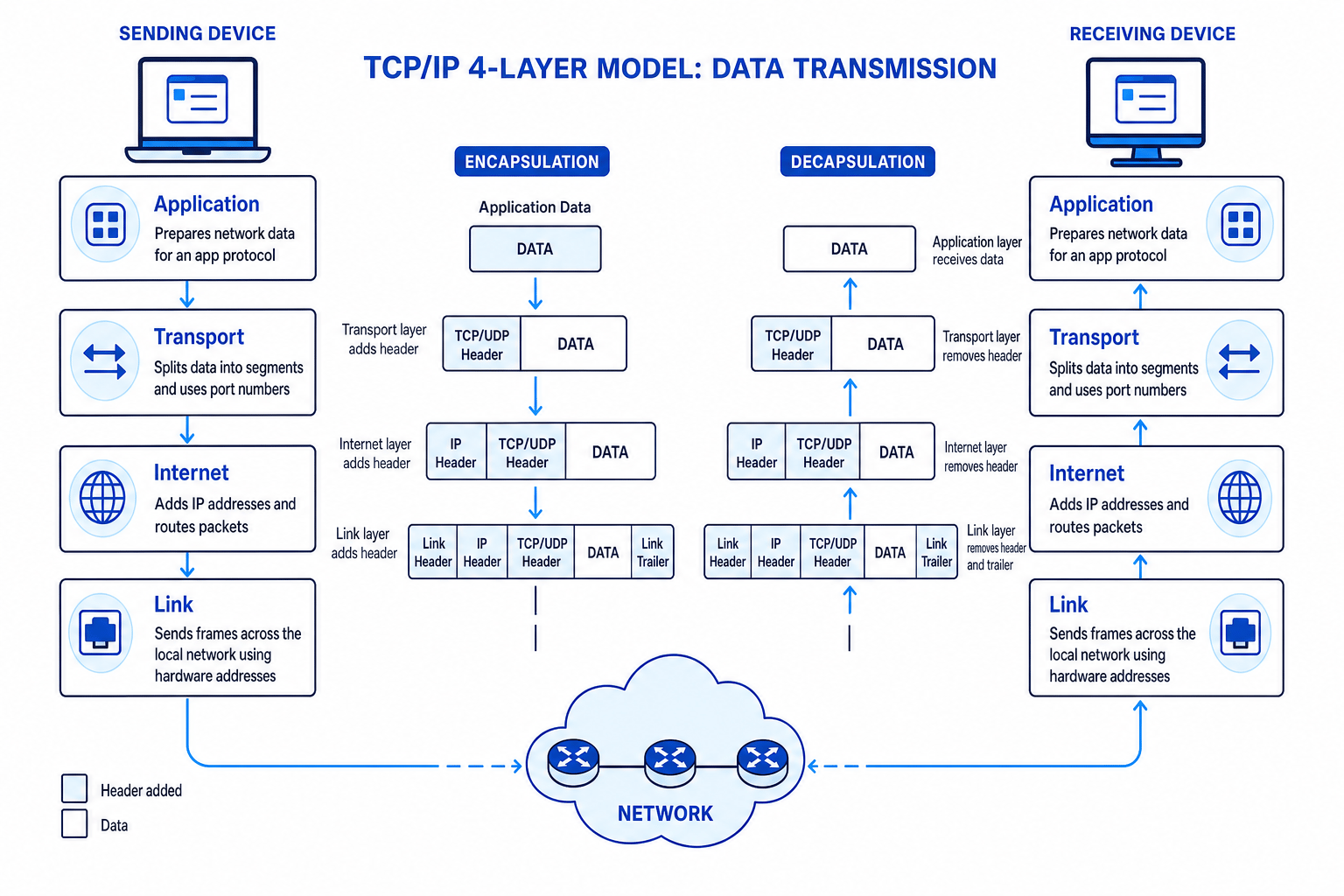
The four TCP/IP layers
The Edexcel 1CP2 order, from top to bottom, is:
- Application
- Transport
- Internet
- Link
Tip
Remember the direction
On the sender, data travels Application → Transport → Internet → Link. On the receiver, it travels back up Link → Internet → Transport → Application.
Application layer
The Application layer is closest to the software the user is using. It provides protocols that applications use to communicate over a network.
Examples include:
- HTTP/HTTPS for web pages
- SMTP for sending email
- FTP for file transfer
This layer prepares the data in a format that the receiving application can understand. For example, a browser using HTTPS sends a request for a web page in a format that a web server understands.
Common Mistake
Application layer is not just 'the app'
The Application layer does not mean the whole browser or email program. It means the network rules and services that applications use to send and receive data.
Transport layer
The Transport layer provides communication between applications running on different devices. It is concerned with getting data to the correct program or service on the receiving device.
A port number is a number used to identify a particular application or service on a device. For example, web traffic using HTTPS commonly uses port 443.
In many GCSE explanations, TCP is the key Transport layer protocol. TCP can:
- split data into smaller chunks
- add port numbers
- keep track of the order of chunks
- help check that data has arrived and request missing data again
A segment is a chunk of data at the Transport layer. You may also see the general word packet used in GCSE questions for chunks of data being sent across a network.
Internet layer
The Internet layer deals with logical addressing and routing between networks.
An IP address is a logical address used to identify a device on an IP network. A router is a device that forwards data between networks.
The Internet layer adds source and destination IP addresses so data can be routed towards the correct network and device. The main protocol here is IP, which stands for Internet Protocol.
A packet is the chunk of data at the Internet layer, including IP addressing information.
Link layer
The Link layer handles sending data across the local network connection, such as Ethernet or Wi-Fi.
A MAC address is a hardware address used to identify a network interface on a local network. A frame is the data unit used at the Link layer.
The Link layer is responsible for the actual local delivery of data from one device to the next device on the route. One step from one network device to the next is called a hop.
Common Mistake
Thinking the Link layer routes across the internet
The Link layer sends frames across a local connection to the next hop. The Internet layer uses IP addresses to route packets across different networks.
Encapsulation: wrapping data for delivery
As data moves down the layers on the sender, each layer adds its own control information. This is like adding labels and instructions so the next parts of the network know what to do.
Definition
Encapsulation
Encapsulation is the process of adding extra control information, usually in a header, to data as it moves down the layers before transmission.
A header is control data added to the front of the data. It might contain things like port numbers or IP addresses. A trailer is control data added to the end of the data, often used at the Link layer. The payload is the actual data being carried.
The reverse process is called decapsulation. This happens on the receiving device, where each layer removes and uses the control information intended for it.
Layer-by-layer data names
| Layer | Data is commonly called | Important information added or used |
|---|---|---|
| Application | Data or message | Application protocol formatting, such as HTTP/HTTPS |
| Transport | Segment | Port numbers, ordering information, reliability checks if using TCP |
| Internet | Packet | Source and destination IP addresses |
| Link | Frame | MAC addresses and local network transmission details |
How data is transmitted using the model
Imagine you request a web page. The process is not just “send the page across the internet”. The data is handled carefully at each layer.
Example
Tracing a web page request
-
The Application layer creates an HTTPS request, so the web server can understand what page the browser wants.
-
The Transport layer uses TCP to prepare the data for delivery to the correct service, adding port information such as destination port 443 for HTTPS.
-
The Internet layer adds IP addressing, so routers can forward the packet towards the web server’s network.
-
The Link layer wraps the packet in a frame for the local network, such as Wi-Fi from your laptop to your router.
-
At the receiving server, the layers work in reverse: the Link layer removes frame information, the Internet layer checks IP addressing, the Transport layer reassembles the data for the correct port, and the Application layer receives the HTTPS request.
Why the layers matter
The layered model makes communication easier to design and troubleshoot.
If you change from Wi-Fi to Ethernet, the Application layer can still use HTTPS. If you switch from a web browser to an email client, the Link layer still sends frames over the local network. The layers hide unnecessary detail from each other.
Key Idea
Independence between layers
Each layer provides a service to the layer above it without the upper layer needing to know the exact details of how that service is carried out.
This is why different technologies can work together. A website can be viewed over home Wi-Fi, school Ethernet or mobile data because the layers separate the application rules from the local transmission method.
Matching exam clues to layers
A good exam skill is spotting which layer a clue points to.
| Clue in the question | Most likely layer |
|---|---|
| Browser, email, HTTP, HTTPS, SMTP, file transfer | Application |
| TCP, port number, reassembling data, reliable delivery | Transport |
| IP address, routers, routing between networks | Internet |
| Ethernet, Wi-Fi, MAC address, frames, local network hardware | Link |
Example
Identifying the relevant layer
A question says: “Packets can reach the correct server IP address, but the connection to port 443 is blocked.” Which layer is most directly involved?
-
The phrase “correct server IP address” suggests the Internet layer is working, because IP addressing and routing have reached the server.
-
The phrase “port 443” points to the Transport layer, because port numbers identify the service or application receiving the data.
-
The best answer is therefore the Transport layer, with a note that the HTTPS application service may also be affected because port 443 is commonly used for HTTPS.
Sender and receiver summary
When a device sends data:
- Application layer prepares the data using the correct application protocol.
- Transport layer splits data into chunks and adds port information.
- Internet layer adds IP addresses and handles routing.
- Link layer sends frames across the local network connection.
When a device receives data:
- Link layer receives the frame from the local network.
- Internet layer checks the IP packet is for this device.
- Transport layer reassembles data and sends it to the correct port.
- Application layer passes the data to the correct application protocol.
Exam technique
In the exam
-
If asked to describe transmission, write the journey in order: Application → Transport → Internet → Link, then explain that the receiver reverses the process.
-
Use the right clues: ports belong to Transport, IP addresses and routers belong to Internet, and MAC addresses, frames, Ethernet or Wi-Fi belong to Link.
-
Do not describe the 7-layer OSI model. For Edexcel 1CP2, use the four TCP/IP layers: Application, Transport, Internet, Link.
Self review
Check yourself
- What are the four TCP/IP layers in order from top to bottom?
- What information is added by the Transport layer, and what information is added by the Internet layer?
- Why does data pass down the layers on the sender but up the layers on the receiver?
You've reached the end
Test yourself on this topic, or move on to the next guide.
How was this guide?