Revision notes for Edexcel GCSE Computer Science Network topologies (bus, star, mesh). Open the guide for explanations and worked examples. Written against the Edexcel GCSE Computer Science (1CP2) specification, so the content matches what's examinable rather than general Computer Science background.
Network topologies (bus, star, mesh)
What you'll learn
- What a network topology is and the key terms used to describe one.
- The main characteristics of bus, star and mesh topologies.
- How topology affects cost, reliability, performance and scalability.
- How to choose and justify a suitable topology in an exam answer.
Starting point: what is a network?
A computer network is a group of connected devices that can communicate and share resources, such as files, printers, internet access or services.
A device on a network is often called a node. A node could be a computer, laptop, printer, server, router or switch. A connection between nodes is called a link. Links may be wired, such as Ethernet cables, or wireless, such as Wi-Fi.
Definition
Network topology
A network topology is the arrangement of devices and connections in a network. It describes how nodes are connected and how data can travel between them.
For GCSE, you need to understand the characteristics of three named topologies: bus, star and mesh.
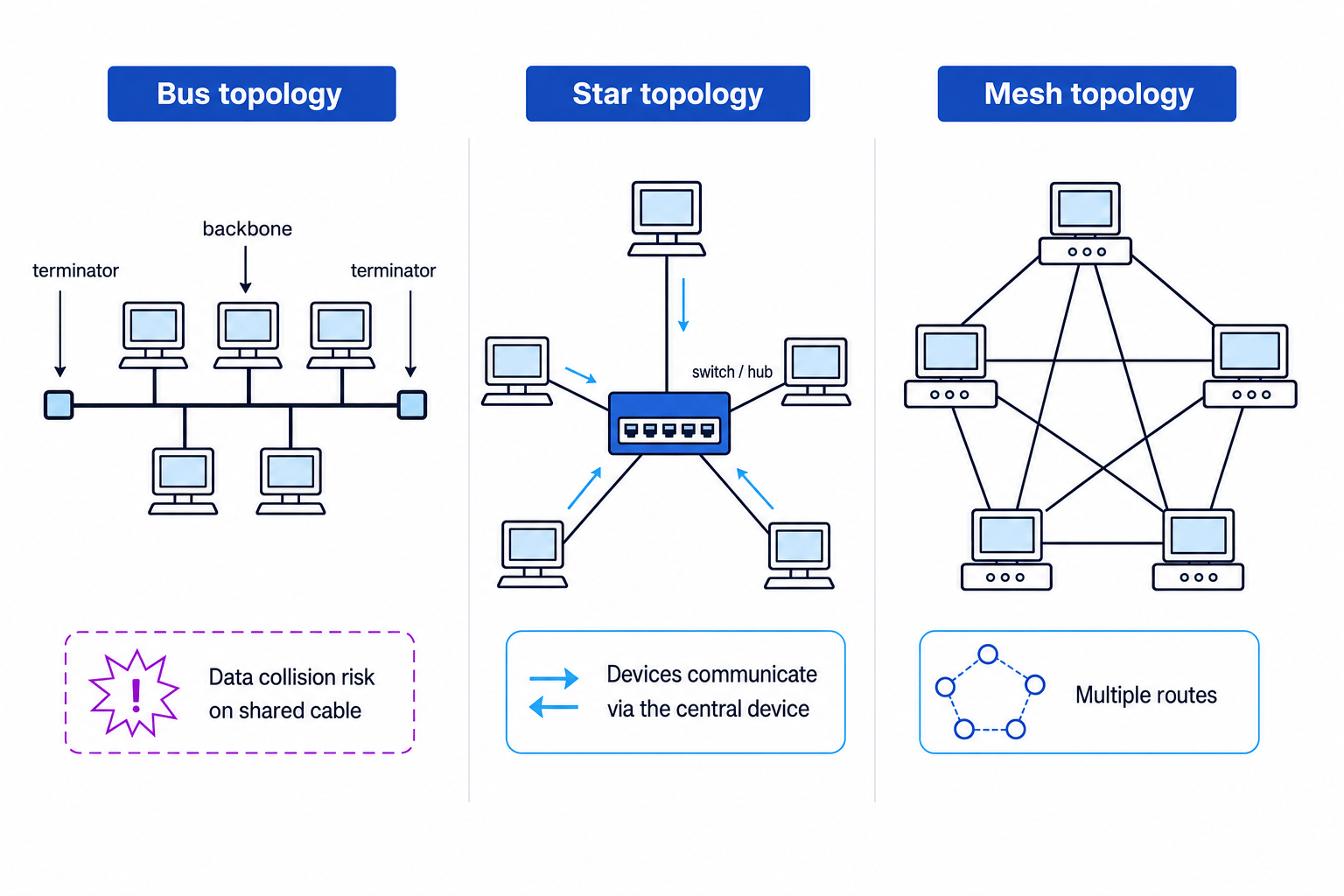
This diagram shows the three layouts side by side.
Why topology matters
The topology of a network affects how well the network works. In particular, it affects:
- Cost: how much cable, hardware and installation work is needed.
- Reliability: how likely the network is to keep working when a device or cable fails.
- Performance: how efficiently data can travel, especially when lots of devices are using the network.
- Scalability: how easy it is to add more devices later.
- Maintenance: how easy it is to find and fix faults.
Key Idea
Topology is a trade-off
There is no single “best” topology for every situation. In exam questions, choose the topology that best matches the scenario’s priorities, such as low cost, easy expansion or high reliability.
Bus topology
In a bus topology, every device is connected to one main cable called the backbone.
Definition
Backbone cable
The backbone is the main shared cable in a bus topology. All devices connect to this cable to send and receive data.
At both ends of the backbone are terminators. These stop signals from bouncing back along the cable and interfering with other data.
How data travels in a bus topology
When a device sends data, the data travels along the shared backbone. All devices can detect the signal, but only the intended recipient accepts it.
Because the backbone is shared, only one device should transmit at a time. If two devices transmit at the same time, a data collision can occur.
Definition
Data collision
A data collision happens when two devices transmit data at the same time on a shared network medium, causing the signals to interfere with each other.
Characteristics of bus topology
Bus topology has some useful features:
- It is relatively cheap because it uses less cable than some other topologies.
- It is fairly simple to install for a small network.
- It does not need a central switch.
However, it has important weaknesses:
- If the backbone cable fails, the whole network can fail.
- As more devices are added, performance usually gets worse because more devices share the same cable.
- Data collisions are more likely when the network is busy.
- Faults can be hard to find because a problem anywhere on the backbone may affect many devices.
- It is not very scalable for a larger network.
Common Mistake
Thinking one device failure always breaks a bus
In a bus topology, a single computer failing does not usually stop the whole network. The bigger problem is failure of the backbone cable or a missing/faulty terminator.
Star topology
In a star topology, each device has its own link to a central device, usually a switch or sometimes a hub.
Definition
Switch
A switch is a network device that connects devices in a LAN and forwards data to the correct destination device.
A hub is less intelligent than a switch because it sends data out to all connected devices. A switch is better because it can send data only where it needs to go, which improves network performance.
How data travels in a star topology
When one device sends data to another, the data goes through the central switch or hub. The connected devices do not usually communicate directly with each other.
For example, if Computer A sends data to Computer B, the data travels:
Computer A → switch → Computer B
Characteristics of star topology
Star topology is very common in modern local area networks.
Its advantages include:
- If one cable fails, usually only one device is affected.
- It is easy to add or remove devices.
- Faults are easier to locate than in a bus topology.
- With a switch, performance is usually good because each device has its own link.
- The network can be managed from the central device.
Its disadvantages include:
- It needs more cable than a bus topology.
- The central switch or hub costs money.
- If the central switch or hub fails, the whole network may stop working.
Definition
Single point of failure
A single point of failure is one component whose failure can stop the whole system or network from working properly.
In a star topology, the central switch or hub is a single point of failure.
Common Mistake
Calling the centre of a star a server
The central device in a star topology is usually a switch or hub, not necessarily a server. A server may be connected to the network, but it is not what makes the topology a star.
Mesh topology
In a mesh topology, devices are connected using multiple links, so there is more than one possible route for data.
There are two useful ideas here:
- In a full mesh, every node is directly connected to every other node.
- In a partial mesh, nodes have several connections, but not every possible connection is present.
For GCSE, the key idea is that a mesh topology provides multiple routes through the network.
How data travels in a mesh topology
Data can travel from one node to another using different paths. If one link fails, the network may be able to send the data by a different route.
This makes mesh topology highly reliable and fault tolerant.
Definition
Fault tolerance
Fault tolerance is the ability of a system or network to continue working even when part of it fails.
Characteristics of mesh topology
Mesh topology has strong advantages:
- It is very reliable because there are multiple paths for data.
- It has no obvious single point of failure in a well-designed mesh.
- It can handle high traffic well because data can use different routes.
- If one link fails, communication may still be possible.
Its disadvantages are mainly about cost and complexity:
- It needs lots of cables or wireless links.
- It can be expensive to install.
- It can be difficult to configure, manage and maintain.
- It may require more advanced routing equipment.
Mesh topologies are often used where reliability is very important, such as parts of the internet, large organisation networks or wireless mesh networks.
Tip
Remember mesh
Think: mesh means many paths. That is why mesh is reliable, but also why it is more expensive and complex.
Comparing bus, star and mesh
Here is a summary of the main characteristics.
| Topology | Main structure | Strengths | Weaknesses |
|---|---|---|---|
| Bus | All devices share one backbone cable | Cheap, simple for small networks, uses little cable | Backbone failure can stop network, collisions, poor performance as devices increase |
| Star | Each device connects to a central switch or hub | Easy to add devices, good performance with a switch, faults easier to find | Central device is a single point of failure, more cable than bus |
| Mesh | Devices have multiple connections and routes | Very reliable, fault tolerant, handles traffic well | Expensive, complex, lots of links needed |
Choosing a topology for a scenario
In questions, you may be asked to recommend a topology. Do not just name one. Explain why it fits the situation.
Good comparison points include:
- How many devices are needed?
- Is low cost the main priority?
- Is reliability very important?
- Will the network need to grow?
- What happens if a cable or device fails?
- How much traffic will the network handle?
Example
Choosing a topology for a school computer room
A school is setting up a computer room with 30 desktop PCs. The network should be easy to expand, and if one PC cable fails, the rest of the room should keep working. Choose a suitable topology.
-
Compare the number of devices with a bus topology. With 30 PCs, a shared backbone could become slow because many devices would share the same cable and collisions would be more likely.
-
Compare reliability. In a star topology, each PC has its own cable to the central switch, so one faulty PC cable should only affect that one PC.
-
Compare cost with mesh. A mesh would be very reliable, but connecting many PCs with multiple links would be expensive and unnecessarily complex for a normal classroom.
-
Choose the best match. A star topology is suitable because it is easy to expand, performs well with a switch, and individual cable faults usually affect only one device.
Identifying topology from clues
Exam questions may describe how a network behaves rather than giving you a diagram.
Look for these clues:
- “All devices connected to one main cable” suggests bus.
- “All devices connected to a central switch” suggests star.
- “Multiple routes between devices” suggests mesh.
- “Central device failure stops the network” suggests star.
- “Backbone cable failure stops the network” suggests bus.
- “Data can be rerouted if a link fails” suggests mesh.
Example
Identifying a topology from fault behaviour
A small office network has a central switch. One computer’s cable is damaged, but every other computer can still access the network. Identify the topology and explain your answer.
-
Use the central device clue. The network has a central switch, which points towards a star topology.
-
Use the fault behaviour. Only one computer is affected when its own cable is damaged, which matches a star because each device has its own link.
-
Rule out the alternatives. A bus would rely on a shared backbone cable, and a mesh would have multiple routes rather than one central switch.
Final comparison: reliability and failure
A useful exam habit is to think about what happens when something breaks.
If a device fails
- Bus: the rest of the network may continue, unless the failure disrupts the backbone.
- Star: usually only that device is affected.
- Mesh: the network can often continue using other routes.
If a cable or link fails
- Bus: a backbone cable fault can stop the whole network.
- Star: one device may be disconnected if its own cable fails.
- Mesh: data may be rerouted through another path.
If the central device fails
- Bus: there is no central device.
- Star: the network may stop working.
- Mesh: there is usually no single central device.
Exam technique
In the exam
-
When asked to describe a topology, explain the structure: bus has a backbone, star has a central switch or hub, mesh has multiple routes.
-
When asked to compare, use clear factors such as cost, reliability, performance, scalability and fault tolerance.
-
When asked to recommend, link your answer to the scenario: for example, “star is suitable because one cable failure affects only one device”.
Self review
Check yourself
- What happens in a bus topology if the main backbone cable fails?
- Why is the central switch in a star topology called a single point of failure?
- Why is a mesh topology usually more reliable but more expensive than a star topology?
Networks
Guide 8 of 8
You've reached the end
Test yourself on this topic, or move on to the next guide.
How was this guide?