Revision notes for Edexcel GCSE Computer Science Standard algorithms (sorts and searches). Open the guide for explanations and worked examples. Written against the Edexcel GCSE Computer Science (1CP2) specification, so the content matches what's examinable rather than general Computer Science background.
Standard algorithms (sorts and searches)
What you'll learn
- How linear search and binary search find items in a list.
- How bubble sort and merge sort put data into order.
- Why binary search only works on sorted data.
- How to trace each algorithm step by step in an exam.
The basics first
Definition
Algorithm
An algorithm is a finite sequence of clear steps used to solve a problem.
For this topic, the problems are:
- searching: finding whether a value is in a list, and often where it is
- sorting: putting values into a chosen order, such as ascending order
Definition
List and index
A list is an ordered collection of items. An index is the position of an item in the list. In Computer Science, indexing often starts at 0, so the first item has index 0.
A comparison means checking two values against each other, such as “is 18 equal to 29?” or “is 18 less than 29?”. A target is the value you are trying to find in a search.
Searching algorithms
A search algorithm looks through data to find a target value.
There are two standard searches you need to understand:
- linear search
- binary search
This diagram compares the main idea of each one.
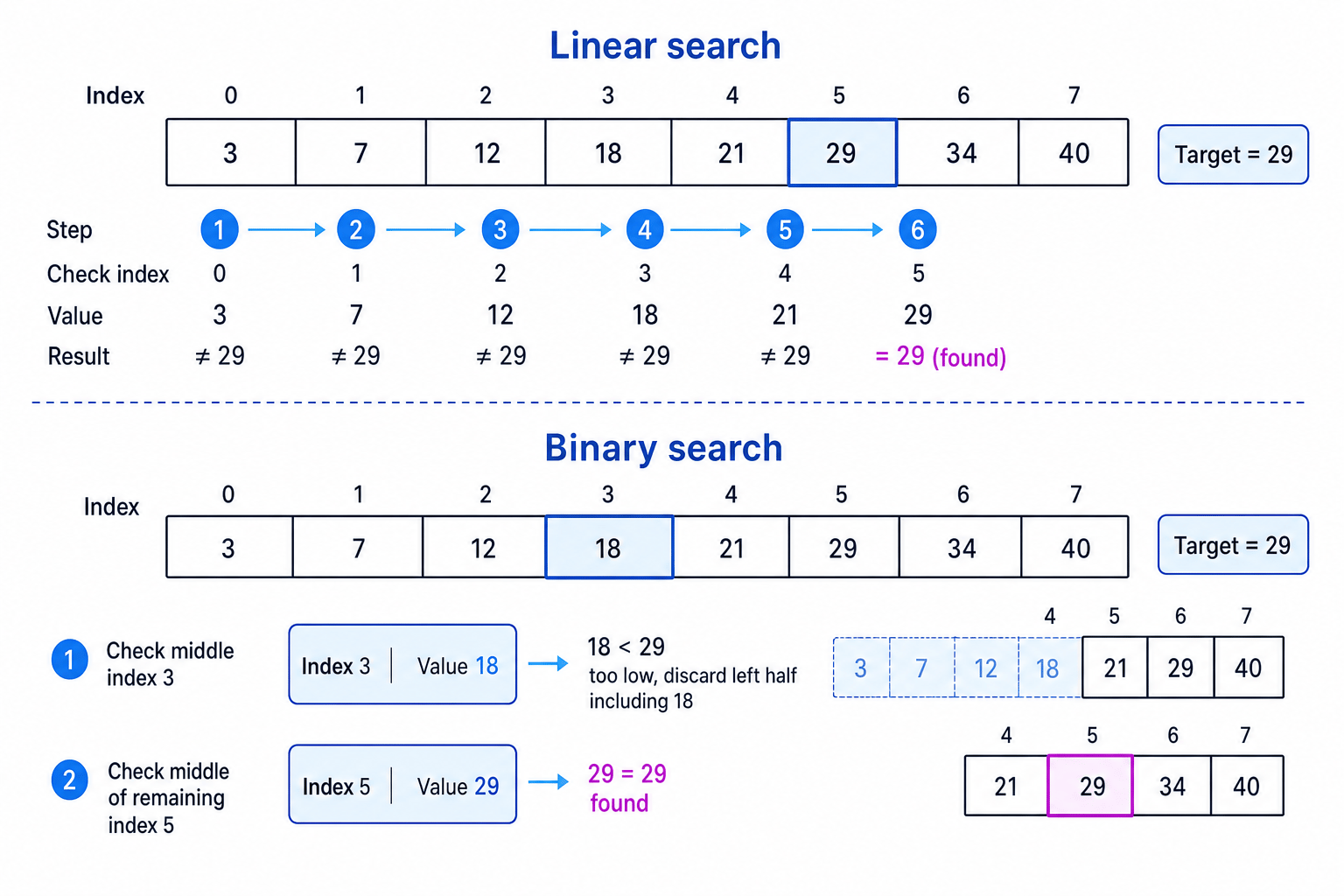
Linear search
Definition
Linear search
A linear search checks each item in a list one at a time, from start to end, until the target is found or the list finishes.
Linear search works on both unsorted and sorted lists. It does not need the data to be in any particular order because it simply checks every item in sequence.
How linear search works
To search for a target:
- Start at the first item.
- Compare the current item with the target.
- If they match, the target has been found.
- If they do not match, move to the next item.
- If the end of the list is reached without a match, the target is not in the list.
Example
Tracing a linear search
List: [14, 3, 27, 9, 18]
Target: 9
- Compare the first item, 14, with the target 9. They are not equal, so the search continues.
- Compare the next item, 3, with 9. They are not equal, so move on again.
- Compare 27 with 9. They are not equal, so the algorithm still has not found the target.
- Compare 9 with 9. They are equal, so the target is found at index 3.
Key Idea
Linear search takeaway
Linear search is simple and flexible, but it may have to check every item if the target is near the end or not present.
Binary search
Definition
Binary search
A binary search finds a target in a sorted list by repeatedly checking the middle item and discarding the half where the target cannot be.
Binary search only works if the list is already sorted. For numbers, that usually means ascending order, such as [2, 5, 8, 11, 16].
How binary search works
Binary search keeps track of a current search area:
low: the lowest index still being searchedhigh: the highest index still being searchedmiddle: the index halfway betweenlowandhigh
The middle index is found using integer division, so any remainder is ignored:
middle=(low+high) integer division 2middle = (low + high) \text{ integer division } 2middle=(low+high) integer division 2
Then:
- Compare the middle item with the target.
- If the middle item equals the target, the search is finished.
- If the target is smaller, search the left half.
- If the target is larger, search the right half.
- Repeat until the target is found or the search area becomes empty.
Example
Tracing a binary search
Sorted list: [4, 8, 12, 19, 25, 31, 42]
Target: 31
- Set
lowto 0 andhighto 6. The middle index is(0 + 6) integer division 2, which gives 3, so compare the value at index 3: 19. - Since 31 is greater than 19, discard index 0 to index 3. The target, if it exists, must be to the right.
- Set
lowto 4 and keephighas 6. The middle index is(4 + 6) integer division 2, which gives 5, so compare the value at index 5: 31. - The middle value equals the target, so the algorithm stops and reports that 31 is found at index 5.
Common Mistake
Using binary search on unsorted data
Binary search does not work on an unsorted list. If the data is not sorted, discarding half the list is not safe because the target could be anywhere.
Sorting algorithms
A sort algorithm rearranges items into a chosen order. At GCSE, you usually sort into ascending order, meaning smallest to largest.
The two standard sorts you need to understand are:
- bubble sort
- merge sort
This diagram shows the difference between “swap neighbouring items” and “split then merge”.
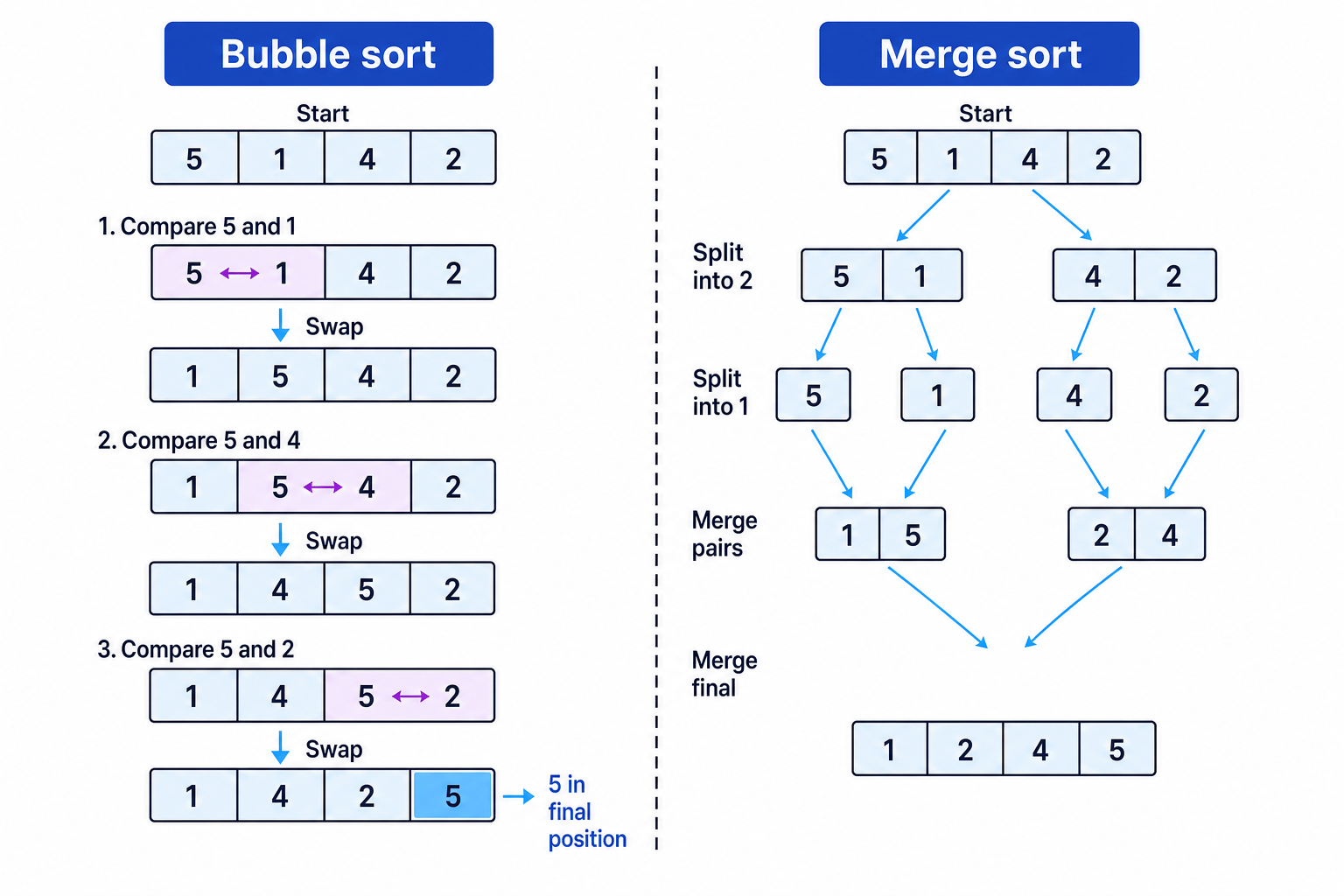
Bubble sort
Definition
Bubble sort
A bubble sort repeatedly compares neighbouring items and swaps them if they are in the wrong order.
A swap means two items exchange places. A pass is one complete movement through the list from start to end.
How bubble sort works
To sort in ascending order:
- Compare the first pair of neighbouring items.
- If the left item is bigger than the right item, swap them.
- Move one position to the right and compare the next pair.
- Continue to the end of the list. After one full pass, the largest item has “bubbled” to the end.
- Repeat passes until no swaps are needed.
Example
Tracing bubble sort
List: [4, 2, 7, 1]
- Compare 4 and 2. Since 4 is greater than 2, swap them to get
[2, 4, 7, 1]. - Compare 4 and 7. They are already in the correct order, so the list stays
[2, 4, 7, 1]. - Compare 7 and 1. Since 7 is greater than 1, swap them to get
[2, 4, 1, 7]. The largest value, 7, is now in its final position. - Start another pass. Compare 2 and 4, then 4 and 1. Swap 4 and 1 to get
[2, 1, 4, 7]. - Start another pass. Compare 2 and 1. Swap them to get
[1, 2, 4, 7]. A final pass would make no swaps, so the list is sorted.
Tip
Bubble sort sanity check
After each full pass, at least one more large value should be fixed at the right-hand end of the list.
Merge sort
Definition
Merge sort
A merge sort sorts a list by splitting it into smaller lists, then merging those lists back together in sorted order.
Merge sort uses a divide and conquer approach. This means it breaks a problem into smaller problems, solves those smaller problems, then combines the results.
How merge sort works
Merge sort has two main stages:
- Split the list into halves again and again until each small list contains one item.
- Merge pairs of lists back together, choosing the smallest next item each time, until one sorted list remains.
A list with one item is already sorted, because there is nothing to compare it with.
Example
Tracing merge sort
List: [6, 3, 8, 1]
- Split the list into two halves:
[6, 3]and[8, 1]. - Split again until each list has one item:
[6],[3],[8],[1]. - Merge
[6]and[3]by comparing their first items. Since 3 is smaller, the merged list becomes[3, 6]. - Merge
[8]and[1]by comparing their first items. Since 1 is smaller, the merged list becomes[1, 8]. - Merge
[3, 6]and[1, 8]. Compare 3 and 1, choose 1 first. Then compare 3 and 8, choose 3. Then compare 6 and 8, choose 6. Add the remaining 8 to get[1, 3, 6, 8].
Key Idea
Merge sort takeaway
Merge sort does not mainly swap neighbouring items. It repeatedly splits the list, then carefully merges smaller sorted lists into a larger sorted list.
Choosing the right search
For GCSE, you should be able to explain when each search can be used.
| Algorithm | Data must be sorted? | Basic idea |
|---|---|---|
| Linear search | No | Check each item from start to end |
| Binary search | Yes | Check the middle, then discard half |
Example
Choosing a search algorithm
A program needs to find a name in this list: ["Zara", "Amir", "Beth", "Chen"].
- Check whether the list is sorted. It is not in alphabetical order because
"Zara"appears before"Amir". - Since the list is unsorted, binary search is not safe to use.
- Linear search is suitable because it can check each name one at a time without relying on order.
Common Mistake
Sorted means sorted by the search key
If you are searching for a surname, the list must be sorted by surname. If it is sorted by age, binary search for a surname would not work correctly.
Common tracing language
In exam answers, use precise words:
- compare when checking two values
- swap when two neighbouring items change places
- discard when binary search removes half the current search area
- split when merge sort divides a list
- merge when merge sort combines sorted lists
Common Mistake
Skipping intermediate states
When tracing a sort, do not jump straight from the original list to the final sorted list. Marks are often for showing the comparisons, swaps, splits, or merges in between.
Exam technique
In the exam
- For a search question, first check whether the list is sorted; this tells you whether binary search is allowed.
- For bubble sort, show the list after each swap or after each full pass, depending on what the question asks.
- For merge sort, keep the split stage and merge stage separate so the examiner can see both parts of the algorithm.
Self review
Check yourself
- Why does binary search fail on an unsorted list?
- In bubble sort, what happens to the largest value after the first full pass?
- How does merge sort combine two already sorted lists?
You've reached the end
Test yourself on this topic, or move on to the next guide.
How was this guide?