Revision notes for Edexcel GCSE Computer Science Evaluating algorithm fitness and efficiency. Open the guide for explanations and worked examples. Written against the Edexcel GCSE Computer Science (1CP2) specification, so the content matches what's examinable rather than general Computer Science background.
Evaluating algorithm fitness and efficiency
What you'll learn
- How to decide whether an algorithm is fit for purpose.
- How to use logical reasoning and test data to check an algorithm.
- How to evaluate efficiency by counting comparisons, loop passes, and memory use.
- How to write a clear judgement about an algorithm in an exam.
The big idea: does it work, and how well?
An algorithm is a finite set of step-by-step instructions for solving a problem.
When you evaluate an algorithm, you are not just saying whether you “like” it. You are using evidence to judge two things:
- Fitness for purpose — does it solve the problem correctly?
- Efficiency — how much work or resource does it use?
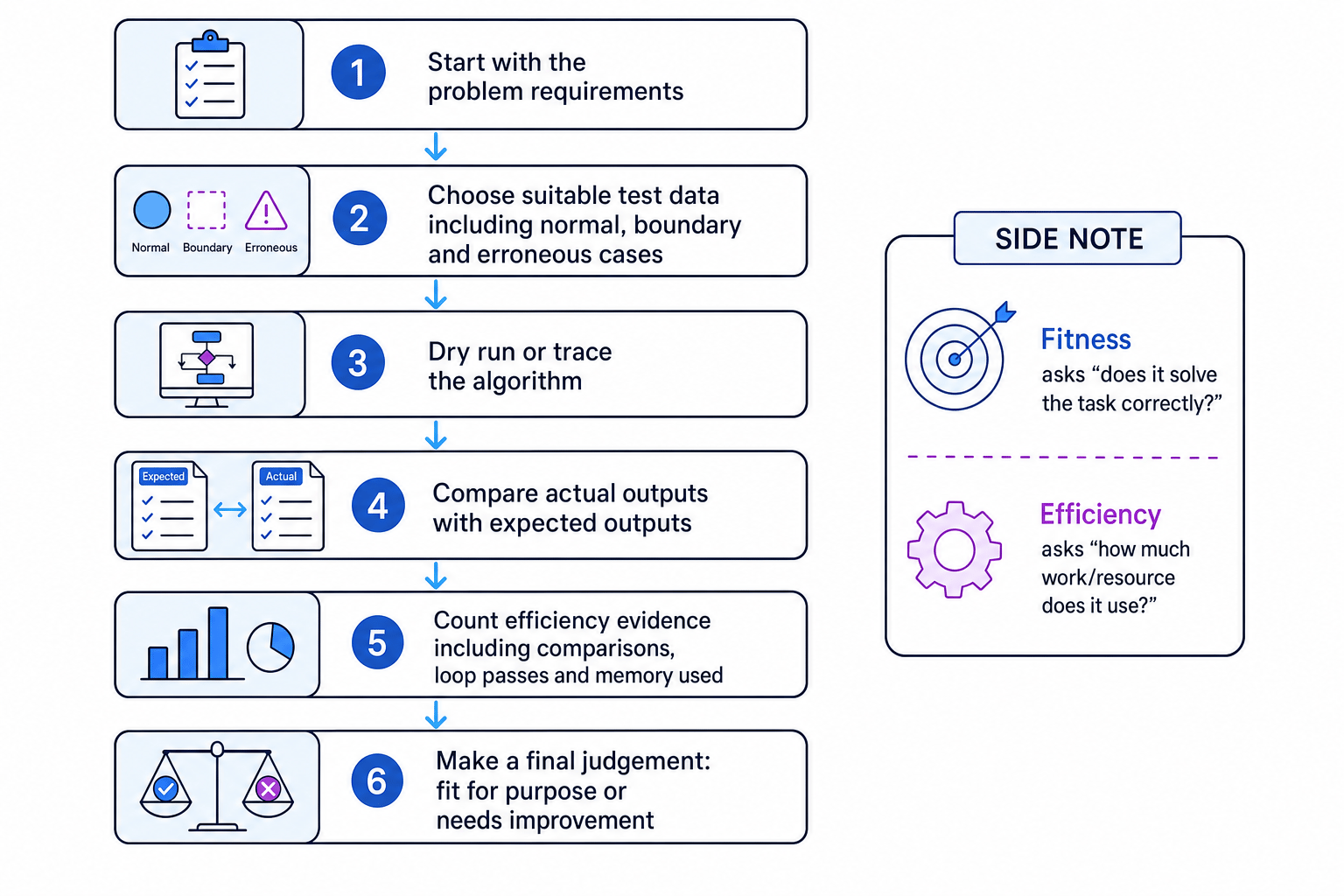
Definition
Fitness for purpose
An algorithm is fit for purpose if it meets the requirements of the problem and produces correct results for the situations it is meant to handle.
Definition
Efficiency
Efficiency describes how economically an algorithm uses resources such as processing work and memory. In this topic, focus on the number of compares, number of passes through a loop, and use of memory.
Key Idea
Correct first, efficient second
An algorithm that is fast but gives the wrong answer is not fit for purpose. Always check correctness before praising efficiency.
Using logical reasoning
Logical reasoning means following the steps of an algorithm carefully and using logic to decide what must happen.
You might reason about:
- which branch of an
IFstatement will run - how many times a loop will repeat
- whether a value could ever become negative
- whether a search can miss an item
- whether the algorithm handles edge cases
For example, if an algorithm says:
IF age < 16 OR age > 60 THEN give discount
you can reason that age 60 will not get a discount, because 60 is not less than 16 and 60 is not greater than 60.
That may or may not be correct, depending on the requirement.
Using test data
Test data means chosen input values used to check whether an algorithm behaves correctly.
For each test, you should know the expected output before running or tracing the algorithm. The expected output is what the algorithm should produce if it is correct.
Useful test data includes:
- normal data — typical valid inputs
- boundary data — values at the edge of a range, such as 16 or 60 in an age rule
- erroneous data — invalid inputs, if the algorithm is supposed to reject them
Example
Testing an age-discount algorithm
A cinema gives a discount to customers aged under 16 or aged 60 and over.
The algorithm uses this condition: age < 16 OR age > 60.
-
Test a value just below the first boundary. Age 15 should get a discount. The condition
age < 16is true, so the algorithm gives a discount. -
Test the boundary age 16. Age 16 should not get the child discount. The condition
age < 16is false andage > 60is false, so the algorithm gives the standard price. -
Test the boundary age 60. Age 60 should get a discount because the requirement says “60 and over”. The condition
age < 16 OR age > 60is false, so the algorithm gives the standard price. -
Compare actual and expected outputs. The algorithm fails for age 60, so it is not fit for purpose until the condition is changed to
age < 16 OR age >= 60.
Common Mistake
Only testing easy values
Testing just one normal value is not enough. Boundary values often reveal errors because algorithms commonly use the wrong relational operator, such as > instead of >=.
Dry running and trace tables
A dry run means manually working through an algorithm without running it on a computer.
A trace table records how variable values change as the algorithm runs. It helps you spot whether the algorithm’s logic matches the intended behaviour.
For example, suppose an algorithm adds the numbers in a list:
| Current number | Total before adding | Total after adding |
|---|---|---|
| 4 | 0 | 4 |
| 7 | 4 | 11 |
| 2 | 11 | 13 |
The trace shows that the final total is 13, so for the list [4, 7, 2], the algorithm should output 13.
Tip
Trace one change at a time
When tracing, update variables in the same order as the algorithm. If you update a variable too early, the rest of your trace may become wrong.
Evaluating efficiency using compares
A compare is when an algorithm checks values against each other, often using relational operators such as =, <, >, <=, >=, or !=.
In a search algorithm, a common measure is the number of items checked against the target value.
For example:
- A linear search checks items one by one from the start.
- A binary search repeatedly checks the middle item, but it only works correctly if the list is sorted.
Example
Counting comparisons in a search
A sorted list is [3, 6, 8, 12, 15, 19, 22, 30]. The target value is 19.
-
For linear search, check values from the start: 3, 6, 8, 12, 15, then 19. That is 6 item comparisons.
-
For binary search, start with the middle value 12. Since 19 is greater than 12, discard the left half of the list.
-
Now search the right half
[15, 19, 22, 30]. The middle value can be chosen as 19, so the target is found after 2 item comparisons in total. -
The binary search is more efficient for this sorted list because it uses fewer item comparisons. However, it would not be fit for purpose on an unsorted list unless the list was sorted first.
Common Mistake
Binary search has a condition
Binary search depends on the data being sorted. If the list is not sorted, binary search may give the wrong result even if it uses fewer comparisons.
Evaluating efficiency using loop passes
A loop repeats a set of instructions. A pass through a loop, also called an iteration, is one complete execution of the loop body.
Counting loop passes helps you judge how much work an algorithm does.
For example:
FOR counter FROM 1 TO 10makes 10 passes.- A loop that processes every item in a list of 20 items usually makes 20 passes.
- A nested loop can make many more passes because the inner loop runs repeatedly inside the outer loop.
Example
Counting passes in nested loops
An algorithm checks every pupil against every task:
- outer loop: 3 pupils
- inner loop: 4 tasks for each pupil
-
The outer loop runs once for each pupil, so it makes 3 passes.
-
For each outer loop pass, the inner loop runs 4 times.
-
The inner loop body therefore runs 3 times 4, which is 12 passes in total.
-
If one comparison happens inside the inner loop, the algorithm makes 12 comparisons.
Common Mistake
Forgetting nested loops multiply
If an inner loop runs 4 times inside an outer loop that runs 3 times, the inner loop does not run 4 times overall. It runs 12 times overall.
Evaluating efficiency using memory
Memory use means how much data storage the algorithm needs while it runs.
At GCSE, you might compare algorithms by asking:
- Does the algorithm store extra variables?
- Does it create a whole second list?
- Does memory use increase when the input list gets longer?
- Can it work by changing the original list instead?
An algorithm can be correct but still use more memory than necessary.
Example
Comparing memory use when reversing a list
Two algorithms reverse a list of 8 numbers.
-
Method A creates a new list and copies the original items into it in reverse order. While running, it stores the original 8 numbers and another 8-number list.
-
Method B swaps the first item with the last item, then the second item with the second-last item, using the original list and a temporary variable.
-
Both methods can produce the correct reversed list, so both can be fit for purpose.
-
Method B is more memory-efficient because it does not create a complete second copy of the list.
Tip
What to count for memory
Unless the question gives exact data sizes, describe memory use in terms of extra variables, extra lists, or extra copies of the data.
Making a final judgement
A good evaluation is balanced. It should mention both correctness and efficiency.
Weak answer:
- “Algorithm B is better because it is faster.”
Stronger answer:
- “Algorithm B is more efficient for a sorted list because it finds the target using fewer comparisons. However, it is only fit for purpose if the input list is sorted; otherwise, Algorithm A may be more reliable.”
Key Idea
Use evidence, not vibes
To evaluate an algorithm, support your judgement with evidence from test data, traces, comparison counts, loop counts, or memory use.
Useful evaluation sentence starters
You can use phrases like:
- “This algorithm is fit for purpose because…”
- “This test data shows a problem because…”
- “The algorithm fails at the boundary value…”
- “The number of comparisons is…”
- “The loop runs once for each…”
- “This uses more memory because it stores…”
- “This algorithm is only suitable if…”
Exam technique
In the exam
-
Check fitness first: use test data and expected outputs to decide whether the algorithm actually solves the problem.
-
Give efficiency evidence: count comparisons, loop passes, or memory use rather than just saying “fast” or “slow”.
-
Mention conditions: if an algorithm only works when data is sorted, valid, or within a range, say so clearly.
Self review
Check yourself
- What is the difference between fitness for purpose and efficiency?
- Why is boundary test data useful when evaluating an algorithm?
- How could two correct algorithms differ in memory use?
Algorithms
Guide 7 of 7
You've reached the end
Test yourself on this topic, or move on to the next guide.
How was this guide?