Revision notes for Edexcel GCSE Computer Science Secondary storage devices. Open the guide for explanations and worked examples. Written against the Edexcel GCSE Computer Science (1CP2) specification, so the content matches what's examinable rather than general Computer Science background.
Secondary storage devices
What you'll learn
- Why computers need secondary storage as well as RAM.
- How data is stored on magnetic, optical and solid-state devices.
- How to choose a suitable storage device for a given situation.
- Common exam pitfalls when comparing storage technologies.
Starting point: data is stored as binary
Computers store data using binary, a number system with only two digits: 0 and 1. Each 0 or 1 is called a bit. Storage devices do not literally store tiny printed 0s and 1s — they store physical states that can be interpreted as binary.
For example, a bit might be represented by:
- a magnetic direction on a disk
- a pit or land on an optical disc
- an electrical charge in a flash memory cell
A byte is 8 bits. Storage capacity is usually measured using binary multiples in this course:
1 KiB=1024 B1 MiB=1024 KiB1 GiB=1024 MiB1 TiB=1024 GiB\begin{aligned} 1\text{ KiB} &= 1024\text{ B}\\ 1\text{ MiB} &= 1024\text{ KiB}\\ 1\text{ GiB} &= 1024\text{ MiB}\\ 1\text{ TiB} &= 1024\text{ GiB} \end{aligned}1 KiB1 MiB1 GiB1 TiB=1024 B=1024 KiB=1024 MiB=1024 GiBWhat is secondary storage?
Definition
Secondary storage
Secondary storage is non-volatile storage used to keep data, programs and files long term, even when the computer is switched off.
Non-volatile means the data is retained without power. This is the key difference from RAM: RAM is fast working memory, but it is volatile, so its contents are lost when the power is turned off.
Secondary storage is used to store:
- the operating system
- application software
- user files, such as documents, photos, videos and games
- backups and archived data
A computer usually loads programs and files from secondary storage into RAM before the CPU works on them.
Key Idea
Main role
RAM is for fast, temporary work. Secondary storage is for long-term, high-capacity storage.
Example
Estimating how many files fit
A USB flash drive has a capacity of 64 GiB. Each video file is 32 MiB. Ignoring overheads, how many files can it store?
-
Convert the drive capacity into MiB, because the file size is already in MiB: 64×1024=65 536 MiB64 \times 1024 = 65\,536\text{ MiB}64×1024=65536 MiB.
-
Divide the total capacity by the size of one file: 65 536÷32=204865\,536 \div 32 = 204865536÷32=2048.
-
So the drive can store 2048 video files, assuming no space is used for formatting, folders or metadata.
The three main storage technologies
Secondary storage devices are usually grouped by how they physically store the bits:
- magnetic storage
- optical storage
- solid-state storage
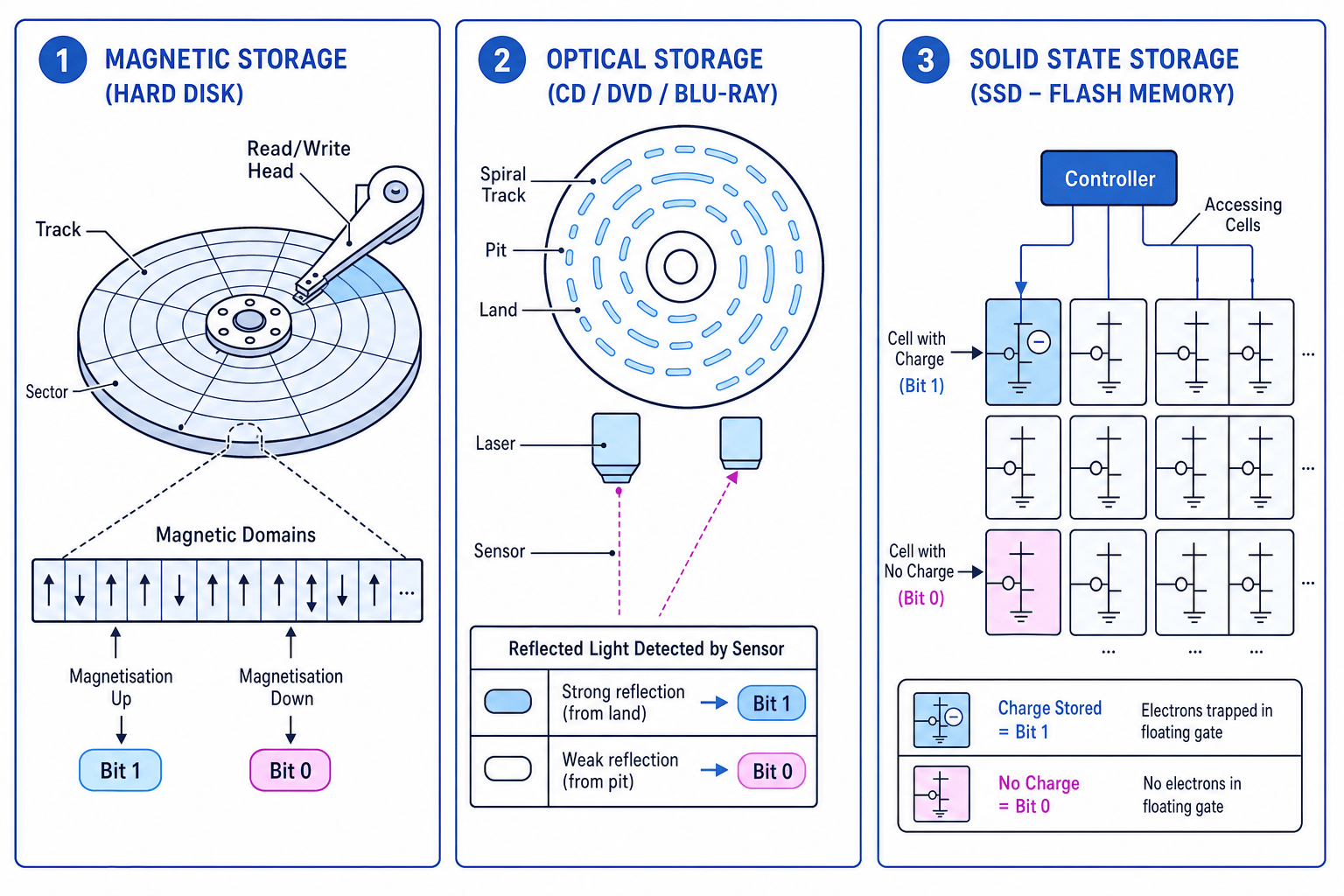
The diagram shows the basic idea behind each type.
Key Idea
Same binary, different physics
All three types store binary data, but they use different physical methods: magnetism, reflected light, or electrical charge.
Magnetic storage
Definition
Magnetic storage
Magnetic storage records data by magnetising tiny areas of a surface in different directions to represent binary values.
Common magnetic storage devices include:
- hard disk drives, often shortened to HDDs
- magnetic tape
Hard disk drives
A hard disk drive contains one or more spinning platters, which are circular disks coated in magnetic material. A read/write head moves over the platter.
The surface is divided into:
- tracks: circular paths around the disk
- sectors: smaller sections of a track
To write data, the read/write head changes the magnetisation of tiny areas. To read data, it detects the magnetic pattern and converts it back into binary.
HDDs are usually:
- high capacity
- cheaper per GiB than SSDs
- good for storing lots of files
- slower than SSDs because they have moving parts
Magnetic tape
Magnetic tape stores data along a long strip of magnetised material. It is usually used for backups and archives, especially when huge amounts of data need to be stored cheaply.
Tape normally uses sequential access. This means the device may need to move through earlier data before reaching the part it needs. A hard disk is closer to direct access, because it can move the read/write head to a particular area of the disk.
Common Mistake
Magnetic does not only mean hard disk
Magnetic tape is also magnetic storage. If a question mentions long-term backups, archives or very low cost per GiB, tape may be the best answer.
Optical storage
Definition
Optical storage
Optical storage uses a laser to read patterns on a disc surface. Differences in reflected light are interpreted as binary data.
Examples include:
- CDs
- DVDs
- Blu-ray discs
An optical disc has a spiral track containing pits and lands. A pit is a tiny indentation or mark, and a land is a flat reflective area. A laser shines onto the disc, and a sensor detects the reflected light.
At GCSE level, it is enough to say that pits and lands reflect light differently, and these differences are used to represent binary data.
Optical discs can be:
- read-only, where data is already stored and cannot be changed
- recordable, where data can be written once
- rewritable, where data can be erased and written again
Optical storage is often:
- cheap
- portable
- useful for distributing read-only data
- slower than HDDs and SSDs
- lower capacity than most modern HDDs and SSDs
- vulnerable to scratches and dirt
Tip
Optical exam wording
If asked how optical storage works, include the words laser, pits and lands, reflected light, and binary.
Solid-state storage
Definition
Solid-state storage
Solid-state storage uses electronic circuits with no moving mechanical parts. Most modern solid-state secondary storage uses flash memory.
Examples include:
- solid-state drives, or SSDs
- USB flash drives
- memory cards
Flash memory stores data in memory cells by trapping or releasing electrical charge. A charged state and an uncharged state can be interpreted as binary 0s and 1s.
Because there are no spinning platters or moving read/write heads, solid-state storage is usually:
- very fast to read from and write to
- silent
- more durable when moved or knocked
- low power, which is useful in laptops and phones
- more expensive per GiB than magnetic storage
Solid-state storage can have a limited number of write cycles, although modern SSDs manage this well and usually last a long time in normal use.
Common Mistake
SSD is not the same as RAM
Both SSDs and RAM use electronic circuits, but RAM is volatile primary memory. An SSD is non-volatile secondary storage.
Comparing storage devices
When choosing a secondary storage device, match the device to the situation. Useful comparison points include:
| Factor | What it means |
|---|---|
| Capacity | How much data the device can store |
| Speed | How quickly data can be read or written |
| Durability | How well it copes with knocks, movement or scratches |
| Portability | How easy it is to move between computers |
| Cost per GiB | How expensive it is for the amount of storage provided |
| Reliability | How likely it is to keep working correctly over time |
Quick comparison
| Technology | Common devices | Main storage method | Often suitable for |
|---|---|---|---|
| Magnetic | HDD, magnetic tape | Magnetised areas | Large capacity storage, backups, archives |
| Optical | CD, DVD, Blu-ray | Laser reads pits and lands | Cheap removable discs, read-only distribution |
| Solid state | SSD, USB drive, memory card | Electrical charge in flash cells | Fast storage, portable devices, laptops |
Example
Choosing a storage device
A wildlife camera needs removable storage. It will be carried outdoors, run on battery power, and may be knocked while in use. Which type of secondary storage is most suitable?
-
Identify the important requirements: the storage should be portable, low power and durable when moved or knocked.
-
Compare the options: optical discs are easily scratched and need a disc drive, while a magnetic hard disk has moving parts and is less suitable for knocks.
-
Choose solid-state storage, such as a memory card, because it has no moving parts, uses little power and is easy to remove from the camera.
Tip
Justify your choice
In a comparison question, do not just write “SSD is best”. Explain why it fits the scenario, such as “no moving parts”, “fast access” or “low power”.
Summary
Secondary storage is needed because computers must keep data after the power is turned off. Magnetic, optical and solid-state devices all store binary data, but they do it in different physical ways.
For exams, focus on:
- the role of secondary storage
- the physical storage method used by each technology
- sensible comparisons for a given situation
Exam technique
In the exam
-
Start by stating that secondary storage is non-volatile and stores data, programs and files long term.
-
For “how data is stored” questions, name the physical method: magnetised areas, pits and lands read by a laser, or electrical charge in flash cells.
-
For selection questions, link the device to the scenario using clear properties such as capacity, speed, durability, portability and cost per GiB.
Self review
Check yourself
- Why does a computer need secondary storage as well as RAM?
- How does magnetic storage represent binary data?
- Which type of storage would you choose for a thin, battery-powered laptop, and what trade-off might it have?
You've reached the end
Test yourself on this topic, or move on to the next guide.
How was this guide?