Revision notes for Edexcel GCSE Computer Science Embedded systems. Open the guide for explanations and worked examples. Written against the Edexcel GCSE Computer Science (1CP2) specification, so the content matches what's examinable rather than general Computer Science background.
Embedded systems
What you'll learn
- What an embedded system is.
- How embedded systems differ from general-purpose computer systems.
- Common everyday uses of embedded systems.
- Why manufacturers use embedded systems in devices.
Before we start: what is a computer system?
A computer system is made from hardware and software working together.
- Hardware means the physical parts, such as a processor, memory, sensors, buttons, screens, motors, or speakers.
- Software means the instructions the hardware follows.
- A computer system usually takes input, processes it, and produces output.
For example, a laptop takes input from a keyboard, processes it using the CPU, and produces output on the screen.
Definition
Computer system
A computer system is a combination of hardware and software that takes input, processes data, and produces output.
General-purpose computer systems
A general-purpose computer system is designed to do many different tasks.
Examples include:
- desktop computers
- laptops
- tablets
- smartphones
You can usually install different apps or programs on them. For example, the same laptop could be used for word processing, gaming, web browsing, video editing, and programming.
Key Idea
General-purpose means flexible
A general-purpose computer is designed to run many different types of software and perform many different tasks.
What is an embedded system?
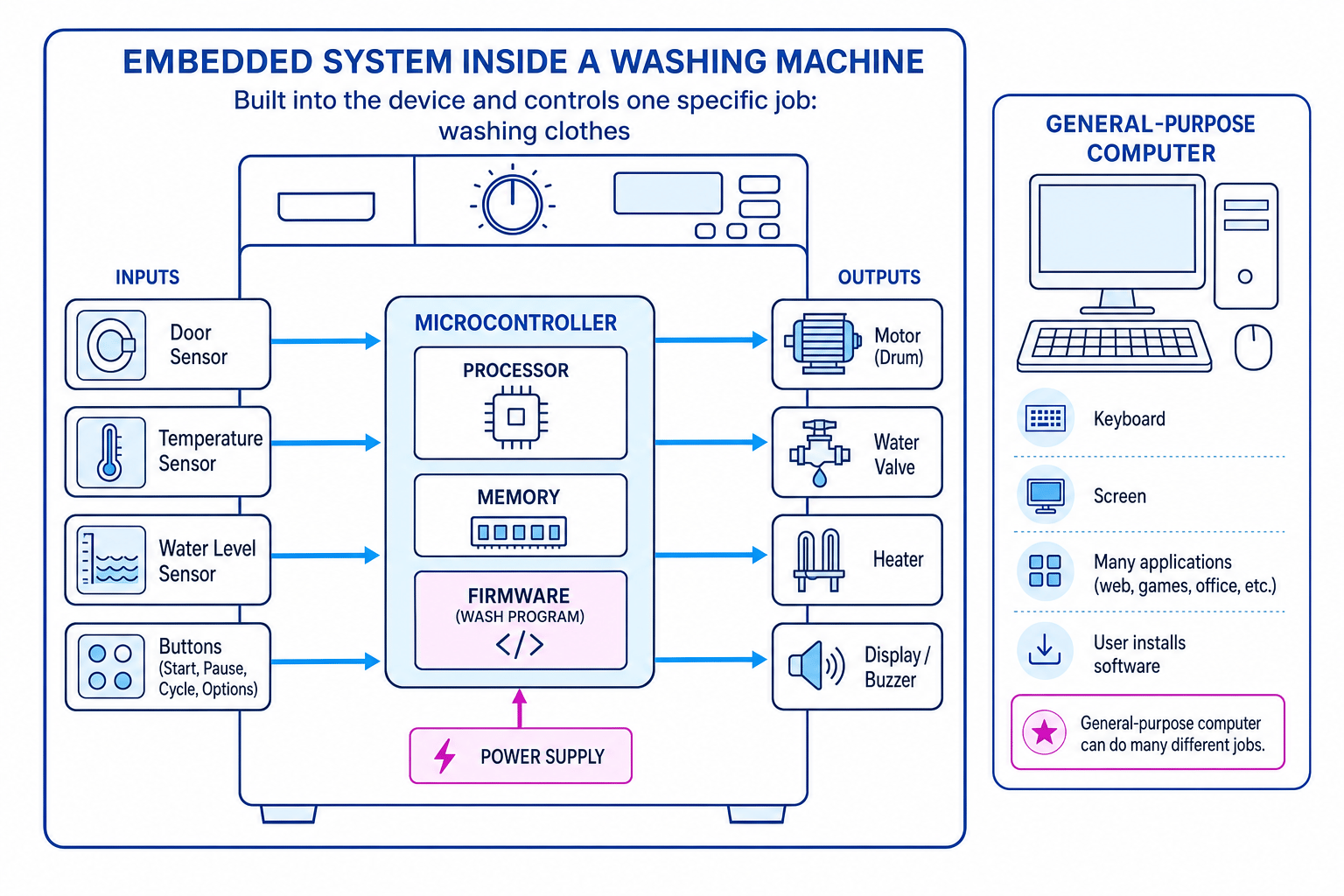
An embedded system is a computer system built into another device. It is designed to perform a specific function or a small set of closely related functions.
The word embedded means “built into”. The computer is not usually the main thing you notice — it is hidden inside the device it controls.
For example, a washing machine may contain a small computer system that controls the water level, temperature, drum movement, timer, and display.
Definition
Embedded system
An embedded system is a computer system built into another device, designed to carry out a specific task.
Specific task, not many tasks
The key difference is purpose.
A general-purpose computer is flexible. An embedded system is usually specialised.
For example:
| Device | Embedded system’s specific job |
|---|---|
| Washing machine | Control wash cycles |
| Microwave oven | Control heating time and power |
| Traffic lights | Control the sequence of lights |
| Car braking system | Help control braking safely |
| Digital camera | Control image capture and storage |
| Smart thermostat | Monitor temperature and control heating |
Common Mistake
Thinking every electronic device is embedded
Not every electronic device is automatically an embedded system. To count as an embedded system, it must contain a computer system that processes input and controls output for a specific purpose.
Main parts of an embedded system
An embedded system normally has a few important parts.
Processor
The processor carries out instructions. In small embedded systems, this is often part of a microcontroller.
Definition
Microcontroller
A microcontroller is a small computer on a single chip, often containing a processor, memory, and input/output connections.
You do not need to know detailed electronics for GCSE, but you should understand that a microcontroller can control a device without needing a full desktop-style computer.
Memory
The system needs memory to store instructions and data.
Many embedded systems use firmware.
Definition
Firmware
Firmware is software stored permanently or semi-permanently in a device’s memory, used to control that device.
For example, the firmware in a microwave controls how the buttons, timer, display, and heating element work together.
Inputs
An input is data received by the system.
Embedded systems often get input from:
- buttons
- switches
- sensors
- keypads
- touchscreens
A sensor is an input device that detects something in the physical world, such as temperature, light, movement, pressure, or distance.
Outputs
An output is an action or information produced by the system.
Embedded systems may output to:
- screens
- lights
- speakers
- buzzers
- motors
- heaters
- valves
For example, a thermostat takes temperature input from a sensor, processes it, then outputs a signal to turn heating on or off.
How an embedded system works
Most embedded systems follow the same basic pattern:
- Receive input.
- Process the input using stored instructions.
- Produce output.
- Repeat when needed.
For example, in a washing machine:
- The water level sensor sends data to the controller.
- The controller checks whether there is enough water.
- If not, it opens the water valve.
- Once the correct level is reached, it closes the valve.
Example
Identifying an embedded system
A student says: “A microwave oven is an embedded system because it has buttons and a display.” Is this a good explanation?
- First, check whether the device contains a computer system. A microwave does: it processes button presses and controls heating, timing, and the display.
- Next, check whether the computer system is built into a larger device. It is built into the microwave, rather than being a separate computer.
- Finally, check whether it performs a specific function. It mainly controls the cooking process, so it is designed for a specific task.
- A better explanation is: “A microwave oven contains a computer system built into the appliance, designed to control heating, timing, and user input for cooking food.”
What embedded systems are used for
Embedded systems are used to monitor, control, and automate devices.
Monitoring
To monitor means to collect data about something.
Examples:
- A burglar alarm monitors movement.
- A thermostat monitors temperature.
- A car parking sensor monitors distance from obstacles.
Controlling
To control means to make a device behave in a particular way.
Examples:
- A washing machine controls the drum motor.
- A microwave controls the heating element.
- Traffic lights control when vehicles stop and go.
Automation
Automation means a system carries out a task with little or no human involvement.
Examples:
- A dishwasher runs through a cleaning cycle automatically.
- A central heating system turns on when the room is too cold.
- A car engine management system adjusts fuel use while driving.
Key Idea
Input-process-output in real life
Embedded systems often use sensors or buttons as input, process the data using firmware, and control outputs such as motors, lights, heaters, or displays.
Why embedded systems are used
Embedded systems are popular because they can be designed very efficiently for one job.
They can be cheaper
A device does not need a full laptop-style computer if it only has one job. A small microcontroller can be cheaper to manufacture.
For example, a microwave does not need a large screen, keyboard, mouse, or operating system like a desktop PC.
They can be smaller
Embedded systems can fit inside small devices, such as:
- smart watches
- digital cameras
- remote controls
- car key fobs
They can use less power
Many embedded systems are designed to use little power. This matters for battery-powered devices, such as fitness trackers, wireless sensors, and remote controls.
They can be reliable
Because the system is designed for a specific purpose, there are fewer ways for the user to interfere with it. This can make it more reliable.
For example, the embedded system in a washing machine should not suddenly start running a web browser or a game. It only needs to control the wash cycle.
They can respond quickly
Some embedded systems need to react quickly to changes.
Examples include:
- anti-lock braking systems in cars
- airbag control systems
- medical monitoring devices
- factory machinery controllers
Tip
Explain the benefit, not just the feature
If asked why embedded systems are used, link the feature to the context. For example, “low power use” is especially important in a battery-powered fitness tracker.
Embedded systems compared with general-purpose computers
| Feature | Embedded system | General-purpose computer |
|---|---|---|
| Main purpose | Specific task | Many different tasks |
| Built into another device? | Usually yes | Usually no |
| Software | Often firmware | Many programs/apps |
| User installs software? | Usually no | Usually yes |
| Examples | Washing machine, microwave, traffic lights | Laptop, desktop PC, tablet |
Example
Comparing two devices
A laptop and a washing machine both contain processors. Explain why the washing machine is an embedded system but the laptop is not.
- Compare the purpose of each device. The laptop is designed to run many types of software, such as browsers, games, and office applications.
- Identify the washing machine’s role. Its computer system is built into the appliance and controls a specific task: washing clothes.
- Use the key distinction. The washing machine contains an embedded system because its computer is dedicated to controlling the appliance, while the laptop is a general-purpose computer.
Everyday examples you should recognise
You should be able to identify embedded systems in familiar devices.
Common examples include:
- washing machines
- dishwashers
- microwave ovens
- traffic lights
- central heating systems
- smart thermostats
- burglar alarms
- digital cameras
- printers
- routers
- car engine control systems
- anti-lock braking systems
- vending machines
In each case, ask yourself: what specific task is the built-in computer controlling?
Common Mistake
Only naming the device
In exam answers, do not just write “a washing machine has an embedded system”. Add what it controls, such as “the wash cycle, water level, temperature, drum motor, and display”.
What you do not need to overcomplicate
For this specification point, you need to understand the concept of an embedded system and what embedded systems are used for.
You do not need to describe detailed circuit design, write low-level code, or explain how a microcontroller is manufactured.
Focus on:
- built into another device
- specific function
- uses inputs and outputs
- controlled by stored software or firmware
- used in everyday devices to monitor, control, or automate tasks
Exam technique
In the exam
- Define an embedded system as a computer system built into another device and designed for a specific task.
- When giving an example, name both the device and the job it controls, such as “traffic lights controlling the light sequence”.
- If comparing with a general-purpose computer, use the contrast: specific task versus many different tasks.
Self review
Check yourself
- Why is a microwave oven an embedded system?
- Give two examples of inputs and two examples of outputs in a washing machine’s embedded system.
- What is the main difference between an embedded system and a general-purpose computer?

Recap questions
Test yourself with 5 quick questions on this guide. Answer them all correctly to complete it.
You've reached the end
Test yourself on this topic, or move on to the next guide.
How was this guide?